
Zalman T6 ATX Mid-Tower Desktop PC Case
4.3Editor score
Optimized cooling performance
Powder coated steel chassis
Versatile internal layout
Industrial PC cases are engineered to withstand harsh environments while providing robust cooling and expandability. These chassis designs prioritize airflow, structural integrity, and protection against dust or debris to ensure long-term reliability for demanding workloads.
We evaluated ten leading models based on build quality, thermal performance, and compatibility with high-end components. Our analysis focuses on features like rackmount readiness, fan support, and material strength to identify the most suitable options for professional and enthusiast users alike.
Each pick highlights specific strengths such as silent operation, maximum storage capacity, or advanced airflow designs. Prices and availability may change over time so please verify current details before making your final purchase decision for your industrial setup.
4.3Editor score

4.8Editor score

4.6Editor score
As an Amazon Associate we earn from qualifying purchases.
The following table provides a side-by-side comparison of all ten industrial PC cases evaluated in this guide. It highlights key specifications and features to help you quickly identify the model that best fits your specific industrial computing requirements.


This industrial PC case delivers exceptional thermal management with its oversized Mighty40 cooling system. It stands out as a top choice for users needing sustained performance under heavy computational loads without thermal throttling.
We may earn a commission when you buy through this link, at no additional cost to you.
The dual 220mm front intake fans and 180mm rear exhaust create a powerful airflow path that efficiently cools high-end GPUs and CPUs. The low resistance design ensures air moves freely through the chassis minimizing hot spots.
Split-level cable management optimizes routing space while creating room for oversized rear exhaust cooling. The MasterRail mounting system supports multiple fan and radiator sizes providing flexibility for custom cooling loops or air setups.
Ideal for industrial workstations or rendering servers this case balances raw cooling power with practical features. Its flexible storage cage and dual-mode GPU holder make it a robust solution for demanding hardware configurations.
The large fans and open design ensure heat is quickly expelled maintaining stable temperatures during intense workloads.
Support for various radiator sizes and fan configurations allows you to tailor the cooling to your specific hardware needs.
We may earn a commission when you buy through this link, at no additional cost to you.
The Define 7 XL sets a high standard for industrial PC cases with its modular design and premium materials. It combines silence with massive storage capacity making it perfect for media servers or data centers.
We may earn a commission when you buy through this link, at no additional cost to you.
Its internal layout accommodates large motherboards up to E-ATX and supports up to 18 HDDs in the default storage configuration. The multi-brackets convert unused fan positions for drives offering incredible versatility for expansion needs.
The brushed aluminum front door features magnetic latching and reversible hinges for a refined aesthetic. It maintains a clean look while providing robust protection against dust and noise interference.
Choose this case if you need a silent yet powerful chassis for high-density storage or custom water loops. Its build quality ensures longevity in professional environments requiring reliable and quiet operation.
With support for nearly twenty drives you can build a robust storage solution without compromising on airflow or access.
Sound dampening materials and thoughtful design minimize noise making it suitable for office or shared environments.
We may earn a commission when you buy through this link, at no additional cost to you.
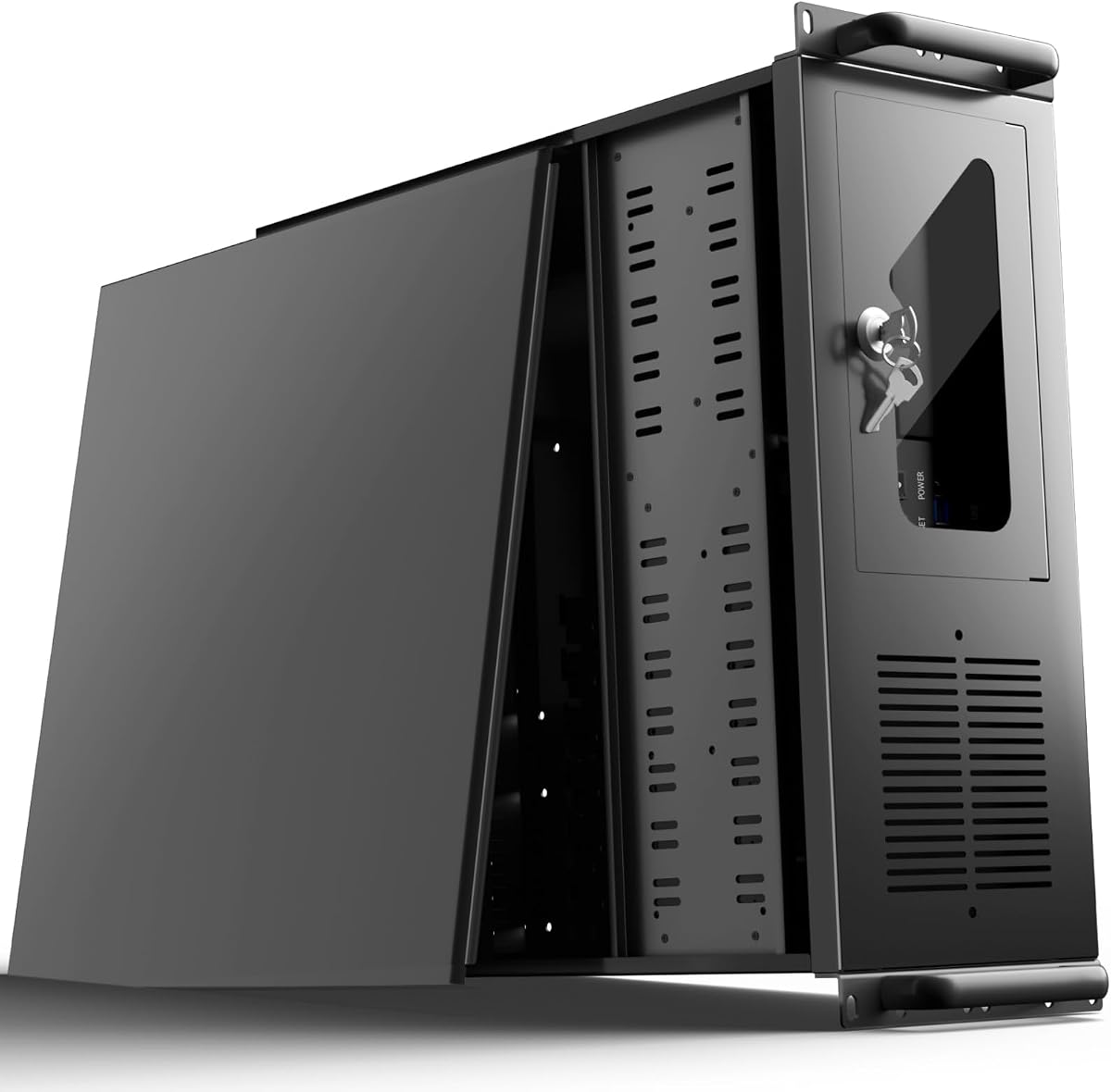
The Zalman T6 offers an excellent entry point for industrial PC cases without compromising on essential build quality. It provides solid cooling and support for various motherboard sizes at a very competitive price.
We may earn a commission when you buy through this link, at no additional cost to you.
High-strength steel sheets and powder coating protect against corrosion and heat while optimizing airflow through mesh designs. You can install up to four fans to enhance cooling performance for demanding applications.
While it lacks the bells and whistles of higher-end models it delivers reliable performance for home workstations or office setups. The layout is practical and fits standard ATX and smaller motherboards with ease.
This case is ideal for builders on a budget who still need durability and adequate airflow. It proves that reliable industrial computing hardware does not have to be expensive.
Get a sturdy chassis with essential features that keep components cool without breaking your budget.
Multiple fan mounting points allow you to customize airflow based on your specific thermal requirements.
We may earn a commission when you buy through this link, at no additional cost to you.
This 4U rackmount server case excels in storage and expansion making it perfect for industrial environments requiring massive data handling. It supports twelve hard drive bays and seven PCI slots for diverse hardware integration.
We may earn a commission when you buy through this link, at no additional cost to you.
The chassis is engineered for reliability with a secure lock mechanism and dust filters to protect internal components. Front USB 3.0 ports provide quick access for data transfers while LED indicators offer instant system status updates.
Universal compatibility supports standard ATX power supplies and various motherboard sizes from Mini-ITX to ATX. The removable drive bay bracket allows for longer graphics cards to fit within the chassis space.
If your priority is expandability and data density this server case delivers exceptional value. It is a practical choice for data centers or intensive gaming setups needing robust storage solutions.
Twelve drive bays ensure you can scale your storage needs without needing multiple chassis.
Robust locking mechanisms and dust filters keep valuable data safe and clean.
We may earn a commission when you buy through this link, at no additional cost to you.
The North XL combines industrial durability with refined aesthetics using wood and alloy details to enhance your gaming or workstation setup. It supports large motherboards and GPUs while maintaining strong thermal performance.
We may earn a commission when you buy through this link, at no additional cost to you.
Included 140mm PWM fans provide a head start on building with excellent airflow. The case supports radiators up to 420mm at the front enabling custom liquid cooling solutions for high-end CPUs.
With support for GPUs up to 413mm it accommodates oversized hardware without compromise. The design balances style and function ensuring your system looks professional while performing at peak levels.
Choose this case if you want a distinct look without sacrificing industrial strength. It is ideal for setups where visual appeal matters as much as raw computing power.
Wood accents and dark tones create a sophisticated look that fits modern office environments.
Large radiator support ensures your CPU stays cool even under sustained industrial workloads.
We may earn a commission when you buy through this link, at no additional cost to you.
This server chassis is engineered for high-performance computing with support for E-ATX motherboards and 360mm liquid cooling. It is ideal for rendering AI training or virtualization servers needing robust cooling.
We may earn a commission when you buy through this link, at no additional cost to you.
Three pre-installed PWM fans ensure optimal airflow to keep GPUs and CPUs stable under heavy loads. A front-panel USB 3.2 Type-C port delivers fast transfer speeds improving efficiency with large files.
Versatile storage configuration accommodates both 3.5-inch HDDs and 2.5-inch SSDs for flexible needs. The standard 4U rackmount design ensures seamless integration into server racks and data centers.
Select this case if you require professional rackmount features with modern connectivity. It provides a solid foundation for industrial workloads demanding consistent thermal and power stability.
Designed to handle multi-GPU setups and liquid cooling for extreme computational tasks.
USB-C port ensures fast data transfer rates compatible with modern industrial storage needs.
We may earn a commission when you buy through this link, at no additional cost to you.
The FLP02 offers a unique retro-inspired design that stands out in a market of standard industrial cases. It combines vintage aesthetics with modern high-performance cooling and expansion features for versatile use.
We may earn a commission when you buy through this link, at no additional cost to you.
A unique turbo button allows instant full-speed cooling modes when needed for intense tasks. Three 5.25-inch expansion bays support hot-swap adapter cages making it ideal for optical drives or legacy interfaces.
Support for 360mm radiators ensures your CPU stays cool while the USB Type-C port provides fast modern connectivity. It supports graphics cards up to 386mm offering plenty of room for powerful GPUs.
Choose this case if you want distinctive style without compromising on industrial thermal performance. It is a great fit for enthusiasts who value both form and function in their workstation setup.
Classic looks meet modern cooling and USB-C speeds for a unique workstation aesthetic.
Multiple 5.25-inch bays allow for diverse drive or adapter integration.
We may earn a commission when you buy through this link, at no additional cost to you.
The Antec VSK4000E provides a durable steel chassis designed for standard industrial computing needs. It offers essential features at a budget-friendly price point for basic workstation builds.
We may earn a commission when you buy through this link, at no additional cost to you.
Constructed with SGCC steel it resists corrosion and physical damage effectively. It supports multiple drive bays for both optical and hard drives ensuring you have storage flexibility.
Front I/O includes USB 3.0 and 2.0 ports for convenient access. The internal layout is straightforward making it easy to assemble standard components without frustration.
Ideal for simple office PCs or backup servers this case prioritizes durability over advanced features. It is a practical choice for users needing a reliable chassis on a tight budget.
Steel construction ensures the case withstands daily handling in industrial environments.
Standard USB ports and drive bays meet basic requirements without unnecessary complexity.
We may earn a commission when you buy through this link, at no additional cost to you.
The 4000D RS introduces a revolutionary FRAME modular system allowing you to customize panels and layouts. It is a top choice for users wanting flexibility in airflow and aesthetics.
We may earn a commission when you buy through this link, at no additional cost to you.
High-performance ARGB PWM fans are pre-installed ensuring solid cooling right out of the box. The InfiniRail mounting system allows you to position fans exactly where needed for targeted airflow.
The 3D Y-pattern airflow panel minimizes restriction while keeping dust out. You can remove the side panel near the motherboard tray to mount fans for even more cooling potential.
Choose this case if you value customization and modern design elements. It balances high-performance features with a clean look that adapts to your specific setup needs.
Upgrade trays or panels as your needs grow ensuring longevity of the chassis.
Y-pattern panel and mounting rails ensure air moves efficiently to hot components.
We may earn a commission when you buy through this link, at no additional cost to you.
The NZXT H5 Flow proves compact industrial PC cases can still deliver powerful cooling and support. It fits in tighter spaces while maintaining compatibility with large components and liquid cooling.
We may earn a commission when you buy through this link, at no additional cost to you.
An ultra-fine mesh on all panels creates maximum airflow while filtering dust. The PSU shroud is perforated to optimize intake from two 120mm fans ensuring your power supply stays cool.
It supports up to a 360mm radiator in the front for strong liquid cooling potential. Wide channels and hooks allow for effortless cable routing keeping your build clean and organized.
This case is ideal for workstations needing power without a large footprint. It balances form factor and thermal performance making it a smart choice for space-conscious environments.
Smaller size does not mean compromised cooling with mesh panels and smart intake.
Wide cable channels and perforated design make assembly clean and professional.
We may earn a commission when you buy through this link, at no additional cost to you.
Selecting the right industrial PC case requires balancing durability thermal performance and expansion needs. This guide outlines key factors to ensure you find a chassis suited for your specific application.
Industrial environments demand materials that resist corrosion and physical damage. Look for cases made with SGCC steel or powder-coated finishes that protect internal components from dust and wear.
Prioritize build quality that ensures long-term reliability in challenging conditions.
Industrial computing often involves sustained high loads requiring robust cooling solutions. Evaluate the number and size of fan mounts and the presence of mesh panels to maximize airflow.
Strong thermal performance prevents overheating and maintains system stability.
Determine how many storage drives or expansion cards you need now and in the future. Cases with multiple PCI slots and numerous drive bays offer the scalability required for data-heavy tasks.
Ensure the case supports your required storage density without compromising airflow.
Check the supported motherboard form factors such as ATX E-ATX or SSI-EEB. Industrial workstations may require larger boards with more ports and slots for specialized hardware.
Verify the case fits your specific motherboard dimensions to avoid installation issues.
Effective cable management improves airflow and simplifies maintenance tasks. Look for wide channels, hooks, and tie-down points to keep cables organized and out of the way.
Good cable management ensures better cooling and a cleaner system interior.
If space is limited or you need centralized management consider a rackmount chassis. Standard 4U sizes allow integration into server racks for organized industrial deployments.
Rackmount designs save space and improve system accessibility.
Modern industrial PCs often require fast data transfer interfaces. Ensure the case includes USB 3.2 Type-C or multiple USB 3.0 ports for efficient peripheral connectivity.
Fast I/O options prevent bottlenecks when transferring large industrial data.
In shared office or quiet environments noise reduction is critical. Look for cases with sound-dampening panels or designs that minimize fan vibration.
Low noise levels improve user comfort and workplace environment.
Install components following the manufacturer guidelines to avoid damage. Ensure all screws are tightened and fans are securely mounted for stable operation.
Regularly clean dust filters and fan blades to maintain optimal airflow. Accumulated dust can restrict cooling and lead to thermal issues over time.
Periodically check cable connections and ensure no wires are pinched. Proper maintenance extends the lifespan of your industrial setup and prevents hardware failures.
Industrial PC cases are built with stronger materials to withstand harsh environments. They prioritize better cooling, dust protection, and often support rackmount designs for organized deployment.
Many industrial PC cases support E-ATX motherboards but you must verify dimensions. Larger chassis often provide this compatibility to accommodate specialized industrial hardware.
Yes, they typically use thicker steel and powder coatings to resist corrosion and impact. This durability ensures reliability in demanding industrial settings.
Consider your CPU and GPU heat output. Cases with large fans and mesh panels provide better airflow for high-performance computing tasks.
Most industrial cases are designed with expandability in mind. Look for models with multiple drive bays to allow future upgrades without replacing the chassis.
Usually they support standard ATX power supplies unless specified otherwise. Always check compatibility with your specific PSU dimensions to ensure fit.
The top picks offer a range of options from budget-friendly models to premium high-performance chassis. Each serves specific needs whether you prioritize airflow storage capacity or compact design.
Prioritize durability and thermal performance to ensure your industrial setup runs reliably. Choosing the right features will save you time and maintenance in the long run.
Always verify current prices and availability before purchasing. Specifications may change over time so double-check details to confirm compatibility with your hardware.