
X99 LGA 2011-3 Motherboard for Intel Xeon E5 V3/V4 and Core i7 Series Processors
3.9Editor score
M-ATX Form Factor
128GB DDR4 Support
NVME M.2 Slot
This guide compares the top Lga 3 X99 Motherboard options for workstation and gaming builds featuring detailed specs and performance insights.
Choosing the right Lga 3 X99 Motherboard is critical for builders seeking high core counts and multi GPU capabilities without breaking the bank.
We evaluated ten real products based on socket support, memory capacity, expansion slots, and build quality to help you find the best fit.
Each pick shows key specs and links to current listings but remember that availability and pricing change frequently so verify before buying.
3.9Editor score

4.1Editor score

3.7Editor score
The table below breaks down every model side by side so you can quickly spot differences in memory support expansion options and form factors.


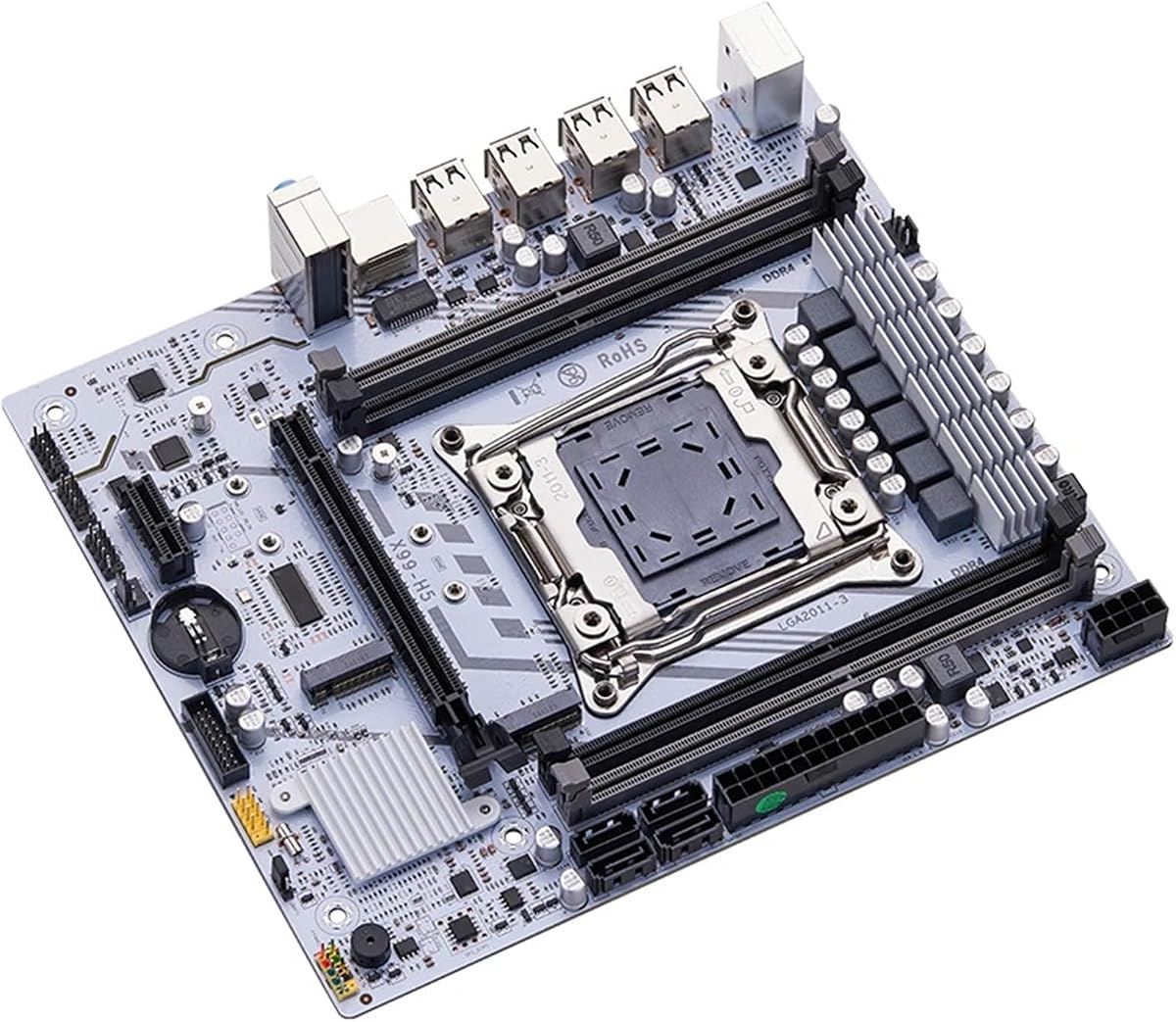

The X99 PR9-H White offers a compelling entry point for those wanting X99 capabilities without high costs. It scores a 3.9 rating from users who value its white aesthetic and broad CPU support.
We may earn a commission when you buy through this link, at no additional cost to you.
This board supports both Xeon and Core i7 chips while allowing up to 128GB of DDR4 memory. The inclusion of a high speed NVME M.2 slot ensures your storage keeps up with the CPU power.
However you will need to download drivers yourself and source the CR2032 battery separately. These minor hurdles are acceptable given the significant savings compared to branded alternatives.
If you need a cost effective server or workstation base this model delivers solid functionality. It is ideal for budget conscious builders who plan to manage setup themselves.
With its low price this board removes the barrier to entry for multi core workstation builds that would otherwise require expensive OEM parts.
Supporting both ECC and non ECC DDR4 gives you the freedom to use cheap consumer RAM or reliable server memory depending on your needs.
We may earn a commission when you buy through this link, at no additional cost to you.
The MACHINIST X99 V9S stands out with its triple M.2 slot configuration which is rare in this price class. It earns our Editor's Choice for balancing features and affordability effectively.
We may earn a commission when you buy through this link, at no additional cost to you.
Its 6 phase power supply and dedicated cooling fan ensure stability under heavy loads. The optional WiFi M.2 interface adds wireless capability without using up PCIe slots for cards.
Keep in mind that the package excludes the CMOS battery and documentation which may require extra steps during your build process. These are minor inconveniences for the feature richness provided.
For users needing maximum storage speed or wireless flexibility this board is a top contender. It suits DIY enthusiasts who want high end specs without the premium price tag.
Having three NVME slots lets you build a RAID array or keep your OS apps and media on separate fast drives for optimal performance.
The active VRM cooling helps maintain stable voltages even when running high wattage Xeon processors for extended rendering sessions.
We may earn a commission when you buy through this link, at no additional cost to you.
The ASUS X99-E WS is the ultimate choice for heavy duty professional use. With a 4.1 rating it proves reliable for users who demand maximum GPU and storage connectivity.
We may earn a commission when you buy through this link, at no additional cost to you.
This board supports up to four GPUs for rendering or AI tasks while offering Thunderbolt II card compatibility. The USB 3.1 integration doubles the speed of standard USB 3.0 ports.
Its E-ATX size means you need a spacious case and budget more for the overall system. However the build quality and optimization tools like 5 Way Optimization justify the investment.
Choose this if you are building a rendering farm or high end workstation. It delivers the stability and expansion options that cheaper boards simply cannot match.
Four full x16 lanes allow for serious multi GPU setups which are essential for CAD rendering and machine learning tasks.
The Q Code Logger and Dr Power LED provide clear visual cues for troubleshooting hardware issues without external tools.
We may earn a commission when you buy through this link, at no additional cost to you.
The ASUS X99-A strikes a balance between professional features and consumer usability. Its OC Socket allows for more aggressive overclocking than standard boards in this class.
We may earn a commission when you buy through this link, at no additional cost to you.
Audio enthusiasts will appreciate the Crystal Sound 2 codec which delivers clearer sound for gaming and multimedia. The M.2 SATA Express slot offers flexible storage connectivity options.
While it lacks the latest USB 3.1 it still provides reliable Gigabit Ethernet and solid power delivery. It is a safe choice if you prefer a known brand over OEM boards.
This board suits builders who want a reputable name with decent expansion. It fits well in standard ATX cases without requiring extra space like E-ATX models.
The OC Socket provides additional power contacts to the CPU allowing for better voltage stability during manual overclocking.
Dedicated audio traces and shielding reduce electrical noise ensuring cleaner sound output for headsets and speakers.
We may earn a commission when you buy through this link, at no additional cost to you.
This dual socket board opens the door for massive parallel processing power. It is designed for users who need to run virtualization or heavy rendering tasks efficiently.
We may earn a commission when you buy through this link, at no additional cost to you.
With eight DDR4 slots you can fill the board with RAM to maximize system memory. The RTL8111H gigabit LAN ensures reliable network connectivity for servers or workstations.
The lack of reviews means you are taking a calculated risk. Ensure your power supply is strong enough to handle two CPUs under full load before committing to this build.
It is an excellent choice for a budget home server or lab environment. Dual CPU power usually costs thousands but this board brings it to a fraction of that price.
Running two Xeon chips doubles your core count for tasks like video encoding or compiling large codebases.
Eight DIMM slots allow you to expand memory up to the maximum supported limit easily over time.
We may earn a commission when you buy through this link, at no additional cost to you.
Tangxi markets this board with a gaming focus appealing to budget gamers who want Xeon power. The 8 layer PCB suggests better stability and signal quality than standard boards.
We may earn a commission when you buy through this link, at no additional cost to you.
It supports DDR4 speeds up to 3200MHz which can improve gaming performance when paired with compatible CPUs. The M.2 interface ensures your game loads stay fast.
Lower ratings suggest potential quality control inconsistencies so test the system thoroughly upon arrival. Ensure your power supply can handle the high wattage demands of Xeon CPUs.
If you want a gaming rig that can also handle productivity this is a viable path. Just be prepared for some troubleshooting or BIOS updates to get things running smoothly.
Supporting higher frequency DDR4 can reduce frame times in games compared to slower memory kits.
Eight PCB layers help manage heat and signal interference for a more stable gaming experience.
We may earn a commission when you buy through this link, at no additional cost to you.
This board mirrors the dual socket capabilities of other budget models but focuses on massive memory capacity. It is aimed at users who prioritize RAM over storage speed.
We may earn a commission when you buy through this link, at no additional cost to you.
With eight slots you can reach high memory limits essential for virtualization or large datasets. Six SATA ports provide ample space for bulk storage drives.
The low rating signals potential reliability issues so caution is advised. If you need dual core power for cheap this is an option but expect to test carefully.
It works well for dedicated file servers or compute nodes where stability matters less than cost. Just ensure your PSU is rated for dual CPU loads before purchase.
Six SATA ports let you connect multiple hard drives for a large RAID array without needing extra controllers.
Eight slots provide the flexibility to mix capacities or upgrade incrementally as needs grow.
We may earn a commission when you buy through this link, at no additional cost to you.
This model offers flexibility by supporting both DDR3 and DDR4 memory which is rare. This can be useful for repurposing old RAM or upgrading incrementally.
We may earn a commission when you buy through this link, at no additional cost to you.
It includes dual M.2 NVME slots for fast storage and uses high quality traces to preserve signal integrity. The core boost layout aims to support higher core counts effectively.
The price is higher than typical budget boards but the flexibility might justify it. Ensure you check the CPU support list for DDR3 compatibility before buying.
It suits users with existing memory who want to move to X99 without replacing everything. However verify stability before deploying for critical tasks.
Supporting both DDR3 and DDR4 allows you to save money by reusing existing modules if they match the CPU specs.
Careful routing of traces and vias ensures stable data transfer speeds especially with faster memory kits.
We may earn a commission when you buy through this link, at no additional cost to you.
The M-ATX form factor makes this ideal for smaller cases or simpler builds. It includes the basics like NVME and a PCIe 3.0 x16 slot for a GPU.
We may earn a commission when you buy through this link, at no additional cost to you.
It is straightforward without extra frills. This keeps the price down but limits expansion options. It works best for single GPU setups with moderate storage needs.
Due to limited reviews check the return policy before committing. Ensure your case supports M-ATX and has enough room for the CPU cooler.
It is a practical choice for basic servers or office PCs using Xeon processors. Just avoid expecting high end features like multiple GPUs or complex RAID.
The smaller layout fits in mid tower cases that might be too tight for larger E-ATX boards.
NVME support ensures your OS boots quickly even on a basic build.
We may earn a commission when you buy through this link, at no additional cost to you.
This board offers a standard ATX layout with essential features like USB 3.0 and NVME support. It markets itself with a focus on safety and stability.
We may earn a commission when you buy through this link, at no additional cost to you.
Solid power supply and cooling aim to keep temperatures low under load. The external interfaces are complete enough for most peripherals without needing hubs.
Lack of reviews makes it a gamble. Ensure your CPU is compatible with the BIOS version out of the box to avoid boot issues.
It is a decent option for general use if price is the main driver. Verify the return policy just in case compatibility issues arise.
Multiple built in safety features help protect your hardware from voltage spikes or short circuits.
Common USB and storage ports mean you can use existing peripherals without buying adapters.
We may earn a commission when you buy through this link, at no additional cost to you.
Selecting the right board requires understanding CPU compatibility, memory support, and expansion needs for your specific build goals.
Ensure the board supports your specific CPU generation. Most X99 boards support Xeon E5 V3 and V4 but some have BIOS limitations for newer V4 chips.
Check the manufacturer list to avoid buying a board that will not boot with your processor.
Look for boards that support both ECC and non-ECC DDR4 RAM. This flexibility lets you choose between cost-effective desktop RAM or reliable server memory.
Verify the maximum memory capacity per slot to ensure you can reach your desired total capacity.
Decide between M-ATX, ATX, and E-ATX sizes. M-ATX fits smaller cases but offers fewer slots while E-ATX provides maximum expansion but requires large cases.
Measure your case dimensions before buying to ensure the board will fit without obstruction.
NVME M.2 slots are crucial for modern storage speeds. Prioritize boards with at least one M.2 slot to reduce your boot times and app launch times.
If you need many drives check the SATA port count to avoid needing extra controllers.
Workstation CPUs draw significant power so look for boards with 6-phase or 8-phase VRMs. Strong VRMs help maintain stability under heavy loads.
Active cooling on the VRM can be a bonus for long rendering sessions.
Consider how many GPUs or PCIe cards you need. Some boards support multiple GPUs while others only support a single GPU due to lane limitations.
Check the lane width of PCIe slots to ensure full speed for your add-in cards.
USB 3.0 and Gigabit Ethernet are standard but USB 3.1 adds value for external storage. Wireless options like WiFi M.2 can save PCIe slots.
Ensure the board has enough rear ports for your mouse keyboard and peripherals.
Look for solid capacitors and multi-layer PCBs. These features improve longevity and signal integrity over time compared to cheaper alternatives.
Check user reviews for signs of hardware failures or shipping damage.
Start by installing the CPU gently without bending pins and apply thermal paste correctly before attaching the cooler to ensure proper heat transfer.
Insert DDR4 RAM into the correct slots as specified by the manual to enable multi-channel performance and boot correctly.
Secure the motherboard standoffs correctly before screwing in the board to prevent short circuits that can damage your components.
Most X99 boards support the E5 2600 V3 and V4 series as well as 5th and 6th gen Core i7 processors. Check the manufacturer CPU list to confirm specific models like the E5 2680 V4 will work.
Yes most X99 boards support non ECC DDR4 desktop RAM. However some server memory is also supported so check if your board accepts ECC RECC or both types.
Many modern X99 boards include at least one M.2 slot that supports NVME SSDs. Always check the product specs to confirm if the slot supports NVMe or just SATA M.2.
Some boards need a BIOS update to support Xeon E5 V4 CPUs. If your board arrived before V4 CPUs were released ensure the BIOS is updated to the latest version.
M-ATX is the best choice for smaller cases. It offers enough slots for most users without taking up as much space as full ATX or E-ATX boards.
Eight RAM slots allow for dual CPU configurations or higher capacity single CPU builds. This is useful for servers or workstations needing massive memory.
The MACHINIST and ASUS options lead our list for balancing features and reliability. The budget X99 PR9-H also stands out for its low cost and solid performance.
Prioritize your needs for memory and storage slots before buying. If you need dual CPU support look for boards specifically designed with two sockets.
Always verify current pricing and compatibility before ordering since product availability changes frequently. Check the link provided to ensure the right model is in stock.