
COLORROOM 2026 Upgraded Android 15 Tablet
4.2Editor score
Six thousand mAh battery
Anti-blue eyes friendly screen
Google Kids Space included
Finding the right device for school-age children requires balancing power with safety and ease of use. Parents need tablets that can handle educational apps, creative tools, and media consumption without breaking easily or costing a fortune to replace when accidents happen.
We evaluated ten leading models released or updated in 2026, focusing on screen quality, battery longevity, and robust parental control systems. Our comparison includes options from major brands and specialized manufacturers, ensuring a wide range of choices for different family budgets and needs.
Each selection below highlights unique strengths such as expandable storage, specific age-appropriate interfaces, or enhanced protection features. Keep in mind that pricing and availability fluctuate frequently, so always verify the current details on the product pages before making your final purchase decision.
4.2Editor score

4.6Editor score

4.9Editor score
As an Amazon Associate we earn from qualifying purchases.
This side-by-side comparison breaks down the key specifications and unique features of each selected model to help you quickly identify which device aligns best with your child's specific learning and entertainment requirements.



This tablet stands out as the top choice for children transitioning from early childhood to school age. With a bright 8 inch HD screen and a slim case designed for older hands, it balances durability with sophistication. Parents appreciate the included Amazon Kids plus subscription and the comprehensive parental control dashboard.
We may earn a commission when you buy through this link, at no additional cost to you.
The performance is powered by a hexa-core processor with increased RAM compared to previous models, ensuring smooth multitasking between educational apps and entertainment. The battery life easily lasts through long school days or travel trips. Additionally, the worry-free guarantee provides peace of mind against accidental drops and breaks.
One trade-off is the reliance on the Amazon ecosystem, which limits access to certain Google Play apps without workarounds. However, the included content is extensive and age-appropriate. The subscription renewal after six months is a minor cost consideration that parents can manage easily.
This device is ideal for families seeking a reliable, long-term tablet for kids aged 6 to 12. It offers the perfect blend of educational value, entertainment, and parental oversight. We highly recommend it for any parent prioritizing safety and quality in a children's device.
The slim case and interface design acknowledge that older kids prefer devices that look less like toys and more like tech tools.
Parents can remotely review activity, set time limits, and approve apps, ensuring a safe digital environment tailored to their child's needs.
We may earn a commission when you buy through this link, at no additional cost to you.
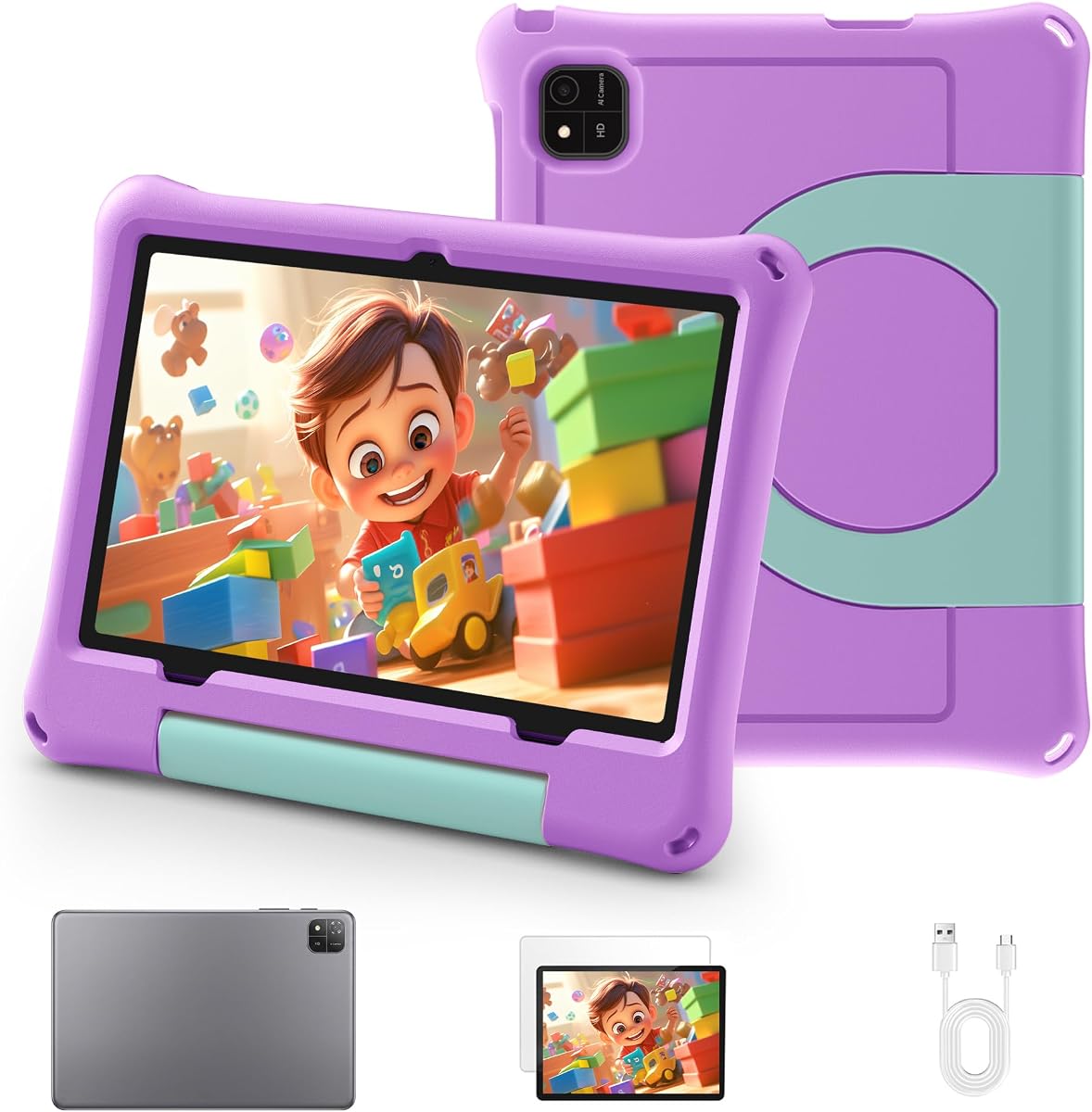
For families seeking a large screen at an affordable price point, this COLORROOM tablet delivers significant value. It runs on a stable Android 15 system with an octa-core CPU, allowing for smooth navigation through educational games and video streaming. The 10.1 inch screen provides ample space for reading and creative tasks.
We may earn a commission when you buy through this link, at no additional cost to you.
The battery capacity is impressive, offering up to 12 hours of continuous use on a single charge. This makes it perfect for long car rides or days without easy access to power outlets. Additionally, the inclusion of Google Kids Space offers a safe, curated environment for children to explore content.
The build quality is functional but lacks the premium feel of branded competitors. Users may notice that the camera sensors are average, suitable for video calls but not for photography enthusiasts. However, for a budget-friendly learning device, these compromises are generally acceptable.
This tablet is best suited for parents who prioritize screen real estate and battery life over brand prestige. It serves well as a secondary device or a primary tablet for basic educational needs. We recommend it for its strong performance-to-price ratio in the Android market.
The anti-blue light design helps reduce eye strain during long reading or screen sessions, promoting healthier viewing habits for children.
Support for up to 1TB expandable storage means kids can store thousands of photos, videos, and apps without running out of space quickly.
We may earn a commission when you buy through this link, at no additional cost to you.
This model represents the top of the line in terms of software support and performance reliability. Running the latest Android 16 operating system ensures that children have access to the most secure and feature-rich applications available. The UNISOC T7200 processor delivers lag-free operation even when multitasking between heavy apps.
We may earn a commission when you buy through this link, at no additional cost to you.
The parental control features are sophisticated, allowing parents to manage daily usage and set specific educational goals easily. The display offers wide viewing angles and blue light reduction, making it comfortable for extended reading sessions. Connectivity is stable thanks to dual-band Wi-Fi support.
The primary trade-off is the higher price tag compared to other budget-friendly alternatives. Additionally, the case options are somewhat limited in color selection. However, the durability and long-term software support often justify the investment for families planning to use the tablet for several years.
We recommend this tablet for parents who want the latest technology and robust security features for their children. It is an excellent choice for households that value stability and performance in a learning device. The premium build quality ensures it can withstand daily use with ease.
With Android 16, this tablet stays relevant longer, receiving updates that keep it secure and compatible with new educational tools.
Dual-band Wi-Fi ensures stable connections even in homes with many devices, reducing buffering during video calls or streaming.
We may earn a commission when you buy through this link, at no additional cost to you.
Designed specifically for younger children, this Fire HD 8 Kids model combines durability with a user-friendly interface. The inclusion of a 1-year Amazon Kids+ subscription means immediate access to thousands of books, games, and videos. The kid-proof case is sturdy and includes a stand for hands-free viewing.
We may earn a commission when you buy through this link, at no additional cost to you.
Performance remains smooth with 3GB RAM, which is a significant upgrade over older versions. The battery life supports all-day usage, making it perfect for preschoolers and early elementary students. Parents can easily manage content and screen time through the dedicated dashboard.
The storage capacity is lower than other models at 32GB, though expandable storage is an option. The device is optimized for younger children, so older kids might find the interface less engaging compared to the Pro version. However, for ages 3 to 7, it is ideal.
This tablet is a top pick for families with younger children who need a robust and simple device. It balances safety features with entertainment value effectively. We recommend it for parents seeking a hassle-free experience for their little ones.
The included case is designed to withstand drops and bumps, ensuring the device survives typical child handling without extra cost.
A full year of Amazon Kids+ is included, providing immediate educational value and entertainment without additional setup or purchases.
We may earn a commission when you buy through this link, at no additional cost to you.
This tablet shines for creative young users who enjoy drawing and digital art. It comes with a dedicated stylus pen and a lightweight design that makes it easy for children to hold for extended periods. The 16GB RAM ensures smooth operation even when using graphic-intensive applications.
We may earn a commission when you buy through this link, at no additional cost to you.
The eye-care screen technology reduces blue light and glare, which is beneficial for children who spend hours on the device for homework or art. Pre-installed software includes educational tools tailored for older kids, helping to bridge the gap between play and learning effectively.
The price point is higher than some competitors, which reflects the inclusion of accessories and performance features. The case quality is functional but not exceptional compared to other rugged options. However, the creative tools provided add significant value for artistic children.
We recommend this device for creative kids who need a reliable tool for digital art and writing. The combination of hardware and software makes it a strong choice for learning and expression. Parents looking for a comprehensive creative suite will find it well worth the investment.
The included stylus and optimized software allow children to draw and write naturally, fostering artistic skills and creativity.
HD eye-care technology protects vision during long sessions, making it safer for extended study or creative time.
We may earn a commission when you buy through this link, at no additional cost to you.
This JIKOCXN tablet offers a compelling mix of performance and accessories at a competitive price. The 24GB RAM ensures that multiple apps can run simultaneously without lag. It includes a protective case and a stylus, making it ready for use right out of the box.
We may earn a commission when you buy through this link, at no additional cost to you.
Battery life is strong, with fast charging capabilities that minimize downtime. The expandable storage up to 1TB allows families to store large libraries of educational content and videos. Parental controls are integrated directly into the system for easy management.
The case design is functional but lacks the premium finish of other brands. Additionally, while the hardware is strong, the software experience may require more initial setup to optimize for older children. However, the value proposition remains high for budget-conscious buyers.
We recommend this tablet for families seeking a full package without overspending. It balances specs and accessories well. The inclusion of a stylus makes it particularly suitable for kids who enjoy drawing or note-taking activities alongside their learning.
USB-C fast charging ensures the tablet gets back to full power quickly, reducing interruptions during busy family schedules.
The inclusion of a case and stylus adds immediate value, saving parents the cost of buying these essentials separately.
We may earn a commission when you buy through this link, at no additional cost to you.
This tablet distinguishes itself with a comprehensive accessory kit including a keyboard, mouse, and stylus. This makes it an excellent choice for children transitioning to more serious learning tasks like typing and detailed drawing. The 30GB RAM ensures smooth multitasking and quick app switching.
We may earn a commission when you buy through this link, at no additional cost to you.
With Android 16 installed, it offers access to the latest apps and security updates. The massive storage expansion up to 2TB ensures that families never run out of room for media and educational content. It is designed to be a long-term companion for learning.
The sheer number of accessories can make the initial setup process slightly complex. Additionally, the quality of the keyboard and mouse may not match dedicated peripherals. However, for a starter bundle, the value and convenience are hard to beat for home learning environments.
We recommend this package for parents who want an all-in-one learning solution. The combination of hardware and peripherals simplifies the purchase process and provides immediate utility. It is particularly suitable for home school or remote learning situations.
Keyboard and mouse included provide necessary tools for typing practice and productivity tasks, preparing kids for future digital needs.
Up to 2TB expansion allows storing thousands of lessons and games, making it ideal for families with large media libraries.
We may earn a commission when you buy through this link, at no additional cost to you.
This device is built to handle demanding apps and multitasking efficiently. With 16GB RAM, it can switch between video streaming and educational tools without freezing. The inclusion of a stylus and case ensures it is ready for both play and study right away.
We may earn a commission when you buy through this link, at no additional cost to you.
Eye protection mode is a standout feature for reducing strain during long sessions. The efficient 10W charging keeps downtime low. Parental controls are user-friendly and help establish healthy digital habits early on. It runs a stable version of Android 16 for modern app support.
While the build quality is adequate, it may not feel as premium as the most expensive options. The camera is sufficient for video calls but not for detailed photography. These minor trade-offs are acceptable given the performance and feature set offered at this price.
We recommend this tablet for active users who need reliable performance. The balance of hardware and safety features makes it a practical choice for daily use. It suits families looking for a versatile device that can grow with their child.
Fast charging reduces wait times significantly, ensuring the tablet is ready for use when it is needed most.
Built-in eye protection modes adjust screen settings to minimize strain, promoting healthier habits for young eyes.
We may earn a commission when you buy through this link, at no additional cost to you.
With a high user rating, this tablet has proven to be a reliable choice for families. The 10.1 inch display provides ample space for video watching and reading. It features a Night Light mode that reduces eye strain during evening use, making it suitable for bedtime reading.
We may earn a commission when you buy through this link, at no additional cost to you.
The inclusion of dual cameras supports video calls and photos, keeping kids connected with family. Parental controls are robust, allowing for secure browsing and time management. The lightweight case ensures the device remains portable and protected from daily bumps.
One limitation is that it is Wi-Fi only, so it cannot be used for cellular connectivity on the go. The box does not include a wall charger, which is a minor inconvenience for new users. However, the overall performance and design justify its popularity.
We recommend this device for home use where Wi-Fi is available. It is an excellent gift for birthdays or holidays. The focus on eye comfort and connectivity makes it a strong contender for media-heavy households.
Night Light mode adjusts color temperature for comfortable viewing in low light, protecting eyes during evening use.
Dual cameras facilitate family video calls and documentation, keeping children engaged and connected with loved ones.
We may earn a commission when you buy through this link, at no additional cost to you.
This tablet prioritizes safety and stability for families focused on secure digital environments. Its advanced parental control system allows for granular management of apps and screen time. The 10-inch display delivers clear visuals for reading and learning without overwhelming the child.
We may earn a commission when you buy through this link, at no additional cost to you.
The lightweight design ensures it is comfortable for small hands to hold. Connectivity remains stable with reliable Wi-Fi performance. High user ratings reflect satisfaction with its reliability and ease of use. It supports modern apps and educational content effectively.
While it may lack some extra accessories found in other bundles, the focus on core functionality and safety is strong. The price reflects a balance between premium features and affordability. It is a solid choice for parents who prioritize a secure digital space.
We recommend this device for families seeking peace of mind regarding online safety. The combination of robust controls and reliable performance makes it a dependable option for daily use. It is an excellent choice for children who need a safe, engaging learning tool.
Granular control over content ensures a safe browsing experience tailored to your child's age and maturity level.
High ratings from parents reflect ease of setup and reliable performance that supports long-term educational goals.
We may earn a commission when you buy through this link, at no additional cost to you.
Selecting the ideal tablet involves considering hardware, software, and safety features tailored to your child's age and needs.
A larger screen such as 10 inches provides better visibility for reading and creative tasks. Look for HD resolution and anti-blue light technology to reduce eye strain during long sessions.
Robust parental controls are essential for managing screen time and filtering content. Ensure the device allows you to set time limits and approve specific apps easily.
A battery life of at least 10 hours ensures the tablet lasts through school days or travel without frequent recharging. Look for high-capacity mAh ratings for reliability.
Children's devices should come with a protective case. Verify that the included case is sturdy and designed to withstand drops and bumps effectively.
Check for at least 64GB of internal storage. Expandable storage via microSD allows you to add more space for apps and media as needed.
An octa-core processor and at least 6GB RAM ensure smooth performance. Avoid devices with older processors that may lag when running modern apps.
Choose a model that matches your child's age. Younger children may need simpler interfaces while older kids require more power for schoolwork.
Start by setting up parental controls before handing the tablet to your child. Create child profiles and install essential educational apps to ensure a safe environment.
Most experts recommend introducing tablets around age 6 for structured educational use. By this age, children can better understand digital navigation and rules.
Use the built-in parental control dashboard to set daily time limits. Most tablets allow you to schedule device access to enforce these limits automatically.
Yes, most modern tablets include eye protection modes. These features reduce blue light to make reading more comfortable for children's eyes.
Android tablets generally support Google Play. Amazon Fire tablets offer an alternative app store with similar educational content for kids.
Most models support microSD cards for expansion. Check the maximum supported capacity in the specifications before purchasing a memory card.
Use the included rugged case for protection. It is designed to absorb shock from drops and bumps common with active children.
We identified the Amazon Fire HD 8 Kids Pro, COLORROOM Android 15, and Kids Tablet 10 Inch Android 16 as top picks for their balanced features. Each offers unique strengths tailored to different family needs.