
Thrustmaster T-Flight Hotas X
4.5Editor score
Affordable ergonomic HOTAS design
Detachable throttle for flexibility
Plug and play compatibility
Discover the top Mac game flight controllers for realistic simulation. We compare yokes, hotas, and pedals to help you choose the best setup for your Mac.
Finding the right flight controller for your Mac can transform your simulation experience into something truly immersive. Whether you are a seasoned pilot or a curious beginner, having the right hardware makes a significant difference in how you interact with virtual cockpits and flight dynamics.
We have carefully evaluated ten top-rated flight control systems to bring you a comprehensive guide tailored for Mac users. Our comparison considers build quality, compatibility, programmability, and overall user satisfaction to ensure you find a device that meets your specific simulation needs and desk space requirements.
Each selection in this guide highlights unique strengths that cater to different flying styles and budget considerations. Please note that while we strive for accuracy, product availability and pricing can change frequently, so verifying current details on the retailer site is always recommended before making a purchase decision.
4.5Editor score

4.6Editor score

4.4Editor score
This side-by-side comparison highlights the key specifications and features of the top ten flight controllers available for Mac gaming and simulation enthusiasts today.





This bundle offers a complete solution for Mac flight simulators by combining a professional yoke system with dedicated rudder pedals. With a strong user rating, it stands out as a top choice for those seeking realism without piecing together separate components from different brands.
We may earn a commission when you buy through this link, at no additional cost to you.
The yoke features a stainless steel shaft that ensures smooth and accurate control inputs during flight. The included rudder pedals provide differential toe brakes, which are essential for realistic ground handling and takeoff procedures in complex simulation environments.
While the setup is robust, it does require ample desk space to accommodate both the yoke and the pedal unit comfortably. Installation involves clamping mechanisms that might take time to secure properly on thicker surfaces or unusual desk configurations.
It is an ideal choice for serious simmers who want a cohesive experience and are willing to invest in hardware that supports long-term use. The combination of controls helps build muscle memory that translates well to real-world aviation training or high-fidelity virtual flying.
Combining yoke and pedals ensures all critical flight controls are integrated seamlessly for a unified cockpit feel.
Stainless steel components provide longevity and consistent resistance for repeated use over time.
We may earn a commission when you buy through this link, at no additional cost to you.
For Mac users looking to start flight simulation without a large financial commitment, this HOTAS system provides an excellent balance of performance and cost. Its high user rating reflects satisfaction with its ease of use and comfortable design for extended sessions.
We may earn a commission when you buy through this link, at no additional cost to you.
The ergonomic design keeps hands in a natural position, reducing fatigue during long flights. The detachable throttle allows users to configure the setup based on their available space, whether keeping it together for a compact desktop or separating it for a more spread-out cockpit layout.
While the materials are primarily plastic, the weighted base ensures stability during aggressive maneuvers. However, it lacks some of the advanced programmability found in higher-end models, which might limit customization for power users who need intricate control mapping.
This controller is best suited for beginners or casual pilots who value comfort and simplicity over extreme fidelity. It offers a reliable entry into the world of flight simulators and serves as a solid foundation for building up a future setup.
Wide hand rest and real-size throttle ensure natural hand positions during extended gaming sessions.
Preconfigured controls mean you can start flying immediately without complex software setup.
We may earn a commission when you buy through this link, at no additional cost to you.
Designed by pilots and aerospace engineers, this yoke system brings a level of realism that rivals professional training tools. The solid steel shaft and dual linear ball bearings provide incredibly smooth control inputs that feel true to life during virtual flight operations.
We may earn a commission when you buy through this link, at no additional cost to you.
The inclusion of a switch panel with master, alternator, and avionics switches adds significant depth to the simulation experience. This allows users to manage electrical systems and lighting directly from the yoke, reducing the need to use keyboard shortcuts or on-screen menus.
The cost is notably higher than entry-level options, but the quality of construction justifies the investment for enthusiasts. The dual mounting solution offers flexibility with clamps or suction pads, though the physical size of the unit requires a dedicated space on your desk.
It is perfect for users who prioritize authenticity and are willing to pay for premium materials and engineering. The realistic rotation and switch layout make it a top contender for those aiming to replicate a real cockpit environment as closely as possible.
Included switch panel allows direct control over avionics and electrical systems for authentic operation.
Linear ball bearings ensure zero friction and no dead zones for precise pitch and roll inputs.
We may earn a commission when you buy through this link, at no additional cost to you.
This HOTAS system is designed for users who need a massive array of controls at their fingertips, such as combat pilots in complex simulators. The high number of programmable buttons and axes allows for extensive customization to match specific aircraft configurations or personal preferences.
We may earn a commission when you buy through this link, at no additional cost to you.
RGB lighting adds a visual element that enhances the immersion of your cockpit setup, allowing you to match the color scheme of your gaming rig. The mini analog sticks provide precise control over pitch, roll, and yaw without relying solely on the main joystick axis.
Setting up all the controls can be time-consuming due to the sheer volume of options available through the software. While powerful, the complexity may be overwhelming for casual users who do not need such a high level of granularity in their flight controls.
It is an excellent choice for power users and VR enthusiasts who demand precision and flexibility. The adjustable spring force and hall-effect sensors ensure that the physical inputs feel accurate and responsive throughout your simulation sessions.
Controls are placed for easy access in VR where visual confirmation of button shapes helps navigation.
4 spring system lets you fine tune stick force to match your preferred flying style.
We may earn a commission when you buy through this link, at no additional cost to you.
This flightstick stands out for its inclusion of an integrated OLED display that provides real-time flight data without needing a second screen. The non-contact main axes help prevent wear and tear, ensuring consistent performance over time compared to traditional mechanical sensors.
We may earn a commission when you buy through this link, at no additional cost to you.
The touchpad navigation sensor offers a unique way to manage menus and cursor control directly from the stick, which is convenient for modern simulation interfaces. With universal compatibility across consoles and PC, it is a versatile option for users who fly on multiple platforms.
While the features are impressive, the software ecosystem might require more attention to ensure full functionality on Mac systems. The OLED screen, while useful, might be small for detailed data viewing depending on personal preference.
It is a strong candidate for those who want advanced features like touchpad control in a compact form factor. The combination of durability and modern interfaces makes it a forward-looking choice for next-gen simulation setups.
OLED display shows key flight metrics right on the unit for better situational awareness.
Hall-effect sensors reduce friction and increase longevity for long-term reliability.
We may earn a commission when you buy through this link, at no additional cost to you.
This system brings the utility of an LCD multi-function display to flight simulation, allowing you to see critical information directly on the controller. The illuminated buttons enhance visibility in low-light environments, which is a practical feature for night flying simulations.
We may earn a commission when you buy through this link, at no additional cost to you.
The progressive throttle with resistance adjustment and detents for afterburner and idle mimics real-world flight controls accurately. Smart technology software enables you to program the controller for each game, ensuring that your settings are preserved and optimized for different flight scenarios.
While the technology is slightly older than some newer models, it remains a functional and affordable choice for many users. However, user feedback suggests mixed experiences with the durability and software compatibility, so checking recent reviews is advisable.
It is best suited for users who want a proven setup with essential features like displays and progressive throttles. The 5 position handle adjustment ensures that the unit can fit comfortably for various hand sizes, promoting better ergonomics during flight.
Backlit controls make it easy to identify functions during night missions or dim cockpit lighting.
Resistance and detents provide tactile feedback for precise throttle management during engine operations.
We may earn a commission when you buy through this link, at no additional cost to you.
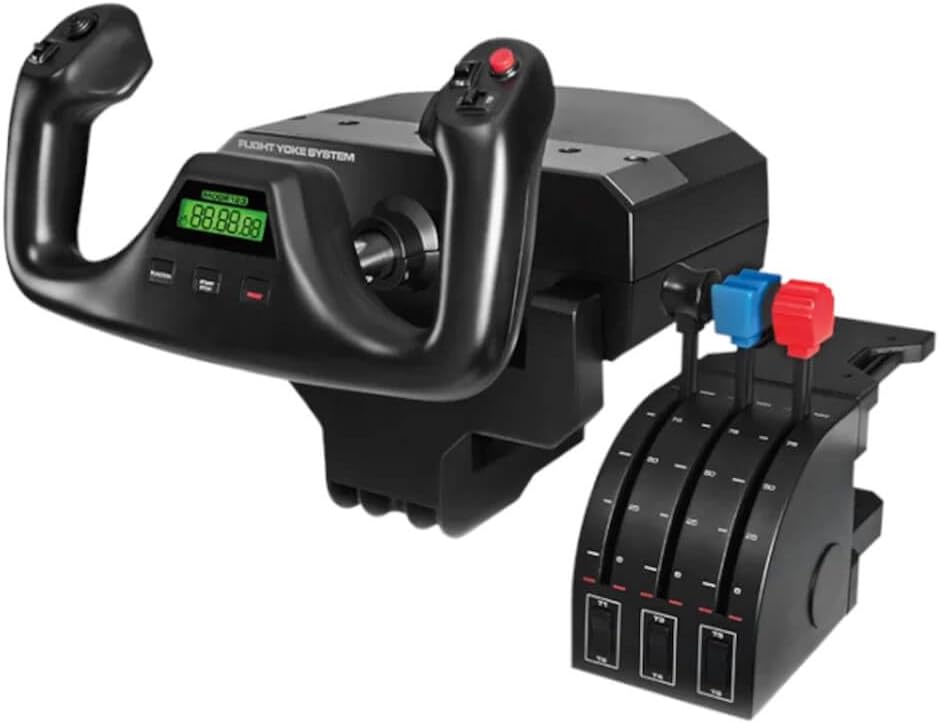
This standalone yoke system provides a professional-grade experience with a robust stainless steel shaft and a separate throttle quadrant. The integrated USB hub is a thoughtful addition that allows you to connect additional peripherals like pedals or buttons without using up computer ports.
We may earn a commission when you buy through this link, at no additional cost to you.
With 75 programmable controls, you have ample capacity to map essential flight functions directly to the yoke and quadrant. The configurable throttle knobs offer tactile feedback that helps you manage engine power and prop settings with greater precision during simulated flights.
While the build quality is strong, it does not come with rudder pedals, so you would need to purchase those separately for a complete setup. The mounting clamp requires a sturdy desk surface to ensure the yoke remains secure during active flying sessions.
It is an ideal choice for pilots who prioritize the yoke and throttle experience but want to build a custom pedal setup later. The multiple mode switches allow you to toggle between different control profiles for various aircraft types easily.
Built-in hub simplifies cable management and frees up ports for other cockpit peripherals.
Steel shaft ensures stability and smooth movement for realistic pitch and roll control.
We may earn a commission when you buy through this link, at no additional cost to you.
This HOTAS unit is packed with inputs and axes, offering a high degree of customization for complex flight simulations. The swappable dual throttle detents provide tactile thrust reference points, which are useful for knowing engine status without looking at a screen.
We may earn a commission when you buy through this link, at no additional cost to you.
A full-color display provides real-time flight data, helping you monitor performance without switching windows. The adjustable throttle resistance and stick tension settings allow you to tailor the physical feel of the controller to your personal preference for flight dynamics.
Despite these features, user ratings indicate potential issues with software stability or build quality that might deter some buyers. The complexity of the system means there is a steeper learning curve to get everything working smoothly across different titles.
It is recommended for enthusiasts who are willing to troubleshoot configuration issues for a feature-rich experience. If you can navigate the setup challenges, the tactile feedback and extensive programmability offer significant rewards for dedicated simmers.
Swappable detents give you physical feedback for key thrust settings like max power and idle.
Adjustable resistance lets you calibrate the stick feel to match specific aircraft handling.
We may earn a commission when you buy through this link, at no additional cost to you.
For those seeking a professional yoke system at a lower cost, this renewed option provides a reliable entry point into high-fidelity simulation. It retains the essential features of the original model, including the stainless steel shaft and throttle quadrant, ensuring a solid physical experience.
We may earn a commission when you buy through this link, at no additional cost to you.
The integrated digital chronograph is a unique feature that helps with navigation procedures like holds and instrument approaches. Saitek's Smart Technology software allows for deep customization of the controls, ensuring you can adapt the yoke to various flight scenarios.
As a renewed product, it may come with less packaging or minor cosmetic imperfections, though it is tested for functionality. Compatibility with newer macOS versions might require checking specific driver support, as older systems sometimes need updates to work seamlessly.
It is a good value for budget-conscious pilots who want access to premium features without the premium price tag. The chronograph and robust shaft design make it a practical tool for both training and recreational flying on your Mac.
Built-in timer helps track time between checkpoints and manage IFR procedures accurately.
Comprehensive customization tools allow you to map every button for specific aircraft needs.
We may earn a commission when you buy through this link, at no additional cost to you.
Selecting the right flight controller for your Mac involves considering several factors to ensure compatibility, comfort, and performance.
Before purchasing any flight controller, verify that the manufacturer explicitly supports macOS. Some devices may only list Windows compatibility, which can lead to driver issues or limited functionality on your Mac. Always check the system requirements on the product page to ensure your operating system version is supported.
Prioritize controllers with native Mac support or those known to work seamlessly via USB without extra drivers.
Decide whether you prefer a HOTAS (Hands On Throttle And Stick) or a Yoke system. HOTAS units are generally better for military or combat simulations due to their compact design and rapid access to buttons. Yokes are more suited for civil aviation and commercial flights where pitch and roll feel like a traditional aircraft wheel.
Choose a type that matches the aircraft you fly most often to enhance immersion and control accuracy.
Look for controllers with durable materials like stainless steel shafts or high-grade plastics that can withstand regular use. Metal components often provide smoother movement and less flex, which is crucial for precise inputs. The base should be stable to prevent shifting during aggressive maneuvers.
A sturdy build ensures the controller lasts longer and provides a more realistic feel over time.
The number of programmable buttons and axes determines how much control you have over flight functions. More options allow you to map complex systems without needing to reach for a keyboard. Check if the software supports profile switching so you can change configurations for different aircraft easily.
Higher programmability means you can adapt the controller to your specific needs rather than using defaults.
Flight sessions can last for hours, so the controller must feel comfortable in your hands. Look for ergonomic handles, soft-touch grips, and adjustable tension mechanisms to reduce strain. A good fit prevents fatigue and ensures you remain focused on the simulation.
Try to find a unit that fits your hand size and offers adjustable resistance for long-term comfort.
Secure mounting is essential to keep the controller stable during flight. Some models come with desk clamps, while others may use suction pads or weighted bases. Consider your desk thickness and stability to ensure the unit does not move during critical flight phases.
Verify that the mounting system fits your workspace and can handle the force applied during simulation.
Extra features like OLED displays, RGB lighting, or switch panels can enhance the simulation experience. These elements add realism and utility, such as showing flight data or managing electrical systems directly. Determine which extras are worth the investment based on your specific interests.
Features like displays and panels can reduce reliance on secondary monitors and improve cockpit realism.
Set a budget that reflects the value you get relative to the features offered. High-end controllers cost more but often last longer and offer better fidelity. Renewed or older models can provide good value if they meet your core needs and are still supported.
Balance the cost against the longevity and feature set to find the best long-term investment for your setup.
When setting up your controller, ensure all cables are securely connected and that the software is installed correctly. Calibrate the axes in the system settings to guarantee smooth and accurate inputs without drift or dead zones.
Regularly clean the surface of the controller with a soft, dry cloth to remove dust and oils that can affect button responsiveness. Avoid using harsh chemicals that might damage the plastic or rubber components of the unit.
Store the controller in a cool, dry place when not in use to prevent wear on the internal sensors. If the unit is detachable, separate the throttle from the stick to avoid stress on the connection points during storage.
Most flight controllers support popular simulators like X-Plane and Microsoft Flight Simulator. However, compatibility can vary for newer titles or niche games. Always check the product details to see which simulators are officially supported for Mac systems.
HOTAS systems combine a joystick and throttle in one unit for easy access, ideal for military sims. Yokes resemble a real aircraft wheel and are better for civil aviation where pitch and roll feel more natural.
Many modern controllers offer plug-and-play functionality without extra drivers. For advanced features like programmable buttons, you may need to install manufacturer software. Check the product page for Mac driver availability before buying.
Yes, most flight controllers support separate rudder pedals. Some bundles include pedals, while others sell them separately. Ensure the controller has enough USB ports to connect both the main unit and pedals.
Open the system settings on your Mac and navigate to game controller options. Select your device and follow the on-screen prompts to move axes through their full range. This ensures the system reads your inputs accurately.
Wireless options are rare in flight simulation due to the need for low latency. Most high-quality controllers use USB connections to ensure stable and responsive performance. Check for specific models if wireless is a strict requirement.
Choosing the right flight controller for your Mac depends largely on whether you prioritize realism, budget, or versatility. The bundles and standalone units reviewed here offer a range of options from entry-level HOTAS systems to premium yokes with switch panels.
Consider your primary flying interests and desk space when making a decision. Investing in durable materials and good ergonomics will pay off in the long run by enhancing both comfort and immersion during your virtual flights.
Keep in mind that product availability and pricing can change. Always double-check the current details on the retailer site to ensure you are getting the best deal for the hardware that fits your needs.