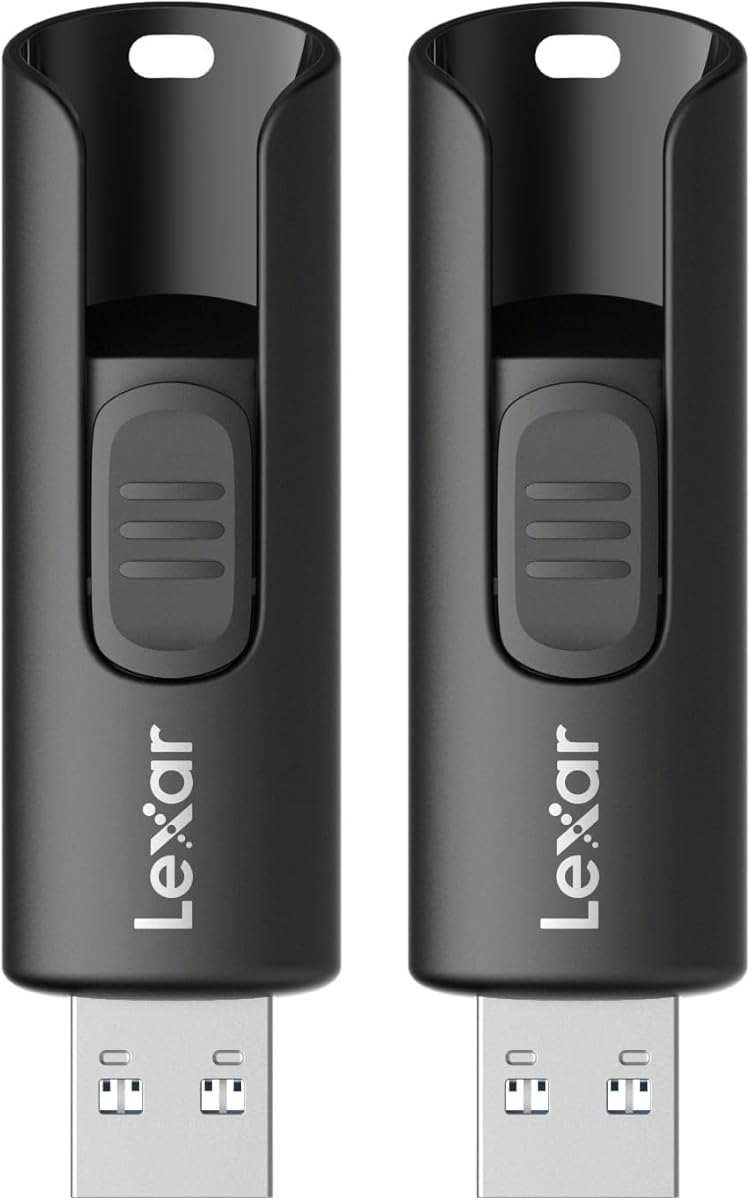
Lexar A30E USB 3.2 Gen 1 Flash Drive
4.6Editor score
Lightweight 7.41g portable design
Transfer speeds up to 100MB/s
Password-protected safe with encryption
This guide compares the top Lexar USB Flash Drive models for speed, capacity, and durability to help you choose the right portable storage solution.
Choosing the right portable storage is essential for modern workflows. Lexar USB Flash Drives offer reliable performance, high speeds, and versatile connectivity for professionals and students alike.
We evaluated ten top models based on transfer rates, build quality, compatibility, and security features. Each entry was ranked to ensure you find the best fit for your specific needs without unnecessary expense.
Every pick highlights key strengths, pros, cons, and ideal use cases. Prices fluctuate frequently, so verify current offers before purchasing to ensure you get the best value available today.
4.6Editor score

4.6Editor score

4.3Editor score
Below is a side-by-side comparison of all ten ranked Lexar USB Flash Drive models. This table allows you to quickly assess key specifications and ratings before making a final decision.


The Lexar D50E stands out as the top choice for users needing high-speed portable storage. With solid-state performance and dual connectors, it bridges the gap between traditional drives and modern mobile needs effortlessly.
We may earn a commission when you buy through this link, at no additional cost to you.
Its read speeds reaching 400MB/s make it significantly faster than standard USB 3.0 options. This ensures quick backups and seamless file transfers, especially for large media files or professional datasets.
While it comes at a premium price, the included Lexar App for photo backups adds unique value. However, the lack of iOS iCloud support and potential heat generation under heavy load are minor trade-offs.
This drive is ideal for creatives and professionals who need reliable, fast storage across multiple device types. It delivers exceptional performance where other drives simply cannot keep up with modern demands.
The built-in USB-A and USB-C connectors eliminate the need for extra adapters or cables when moving files between computers and mobile devices.
Leveraging SSD technology, this drive offers read and write speeds far exceeding typical flash memory, ensuring smooth workflows for large file transfers.
We may earn a commission when you buy through this link, at no additional cost to you.
The Lexar A30E offers an excellent entry point for those seeking reliable USB storage without breaking the bank. Its lightweight build and included security features make it a versatile choice for everyday tasks.
We may earn a commission when you buy through this link, at no additional cost to you.
With transfer speeds up to 100MB/s, it handles standard document and photo backups efficiently. The retractor design protects the connector while the DataShield software secures sensitive files with password protection easily.
Although it lacks the durability of metal drives and faster speeds, its price point makes up for it. The 2-pack ensures you always have a spare available for sharing or emergency backups when needed.
This drive is perfect for students and casual users who prioritize convenience and cost. It delivers consistent performance for typical storage needs without requiring complex setup or software installation.
Weighing just 7.41 grams, this drive is virtually weightless in your pocket or keychain, making it ideal for carrying everywhere you go.
Lexar DataShield allows you to create password-protected safes automatically, ensuring your private files remain secure even if the drive is lost.
We may earn a commission when you buy through this link, at no additional cost to you.
The Lexar D40E combines style and substance with a durable metal enclosure and versatile dual connectivity. It is designed for users who demand both aesthetic appeal and functional robustness in their portable storage.
We may earn a commission when you buy through this link, at no additional cost to you.
Its swivel design offers a unique way to protect connectors without caps, while the metal housing withstands temperature extremes. The included 256-bit AES encryption ensures your data remains secure during transit or storage.
While the overall rating is slightly lower due to individual user experiences, the specifications remain competitive. The 2-pack provides excellent value for teams or families needing multiple reliable drives for different devices.
This drive is best suited for professionals who value build quality and security features. It offers a balance of premium materials and practical functionality that stands out in crowded market options.
The 360-degree swivel mechanism allows easy access to both connectors while preventing loss of caps or damage to the USB interface.
Constructed with a metal enclosure, this drive offers superior protection against physical drops and thermal stress compared to plastic alternatives.
We may earn a commission when you buy through this link, at no additional cost to you.
The Lexar JumpDrive S80 delivers solid performance with its fast read speeds and reliable security features. It serves as a practical solution for users who need quick access to files without compromising on data protection.
We may earn a commission when you buy through this link, at no additional cost to you.
Its retractable design protects the USB interface effectively, reducing the risk of lost caps. The inclusion of 256-bit AES encryption ensures that sensitive information remains secure, making it suitable for business use.
While it is limited to USB-A connectivity, its backwards compatibility ensures it works with older systems seamlessly. The three-year warranty adds significant peace of mind for long-term usage and reliability.
This drive is ideal for office professionals and students who prioritize speed and security. It balances performance with affordability, offering a trustworthy option for daily file transfers and storage needs.
With read speeds up to 150MB/s, this drive significantly outperforms standard USB 2.0 options, reducing wait times during file movements.
Advanced security software with 256-bit AES encryption provides a strong barrier against unauthorized access, keeping your personal files safe.
We may earn a commission when you buy through this link, at no additional cost to you.
The Lexar JumpDrive TwistTurn2 offers a classic, reliable design for basic storage needs. Its unique twist mechanism makes it easy to use without worrying about losing protective caps in transit.
We may earn a commission when you buy through this link, at no additional cost to you.
While it operates on USB 2.0, which limits transfer speeds, it remains effective for small documents and essential files. The 3-pack provides excellent value for households or offices requiring multiple drives for various tasks.
The plug-and-play functionality ensures immediate usability across both PC and Mac systems. This simplicity makes it a preferred choice for users who want a straightforward tool without complex configurations.
This drive is best for users prioritizing simplicity and affordability. It handles everyday storage tasks efficiently, providing a dependable option for sharing files or backing up critical documents.
The hinged jacket rotates to reveal the interface, eliminating the need for separate caps and reducing the risk of losing them.
Compatible with most PC and Mac computers out of the box, this drive ensures seamless file sharing across different operating systems.
We may earn a commission when you buy through this link, at no additional cost to you.
The Lexar JumpDrive D400 provides substantial storage space with its 256GB capacity, making it perfect for holding large media libraries or project files. Its dual connectivity supports modern devices without extra adapters.
We may earn a commission when you buy through this link, at no additional cost to you.
Read speeds reaching 130MB/s ensure efficient file transfers, though not as fast as dedicated SSDs. The metal housing offers a sleek look while protecting the drive from physical damage during daily use.
With Lexar DataShield included, users can encrypt sensitive data easily. The swivel design adds convenience, ensuring connectors remain protected without needing to replace caps frequently in a busy environment.
This drive is ideal for content creators needing portable storage with significant capacity. It offers a balance of space, speed, and design that meets the demands of professional workflows effectively.
With 256GB of space, this drive can hold thousands of photos or hours of video, making it ideal for media storage on the go.
The combination of USB-C and USB-A connectors allows seamless file transfers between computers, phones, and tablets without needing additional cables.
We may earn a commission when you buy through this link, at no additional cost to you.
The Lexar JumpDrive S60 5-drive set is perfect for teams or families needing multiple portable drives for various tasks. The sliding cover design protects the connector while keeping the drive compact for easy carrying.
We may earn a commission when you buy through this link, at no additional cost to you.
With USB 2.0 connectivity, it is best suited for small files and documents rather than large media. The assorted colors help users differentiate drives for specific projects or team members easily.
It works with most PC and Mac systems, ensuring broad compatibility. While not the fastest option, its reliability and value make it a practical choice for sharing files or distributing information.
This pack is ideal for educational institutions or small businesses. It provides an affordable solution for distributed storage needs, ensuring everyone has access to portable storage when required.
The sliding mechanism keeps the USB connector safe from dust and damage, reducing wear and tear over extended periods of use.
With five drives in one pack, you can distribute storage for different departments or individuals, simplifying file sharing processes.
We may earn a commission when you buy through this link, at no additional cost to you.
The Lexar JumpDrive M400 combines style with reliable performance, making it a standout choice for users who value aesthetics alongside functionality. Its durable design ensures it looks good while protecting your data.
We may earn a commission when you buy through this link, at no additional cost to you.
Transfer speeds reach 150MB/s, offering quick access to files. The DataShield software provides encryption for sensitive information, adding an essential layer of security to everyday storage tasks.
While it is USB-A only, backwards compatibility ensures it works with older systems. This makes it a flexible tool for various computing environments without sacrificing modern performance capabilities.
This drive is best for professionals who appreciate quality design and dependable performance. It offers a sleek option that complements high-end devices while delivering consistent results for daily tasks.
Designed to be as durable as it is stylish, this drive withstands daily wear and tear while maintaining its professional look.
With Lexar DataShield, you can protect sensitive files with encryption, ensuring they remain confidential and secure at all times.
We may earn a commission when you buy through this link, at no additional cost to you.
The Lexar E31 is designed for everyday use, offering a compact and durable solution for storing essential files. Its all-metal construction ensures longevity, while the integrated keyring loop keeps it accessible.
We may earn a commission when you buy through this link, at no additional cost to you.
With transfer speeds up to 100MB/s, it handles common tasks like document transfers quickly. It works across a wide range of devices, including TVs and car audio systems, enhancing its versatility.
While 64GB may not suffice for large media libraries, it is sufficient for documents and small backups. The quality testing ensures reliability, making it a trustworthy choice for casual users.
This drive is ideal for anyone needing a reliable pocket-sized storage device. It combines practicality with durability, making it a great option for carrying around digital files daily.
The sturdy metal construction provides reliable protection against daily wear, ensuring the drive lasts through frequent use and travel.
An integrated keyring loop allows easy attachment to keychains, ensuring you never lose your drive while on the move.
We may earn a commission when you buy through this link, at no additional cost to you.
The Lexar JumpDrive S60 Black 3-Pack is a straightforward solution for basic storage needs. Its high rating reflects user satisfaction with its simple design and reliable performance across different devices.
We may earn a commission when you buy through this link, at no additional cost to you.
With USB 2.0 connectivity, it handles small files efficiently. The sliding cover protects the connector effectively, ensuring a consistent connection without the hassle of replacing caps.
It works seamlessly with most PC and Mac systems, making it universally compatible. While capacity is limited, it is perfect for distributing files or managing essential data across multiple endpoints.
This drive is best for users seeking simplicity and value. It offers a no-frills approach that meets everyday storage requirements effectively without unnecessary complexity or cost.
The sliding cover mechanism provides easy access to the connector while protecting it from damage and ensuring a secure fit.
Compatible with most PC and Mac systems, this drive ensures seamless file access across different platforms without additional drivers.
We may earn a commission when you buy through this link, at no additional cost to you.
Choosing the right Lexar USB Flash Drive requires understanding your storage needs, speed requirements, and device compatibility. This guide breaks down key factors to help you make an informed decision.
Storage capacity determines how much data you can store on the drive. Options range from 32GB for basic documents to 1TB for large media libraries. Select a capacity that matches your typical file sizes and backup needs.
For general office work or school projects, 128GB is often sufficient. If you frequently transfer videos or large datasets, opt for 256GB or higher to avoid constant file management.
Transfer speed impacts how quickly files move between your drive and computer. USB 3.2 Gen 1 drives offer speeds up to 100MB/s to 150MB/s, while SSD drives can exceed 400MB/s.
For large file transfers, prioritize drives with higher read/write speeds. Faster drives reduce wait times and improve overall workflow efficiency, especially for professionals working with media.
Modern drives often include dual USB-A and USB-C connectors. This allows you to connect directly to both traditional computers and modern mobile devices without extra cables.
Check your devices before buying. If you frequently use smartphones or newer laptops with USB-C ports, dual-connect drives offer superior convenience and versatility.
Build quality ensures durability during travel and daily use. Metal housings provide better protection against drops and heat compared to plastic models.
Look for retractable covers or swivel designs to avoid losing caps. A sturdy build protects the connector and ensures the drive lasts longer over time.
Data security is critical for protecting sensitive information. Many Lexar drives include DataShield or 256-bit AES encryption software to password-protect files.
Ensure the drive includes encryption tools if you handle confidential documents. Secure drives prevent unauthorized access even if the physical device is lost.
Compatibility ensures the drive works with your specific operating system and devices. Most drives work with Windows and macOS out of the box.
Check for specific requirements for Android or iOS devices. Dual-drive models often have dedicated apps for mobile backup to enhance compatibility.
Warranty coverage protects your investment against defects. Lexar offers limited warranties ranging from two to three years depending on the model.
Always register your drive to validate the warranty. A longer warranty provides peace of mind and indicates manufacturer confidence in product durability.
Price varies based on capacity and features. Multi-pack options often provide better value if you need multiple drives for different users.
Balance your budget with necessary features. Investing slightly more in faster speeds or better build quality often saves money in the long run.
To start using your Lexar USB Flash Drive, simply plug it into an available USB port on your computer or compatible device. Windows users may need to wait for the driver to install automatically before accessing files.
Ejecting the drive safely is crucial to prevent data corruption. Use the Safely Remove Hardware option in your system tray before unplugging to ensure all write operations complete successfully.
Keep your drive in a protective case or pocket when not in use. Avoid exposing it to extreme temperatures or moisture, as these conditions can degrade the storage components over time.
Yes, most Lexar USB Flash Drives are compatible with Mac computers without requiring additional drivers. However, if the drive is formatted in NTFS, you may need third-party software to write files. Reformatting to exFAT ensures full compatibility across Windows and macOS systems.
You can protect files using Lexar DataShield software available on select models. This tool allows you to create password-protected folders with 256-bit AES encryption. Files stored in the protected area cannot be accessed without the correct password, ensuring your data remains secure.
Yes, you can use Lexar USB Flash Drives with Android phones that support USB OTG (On-The-Go). Models with dual USB-C connectors work directly without adapters, while USB-A models require an OTG adapter to connect to compatible phones for file transfers.
USB 3.2 Gen 1 is essentially the same as USB 3.0 and USB 3.1 Gen 1 in terms of speed and performance. The naming convention changed, but they offer similar maximum transfer speeds of up to 5Gbps. Both are backwards compatible with USB 2.0 devices.
Lexar USB Flash Drives are built for durability and can last several years with regular use. Flash memory has a finite number of write cycles, but for typical users, this exceeds normal usage patterns. Proper care and avoiding physical shocks extend their lifespan further.
First, try connecting the drive to a different USB port or computer. If it is still not recognized, check Disk Management to see if it appears there. Reinstalling the drivers or reformatting the drive may resolve recognition issues if data is not a concern.
The Lexar D50E solid-state drive leads the list with exceptional speeds and versatility, while the A30E offers unbeatable value for budget-conscious buyers. The D40E strikes a premium balance for those prioritizing build quality and security.
When choosing, prioritize speed and connectivity that match your daily workflow. High-capacity models suit media professionals, whereas compact options are better for casual users needing occasional file transfers.
Prices and availability change frequently. Verify current offers and warranty terms on retailer sites before purchasing to ensure you secure the best deal and support for your chosen model.