
Thermalright Trofeo Vision
4.3Editor score
9.16 inch IPS display
USB-C plug and play
Lightweight slim design
Modern PC builds now feature integrated LCD screens that transform standard cases into smart displays capable of showing real-time system data and custom animations.
This guide evaluates ten top-rated LCD screens for PC cases based on resolution, connectivity options, software features, mounting flexibility, and overall build quality for enthusiasts.
Each selection highlights unique strengths like touchscreen support or magnetic mounting while noting that current pricing may fluctuate so always verify before purchasing online.
4.3Editor score

4.4Editor score

4.5Editor score
As an Amazon Associate we earn from qualifying purchases.
The following table provides a side-by-side overview of each LCD screen model highlighting key specifications and unique features to help you narrow down your choice quickly.




The Lian Li SM088X stands out as a premium choice for enthusiasts seeking a high quality display inside their PC case with solid ratings and robust features.
We may earn a commission when you buy through this link, at no additional cost to you.
Its 8.8 inch screen offers vibrant visuals and supports custom layouts via L Connect 3 software allowing users to monitor temperatures or play media easily.
While the price is higher than budget options the flexibility to mount it anywhere and use it as an independent monitor justifies the investment for most builders.
Anyone looking to elevate their build aesthetic and functionality should consider this screen especially if they already use Lian Li components for a cohesive look.
The versatile mounting bracket supports height and tilt adjustments ensuring optimal visibility from any angle whether attached to fan frames or case panels.
Access preset themes and modular information or upload your own videos and photos to create a personalized display that suits your unique style perfectly.
We may earn a commission when you buy through this link, at no additional cost to you.
The darkFlash V92 offers a dedicated wide screen format ideal for displaying multiple widgets like weather and system stats simultaneously without needing HDMI connections.
We may earn a commission when you buy through this link, at no additional cost to you.
Its 1920×462 resolution provides sharp visuals and wide viewing angles making it easy to read through tempered glass on case panels in various lighting conditions.
Users should note that the Station Space software must remain running to display data which limits flexibility compared to standalone displays that store content internally.
This model is a strong option for those who want a dedicated sensor panel inside the case and do not mind relying on specific Windows software for updates.
The ultra-wide PC case LCD delivers bright sharp visuals and wide viewing angles for easy reading through tempered glass without compromising clarity.
Connect through an external USB port or an available motherboard USB 2.0 9-pin header without requiring HDMI or DisplayPort to free up GPU outputs.
We may earn a commission when you buy through this link, at no additional cost to you.
The WOWNOVA 8 Inch distinguishes itself with desktop mode support allowing it to function as a true extended screen alongside standard temperature monitoring features.
We may earn a commission when you buy through this link, at no additional cost to you.
With a single USB-C or 9-pin cable connection it simplifies setup significantly while providing a high resolution panel that renders images and video content vividly.
The dynamic video theme support adds creativity enabling users to upload custom content that moves and changes over time inside their PC enclosure easily.
For users wanting both practical utility and creative flair this screen offers a balanced experience with professional grade software that occupies fewer system resources.
Support switching to desktop mode as an extended screen while still maintaining sensor panel capabilities for a versatile and useful secondary display option.
Only needs one single USB-C cable or one 9pin cable so it can be mounted internally without needing a port on the GPU which saves slots.
We may earn a commission when you buy through this link, at no additional cost to you.
The wisecoco 12.6 Inch is a large bar style display that adds a significant visual element to builds especially when paired with compatible cases like the Hyte Y60.
We may earn a commission when you buy through this link, at no additional cost to you.
It functions as a secondary monitor via HDMI making it versatile for desktop use or gaming overlays while also including dual built-in speakers for audio output.
While installation is straightforward with the included bracket users may find the dependency on HDMI limits internal placement options compared to USB powered panels.
This screen is ideal for users prioritizing a large viewing area and audio integration over deep system stat monitoring and extensive software customization options.
Built-in speakers provide audio output without the need for external speakers making it a complete multimedia solution for your gaming or workstation desk.
A 12.6 inch display provides ample space for visuals and movies with a wide viewing angle and fast response time suitable for dynamic content.
We may earn a commission when you buy through this link, at no additional cost to you.
The Hosyond 8.8 Inch brings touchscreen capability to PC case displays allowing users to interact directly with media or settings without needing external peripherals.
We may earn a commission when you buy through this link, at no additional cost to you.
It supports a wide range of systems including Raspberry Pi and Windows and connects via HDMI making it a versatile secondary display for various hardware setups.
Users must install AIDA64 separately to utilize full system monitoring features which adds a small step to setup but offers robust data visualization options.
This option is best for those seeking interactive features and broad compatibility rather than a purely plug and play solution designed for specific PC cases.
Featuring a responsive capacitive touchscreen for smooth control and HDMI input and a driver-free plug and-play design that sets up instantly with no complicated installation.
Works with Raspbian Ubuntu Kali Linux Kodi Win10 IoT and Windows 7 8 10 11 for hassle-free driverless installation on many different hardware platforms.
We may earn a commission when you buy through this link, at no additional cost to you.
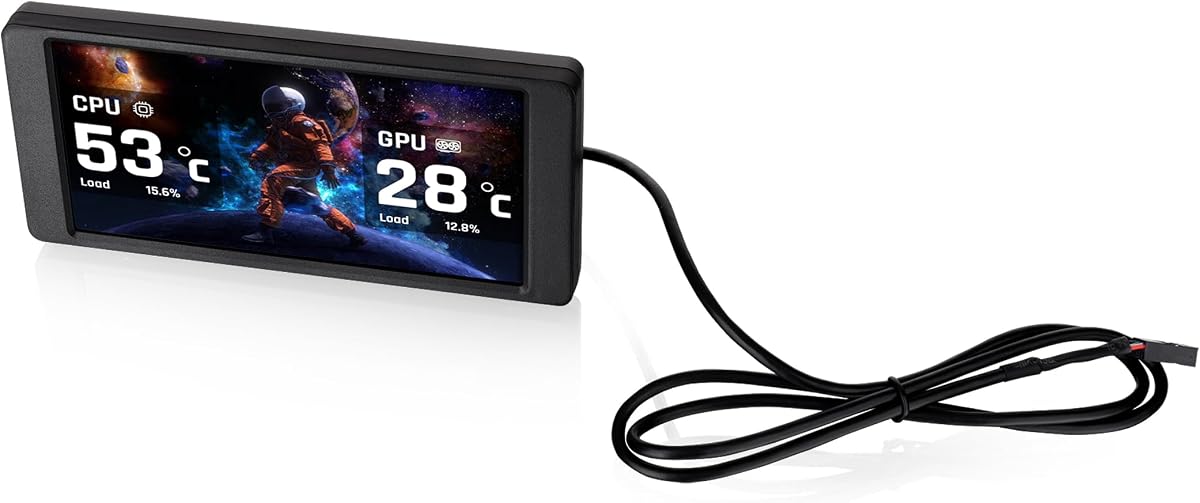
The Thermalright Trofeo Vision delivers a solid balance of performance and affordability making it accessible for builders on a budget who still want a quality display.
We may earn a commission when you buy through this link, at no additional cost to you.
Its USB-C plug and play setup simplifies connection while the slim design allows it to fit seamlessly inside or outside a PC case without taking up extra room.
Although software options are basic they cover essential monitoring needs and the ability to create unique interfaces helps personalize the look effectively enough for most users.
This screen is a top recommendation for those seeking an inexpensive yet functional display that adds a modern touch to a build without breaking the bank.
Simple Type-C interface ensures quick setup and compatibility with most Windows systems without requiring complicated drivers to get the display working immediately.
At only L251 x W68 x H17 mm this slim display fits seamlessly inside or outside your PC case adding both function and aesthetic appeal.
We may earn a commission when you buy through this link, at no additional cost to you.
The Thermaltake 6.0 Inch is a specialized kit designed to fit perfectly into Thermaltake View 370 and View 390 series chassis for a cohesive built-in look.
We may earn a commission when you buy through this link, at no additional cost to you.
It offers a larger viewing surface than previous models allowing for sharper images and real-time monitoring data via the TT RGB PLUS 3.0 software suite.
Users can upload custom graphics in various formats to personalize the display making it a flexible tool for showcasing unique builds and system performance data.
If you own a compatible Thermaltake case this kit is the most logical choice to maintain design consistency while upgrading to a larger display screen.
Compatible with Thermaltake View 370 and View 390 series chassis to ensure a seamless and professional appearance within the system enclosure.
Choose between six default background graphics or upload up to 20 custom graphics with JPG GIF PNG MP4 MOV and AVI formats supported.
We may earn a commission when you buy through this link, at no additional cost to you.
The GeeekPi 12.6 Inch combines a large screen with robust touch capabilities allowing users to control media and settings directly from the PC case panel.
We may earn a commission when you buy through this link, at no additional cost to you.
Its design is optimized specifically for the Hyte Y60 case ensuring a perfect fit while the plug and play nature simplifies setup for compatible systems immediately.
With built-in dual speakers this model serves as both a display and an audio source removing the need for additional hardware on a desk or shelf.
This screen is perfect for users who want a high-end multimedia experience within their PC case and prefer a large interface with responsive touch control.
Equipped with a touch screen and tempered glass panel providing an excellent touch experience with up to 10-points of multi-touch accuracy.
Compatible with Windows 7 8 10 and macOS systems ready to use out of the box with no additional software required for easy setup.
We may earn a commission when you buy through this link, at no additional cost to you.
The Thermalright TV 9.16 simplifies installation with magnetic suction technology eliminating the need for screws and allowing quick attachment to compatible chassis surfaces.
We may earn a commission when you buy through this link, at no additional cost to you.
It features a full color IPS panel that accurately reproduces true colors with stable viewing angles ensuring clear visuals from any position inside the case.
Users should ensure wiring is complete before installing TRCC software which manages the display functions and allows for various static dynamic image switching options.
This screen is ideal for modders who frequently change their case layout and prefer a tool-free mounting solution that maintains a sleek clean aesthetic.
The screen adopts metal frame technology and the magnetic screen does not require screws making it easy to install and remove whenever needed.
You can download TRCC software to monitor system parameters support multiple static dynamic image switching and DIY personalized theme displays easily.
We may earn a commission when you buy through this link, at no additional cost to you.
The Thermalrlght 6.86 is a compact display option ideal for smaller cases or CPU liquid coolers where space is limited but a visual element is desired.
We may earn a commission when you buy through this link, at no additional cost to you.
It supports magnetic mounting allowing flexible positioning on chassis or coolers and uses TRCC software to show system parameters and dynamic static image displays.
Although the resolution is lower than larger models it remains sufficient for essential stats and adds a touch of customization without requiring much physical room.
This screen is best suited for users with tight space constraints who still want a functional and aesthetically pleasing display for their system components.
The product size is 187.2×72.1x21mm making it very compact for installation on cooling systems or inside small computer enclosures easily.
Support magnetic chassis fixed screen panel or can be paired with Trofeo Vision series water cooling radiator without a fixed position.
We may earn a commission when you buy through this link, at no additional cost to you.
Selecting the right PC case screen depends on matching the display size and connectivity to your specific case and system configuration.
Display size ranges from six to twelve inches and should be chosen based on available internal space and desired visibility from outside the case.
Resolution impacts how sharp text and graphics appear so look for at least 1080p or equivalent for clear monitoring data and animations.
Some screens use USB-C or nine-pin headers while others require HDMI which affects placement options and whether your motherboard supports internal connections.
Choose a connection method that matches your available ports to avoid extra cables and simplify the internal build process significantly.
Many displays rely on proprietary software to show stats and themes so check if the software supports your operating system and hardware needs.
A robust software suite allows for personalized themes and smooth performance which is essential for a good user experience over time.
Ensure the screen fits your case or cooler design by checking included brackets or magnetic options before purchasing to avoid installation issues.
Flexible mounting options like adjustable brackets allow you to optimize viewing angles for better usability inside your system.
Touchscreens add interactivity but may not be necessary for all users so consider if you want to control media from the PC itself.
If touch support is important look for models with multi-point touch and reliable drivers to ensure responsive performance.
Some larger screens include built-in speakers which can reduce cable clutter and save space on a desk by providing audio directly.
This feature is useful for gaming setups that want to save space but may lack high fidelity sound quality.
Prices vary significantly based on size and features so determine your spending limit to find a balance between quality and affordability.
Higher price points often bring better resolution and more advanced software so weigh these against your specific usage needs.
Check compatibility with specific case models especially if the screen is designed to fit a particular chassis for a seamless installation.
Universal screens offer more flexibility but may require additional mounting kits to sit securely in non-specific enclosures.
Connect the screen to a USB header or HDMI port and install any required software to enable system monitoring or custom theme display features.
Clean the display with a soft microfiber cloth and avoid harsh chemicals to prevent scratches or damage to the screen surface.
Update software periodically to ensure compatibility with system changes and access new themes or features released by the manufacturer.
Most screens draw power from USB headers or internal USB ports on the motherboard which means no external power supply is needed. This simplifies cable management inside the case.
Many screens are optimized for Windows and rely on specific software that may not support macOS. Always check the product specifications for OS compatibility before purchasing.
HDMI provides a direct video signal for a secondary monitor but requires a free port. USB is easier for internal use and does not consume GPU video outputs.
Use the included brackets or adhesive pads to attach the screen to fan mounts or side panels. Ensure there is enough clearance so it does not block airflow.
You can monitor CPU and GPU temperatures fan speeds usage and RAM usage. Some screens also support weather and stock widgets or custom animations.
These displays typically use minimal system resources especially when using proprietary software. They do not significantly impact gaming performance when properly configured.
Yes most screens support video playback via internal storage or software settings. This allows for custom animations or media clips inside your case.
High-quality IPS panels are designed for continuous operation. Avoid physical impact and keep the case dust-free to maintain the screen's longevity.
Choosing the right LCD screen involves balancing size resolution and software features to match your case layout and monitoring needs.
Focus on connectivity options that align with your hardware so installation is smooth and the display performs reliably over time.
Always verify current prices and compatibility details as options change frequently and the best fit may vary by build configuration.