
Lenovo Smartcard Wired Keyboard II-US English
4.4Editor score
Wired Security Keyboard
Secure PIN Entry
Thin Design
This guide compares ten top-rated keyboards with built-in smart card readers for secure authentication in government healthcare and enterprise environments
Finding a reliable keyboard with smart card reader is essential for professionals who need secure authentication without compromising typing comfort. These devices integrate chip card terminals directly into the layout ensuring seamless login and transaction processes across various enterprise systems.
We evaluated ten highly rated models based on security certifications ergonomic design and durability. Our comparison focuses on FIPS and PC/SC compliance along with build quality and specific features like spill resistance or mechanical switches for demanding workstation environments.
Each pick below highlights key strengths and ideal use cases to help you choose the right secure input device. Please note that product availability and pricing can change so verify current details before purchasing your next secure keyboard.
4.4Editor score
4.6Editor score

4.6Editor score
The following table provides a side-by-side comparison of all ten secure keyboards reviewed in this guide highlighting their key specifications and security certifications.


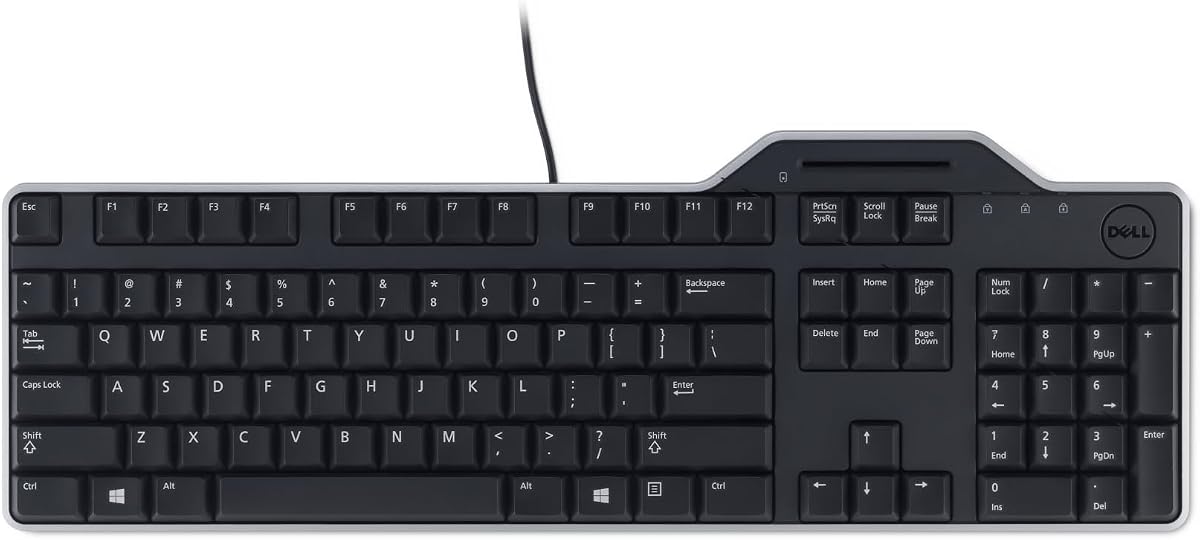
The Dell KB813 is a top rated secure keyboard featuring a built-in smart card reader and a strong 4.6 star rating. It stands out for its combination of enterprise security features and comfortable ergonomic design suitable for daily office use.
We may earn a commission when you buy through this link, at no additional cost to you.
Its integrated smartcard reader enhances security by enabling seamless authentication for web applications and logon processes. The spill resistant design ensures durability in busy environments while the low profile keys provide quiet comfortable typing throughout long shifts.
While the keyboard excels in build quality and security it requires specific software setup for the smart card module. The wired USB connection is secure but limits placement flexibility compared to wireless options available in other models.
This keyboard is ideal for Dell system users needing reliable secure authentication. Its blend of durability comfort and integrated security makes it a strong recommendation for enterprise workstations prioritizing safety and productivity.
The built-in smartcard reader simplifies secure logins by embedding authentication directly into your typing workflow.
Spill resistant construction protects internal components ensuring reliable performance even after accidental liquid exposure.
We may earn a commission when you buy through this link, at no additional cost to you.
The Adesso TruForm AKB-150SB-TAA is a specialized secure keyboard designed specifically for US government and military procurement needs. With a TAA compliant certification it offers strong security through a built-in smart card reader and ergonomic features for long hours.
We may earn a commission when you buy through this link, at no additional cost to you.
Its split ergonomic design and integrated palm rest promote natural hand positioning reducing joint pain and spinal discomfort. The smart card reader supports multiple standards including ISO7816 and PC/SC ensuring broad compatibility with secure systems and applications.
While the ergonomic benefits and compliance are major advantages the split layout may require time to adjust for typists used to standard keyboards. The price point is higher reflecting its specialized certification and robust build quality for professional environments.
This keyboard is best suited for government agencies and contractors requiring TAA compliant input devices. Its focus on ergonomic health and strict security standards makes it a valuable tool for compliance driven workplaces.
TAA compliance ensures this device meets all US trade agreement requirements for federal and military contracts.
The split design and palm rest work together to minimize physical strain during extended typing sessions.
We may earn a commission when you buy through this link, at no additional cost to you.
The Cherry KC 1000 is a high rated compact secure keyboard that delivers robust security features without bulk. It features a thin smart card contacting unit and a strong 4.6 star rating making it an efficient choice for restricted desk environments.
We may earn a commission when you buy through this link, at no additional cost to you.
Its FIPS 201 approval ensures strict adherence to security protocols for government and enterprise use. The one handed smart card operation and secure PIN entry protect sensitive data while maintaining a streamlined profile compatible with Windows Mac and Linux systems.
While security is its main strength the keyboard lacks advanced ergonomic or multimedia features found in more expensive models. The compact design is ideal for minimal setups but may not provide the full typing comfort some users expect.
This model is perfect for users needing certified security in a small footprint. Its broad OS support and strong approval ratings make it a reliable choice for secure workstations where space is at a premium.
The thin smart card unit keeps the keyboard profile low saving valuable desk real estate.
PIN entry security ensures your credentials remain protected during authentication processes.
We may earn a commission when you buy through this link, at no additional cost to you.
The Adesso EasyTouch 130SB combines mechanical keyboard performance with enterprise grade security features. It features red mechanical switches and a built-in smart card reader achieving a 4.6 star rating for durability and functionality in demanding workstation environments.
We may earn a commission when you buy through this link, at no additional cost to you.
Its mechanical switches offer tactile feedback with a 50 million keystroke lifespan ensuring long-term reliability. The large print keycaps provide excellent contrast for users needing better visibility while the Copilot AI hotkey offers instant access to creative and coding tools.
While the mechanical build is robust it may produce more noise than membrane keyboards. The large keycaps improve readability but slightly increase the overall size which might impact desk space usage in tight setups.
This keyboard is recommended for power users requiring both speed and security. Its blend of mechanical durability smart card integration and AI hotkeys makes it a powerful tool for modern development and enterprise workflows.
Large print keycaps offer improved character legibility for users with visual needs or low light conditions.
The dedicated Copilot hotkey streamlines access to AI tools without navigating software menus.
We may earn a commission when you buy through this link, at no additional cost to you.
The Dell Keyboard Smartcard USB is a reliable input device designed to integrate smoothly with Dell systems. It features a built-in smart card reader and holds a strong 4.7 star rating for its seamless compatibility and quiet typing performance.
We may earn a commission when you buy through this link, at no additional cost to you.
Its wired USB connectivity ensures secure fast data transfers without the need for batteries. The low profile keys and detachable palm rest provide a comfortable workspace for extended use while maintaining a standard full size layout.
While it excels in basic functionality and reliability it lacks the advanced ergonomic or media features found in higher tier models. The focus on simplicity and Dell specific integration makes it a practical choice for standardized IT environments.
This keyboard is ideal for Dell users seeking a no fuss secure input device. Its straightforward design and reliable connectivity ensure consistent performance for daily business tasks and secure logins.
Wired USB eliminates the need for batteries ensuring continuous operation without power interruptions.
Low profile keys are designed to minimize noise for a distraction free work environment.
We may earn a commission when you buy through this link, at no additional cost to you.
The Kensington KB201C is a secure keyboard certified for Common Access Card and PIV authentication. With TAA compliance and a 3-year warranty it offers robust security features for government and federal institutions though it has a lower customer rating.
We may earn a commission when you buy through this link, at no additional cost to you.
Its quiet click mechanism enhances focus in shared offices while the full size layout supports efficient data entry. The CAC reader ensures secure and efficient access meeting rigorous regulatory standards for enterprise environments.
While the security certifications are strong the lower rating suggests potential usability quirks or support issues. The standard membrane keys and basic design are functional but may not offer the premium feel of other models.
This keyboard is best for organizations requiring certified federal compliance. Its warranty and security standards make it a safe choice for government sectors needing reliable and compliant input devices.
CAC and PIV certification ensures authorized personnel can securely access protected systems.
The 3-year limited warranty provides peace of mind for long term organizational deployments.
We may earn a commission when you buy through this link, at no additional cost to you.
The Lenovo Smartcard Wired Keyboard II offers a straightforward secure typing solution for business environments. With a 4.4 star rating it provides essential smart card functionality at a competitive price point for users needing reliable authentication.
We may earn a commission when you buy through this link, at no additional cost to you.
Its lightweight and compact design makes it easy to transport or deploy across multiple workstations. The secure card integration supports standard PIN entry for safe logins without requiring additional hardware or complex configuration.
While it delivers on core functionality the basic build and limited feature set may not satisfy power users. The focus on simplicity and value makes it an attractive option for bulk procurement in cost sensitive settings.
This keyboard is ideal for budget conscious users needing basic security features. Its compact design and reliable performance support efficient daily tasks in environments prioritizing cost effectiveness.
A small footprint allows for easy transport and deployment across different work locations.
Balances essential secure input features with an affordable price for large scale use.
We may earn a commission when you buy through this link, at no additional cost to you.
The HP Business Slim Smartcard Keyboard is designed for reliability with a built-in spill drain to protect internal components. It holds a 4.5 star rating for its practical features and slim professional profile suitable for office environments.
We may earn a commission when you buy through this link, at no additional cost to you.
Its membrane keyswitch provides a quiet typing experience while the smart card reader ensures secure authentication for enterprise systems. LED key indicators offer clear feedback on system status without cluttering the interface.
While the spill drainage is a standout feature the lack of backlighting limits usability in low light settings. The cable length is standard but may restrict placement on larger desks compared to longer alternatives.
This keyboard is ideal for busy offices where accidental spills are common. Its protective design and quiet operation make it a practical choice for maintaining productivity in shared workspaces.
The built-in spill drain directs liquids away from electronics protecting the keyboard from damage.
Membrane switches ensure minimal noise keeping workspaces peaceful for all employees.
We may earn a commission when you buy through this link, at no additional cost to you.
The Cherry Secure Board 1.0 is an intelligent security keyboard with an integrated NFC interface for reading cards and tags. With a 4.2 star rating it offers advanced security features ideal for environments requiring secure authentication without physical swiping.
We may earn a commission when you buy through this link, at no additional cost to you.
Its secure mode with authentication and encryption protects sensitive data especially in thin client environments. The card reader supports ISO 7816 standards ensuring compatibility with a wide range of secure enterprise cards.
While the NFC capability is innovative it adds complexity that may not be needed for standard use cases. The specialized security focus makes it less versatile for general office needs but highly effective for high security zones.
This keyboard is best for specialized secure environments needing NFC support. Its encryption and ISO compliance make it a strong choice for organizations prioritizing advanced authentication protocols.
Reads cards and tags via RF/NFC reducing wear and tear on physical card readers.
Secure mode ensures robust protection for remote desktop and thin client workstations.
We may earn a commission when you buy through this link, at no additional cost to you.
The NEW OEM Dell KB813t provides a genuine replacement for Dell systems needing secure input devices. With a 4.4 star rating it ensures compatibility and reliability through original manufacturing standards for businesses updating their workstations.
We may earn a commission when you buy through this link, at no additional cost to you.
It includes a standard smart card reader for secure authentication and comes in an unopened factory sealed package. The USB English layout matches standard office requirements ensuring seamless integration into existing setups.
While the OEM assurance is a major advantage the packaging is basic without additional accessories. Users should verify system compatibility before purchase as OEM parts are designed for specific hardware configurations.
This keyboard is ideal for IT departments replacing damaged or outdated units. Its genuine OEM quality ensures consistent performance and security for Dell environments requiring stable input solutions.
Factory sealed OEM packaging ensures the device meets original manufacturing specifications.
Designed for specific Dell systems to guarantee driver and hardware compatibility.
We may earn a commission when you buy through this link, at no additional cost to you.
Selecting the right secure keyboard involves considering several critical factors ranging from security certifications to ergonomic design. Understanding these elements ensures you choose a device that meets your organization's needs.
Ensure the keyboard meets relevant standards such as FIPS 201 PC/SC or ISO7816 for secure authentication. These certifications guarantee the smart card reader functions correctly with enterprise systems and government protocols.
Prioritize keyboards with verified security certifications to avoid compatibility issues.
Government agencies and contractors often require TAA compliant devices for federal procurement. Verify that the keyboard explicitly states compliance to meet legal and procurement standards.
Always check for TAA compliance labels before purchasing for government work.
Check that the keyboard supports your primary operating system whether Windows macOS or Linux. Driver support is crucial for the smart card reader to function without manual configuration.
Verify OS compatibility to ensure seamless installation and operation.
Look for features like split designs palm rests or low profile keys to reduce strain during long typing sessions. Comfort is key for maintaining productivity and preventing repetitive strain injuries.
Choose an ergonomic design that fits your typing habits.
Consider models with spill resistant or spill drain designs to protect against accidental liquid exposure. Durability ensures the keyboard withstands daily office wear and tear.
Opt for spill protection if working in shared or busy spaces.
Decide between membrane or mechanical switches based on your preference for noise and tactile feedback. Mechanical switches offer longevity while membrane keys provide a quieter experience.
Match the switch type to your environment and noise requirements.
Determine if you need a full-size layout with a numeric keypad or a compact design for space savings. Multimedia or internet hotkeys can enhance productivity for specific workflows.
Select a layout that supports your data entry needs.
Check for warranty coverage to protect against defects. Longer warranties like three years indicate confidence in product quality and provide peace of mind.
Prioritize products with strong warranty support.
Connect the keyboard to your system using the provided USB cable and install necessary drivers. Ensure the smart card reader is recognized in your operating system settings before attempting authentication.
Insert your smart card into the reader slot while typing your PIN to log in securely. Keep fingers dry and cards clean to prevent read errors and ensure smooth operation.
Clean the keyboard regularly with a soft dry cloth and avoid liquids. If the model has a spill drain tilt it slightly to empty trapped moisture and extend its lifespan.
A smart card reader keyboard includes an embedded chip card terminal for secure authentication. Standard keyboards lack this hardware and cannot verify identity using physical cards.
Most models support Windows macOS and Linux but you should verify specific driver availability. Check product details for operating system compatibility before purchasing.
Yes most systems require middleware or specific drivers to recognize the smart card module. Consult your IT department for recommended software configuration.
Yes models with FIPS 201 or EMV certifications are designed for high security. These standards ensure encrypted data transfer and secure authentication.
Some keyboards feature spill resistant designs or drains that protect internal components. Tilt the keyboard to drain liquids and disconnect power immediately to prevent damage.
Yes you can use all standard keys normally without inserting a card. The smart card module does not interfere with regular typing functionality.
Choosing the right keyboard with smart card reader depends on your specific security and ergonomic needs. The Dell KB813 and Adesso TruForm offer strong all-around options while models like the Cherry KC 1000 suit compact setups.
Prioritize certifications like TAA or FIPS 201 if you work in government or regulated industries. Ensure your operating system supports the required drivers for seamless authentication.
Remember that prices and availability change frequently. Always verify current stock and compatibility details on retailer pages before finalizing your purchase to ensure a smooth upgrade.