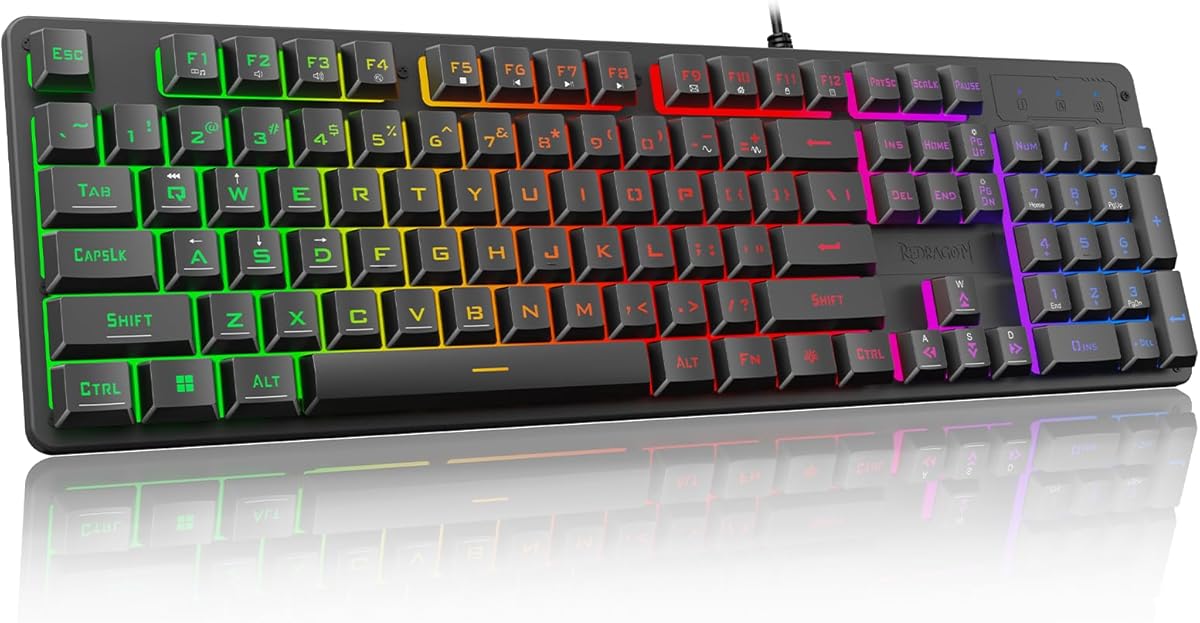
Redragon K521 Upgrade Rainbow LED
4.4Editor score
Mechanical Feeling Switches
Anti-Ghosting Support
19 Key Roll Over
Multimedia Keys Included
Discover the best Keyboard for Rainbow Six Siege to enhance your gameplay. This guide compares top models for speed, durability, and customization.
Finding the right Keyboard for Rainbow Six Siege is essential for tactical accuracy and rapid response during intense matches. A high-quality keyboard ensures your commands are registered instantly, giving you an edge in competitive play.
We evaluated ten top-rated gaming keyboards based on switch speed, build quality, and programmable features. Each model offers unique advantages tailored to different playstyles and budget ranges for serious players.
This guide details performance metrics, pros, cons, and expert recommendations for every pick. Prices and availability may vary, so check current listings before making your final decision.
4.4Editor score

4.6Editor score

4.5Editor score
This side-by-side comparison highlights key specifications across all ten models. From wireless connectivity to switch types, these details help you find the perfect match for your setup.


The ASUS ROG Strix Scope II 96 Wireless stands out as the top choice for Rainbow Six Siege players seeking premium performance. Its wireless versatility and customizable switches offer a balanced experience for both competitive play and daily tasks.
We may earn a commission when you buy through this link, at no additional cost to you.
Its tri-mode connectivity allows seamless switching between Bluetooth and 2.4GHz wireless, ensuring low latency during critical moments. The pre-lubed linear switches provide smooth keystrokes essential for rapid crouching and weapon switching.
While the price is higher than budget options, the build quality justifies the investment. The inclusion of dampening foam reduces unwanted noise, which is appreciated during long gaming sessions or streaming.
Ideal for serious gamers, this keyboard combines durability with advanced features. If you prioritize wireless freedom and customization, it is the best investment for your arsenal.
Switch between Bluetooth and 2.4GHz wireless effortlessly to connect multiple devices without compromising speed.
Modify your switch experience without soldering to tailor the keyboard to your specific tactile preferences.
We may earn a commission when you buy through this link, at no additional cost to you.
The Redragon K521 offers an exceptional entry point for gamers on a tight budget. Its mechanical-feeling switches and RGB backlighting provide a surprisingly premium experience for the price.
We may earn a commission when you buy through this link, at no additional cost to you.
Designed with 19-key anti-ghosting, it ensures accurate command inputs during intense firefights. The one-touch lighting control and adjustable brightness allow you to customize visuals without software complexity.
It lacks true mechanical switches, so the tactile feedback differs from high-end models. However, for casual players or those upgrading from standard keyboards, the performance is adequate.
Perfect for budget-conscious gamers, this keyboard delivers value. If cost is your primary concern, it provides the essential features needed to enjoy Rainbow Six Siege effectively.
Achieve competitive readiness without breaking the bank with reliable anti-ghosting technology.
Enjoy customizable lighting modes to match your setup aesthetics.
We may earn a commission when you buy through this link, at no additional cost to you.
Razer's BlackWidow V4 X delivers professional-grade features tailored for competitive FPS gaming. The yellow linear switches offer silent, rapid inputs perfect for stealthy maneuvers in Siege.
We may earn a commission when you buy through this link, at no additional cost to you.
Six dedicated macro keys expand your command arsenal, allowing quick execution of complex strategies. The multi-function roller provides intuitive control over media and volume, enhancing convenience.
The doubleshot ABS keycaps ensure durability, but the high price limits accessibility. Acoustic improvements minimize noise, though they do not eliminate it entirely.
Recommended for enthusiasts who prioritize speed and silence, this keyboard excels in high-pressure scenarios. If you demand top-tier performance, it is a worthy investment.
The yellow switches provide instant actuation with minimal noise for stealthy gameplay.
Dedicated macro keys streamline command execution during tactical operations.
We may earn a commission when you buy through this link, at no additional cost to you.
The Aula WIN60 HE introduces magnetic switches for unmatched speed and precision. Its rapid trigger mode enables instant key resets, giving you a significant advantage in movement-heavy FPS titles.
We may earn a commission when you buy through this link, at no additional cost to you.
An 8000 Hz polling rate ensures near-instant signal transmission, crucial for competitive environments. The compact 60% layout saves desk space, allowing for wider mouse movement during aiming.
Adjusting actuation points requires using the web-based driver, which is convenient but may lack offline features. The lack of a number pad might frustrate those needing full layouts.
Best for competitive FPS players seeking a speed advantage, this keyboard is a game-changer. If you prioritize performance over layout versatility, it stands out.
Instantly reset keys to execute rapid movement combos with precision.
Save space for more room to maneuver your mouse during aim training.
We may earn a commission when you buy through this link, at no additional cost to you.
The ASUS ROG Strix Scope II X offers a robust wired solution for those preferring stability. Its full-size layout includes a number pad, making it ideal for players who need comprehensive input options.
We may earn a commission when you buy through this link, at no additional cost to you.
V2 linear switches provide smooth, consistent keystrokes with improved RGB illumination. The integrated sound-dampening foam creates a satisfying acoustic experience without excess noise.
While it lacks wireless capabilities, the USB-C connection ensures zero latency. The PBT keycaps resist wear, maintaining clarity over extended use.
Perfect for desk-bound gamers, this keyboard combines reliability with high-end features. If you prefer a traditional setup with maximum customization, it is an excellent choice.
Eliminate wireless latency issues with a robust USB-C connection.
PBT material ensures long-lasting legends and resistance to wear.
We may earn a commission when you buy through this link, at no additional cost to you.
The AULA F75 Pro blends compact design with versatile connectivity. Its 75% layout balances space-saving with essential keys, while the multi-function knob offers intuitive volume and lighting control.
We may earn a commission when you buy through this link, at no additional cost to you.
Tri-mode support lets you connect up to five devices, switching seamlessly via shortcut keys. The pre-lubed switches deliver a smooth, creamy typing experience ideal for long sessions.
The 4000mAh battery ensures longevity, reducing recharge frequency. However, driver dependencies might complicate initial setup for non-technical users.
Great for users needing flexibility, this keyboard bridges wireless freedom and customization. If you juggle multiple devices, it is a practical solution.
Manage multiple connections easily without disconnecting cables.
Adjust settings instantly without interrupting your gameplay.
We may earn a commission when you buy through this link, at no additional cost to you.
The Corsair K55 RGB PRO is a reliable budget option featuring macro keys and spill resistance. It suits players who need basic programmable features without mechanical switch investment.
We may earn a commission when you buy through this link, at no additional cost to you.
Six macro keys allow quick activation of functions, useful for executing commands. The IP42 rating protects against accidental spills, ensuring longevity in casual setups.
Response times are slower than mechanical alternatives, which may hinder fast-paced reactions. However, for casual play, it offers good value.
Ideal for casual gamers needing macros and durability, this keyboard works well. If you prioritize spill resistance and affordability, consider it.
Six dedicated keys simplify complex in-game actions.
IP42 rating safeguards against accidental liquid damage.
We may earn a commission when you buy through this link, at no additional cost to you.
The SteelSeries Apex 3 excels in quiet operation, making it ideal for shared spaces. Its water-resistant design and magnetic wrist rest enhance comfort and durability.
We may earn a commission when you buy through this link, at no additional cost to you.
Whisper-quiet switches minimize noise, beneficial for late-night gaming or streaming. The 10-zone RGB illumination adds style without excessive customization options.
Mechanical feedback is absent, which may disappoint enthusiasts seeking tactile precision. It remains a solid choice for silent, reliable gaming.
Best for players needing quiet and durable gear, this keyboard delivers comfort. If noise reduction is priority, it is a smart pick.
Nearly silent switches prevent disturbances in shared environments.
Magnetic wrist rest provides support for extended sessions.
We may earn a commission when you buy through this link, at no additional cost to you.
The Logitech G413 TKL SE offers tactile mechanical precision in a compact design. Its PBT keycaps ensure durability, and the tenkeyless layout saves desk space.
We may earn a commission when you buy through this link, at no additional cost to you.
Tactile switches provide clear feedback for precise inputs during critical plays. The robust aluminum case resists flex, maintaining stability during intense gameplay.
The lack of RGB lighting limits aesthetic customization, and keycaps are fixed. Still, performance-focused players will appreciate the reliability.
Ideal for players seeking tactile feedback, this keyboard excels in build quality. If you prefer durability over flash, it is a great fit.
Clear feedback ensures accurate input during high-stakes moments.
PBT keycaps resist wear for long-term use.
We may earn a commission when you buy through this link, at no additional cost to you.
The Razer Ornata V3 features low-profile keys for ergonomic efficiency. Its mecha-membrane switches offer a satisfying tactile feel without full mechanical noise.
We may earn a commission when you buy through this link, at no additional cost to you.
UV-coated keycaps ensure fade resistance, and dedicated media keys streamline playback control. The magnetic wrist rest adds comfort during extended sessions.
Switch travel is shorter, which may feel less substantial to mechanical purists. However, for a balanced experience, it performs well.
Best for ergonomic focus, this keyboard suits players seeking comfort. If you prefer slim profiles with tactile feedback, it is a strong choice.
Low-profile keys reduce strain during long typing or gaming sessions.
UV coating ensures legends remain clear over time.
We may earn a commission when you buy through this link, at no additional cost to you.
Selecting the right Keyboard for Rainbow Six Siege requires evaluating features that impact gameplay. Focus on switch types, build quality, and connectivity to match your needs.
Mechanical switches offer distinct tactile feedback, while membrane provides quieter, budget-friendly options. Linear switches favor rapid inputs for movement-heavy games like Siege.
Choose switches that align with your preference for speed or feedback.
TKL and compact layouts save desk space for better mouse movement, while full-size models include number pads for productivity. Consider your workspace needs.
Select a layout that balances desk space with functionality.
Wired connections ensure zero latency, whereas wireless models offer flexibility. 2.4GHz wireless typically provides lag-free performance comparable to wired.
Opt for wired if latency is critical, or 2.4GHz wireless for flexibility.
PBT keycaps resist wear better than ABS, and aluminum frames enhance durability. Spill resistance is crucial for protecting against accidental damage.
Prioritize keyboards with durable materials to extend lifespan.
Macro keys allow rapid execution of complex commands. Ensure the software supports detailed mapping for your playstyle.
Look for models with dedicated macro keys for strategic advantage.
Budget options provide essential features like anti-ghosting, while premium models offer advanced customization. Determine which features justify the cost.
Balance price with necessary features to find the best value.
RGB customization adds aesthetic appeal and aids key visibility. Some keyboards offer per-key lighting for precise control.
Choose lighting options that enhance visibility and style.
Wrist rests and adjustable angles reduce strain during long sessions. Comfort is vital for maintaining focus during intense matches.
Select ergonomic features that support prolonged use.
Regularly clean your keyboard using compressed air to remove debris between keys. This prevents stuck keys and maintains smooth operation.
Use manufacturer software to program macros for Siege-specific actions. This streamlines commands and improves response times during matches.
Avoid eating or drinking near the keyboard to prevent spills. If accidents happen, disconnect immediately and dry the unit to prevent damage.
Rapid response time and low latency are critical for competitive play. Look for mechanical switches, anti-ghosting support, and customizable macros.
Mechanical keyboards offer better consistency and faster response times. They are recommended for competitive play but not strictly required.
Yes, 2.4GHz wireless keyboards provide lag-free performance. Ensure it has low-latency technology suitable for gaming.
Rapid trigger allows keys to reset immediately upon release for faster inputs. It is essential for quick movement strategies in tactical shooters.
Use compressed air to remove dust and debris. Wipe the surface with a damp cloth for stains without soaking the keys.
Anti-ghosting ensures multiple keys register simultaneously. This is vital for executing complex commands during intense firefights.
Membrane keyboards are quieter and cheaper but slower than mechanical options. They are suitable for casual play but not competitive scenarios.
The ASUS ROG Strix Scope II 96 Wireless leads our list with its versatile connectivity and premium features. The Redragon K521 offers an affordable alternative for budget-conscious gamers.
Prioritize switch type and layout size to match your playstyle. Competitive players should focus on speed, while casual gamers might value comfort and durability.
Always check current prices and availability before purchasing. Prices fluctuate, so verify details to ensure you get the best deal.