
Redragon K617 HE Wired Hall-Effect Rapid Trigger Magnetic Gaming Keyboard
4.3Editor score
Hall Effect magnetic switches
8000Hz hyper polling
Software adjustable actuation
Discover the top 10 keyboards for CS2 in October 2026 featuring Hall Effect switches, rapid trigger technology, and ergonomic designs for competitive FPS
Finding the right keyboard for CS2 can transform your gameplay from average to elite. Modern competitive titles demand instant response times and precise actuation control. Hall Effect magnetic switches now dominate the market, offering durability and speed that traditional mechanical switches cannot match.
We compared ten top-rated gaming keyboards specifically selected for CS2 performance. Our analysis focuses on polling rates, actuation adjustments, and build quality. Each product offers unique features like rapid trigger and SOCD handling to help you dominate every round.
Every pick in this guide highlights specific strengths for different playstyles and budgets. You will see detailed breakdowns of features and real-world performance notes. Remember that prices and availability change frequently so check current listings before buying.
4.3Editor score
4.4Editor score
4.5Editor score
This side-by-side comparison highlights the key specifications and features of the top ten keyboards for CS2. You can easily compare switch types, polling rates, and form factors to find the best match for your setup.


The Redragon K617 HE delivers exceptional value for players seeking magnetic switch technology. It features dedicated Hall Effect switches that eliminate physical contact for faster response. Its rating of 4.3 reflects solid performance for the price.
We may earn a commission when you buy through this link, at no additional cost to you.
Its key strengths include software adjustable actuation allowing precise control over trigger points. The 8000Hz hyper polling ensures inputs are transmitted much faster than standard keyboards. Rapid trigger and PRCS cut redundant keystrokes during quick direction changes.
The main trade-off is the 60% compact layout which removes the numpad and nav cluster. This is acceptable for most CS2 players who prioritize mouse space over extra keys. The vibrant RGB lighting remains fully adjustable for your desk.
This keyboard is ideal for budget conscious gamers needing high speed input. It helps you stop shoot and aim accurately without breaking the bank. Highly recommended for entry level competitive FPS setups.
Magnetic switches sense keypresses without physical contact so your peek and fire timing lands exactly when you mean it.
Save multiple actuation profiles between 0.1mm and 3.4mm to calibrate switches through the desktop or web based driver.
We may earn a commission when you buy through this link, at no additional cost to you.
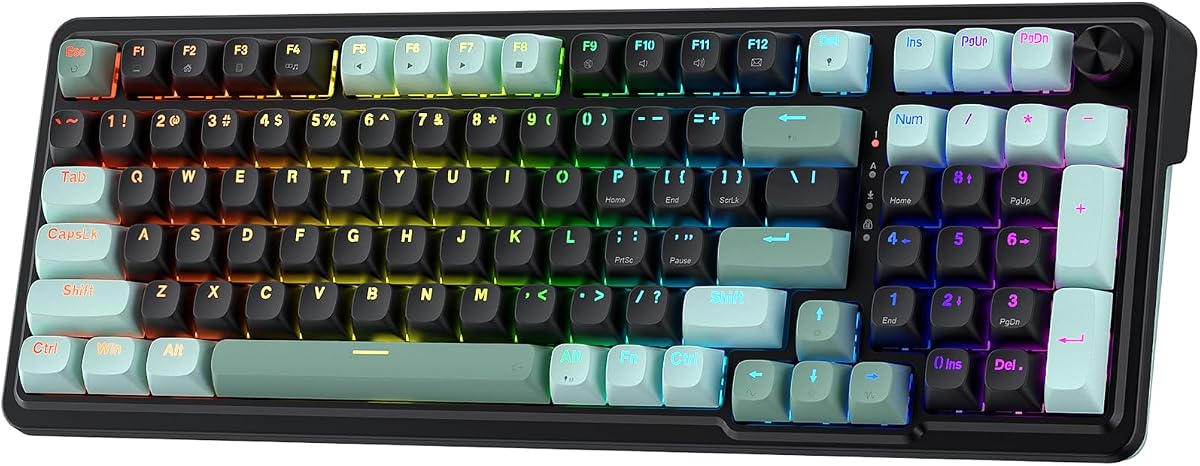
The Redragon K686 HE stands out with its one knob control for brightness and media. It uses Next-gen UltraMag POM magnetic switches for contactless keypresses. The rating of 4.4 highlights strong user satisfaction with its build.
We may earn a commission when you buy through this link, at no additional cost to you.
Its dual module floating structure provides a soft silky bounce instead of a harsh clack. This design reduces noise and improves comfort during long sessions. The 8000Hz polling rate ensures inputs reach your PC nearly instantly.
You might miss a full size layout but the floating structure justifies the compact design. The noise dampening ensures your teammates hear your game not your keyboard. This balance suits those wanting quality without bulk.
Buy this if you value tactile feel and quiet operation. The one knob simplifies daily adjustments significantly. It is a strong step up from basic membrane keyboards for CS2.
A single control knob adjusts backlight brightness and media playback so you manage lighting and volume without memorizing extra key combos.
Anti wobble independent switch plate design paired with dampening layers gives a soft Hi-Fi bounce instead of harsh rigid clack.
We may earn a commission when you buy through this link, at no additional cost to you.
The Redragon K673 HE shares key features with the K686 model offering great value. It also includes Next-gen UltraMag POM magnetic switches for precise timing. The 4.1 rating suggests reliable performance for competitive play.
We may earn a commission when you buy through this link, at no additional cost to you.
Its floating structure and noise dampening create a satisfying typing feel. You can adjust actuation profiles via software for different games or tasks. The 8000Hz polling keeps inputs responsive during fast paced matches.
The rating is slightly lower than the K686 but features remain similar. You still get the one knob for convenience and rapid trigger benefits. It suits players who want reliability without extra cost.
Choose this if you need a solid keyboard without extra features. It provides the core tools needed for CS2 precision. Good for entry level magnetic switch adopters.
A single control knob adjusts backlight brightness and media playback for easy volume control without memorizing key combos.
Independent switch plate design paired with dampening layers reduces wobble for a consistent bounce during rapid keystrokes.
We may earn a commission when you buy through this link, at no additional cost to you.
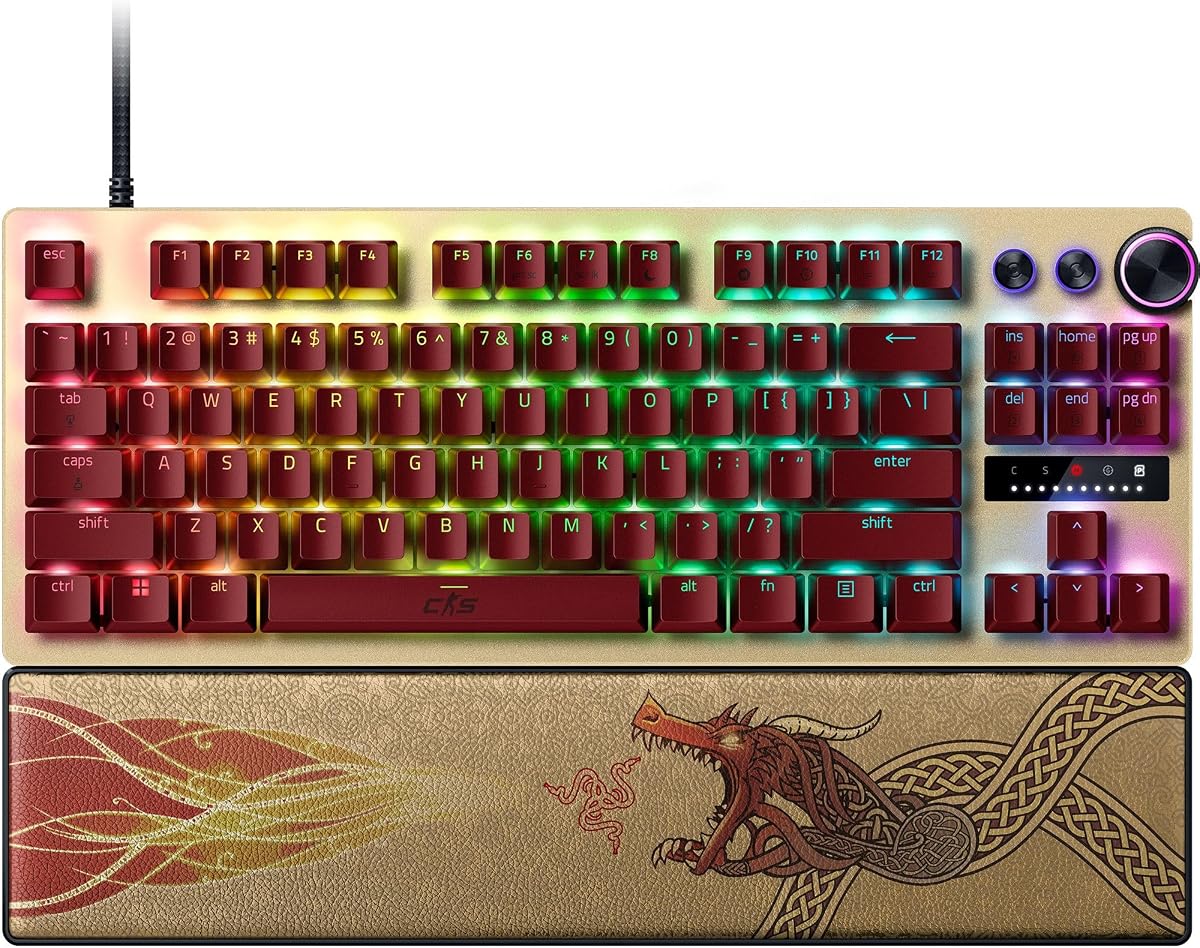
The Razer Huntsman V3 Pro TKL CS2 Edition is built for elite competitive play. It features Analog Optical Switches Gen 2 for ultra fast repeated inputs. The rating of 4.4 shows professionals trust its reliability.
We may earn a commission when you buy through this link, at no additional cost to you.
Snap Tap prioritizes the latest input for near instant directional changes. You can make adjustments using onboard LED without external software. The textured double shot PBT keycaps resist wear during intense play.
Its price is high but justified for serious players needing every advantage. The magnetic wrist rest adds ergonomic comfort for long training sessions. Onboard settings ensure your config stays consistent across PCs.
If you want the best tool for rushing B pick this model. It offers features like rapid trigger and snap tap out of the box. Ideal for pros demanding precision and durability.
Snap Tap mode prioritizes latest input between selected keys without releasing previous one for near instant directional changes in FPS games.
Make precise on the fly adjustments to actuation height with visual aid of onboard LED array and save to keyboard without software.
We may earn a commission when you buy through this link, at no additional cost to you.
The Corsair Clipper PRO MINI 60 combines compact size with robust durability. It uses Ultra Fast MGX Hyperdrive Core Hall Effect switches for adjustable actuation. The rating of 4.4 highlights reliability and performance consistency.
We may earn a commission when you buy through this link, at no additional cost to you.
IP57 rating ensures water and dust resistance for long sessions. FlashTap SOCD enables cleaner directional inputs for sharper counter strafing. Rapid trigger enables instant 0.1mm reset for rapid taps and faster reactions.
The 60% US QWERTY layout maximizes mouse space for low sensitivity aiming. Dual layer sound dampening keeps keystrokes quieter to reduce distraction. This makes it ideal for shared spaces or quiet streaming setups.
Select this if you want durability alongside speed and compactness. It suits players prioritizing resistance and space saving layout. Highly recommended for portable competitive gaming.
IP57 rated durability handles intense gameplay with water and dust resistance plus durable PBT double shot keycaps resisting wear.
FlashTap SOCD enables cleaner directional inputs and sharper counter strafing while AXON delivers 8000Hz polling for instant registration.
We may earn a commission when you buy through this link, at no additional cost to you.
The Redragon K745 HE offers a feature rich package for gaming enthusiasts. It includes Next-gen UltraMag POM magnetic switches for contactless keypresses. The rating of 3.9 suggests room for improvement in consistency.
We may earn a commission when you buy through this link, at no additional cost to you.
Five layer noise dampening provides a soft silky Hi-Fi bounce. The 8000Hz polling rate reduces input latency during direction changes. Software tuning lets you save actuation profiles between 0.1mm and 3.4mm.
Its rating trails slightly behind other Redragon models but still delivers core value. RGB lighting brings a true eSports vibe to your desk. Ideal for users wanting magnetic switches without high cost.
Choose this for vibrant lighting and responsive inputs. It suits players who prioritize speed and style. Good for budget builds seeking rapid trigger tech.
Anti wobble independent switch plate design paired with five layers dampening gives soft bounce instead of harsh rigid clack.
Wired connection transmits inputs up to eight times faster than standard keyboards while dynamic activation cuts redundant keystrokes.
We may earn a commission when you buy through this link, at no additional cost to you.
The Keychron C0 HE 8K is a specialized one handed keypad for competitive FPS. It uses Hall Effect magnetic switches for adjustable actuation with high precision. The rating of 4.2 reflects strong performance in gaming tasks.
We may earn a commission when you buy through this link, at no additional cost to you.
Its web based configurator allows customization without software installation. You can adjust actuation and per-key RGB through a browser. This makes it ideal for multi system setups across Windows and macOS.
As a keypad it requires a separate main keyboard for full typing. This layout suits MMO or MOBA control where essential commands are needed fast. It frees up desk space while maintaining rapid trigger tech.
Consider this if you need a dedicated control pad for macros. It streamlines complex commands for content creators or power users. Perfect supplement to existing mechanical keyboards.
Customize key mapping actuation settings and RGB lighting through web based configurator without software installation for cross platform use.
Compact thirty five key one handed layout keeps essential commands within reach minimizing hand movement during extended gaming sessions.
We may earn a commission when you buy through this link, at no additional cost to you.
This renewed Razer Huntsman V3 Pro TKL offers similar performance at lower cost. It features Razer Analog Optical Switches Gen 2 for fast repeated inputs. The rating of 3.5 reflects variable condition of renewed items.
We may earn a commission when you buy through this link, at no additional cost to you.
Snap Tap mode prioritizes input for directional changes in FPS games. Quick onboard adjustments allow tweaking actuation height without software. The tenkeyless form factor gives more room to maneuver your mouse.
While renewed it still includes premium PBT keycaps and aluminum plate. Ensure firmware is updated to activate all advanced features like Snap Tap. Great for those seeking top features without full price.
Choose this if you want high-end tools at a discount. It suits players needing rapid trigger for CS2 performance. Check return policy before purchasing.
Make precise on the fly adjustments to actuation height with visual LED aid and save to keyboard without software required.
Tenkeyless form with aluminum top plate gives more room for mouse and takes punishment thanks to solid warp resistant casing.
We may earn a commission when you buy through this link, at no additional cost to you.
The Corsair K55 RGB PRO offers solid features without high cost. It features six dedicated macro keys activated via iCUE software or Elgato Stream Deck. The 4.4 rating shows high user satisfaction with its comfort.
We may earn a commission when you buy through this link, at no additional cost to you.
IP42 rated protection guards against spills to ensure gameplay never stops. Detachable palm rest reduces stress on hands during long sessions. Dedicated volume and media keys allow fine-tuning without interrupting game.
It lacks magnetic switches so actuation adjustments and rapid trigger are missing. However it remains a reliable choice for casual gamers. The dynamic RGB backlighting lets you assign colors to five zones.
Buy this if you need a basic keyboard for general use. It suits players needing macro functionality on a budget. Good entry level option for CS2.
Six dedicated macro keys activate functions shortcuts or keypresses in one stroke easily set up through iCUE or Stream Deck.
IP42 rated protection guards against spills so gameplay never has to stop during intense competitive matches or daily use.
We may earn a commission when you buy through this link, at no additional cost to you.
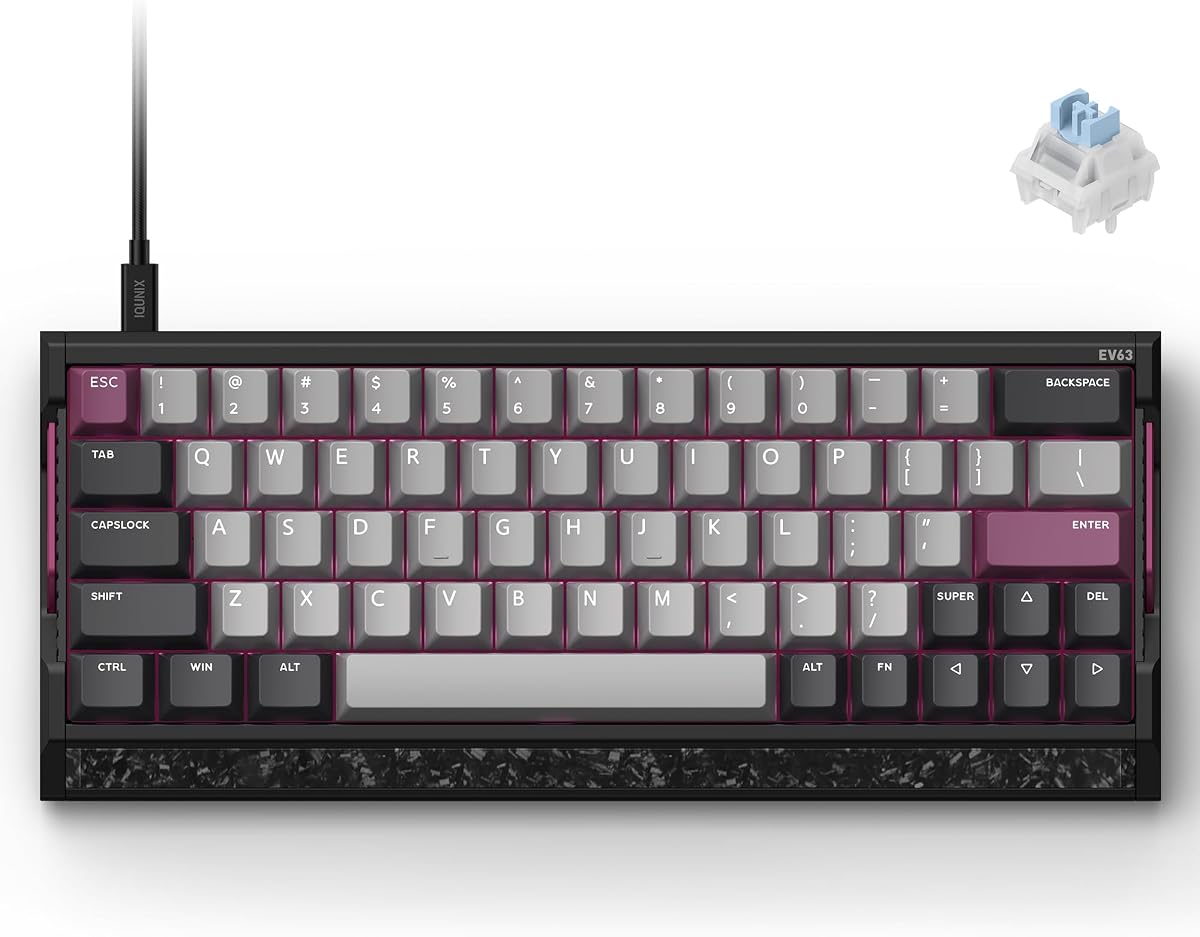
The IQUNIX EV63 delivers premium quality with its CNC aluminum case. It features Magnetic X Ultra Switches tuned for rapid FPS response. The 4.5 rating highlights exceptional build and performance.
We may earn a commission when you buy through this link, at no additional cost to you.
M.A.T. 2.0 algorithm reduces missed inputs and sticky inputs. Aluminum plus real forged carbon ensures solid chassis and no unwanted desk movement. EV Driver 3.0 offers pro tuned FPS presets for champion settings.
Its custom 64 key layout saves desk space but may take time to adjust. Full size users might miss certain keys initially. The weight provides planted stability ideal for competitive play.
Choose this for a premium custom-like feel. It is perfect for players needing stable input during high-speed movement. Top tier choice for serious CS2 gamers.
M.A.T. 2.0 Magnetic Auto-Tune checks each key in real time separating sensor and RGB power to reduce voltage fluctuation and missed inputs.
Aircraft-grade CNC aluminum case with real forged carbon front plate reduces desk movement and vibration for solid custom-like feel.
We may earn a commission when you buy through this link, at no additional cost to you.
Choosing the right keyboard for CS2 involves evaluating switch technology and build quality.
Hall Effect switches offer adjustable actuation and rapid trigger which are critical for competitive FPS gaming. These switches eliminate physical contact to reduce wear and increase response speed compared to traditional mechanical switches.
Prioritize Hall Effect switches with adjustable actuation to customize trigger points for your specific playstyle.
A high polling rate ensures faster input registration which can give you a split second advantage. Modern gaming keyboards now support rates up to 8000Hz for near instant input transmission.
Look for keyboards with at least 1000Hz but consider 8000Hz for optimal competitive performance.
Adjustable actuation lets you set how deep a key must press before registering. This feature helps reduce finger fatigue and improves precision during long sessions.
Select keyboards offering actuation range from 0.1mm to 4mm for versatile customization options.
60% or TKL layouts provide more desk space for mouse movement which is vital for low sensitivity players. Compact designs reduce hand travel and increase focus on key gaming zones.
Choose a compact layout if you prioritize mouse space over number pad functionality.
Look for features like spill resistance and durable keycaps to withstand intense gaming sessions. PBT keycaps are preferred for resistance to shine and wear over ABS.
Invest in keyboards with water resistance and high-quality keycaps to ensure longevity.
Robust software allows saving profiles and adjusting lighting or macros easily. Web based configurators eliminate need for installation and work across multiple operating systems.
Verify software options support saving profiles to onboard memory for plug and play convenience.
Sound dampening layers improve acoustic feel reducing harsh clacking sounds during gameplay. This can benefit players streaming or playing in shared spaces.
Check for noise reduction features if quiet operation is important for your environment.
Comfortable wrist rests and detachable palm rests reduce strain on hands and wrists. Ergonomic design helps prevent fatigue during extended play sessions.
Select keyboards with included or compatible ergonomic rests to maintain comfort.
To maintain peak performance regularly clean keycaps using compressed air to remove dust and debris. Avoid harsh chemicals that may damage surface coatings or key legends.
Update firmware through manufacturer software to access latest features and improve stability. Many rapid trigger benefits require latest updates to function properly.
Customize actuation and lighting settings using the provided software or web configurator. Save profiles to onboard memory if available for consistent performance across different PCs.
Rapid Trigger allows keys to reset immediately when you lift your finger instead of waiting for full bottom out. This feature enables faster repetitive key presses and precise movements which are essential for competitive CS2 gameplay.
Hall Effect switches use magnetic fields instead of physical contact to register keystrokes. This results in longer switch lifespan adjustable actuation and faster response times which mechanical switches cannot match.
Higher polling rates such as 8000Hz reduce input latency making your keystrokes register faster on screen. This can be crucial for split-second decisions in competitive shooters like CS2.
Yes 60% keyboards save significant desk space for wider mouse movements. This layout suits players who prefer low sensitivity aiming and require large mouse travel areas.
You adjust actuation points through the keyboard's companion software or web configurator. These tools let you set specific millimeter triggers for each key to fit your playstyle preferences.
SOCD stands for simultaneous opposite cardinal direction cleaning which ensures fair directional inputs. In CS2 this prevents input conflicts and ensures movement commands execute exactly as intended.
The ten keyboards reviewed above offer a range of options from budget friendly to premium builds. Our top picks highlight models with rapid trigger technology adjustable actuation and durable construction suitable for competitive play.
Prioritize Hall Effect switches and high polling rates to ensure your setup matches your gaming needs. Features like Snap Tap and software customization provide additional edges for competitive CS2 players.
Prices and availability change regularly so always verify current listings before making a purchase. Check retailer sites for latest deals and warranty options to ensure you get the best value.