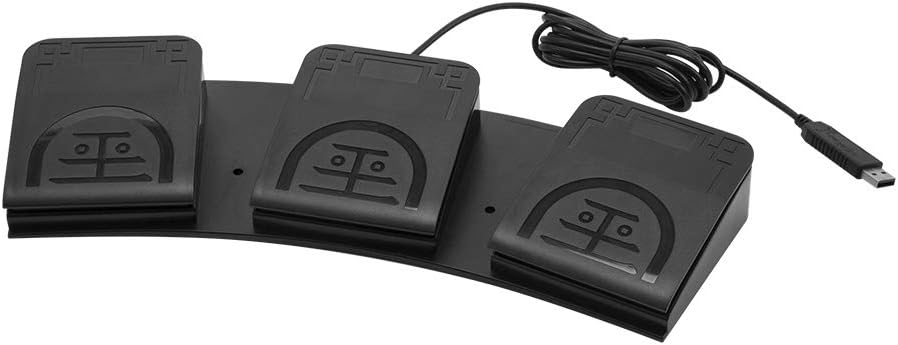
iKKEGOL Upgraded USB Triple Foot Pedal Switch Control
4.4Editor score
Programmable HID device for custom keymapping
Optical switches ensure quiet operation
Durable construction supports heavy daily use
This guide compares the top ten foot pedals for transcriptionists, evaluating ergonomic design, software compatibility, durability, and control features for
Transcriptionists rely on efficient tools to manage audio files accurately. A quality foot pedal allows hands-free control over playback, enabling faster typing speeds and reduced fatigue during long sessions.
We compared ten top-rated USB foot pedals based on build quality, ergonomic design, software compatibility, and user feedback. Each model offers unique features tailored to different transcription software and workflow needs.
Each pick highlights key strengths and potential limitations to help you choose the right device. Prices and availability change frequently, so verify current details before purchasing to ensure the best fit for your setup.
4.4Editor score

4.5Editor score

5.0Editor score
This side-by-side comparison outlines the key specifications and design features of the ten selected foot pedals. Reviewing these details helps identify which model aligns best with your specific transcription software and ergonomic requirements.


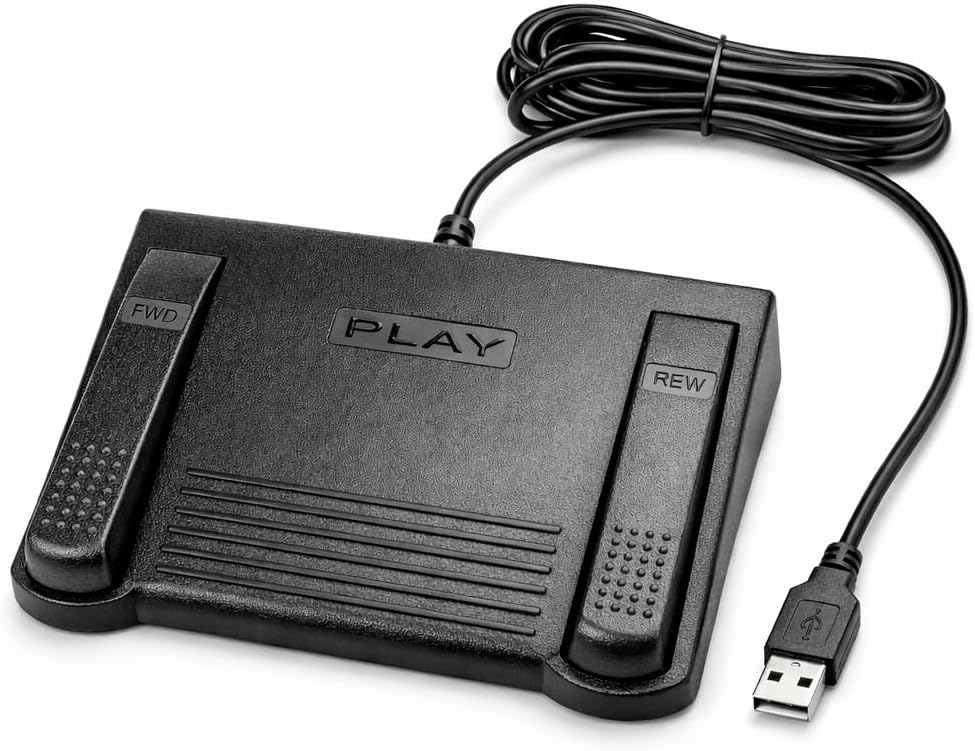


The Infinity 3 USB Foot Pedal Control stands out as a reliable choice for transcription professionals seeking durability and comfort. With a rating of 4.5 stars, users appreciate its robust construction and ergonomic design tailored for long sessions.
We may earn a commission when you buy through this link, at no additional cost to you.
Its ultra-heavy-duty micro switches ensure countless hours of trouble-free performance, making it ideal for high-volume transcription work. The wide, central, sloping Play pedal allows easy foot movement between Play, Fast Forward, and Rewind keys without strain.
While the design is solid, some users may find the layout favors specific software configurations initially. However, these minor setup considerations are outweighed by the consistent performance and physical comfort it provides during extended daily use.
Transcriptionists needing a sturdy, dependable foot pedal should prioritize this model. Its balance of durability and ergonomic design makes it a top recommendation for maintaining efficiency and reducing physical fatigue.
The heavy-duty micro switches are designed to withstand millions of presses, ensuring the device remains functional even with intensive daily transcription use.
The sloping central pedal and wide surface area allow natural foot positioning, minimizing fatigue during long transcription sessions.
We may earn a commission when you buy through this link, at no additional cost to you.
The VEC in-USB-2 Infinity Digital Foot Control offers an affordable yet capable solution for transcriptionists needing versatile audio control. Rated at 4.4 stars, it balances cost with features like a rechargeable battery and high-quality switches.
We may earn a commission when you buy through this link, at no additional cost to you.
Its rechargeable battery supports up to 1000 hours of digital recording time, allowing for extended use without constant cable tethering. The mechanical stop prevents accidental triggering of the center pedal, maintaining control during active transcription.
Though the wireless feature adds convenience, users must manage battery recharging cycles. Additionally, compatibility with specific software may require initial configuration. Despite these minor points, its build quality and functionality make it a strong budget-friendly option.
Those seeking an affordable pedal with modern wireless capabilities will find this model compelling. It provides reliable performance for diverse transcription tasks while keeping costs manageable.
The rechargeable battery provides up to 1000 hours of recording time, enabling flexible positioning without constant cable management.
A mechanical stop ensures the center pedal does not activate accidentally when stepping on side pedals, maintaining workflow stability.
We may earn a commission when you buy through this link, at no additional cost to you.
The DAC 3 Function Foot Pedal- FP-110-USB achieves a perfect 5.0 rating, signaling exceptional satisfaction among users. Its design focuses on clarity and reliability, featuring large labeled buttons tailored for specific transcription software needs.
We may earn a commission when you buy through this link, at no additional cost to you.
The buttons are clearly labeled from left to right as Next Job, Rew/Play, and Record, reducing confusion during fast-paced work. Built with a USB connector, it ensures stable, direct integration with compatible computer systems without complex setup.
While the price is higher than many competitors, the quality and precision justify the investment for professionals. The limitation to certain software may restrict versatility, but for targeted workflows, it delivers unmatched performance and dependability.
Transcriptionists prioritizing premium quality and clear function labeling should consider this model. Its high ratings and robust build make it an excellent choice for demanding professional environments.
Large buttons labeled Next Job, Rew/Play, and Record ensure quick identification and reduce errors during intense transcription sessions.
With a 5.0 rating, this pedal reflects exceptional reliability and user satisfaction, validating its premium build and design.
We may earn a commission when you buy through this link, at no additional cost to you.
The Philips ACC2330 4-Pedal Foot Control offers unique ergonomic features like toe touch control and heel swing design. It holds a 4.1 rating, reflecting solid performance for professionals working with digital dictation systems.
We may earn a commission when you buy through this link, at no additional cost to you.
The increased width of the center pedal helps avoid unintended presses of other pedals, improving accuracy. Users appreciate the heel swing design which allows for easy foot relaxation during pause times, reducing strain during long tasks.
While effective for specific digital systems, it may not suit all general transcription software setups as broadly as universal models. Its specialized design means users should verify compatibility before purchase, but it remains a strong option for targeted needs.
Professionals seeking ergonomic benefits and specific digital integration should evaluate this model. Its unique design features provide comfort and precision tailored to dictation workflows.
Toe touch control allows easy activation without lifting the heel, supporting a more natural and relaxed foot posture.
The increased width of the center pedal creates a clear boundary, helping prevent accidental activation of adjacent controls.
We may earn a commission when you buy through this link, at no additional cost to you.
The Infinity USB Digital Foot Control IN-USB3 is designed with a low profile and a greater non-slip surface area. Its 4.5 rating indicates users value its reliable digital control and simple USB plug-and-play functionality.
We may earn a commission when you buy through this link, at no additional cost to you.
Its low profile design helps save desk space, making it suitable for setups with limited room. The large non-slip surface ensures the pedal stays securely in place during active use, preventing unwanted movement that could disrupt workflow.
While it lacks advanced ergonomic curves found in higher-end models, its stability and ease of connection make it a practical choice. Users looking for a no-fuss, reliable device will find it performs well for essential playback tasks.
Ideal for those needing a compact, dependable pedal, this model offers straightforward functionality without unnecessary complexity. It supports basic transcription needs effectively with secure placement and easy setup.
The slim profile reduces desk clutter, accommodating compact workstations without sacrificing control performance.
A wider, non-slip surface ensures the pedal remains fixed in position, providing consistent control during use.
We may earn a commission when you buy through this link, at no additional cost to you.
The Express Scribe Transcription Foot Pedal ECS-FPAE is built exclusively for use with Express Scribe transcription software. With a 3.8 rating, it delivers seamless operation for Scribe users but lacks compatibility with other platforms.
We may earn a commission when you buy through this link, at no additional cost to you.
Pre-programmed and ready to use out of the box, it eliminates the need for manual configuration wizards. The oversized pedal design allows easy movement between play, fast-forward, and rewind functions, supporting comfortable low-fatigue operation.
Its exclusive compatibility is a double-edged sword: ideal for Scribe users but useless for those using different software. The 1-year warranty adds confidence, but the limited scope means buyers must confirm their software requirements carefully.
For dedicated Express Scribe users, this pedal offers a streamlined, reliable experience. However, broader compatibility seekers should consider more versatile options to avoid software restrictions.
Designed exclusively for Express Scribe, this pedal ensures reliable and precise playback control without additional setup steps.
Pre-programmed configuration means no manual setup is needed; simply connect via USB and start transcribing immediately.
We may earn a commission when you buy through this link, at no additional cost to you.
The ECS-IN-USB-1 Foot Pedal Transcription Control prioritizes hands-free control and broad software compatibility. Rated at 3.5 stars, it aims to reduce fatigue with an ergonomic layout suited for extended transcription workloads.
We may earn a commission when you buy through this link, at no additional cost to you.
Its broad compatibility ensures it works with most major dictation platforms, offering flexibility for users switching between different tools. The ergonomic design features contoured contours to support natural foot positioning, helping minimize strain over time.
Despite the ergonomic focus, some users report durability issues or inconsistent responsiveness. While the warranty adds support, these factors suggest it may be best suited for lighter professional use rather than intense daily volumes.
Transcriptionists seeking comfort and flexible software support will find this model appealing. Just consider usage intensity and ensure compatibility with your specific transcription needs before purchasing.
The thoughtfully contoured layout supports natural foot positioning, helping reduce strain during extended transcription sessions.
Works with most major dictation platforms, making it a versatile choice for users needing flexibility across different software.
We may earn a commission when you buy through this link, at no additional cost to you.
The iKKEGOL Upgraded USB Triple Foot Pedal Switch Control features optical switches that operate quietly and a wide pedal design for comfort. With a 4.4 rating, users appreciate its programmability as a standard HID device.
We may earn a commission when you buy through this link, at no additional cost to you.
Its optical switches are quiet, reducing noise during recordings, while the wide pedal supports long-lasting comfort. Users can map the pedal to customized keyboard commands using ElfKey software, allowing tailored workflows beyond standard playback.
However, because it is a generic HID device, it requires software configuration to function specifically as a transcription pedal. This setup effort may be a barrier for some, but for tech-savvy users, it offers significant customization potential.
Ideal for those wanting to customize their transcription macros, this model delivers flexibility. Just factor in the software setup time to unlock its full capabilities for specialized workflows.
Optical switches operate quietly to minimize background noise, ensuring clean audio recordings during transcription sessions.
Programmable HID device allows users to map complex macros, speeding up workflows beyond standard playback controls.
We may earn a commission when you buy through this link, at no additional cost to you.
The Philips LFH-2330 Configurable USB Foot Control offers a 4-pedal design that can be fully configured using a user-friendly wizard. Rated at 4.2 stars, it provides flexibility for users needing custom control layouts.
We may earn a commission when you buy through this link, at no additional cost to you.
Its slim ergonomic design minimizes physical strain by reducing foot movement during transcription. The anti-slip bottom surface keeps the pedal securely in place, ensuring consistent performance across various floor types and surfaces.
While configuration is easy, the device may feel less robust than heavier-duty alternatives. Users prioritizing customization will find value, but those needing extreme durability might look elsewhere. Overall, it balances flexibility with comfort well.
Transcriptionists needing adaptable pedal layouts will appreciate its configurability. Just verify that the slim profile meets your durability expectations for long-term professional use.
A straightforward wizard allows complete customization of all four pedals, matching the device to individual workflow needs.
The slim footprint reduces unnecessary foot movement, helping to lower physical strain during extended transcription periods.
We may earn a commission when you buy through this link, at no additional cost to you.
The iKKEGOL Upgraded USB Triple Foot Pedal Mechanical Switch offers tactile mechanical feedback and supports Windows, Mac, and Linux systems. Rated at 4.3 stars, it provides advanced programming capabilities through ElfKey software for complex workflows.
We may earn a commission when you buy through this link, at no additional cost to you.
When pressed, the spring-loaded lever closes an electrical circuit to send signals, giving a tactile feel many users prefer. The ElfKey configuration software allows mapping complex macros, which can significantly speed up specialized transcription tasks.
However, the advanced features require downloading and setting up configuration software, which might be unnecessary for basic playback needs. Users should weigh the complexity against their specific workflow requirements before committing to this model.
Transcriptionists needing customizable macros and cross-platform support will find this pedal valuable. If you prefer simple plug-and-play devices, consider simpler alternatives to avoid unnecessary configuration steps.
Compatible with Windows, macOS, and Linux, allowing flexible use across different operating systems without compatibility issues.
Mechanical switches provide clear tactile feedback, ensuring confident activation during fast-paced transcription work.
We may earn a commission when you buy through this link, at no additional cost to you.
Selecting the right foot pedal involves evaluating several key factors that impact comfort, efficiency, and software integration. This guide outlines the most important features to consider.
Ensure the pedal supports your specific transcription software. Some models work universally, while others are optimized for platforms like Express Scribe or specialized medical systems.
Always verify software lists before purchasing to avoid integration issues.
Look for pedals with sloping surfaces, wide pedals, and anti-slip bases to reduce strain during long sessions. Proper foot positioning can prevent repetitive stress injuries.
Choose models with ergonomic contours tailored to natural foot placement.
High-quality micro switches and sturdy construction ensure the pedal withstands daily heavy use. Consider the material quality and warranty coverage for long-term reliability.
Prioritize models with proven durability ratings for professional workloads.
USB plug-and-play models simplify setup, while wireless options offer flexibility. Choose based on your desk space and mobility needs.
Standard USB is generally reliable for most setups.
Optical or mechanical switches affect sound and tactile feedback. Optical switches are quieter, while mechanical ones offer more tactile precision.
Select based on noise sensitivity and personal preference.
Programmable pedals allow mapping custom macros or commands beyond standard playback. This benefits advanced users with complex workflow needs.
Basic users may prefer simpler pre-configured options.
A solid warranty indicates manufacturer confidence. Look for at least one-year parts and labor coverage to protect your investment.
Check terms for mail-in or onsite repair options.
Low-profile designs save desk space, while larger pedals offer more surface area. Match the size to your workstation layout.
Consider desk clearance for comfortable foot movement.
Plug the pedal into a USB port and install any required drivers or configuration software before starting your transcription session. Ensure the pedal connects with your specific software to function correctly.
Position the pedal under your dominant foot and adjust your chair height so your foot rests naturally without straining. Use the center pedal for playback control while using the side pedals for rewinding or fast-forwarding.
Keep the pedal surface clean and free of dust to ensure responsive switches. Avoid spills and store the device in a dry environment to prolong its lifespan and performance.
Not all foot pedals work universally. Some are designed for specific platforms like Express Scribe, while others offer broad compatibility. Always check the product's supported software list before purchasing.
Most USB pedals are plug-and-play, requiring no additional drivers. However, programmable models may need configuration software to customize key mappings and functions.
Many models support both operating systems, but it's essential to verify compatibility. Look for cross-platform support in the product specifications or documentation.
High-quality pedals with heavy-duty micro switches can last for millions of presses. Regular maintenance and careful use help extend their operational life significantly.
Ergonomic pedals reduce strain by aligning with natural foot movements. This minimizes fatigue and lowers the risk of repetitive stress injuries during long transcription sessions.
Basic pedals are pre-configured and ready to use. Advanced models may require configuration tools like ElfKey to customize macros or assign specific commands to pedals.
Choosing the right foot pedal can significantly improve your transcription speed and comfort. Top picks like the Infinity 3 and VEC in-USB-2 offer excellent balance between durability and features.
Prioritize ergonomic design and software compatibility to ensure the pedal fits your workflow. Consider factors like switch type and build quality for long-term reliability.
Always check current prices and availability before purchasing. Conditions change, and verifying details ensures you get the best value for your specific needs.