
USB C Docking Station Dual DisplayPort
4.3Editor score
Dual DisplayPort 4K 60Hz
100W PD charging support
Includes VGA and HDMI outputs
Explore our expert guide comparing the top docking stations with Display Port for dual and triple monitor setups across laptops and desktops in October 2026.
Finding the right docking station with Display Port is essential for modern professionals who need reliable multi-monitor connectivity. These devices transform a single laptop port into a full desktop workstation, supporting high-resolution displays and peripheral connections seamlessly.
We evaluated ten top-rated docking stations based on compatibility, video output quality, data transfer speeds, and power delivery capabilities. Our comparison focuses on devices that support DisplayPort alongside other modern interfaces like HDMI and USB-C for versatile workspace expansion.
Each product in this list highlights unique strengths for different user needs, from budget-friendly options to premium hubs with advanced features. Keep in mind that availability and specifications may vary by region and retailer when you make your final purchase decision.
4.3Editor score

4.5Editor score
4.3Editor score
This side-by-side comparison highlights key specifications across all ten selected docking stations to help you identify the best fit for your specific workflow and hardware requirements.


The Dell Pro Laptop Docking Station WD25 earns our Editor's Choice for its robust power delivery and expansive display capabilities. With support for up to four high-resolution screens and 100W charging, it caters to demanding professional workflows.
We may earn a commission when you buy through this link, at no additional cost to you.
Its compatibility extends beyond Dell laptops to include many non-Dell devices, making it a versatile choice for mixed hardware environments. The ambidextrous USB-C cable design adds flexibility for desk organization regardless of laptop placement.
While the price reflects its premium build and features, the sustainability angle with recycled materials appeals to eco-conscious buyers. Standby power consumption is significantly reduced, contributing to lower operational costs over time.
For IT professionals or power users needing reliable multi-monitor setups, this dock provides the connectivity and stability required. It stands out as a top-tier option for those prioritizing power and display performance.
Delivers up to 100W charging while supporting up to four high-resolution external displays for maximum productivity.
Built with at least 65% postconsumer recycled materials and reduced standby power consumption for eco-friendly operations.
We may earn a commission when you buy through this link, at no additional cost to you.
This budget-friendly docking station offers impressive value with dual DisplayPort outputs capable of 4K resolution at 60Hz. It also includes HDMI and VGA ports, making it suitable for a wide range of monitor configurations.
We may earn a commission when you buy through this link, at no additional cost to you.
The 100W Power Delivery charging port ensures your laptop stays powered during heavy tasks. Data transfer speeds are adequate for most peripherals, though USB-A ports operate at 2.0 rates which may slow large file transfers.
Compatibility spans Dell, HP, and Lenovo laptops with USB-C ports supporting display output. The 18-month warranty provides peace of mind for buyers looking for a reliable yet inexpensive multi-monitor solution.
Ideal for home offices or students needing dual screens without breaking the bank, this hub delivers solid performance. Just note that macOS users will face mirror-only limitations for external displays.
Features dual DisplayPort HDMI and VGA ports to support various monitor types and resolutions up to 4K.
Provides essential docking features like PD charging and multiple ports at a competitive price point for budget buyers.
We may earn a commission when you buy through this link, at no additional cost to you.
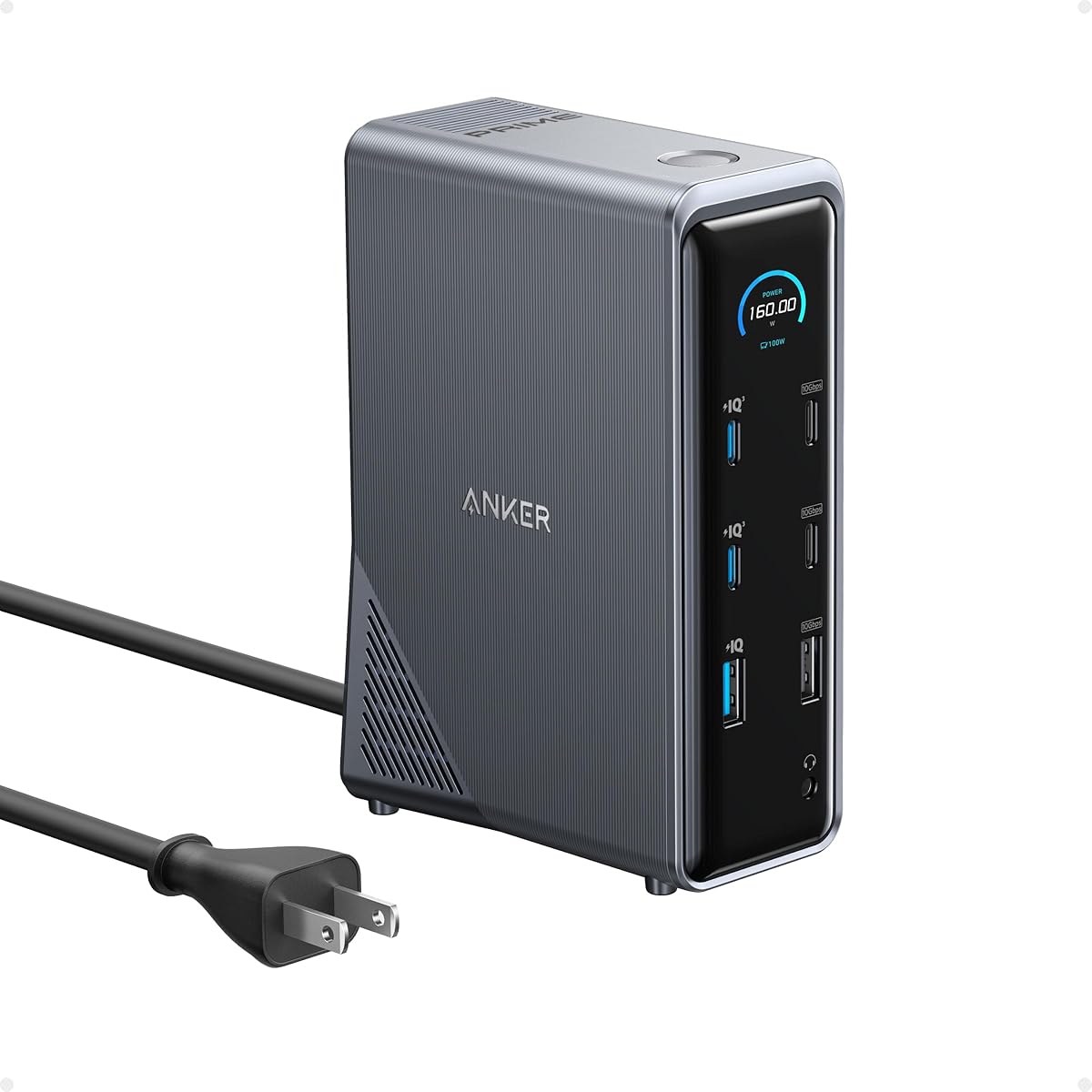
The Anker Prime Docking Station stands out with a massive 160W total power output allowing simultaneous charging of up to four devices. This makes it perfect for users with multiple laptops, tablets, or phones needing power.
We may earn a commission when you buy through this link, at no additional cost to you.
With 14 ports including dual HDMI for dual monitors, it offers extensive connectivity. Data transfers benefit from 10Gbps USB ports which are ideal for moving large video or design files quickly across storage drives.
While it lacks a dedicated DisplayPort output this model the dual HDMI support still handles 2K 60Hz well on most setups. The premium build quality justifies the cost for professionals needing reliable power and speed.
If you need maximum power delivery and data speeds alongside display support this dock is a top premium choice. It ensures your workspace remains powered and organized without juggling multiple adapters or chargers.
Offers 160W total output capable of charging up to four devices at once for power-intensive setups.
Includes USB ports supporting speeds up to 10Gbps for rapid file transfers and peripheral connectivity.
We may earn a commission when you buy through this link, at no additional cost to you.
This Anker hub delivers a balanced expansion solution with 4K HDMI and DisplayPort outputs alongside fast data transfer options. It is particularly useful for users who need network connectivity and card reading capabilities.
We may earn a commission when you buy through this link, at no additional cost to you.
The 85W pass-through charging keeps your laptop powered while you work. Ethernet connectivity ensures stable internet speeds which is beneficial for video calls or cloud-based applications that require consistent bandwidth.
While macOS support is present the display limitations mirror both external screens similarly. This is a standard constraint for many hubs but worth noting if you need extended desktop mode on a Mac.
For general office use and content creators needing card readers and network ports this hub offers great value. It handles daily tasks efficiently without unnecessary complexity or excessive cost.
Includes Gigabit Ethernet and SD card slots for reliable internet and media file access.
Supports up to 85W pass-through charging so your laptop stays powered during use.
We may earn a commission when you buy through this link, at no additional cost to you.
Plugable's docking station leverages DisplayLink technology to support dual 4K monitors making it ideal for productivity work. The six USB 3.0 ports allow connecting many peripherals without bandwidth bottlenecks.
We may earn a commission when you buy through this link, at no additional cost to you.
Gigabit Ethernet ensures stable network connections which is crucial for office environments. The unit works well with Windows and ChromeOS out of the box though macOS requires additional driver installation for video.
One limitation is the lack of host computer charging meaning you still need a separate laptop adapter. However the connectivity options and dual high-res support make up for this for stationary desk setups.
This dock is perfect for office workers needing multiple high-resolution screens without investing in expensive proprietary hardware. Its broad compatibility and USB options provide a solid foundation for a multitasking workspace.
Uses DisplayLink to enable dual 4K monitors via USB for expanded screen real estate.
Includes six USB 3.0 ports to connect multiple peripherals like drives, printers, and webcams.
We may earn a commission when you buy through this link, at no additional cost to you.
The Acer docking station offers a rare triple display configuration via two HDMI and one DisplayPort output. This setup is excellent for multitaskers who need code charts and research visible at once.
We may earn a commission when you buy through this link, at no additional cost to you.
Included is a 110W power adapter which delivers 100W to your laptop ensuring stable performance under load. The aluminum body helps dissipate heat maintaining consistent operation during long work sessions.
Physical security is enhanced with an integrated slot for cable locks adding protection for public or shared spaces. Compatibility spans Windows laptops with MST support though macOS users face mirror restrictions.
For power users needing extensive screen real estate this dock provides unique value. It balances connectivity and power delivery to support heavy workloads without additional adapters.
Supports up to three external displays using MST technology for enhanced multitasking.
Comes with a 110W adapter delivering 100W to laptop for reliable power under heavy workloads.
We may earn a commission when you buy through this link, at no additional cost to you.
Anker's Nano dock features a detachable 6-in-1 hub allowing you to separate it for travel while keeping the main unit at your desk. This dual-use design maximizes value for mobile professionals.
We may earn a commission when you buy through this link, at no additional cost to you.
Video output includes two HDMI and one DisplayPort supporting triple displays up to 4K on compatible systems. The 100W power delivery ensures your laptop stays charged while peripherals are connected.
Data transfers benefit from 10Gbps USB-C ports which handle large files efficiently. The included 140W adapter ensures stable performance even when multiple devices draw power simultaneously.
Ideal for travelers who want a full desktop setup when home this dock offers flexibility. It balances portability with high-performance features to support demanding workflows anywhere.
Features a detachable hub portion for portable use without carrying the entire dock.
Includes 10Gbps USB-C data ports for fast file transfers between laptop and storage.
We may earn a commission when you buy through this link, at no additional cost to you.
WAVLINK's docking station uses DisplayLink to enable dual 4K 60Hz monitors even on systems with limited graphics outputs. This makes it a strong option for Mac users who want extended displays.
We may earn a commission when you buy through this link, at no additional cost to you.
It supports flexible combinations of HDMI and DisplayPort allowing you to mix monitor types. The six USB 3.0 ports provide ample connections for peripherals like webcams and external drives.
Note that DisplayLink drivers must be installed for video output which may add setup time. However once configured the system supports both Windows and macOS effectively for productivity.
For home offices needing reliable dual 4K setups this dock offers stability and compatibility. Just ensure your workflow does not require gaming or high-frame-rate video editing.
Compatible with macOS and Apple Silicon M1-M5 Neo devices for expanded display capabilities.
Supports laptops with USB-A, USB-C, and Thunderbolt ports for broad hardware compatibility.
We may earn a commission when you buy through this link, at no additional cost to you.
Plugable's USB-C dock is noted for enabling dual 4K 60Hz displays on M1-M5 Macs that typically support only one external screen. This bypasses Apple's hardware limits for professional workstations.
We may earn a commission when you buy through this link, at no additional cost to you.
The premium aluminum housing matches MacBook aesthetics while offering a 100W charging port. Card readers and SD slots add convenience for photographers and designers needing quick file access.
As with other DisplayLink docks drivers must be installed for video to work. However lifetime support from the North American team adds confidence for business deployments.
Best for Mac users needing dual high-resolution screens this dock provides a practical solution. It ensures productivity workflows remain efficient without compromising on display quality.
Enables two 4K monitors on Apple Silicon Macs using DisplayLink technology.
Features an aluminum housing and lifetime support for durability and reliability.
We may earn a commission when you buy through this link, at no additional cost to you.
This Selore dock allows up to four monitor connections via dual DisplayPort HDMI and VGA outputs. It is an affordable option for users needing extensive screen space without spending heavily.
We may earn a commission when you buy through this link, at no additional cost to you.
The 100W Power Delivery port ensures your laptop remains charged during use. Data ports include USB-C and USB-A for connecting keyboards mice and other essentials seamlessly.
Note that while Windows supports extending across all four displays macOS users are limited to mirror or single extend modes. This is a common OS-level restriction rather than a hardware flaw.
For budget-conscious professionals needing four-screen capability this hub offers practical utility. It ensures your desk remains organized while supporting complex multitasking setups.
Supports up to four displays using a mix of DP HDMI and VGA ports.
Delivers up to 100W charging power to your laptop via the USB-C port.
We may earn a commission when you buy through this link, at no additional cost to you.
Selecting the right docking station requires evaluating video capabilities, power needs, and overall connectivity to match your hardware and workflow.
Verify the dock supports your desired number and resolution of monitors. DisplayPort HDMI and VGA outputs vary between models with some offering 4K 60Hz and others limited to 1080p. Check if the dock supports extended modes on your operating system since macOS often limits multi-monitor setups compared to Windows.
Prioritize docks that match your monitor resolutions and refresh rates for smooth performance.
Look for USB-C Power Delivery ratings that meet or exceed your laptop's power requirements. Many docks provide 65W to 100W allowing you to replace your original charger. Some premium units offer over 100W total output enabling simultaneous charging of multiple devices including phones and tablets.
Ensure the dock supports pass-through charging so your laptop stays powered while connected.
USB port speeds impact file transfers and peripheral responsiveness. Models offering 10Gbps USB-C or USB-A ports handle large files faster than 480Mbps USB 2.0 ports. High data speeds are crucial for external drives and professional workflows.
Choose docks with high-speed USB ports if you frequently transfer large data.
Confirm the dock works with your OS since some require drivers for video output. DisplayLink docks work across Windows macOS and ChromeOS but need driver installation. Linux support may be limited so check documentation carefully for your specific system.
Select docks explicitly listing support for your operating system to avoid driver issues.
Aluminum or metal housings dissipate heat better than plastic which helps maintain performance during long use. Consider cable routing and form factor to ensure it fits your desk comfortably. Ambidextrous cables provide flexibility for left or right laptop placement.
Opt for durable materials and ergonomic designs to extend the dock's lifespan.
Evaluate extra connectivity like Ethernet SD card readers and audio jacks based on your needs. Ethernet ensures stable internet connections while card readers simplify media workflows. Some docks include security slots for physical protection in shared workspaces.
Choose models with ports that match your peripheral ecosystem to reduce extra adapters.
Check the warranty period and customer support availability. Many brands offer 18-month to lifetime support which adds value for professional use. Reliable support can resolve compatibility or driver issues quickly.
Prioritize brands with strong support records to ensure long-term reliability.
Balance price against features to ensure you pay only for what you need. Budget docks often lack high-speed ports or advanced video support while premium models offer more robust charging and data features. Assess if you need extra ports like SD readers or Ethernet.
Select a dock that fits your budget while meeting critical performance requirements.
Connect the docking station to your laptop using the appropriate USB-C or USB-A cable first. Then plug monitors and peripherals into the DisplayPort HDMI USB and Ethernet ports as needed.
For DisplayLink docks install any required drivers before connecting video devices. This ensures your monitors are recognized properly by the operating system for extended desktop mode.
Keep the dock in a well-ventilated area to prevent overheating. Avoid covering vents and unplug devices when not in use to extend the hardware lifespan.
Yes many docking stations support three or four monitors via MST or DisplayLink technology. Ensure your laptop supports the required video protocols and that you use compatible cables for each display.
Most modern docks with USB-C Power Delivery do charge your laptop while providing video output. Check that the wattage meets your laptop's charging requirements to avoid slow or insufficient power.
Compatibility depends on the specific model. Many docks work with both OSes but macOS may be limited to mirror mode or require drivers for multi-monitor setups. Review product details for your system.
Some docks work plug-and-play while others using DisplayLink require driver installation. Windows users often benefit from automatic drivers while macOS and ChromeOS may need manual setup for full functionality.
Yes most docks allow mixed connections like one DisplayPort and one HDMI simultaneously. This provides flexibility for using different monitor types or resolutions within the same workspace.
Check that all cables are securely connected and restart your laptop after plugging in the dock. Update drivers and firmware if needed and verify your operating system supports the display resolution you want.
Most docking stations are designed for productivity not gaming and may introduce input lag. For gaming prioritize direct GPU connections or specialized docks that support high refresh rates without DisplayLink processing.
You typically need HDMI or DisplayPort cables to connect your monitors. A USB-C cable for data and power plus a separate charger if your dock does not provide pass-through charging may also be required.
Our top picks like the Dell Pro WD25 and Anker Prime offer robust features for professionals needing reliable power and display options. Budget-conscious users will appreciate models from MOKiN and Selore that deliver solid performance at lower costs.
Prioritize docks that match your laptop's power needs and display count to avoid bottlenecks. Compatibility with your operating system and sufficient data speeds are critical to ensure smooth daily workflows.
Always verify current availability and specifications before purchasing since features may vary by region and model. Investing in the right docking station will streamline your workspace and enhance productivity for years.