
Yamaha MGX12
5.0Editor score
Versatile I/O
USB-C Interface
Built-in DSP
This guide compares the top ten digital mixing consoles for live sound and studio recording, analyzing features, audio quality, and workflow capabilities to
Digital mixing consoles have revolutionized how audio engineers manage sound for live events and studio recordings. These advanced devices offer unprecedented control over audio signals, allowing for precise adjustments and complex routing options that were once only possible in large broadcast facilities.
We have carefully evaluated ten leading models based on their input capabilities, sound quality, ease of use, and overall value. Our analysis focuses on real-world performance metrics and user feedback to ensure you receive reliable information for your purchasing decision.
Each selection highlights specific strengths that cater to different needs ranging from portable setups to large-scale productions. Please note that product availability and specifications may vary over time so always verify current details before finalizing your purchase.
5.0Editor score

4.7Editor score

4.2Editor score
The following table provides a side-by-side comparison of all ten models featured in this guide to help you quickly identify which console best fits your specific audio production requirements and budget constraints.



The Behringer X32 stands out as a powerhouse for both live and studio applications with its robust 40 input channel capacity and 25 bus system. Its high rating reflects the industry standard it has set for digital mixing over the past decade.
We may earn a commission when you buy through this link, at no additional cost to you.
At the heart of this console are 32 MIDAS-designed mic preamps that deliver audiophile sound quality. The fully automated motorized 100 mm faders provide instant overview and powerful scene management capabilities that streamline workflow significantly.
While the unit offers immense flexibility it does require time to master all features. The complexity is inherent in such a powerful tool but the payoff in control is substantial for professional environments.
If you need a versatile console that scales with your production needs the X32 remains a top recommendation. It balances performance and value better than most competitors in its class today.
The MIDAS-designed preamps ensure clean gain and low noise across all channels.
Motorized faders allow for instant recall and real time adjustments during mixes.
We may earn a commission when you buy through this link, at no additional cost to you.
The Yamaha DM3 offers renowned sound quality in an ultracompact form factor ideal for smaller venues or mobile setups. Its 22 channel configuration provides ample flexibility without overwhelming the user with excessive complexity.
We may earn a commission when you buy through this link, at no additional cost to you.
Featuring a best in class 9 inch touch screen the DM3 simplifies navigation and adjustment tasks. The 16 professional Yamaha Pre-Amps ensure high fidelity signal capture right from the source.
The limited number of inputs may restrict growth for larger productions but for focused projects it is sufficient. The USB audio interface adds significant value for direct recording and playback workflows.
Choose this console if portability and ease of use are your primary concerns. It delivers professional results in a package that fits easily into tight spaces.
The large display makes navigating channels and effects quick and efficient.
High quality preamps maintain signal integrity across all input sources.
We may earn a commission when you buy through this link, at no additional cost to you.
The Behringer WING represents the pinnacle of digital mixing technology with 48 channels and a 28 bus system. It is designed for large scale productions that demand extensive connectivity and precise control.
We may earn a commission when you buy through this link, at no additional cost to you.
Its plug and play remote I/O connectivity supports up to 144 input and output signals via AES50 ports. This flexibility allows for distributed audio processing that keeps the console surface manageable.
The investment required is significant and the system demands dedicated time to configure correctly. However for major events the reliability and scalability justify the cost for serious professionals.
This console is best suited for touring crews and large installers. If you need maximum routing flexibility the WING is a future proof solution.
Super MAC tech ensures ultra low jitter and latency across long cable runs.
Configurable sections allow you to adapt the surface to your workflow.
We may earn a commission when you buy through this link, at no additional cost to you.
The Yamaha MGX12 delivers exceptional value with its versatile I/O and built-in DSP processor for professional sound. Its 5 star rating highlights user satisfaction with its tactile faders and intuitive controls.
We may earn a commission when you buy through this link, at no additional cost to you.
New MGX preamps offer an impressive 86 dB gain range ensuring clean amplification for various microphone types. The USB-HDMI interface allows for direct video capture making it ideal for content creators.
While it lacks the depth of larger consoles it provides all essential features for small to mid-level mixes. The included software bundle adds extra value for recording and streaming applications.
This unit is perfect for home studios or small venue sound engineers. It balances performance and cost effectively for those starting their audio journey.
4K video capture and pass-through streamline live streaming workflows.
Wide gain range accommodates dynamic microphones without distortion.
We may earn a commission when you buy through this link, at no additional cost to you.
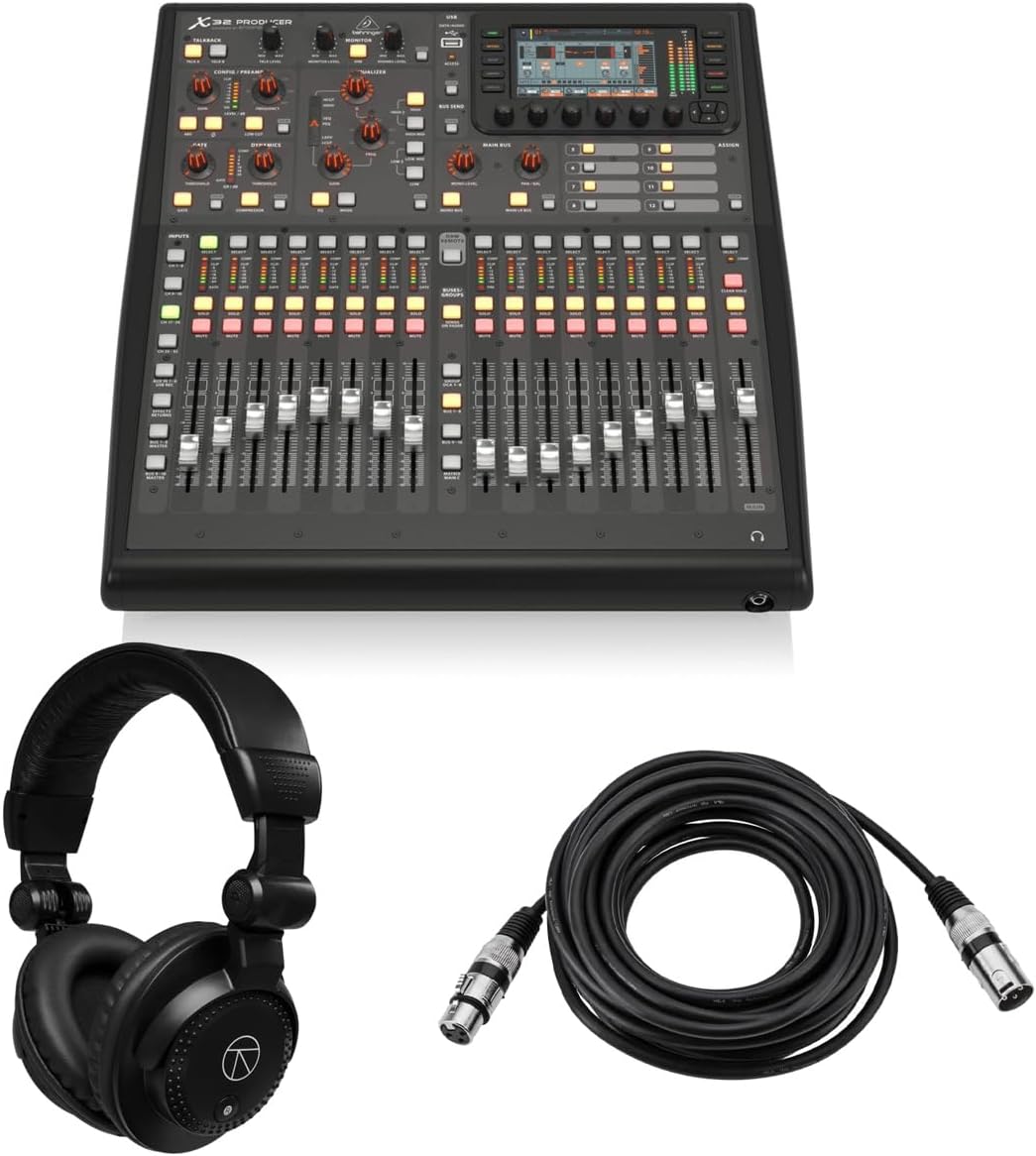
The Behringer X32 Producer brings the power of the X32 into a rack-mountable format ideal for space-constrained environments. It maintains the core audio processing capabilities including 16 programmable MIDAS Preamps.
We may earn a commission when you buy through this link, at no additional cost to you.
With 40 input channels and 25 buses it handles complex setups effortlessly. The included headphones and cable add value making it ready for immediate deployment in studio or live settings.
The lack of motorized faders is a trade-off for the smaller footprint. For applications where remote control or screen monitoring is used this limitation is negligible.
Choose this model if you need powerful sound in a compact package. It is an excellent solution for control rooms or mobile racks.
Saves significant floor space while retaining full digital processing power.
Accessories included allow for immediate setup without additional purchases.
We may earn a commission when you buy through this link, at no additional cost to you.
The Behringer X32 Compact offers a full 40 input channel digital mixing experience in a reduced physical footprint. It retains the high audio quality and scene management features of the larger model.
We may earn a commission when you buy through this link, at no additional cost to you.
17 fully automated motorized faders provide instant overview and powerful scene management. The LCD Scribble Strips on all channels and buses create easy assignment and intuitive channel distinction.
The compact design reduces physical controls which can make quick adjustments harder during live events. However for fixed installations or rehearsals it is highly efficient.
This model bridges the gap between size and functionality effectively. It is ideal for those who need the X32 power in a smaller space.
Retains full processing capabilities without sacrificing output flexibility.
Motorized faders offer precise control despite the smaller console size.
We may earn a commission when you buy through this link, at no additional cost to you.
The PreSonus StudioLive Classic 16.0.2 is a reliable workhorse for studio recording and live sound. Its Fat Channel signal processing on all channels and buses provides precise tone shaping.
We may earn a commission when you buy through this link, at no additional cost to you.
12 Class A XMAX solid-state mic preamplifiers deliver high quality audio capture. The 18-in/16-out USB audio interface records all channels allowing for flexible post production workflows.
While it lacks modern touch interfaces its tactile controls remain preferred by many engineers. The software library including Studio One Artist adds significant value for recording tasks.
This console is great for those prioritizing hardware EQ and DAW control. It remains a solid choice for traditional recording environments.
Comprehensive processing on every channel ensures consistent tone across mixes.
Included recording software simplifies setup for new studio owners.
We may earn a commission when you buy through this link, at no additional cost to you.
The Behringer X AIR XR18 allows for iPad and Android tablet controlled mixing making it ideal for front of house or remote setups. It features 16 award-winning MIDAS-designed mic preamps for audiophile sound quality.
We may earn a commission when you buy through this link, at no additional cost to you.
Its built-in Tri-mode Wi-Fi router enables direct operation without needing external routers. The 18 x 18 channel bidirectional USB interface supports direct recording on tablets or computers.
Dependence on mobile devices can be risky if connectivity fails during critical moments. However the convenience of wireless mixing is a major benefit for flexible productions.
This mixer is perfect for churches and small bands using mobile devices. It offers professional sound in a highly portable form.
Control the mix from anywhere in the venue using your device.
Capture multi-track sessions directly through the USB interface.
We may earn a commission when you buy through this link, at no additional cost to you.
The Allen & Heath Qu-5 delivers exceptional audio quality with 96kHz XCVI FPGA Processing. This technology provides ultra-low latency and the performance needed for professional live sound and installed applications.
We may earn a commission when you buy through this link, at no additional cost to you.
Its flexible mixing architecture supports up to 38 inputs and 12 configurable mixes. The extensive connectivity includes AES3 digital output and USB-C multichannel audio interface.
While the audio quality is superior the cost and complexity require expert operation. The SLink expansion port allows for future growth with additional I/O options.
This console is a premium choice for critical listening environments. It ensures the highest fidelity for professional productions.
High-speed processing ensures clean audio with minimal delay during mixes.
Expandable inputs allow the console to grow with venue requirements.
We may earn a commission when you buy through this link, at no additional cost to you.
The QSC TouchMix-16 is designed for simplicity with 20 full function inputs including mic and stereo line options. Its intuitive interface allows users to achieve professional results quickly without deep technical knowledge.
We may earn a commission when you buy through this link, at no additional cost to you.
It features 4-band full parametric EQ and gate and compressor on all input channels for precise control. The TRS Aux outs drive wired In Ear Monitors directly making it useful for performers.
The included bag makes it highly portable for mobile engineers. However advanced routing capabilities are limited compared to larger digital mixers.
This console is ideal for volunteers or engineers needing quick setup. It offers reliability and ease of use in a compact package.
Directly drive in ear monitors without extra hardware or converters.
Intuitive layout reduces setup time for temporary sound checks.
We may earn a commission when you buy through this link, at no additional cost to you.
Selecting the right console involves evaluating input capacity audio quality and connectivity options to ensure it meets your production needs.
Input capacity determines how many microphones and line sources you can connect simultaneously. Larger productions like theater or concerts require at least 32 inputs to cover vocalists and instruments effectively.
Assess your typical setup size to choose a model that allows room for expansion without unnecessary overhead costs.
Sound quality depends on preamp design and converter quality. Look for consoles with reputable preamps such as MIDAS or Class A designs to ensure clean gain and low noise.
High sample rates like 96kHz offer better fidelity for recording but are less critical for standard live PA applications.
Routing flexibility is essential for complex mixes. A high number of buses allows multiple submixes for in-ear monitors or recording feeds without affecting the main output.
Ensure the console supports the required number of mix buses for your specific production demands.
Connectivity options like USB audio interfaces allow direct recording and playback. AES50 or SLink ports support remote I/O for distributed systems in large venues.
Check for HDMI or Ethernet options if video streaming or network control is part of your workflow.
Touchscreens and motorized faders improve workflow efficiency. Tactile controls are preferred for live mixing while touch interfaces excel in setup and recall tasks.
Choose an interface that matches your comfort level and operational style to reduce setup time.
Physical size and weight impact transport logistics. Compact models are better for mobile crews while rack mountable units save space in fixed installations.
Consider the environment where the console will live frequently to balance performance with portability.
Manufacturer software updates add features and fix bugs. Models with strong community support ensure long term viability and compatibility with modern DAWs.
Look for open standards like Dante to future proof your setup against proprietary changes.
Prices vary widely from entry level to professional high-end consoles. Determine your maximum budget early to avoid overspending on features you will not use.
Balance cost with necessary features to get the best return on investment for your workflow.
Start by connecting all audio sources to the inputs and setting initial gain levels to avoid clipping. Use the built-in EQ and compressors to shape the sound before it reaches the main bus.
Regularly update the firmware to access new features and stability fixes. Backup your scenes and presets to external storage to prevent data loss during power outages.
Store the console in a dry cool environment to protect internal components. Clean the faders and screens with appropriate tools to maintain tactile feel and visibility.
Digital mixing consoles use software to process audio signals allowing for more complex routing and recall capabilities. Analog consoles rely on physical circuitry and offer a direct tactile feel but lack digital automation features.
Most modern digital consoles include built-in USB audio interfaces that allow direct connection to computers. However high track counts may require an external interface if the console USB ports are limited.
Yes many models offer simplified modes to assist new users. Features like auto gain and preset libraries make the learning curve manageable for those starting out in audio production.
Digital consoles usually have dedicated aux sends or matrix outputs for IEM feeds. You can route specific mixes to these outputs and connect to wireless transmitters or direct wired drivers.
Motorized faders automatically move to reflect saved scenes allowing quick recalls of mix positions. They provide visual feedback on channel levels which speeds up troubleshooting during live shows.
Many consoles support wireless control via tablets using dedicated apps. This allows for remote mixing without standing near the console which is ideal for front of house engineers.
The Behringer X32 leads our list with its balance of power and versatility making it a top choice for diverse audio needs. It offers extensive routing and quality preamps that satisfy professional standards.
For those seeking value the Yamaha MGX12 provides modern features like USB-C connectivity at an accessible price point. It is ideal for smaller setups needing reliable performance.
Always check the latest specifications and pricing before purchasing as features may evolve. Choosing a console that aligns with your long-term goals ensures satisfaction and growth in your audio work.