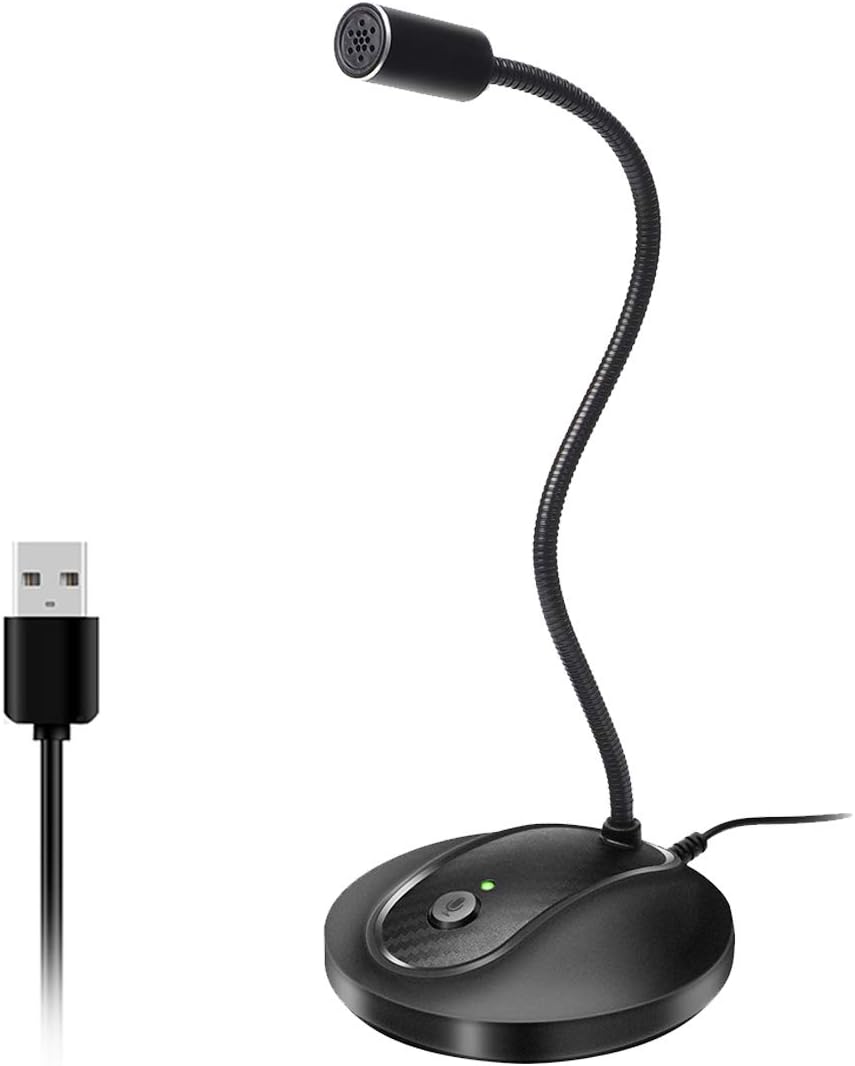
USB Microphone, 360 Degree Adjustable Gooseneck Design
4.4Editor score
360 degree adjustable gooseneck
Built-in mute button and LED
Intelligent noise canceling technology
Discover the top rated dictation microphone for computer options reviewed for quality and performance to help you choose the right model for your workflow.
Finding the right dictation microphone for computer can transform how you work and create content. High quality audio ensures your voice is captured clearly without unwanted background noise interfering with your productivity.
We compared ten real products based on their build quality sound performance and ease of use. Our list covers everything from budget friendly gooseneck mics to professional desktop units designed for heavy duty transcription tasks.
Each pick shows key features and ideal use cases so you can decide quickly. Please note that availability and stock levels change often so check current listings before making your final purchase decision today.
4.4Editor score

4.6Editor score

4.2Editor score
This side by side comparison highlights the core specifications and unique features of each model. We focus on audio quality connectivity options and design ergonomics to help you visualize the differences between these top ranked options.




This USB microphone offers a practical solution for users needing reliable audio capture. With a 4.4 rating it stands out for its solid construction and ease of setup. The gooseneck design allows you to position the mic exactly where you need it without cluttering your desk.
We may earn a commission when you buy through this link, at no additional cost to you.
Its intelligent noise canceling technology helps filter out background distractions like keyboard clicks or fan hum. This ensures that your voice remains the primary focus during recordings or calls. The omnidirectional pickup pattern captures sound from all directions which is useful for varying seating positions.
While the six foot cable is functional it may limit placement options in larger offices. Additionally the lack of compatibility with gaming consoles like Xbox means it is strictly a PC focused tool. These limitations are acceptable given the affordable price point and core functionality.
Buyers seeking a straightforward and affordable microphone for dictation will find this model ideal. It works seamlessly with common voice recognition software and conference tools. For daily tasks that require clear vocal input this unit delivers consistent results.
The 360 degree adjustable gooseneck lets you move the mic head to your preferred speaking angle quickly.
Built-in noise canceling tech reduces background echo so your recordings sound cleaner and more professional.
We may earn a commission when you buy through this link, at no additional cost to you.
The Philips LFH3500 is a premium option designed for professionals who prioritize accuracy. Its free-floating decoupled microphone reduces vibration noise ensuring precise recordings every time. The built-in motion sensor adds a layer of convenience by allowing device control through simple gestures.
We may earn a commission when you buy through this link, at no additional cost to you.
You can freely configure function keys to match your personal workflow needs which speeds up dictation tasks significantly. The microphone grille structure is optimized to deliver crystal clear sound that enhances speech recognition accuracy. This model is built to withstand heavy use in office environments.
The cost is significantly higher than basic alternatives which might be a barrier for casual users. Setup often requires specific drivers to unlock the full potential of the gesture controls and keys. However for those needing maximum precision this investment pays off in time saved.
Choose this if you need a robust tool for daily professional dictation. It integrates well with specialized software and offers features that standard microphones lack. The ergonomic design also reduces hand fatigue during long sessions.
The motion sensor allows you to navigate and control your computer without touching the mouse or keyboard.
Freely configurable function keys let you map commands to specific buttons for faster document handling.
We may earn a commission when you buy through this link, at no additional cost to you.
This FIFINE microphone brings portability and performance to a small footprint. It is designed to be easy to take anywhere while maintaining solid audio quality. The adjustable gooseneck ensures you can direct the sound capture precisely toward your mouth.
We may earn a commission when you buy through this link, at no additional cost to you.
Its sturdy metal base keeps the unit stable on any desk surface even when adjusted. The included windscreen helps reduce plosive sounds and background noise for cleaner recordings. It works with a wide range of applications from voice training to casual streaming.
The lack of a physical mute button means you must rely on software controls which can be less convenient. The cable length is sufficient for most desktop setups but might restrict larger workspaces. These factors are minor considerations given the overall value.
Ideal for students or travelers who need a reliable mic on the go. It offers a balance of build quality and sound performance. For anyone starting with voice dictation this is a safe and practical choice.
The tiny profile takes up minimal desk space and fits easily in a laptop bag for travel.
A dedicated windscreen is included in the box to immediately improve sound clarity and reduce noise.
We may earn a commission when you buy through this link, at no additional cost to you.
The Blue Yeti is a industry standard microphone known for its versatile performance. With a custom three capsule array it produces powerful broadcast quality sound suitable for various tasks. Its popularity stems from the ability to adapt to different recording scenarios seamlessly.
We may earn a commission when you buy through this link, at no additional cost to you.
The Blue VO!CE software elevates your recordings with advanced modulation and HD audio samples. You can choose from four pickup patterns to suit your specific environment or audience needs. Onboard controls for gain and mute give you immediate physical access to essential settings.
The size requires a dedicated spot on your desk which might be an issue for tight spaces. The price is higher than basic options but the feature set justifies the cost for serious users. It offers a level of control typically found in studio setups.
Choose this if you want a long term solution for high quality audio needs. It works well for both dictation and creative projects like podcasts or streaming. The build quality ensures it remains reliable for years of daily use.
Blue VO!CE software allows for deep customization of your voice effects and audio quality directly in software.
Switch between cardioid omni bidirectional and stereo patterns to optimize sound capture for different uses.
We may earn a commission when you buy through this link, at no additional cost to you.
This TONOR microphone excels in environments where multiple voices need to be captured. Its omnidirectional pickup pattern allows sound to be heard from any direction clearly. It is perfect for users who engage in frequent small or medium group video chats.
We may earn a commission when you buy through this link, at no additional cost to you.
The convenience of plug and play installation means you can start using it immediately without complex settings. A built-in mute button provides quick control over audio privacy during active conversations. The metal base ensures stability even when the unit is placed near the edge of a desk.
While excellent for meetings it may not isolate a single speaker as well as directional microphones. The lack of specific noise cancellation features means background noise might be picked up in loud rooms. This trade-off is acceptable for collaborative communication needs.
Select this for a reliable conference tool that doubles for standard dictation. It keeps the setup simple and ensures everyone can hear clearly. For shared office environments this model delivers consistent performance.
The design prioritizes capturing sound from a wider area so all participants in a meeting can be heard.
A dedicated physical mute button lets you silence your mic instantly with one press for privacy.
We may earn a commission when you buy through this link, at no additional cost to you.
The ZealSound K66 offers a comprehensive set of features for audio capture. Its intelligent noise reduction mode helps filter out common distractions like keyboard clicks or fan hum automatically. This ensures your vocal track remains focused and clear during recording sessions.
We may earn a commission when you buy through this link, at no additional cost to you.
Real-time zero latency monitoring lets you hear your voice exactly as it is being recorded. The adjustable echo control adds depth or removes it to suit your specific environment needs. Physical knobs for gain and monitoring give you hands-on control without needing software.
The number of settings might be overwhelming for users who just want simple plug and play. Understanding the echo adjustment requires some trial and error to get the sound just right. However these controls provide a level of customization that few competitors offer.
Choose this if you want detailed control over your audio output. It supports both desktop and mobile devices making it a versatile pick for creators. The combination of features makes it a strong contender for mixed use cases.
Hold the mute button to activate intelligent noise reduction that targets keyboard clicks and background hum.
Use the dedicated knob to add depth to your voice or remove it for a cleaner natural sound.
We may earn a commission when you buy through this link, at no additional cost to you.
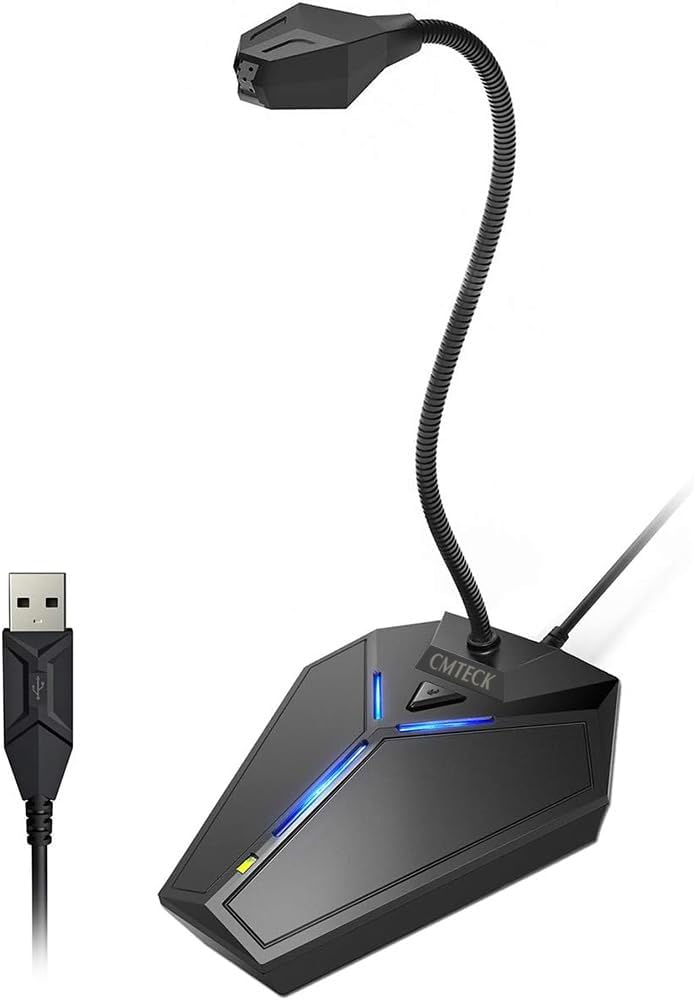
This CMTECK microphone uses a high-performance SMART CHIP to suppress background noise effectively. The flexible metal gooseneck tube allows you to position the mic head precisely for optimal sound capture. It is designed to deliver studio quality audio even in casual home office settings.
We may earn a commission when you buy through this link, at no additional cost to you.
A built-in mute button provides a quick way to control audio transmission during calls. The unique blue LED light adds a visual cue that indicates the mic is active or muted. This visual feedback helps prevent accidental voice leakage during important meetings.
The LED light may be distracting for some users who prefer a minimal setup. Compatibility is broad with Windows and macOS but it excludes specific gaming hardware like Xbox. These are minor drawbacks given the solid performance and price.
Ideal for users needing a reliable mic for both work and gaming. The SMART CHIP ensures clear audio quality that stands out in crowded audio environments. For general desktop use this model offers excellent value.
The built-in SMART CHIP actively suppresses background noise to ensure your voice comes through clearly.
A clear LED indicator lights up to show your connection status and mute state at a glance.
We may earn a commission when you buy through this link, at no additional cost to you.
The PowerMic III is built specifically for professionals using Dragon speech recognition software. Its ergonomic thumb control lets you manage dictation functions without leaving your keyboard. This design significantly boosts productivity by reducing the need to switch between devices constantly.
We may earn a commission when you buy through this link, at no additional cost to you.
You can control standard mouse functions and voice commands simultaneously which streamlines document editing. The advanced noise cancellation ensures higher accuracy even in noisy environments. This makes it a vital tool for legal or medical professionals who rely on precise transcripts.
The high price point limits it to specialized workflows rather than general use. It requires specific software to function fully so it is not a standalone audio capture device. However for dedicated users the time saved justifies the investment quickly.
Choose this if you rely on Dragon for daily work and need speed. The integrated mouse capabilities change how you interact with your computer entirely. For high volume dictation tasks this is the gold standard tool.
The power mic allows users to easily control standard dictation functions with PC mouse actions for higher speed.
Designed with thumb controls to avoid constant switching from microphone to mouse to keyboard during work.
We may earn a commission when you buy through this link, at no additional cost to you.
This Philips model delivers accurate speech recognition results with its dedicated technology. The push button operation allows for quick control over your dictation tasks. It is designed to integrate seamlessly with Dragon Naturally Speaking software for efficient workflows.
We may earn a commission when you buy through this link, at no additional cost to you.
Its noise canceling technology ensures that your voice is isolated from background noise effectively. The advanced speaker design provides crystal clear playback so you can review your transcripts easily. Energy Star compliance means it uses less power than standard office equipment.
The price is high for a hardware tool unless you have a specific need for speech recognition. It does not offer general audio recording features like a standard studio mic. For professional documentation tasks however it is highly optimized.
Select this for dedicated professional documentation where accuracy is paramount. The push buttons speed up the process of controlling software with simple physical actions. It is a specialized tool for a specific type of professional user.
Designed for Dragon Naturally Speaking to ensure seamless integration and accurate transcription results.
Energy Star compliant design ensures lower power consumption during daily office use.
We may earn a commission when you buy through this link, at no additional cost to you.
The Olympus RecMic II is a wired USB microphone designed for controlled dictation environments. Its trackball allows for precise navigation without leaving your speaking position. The silent keys are designed to minimize contact noise that could interfere with recordings.
We may earn a commission when you buy through this link, at no additional cost to you.
With two microphone systems it can handle recording in noisy environments effectively. The push button assignments are preset for Dragon software allowing for quick command execution. The smooth UV coating gives it a durable finish that resists wear.
It lacks some of the advanced ergonomic features found in newer professional models. The trackball functionality can be tricky to master if you are used to a standard mouse. This limits its appeal to long time users of specific dictation software.
Choose this for a functional tool in a controlled office setting. It offers a practical way to combine navigation and audio capture. For legacy users needing a specific setup this unit provides necessary compatibility.
Silent keys and smooth UV coating minimize annoying contact noise during active recording sessions.
Dual microphone systems help you record effectively even in environments with higher background noise levels.
We may earn a commission when you buy through this link, at no additional cost to you.
Selecting the right microphone depends on your specific workflow and budget. Consider these core factors to find a model that fits your technical and functional needs.
Look for a microphone that captures your voice clearly without distortion. Directional patterns like cardioid are better for isolating your voice while omnidirectional patterns capture sound from all angles which is useful for meetings.
Prioritize models that explicitly mention high fidelity or studio-quality sound to ensure your transcripts are accurate.
Background noise can ruin a recording so built-in noise reduction is vital. Check if the mic filters out keyboard clicks fans or other office distractions effectively.
Choose a unit with dedicated noise canceling features to keep your voice isolated in busy environments.
Plug and play setups save time and avoid complex configuration. Most modern units work instantly but some specialized ones require specific software or drivers to function fully.
If you need quick setup prioritize models that explicitly state they require no driver installation for basic use.
A comfortable design reduces fatigue during long sessions. Look for adjustable necks or bases that allow you to position the mic precisely.
Choose a microphone that feels stable on your desk and fits your preferred posture for extended use.
Determine how much you are willing to spend on hardware. Entry level mics work well for casual use while professional models offer advanced controls and better audio.
Select a microphone that offers the essential features you need without paying for unnecessary extras.
Ensure the microphone works with your preferred operating system and software. Some units are optimized for specific tools like Dragon while others are general purpose.
Check the documentation to confirm full support for your chosen dictation or communication applications.
Mute buttons and volume knobs provide quick access to essential functions without relying on software menus. Physical controls are often faster and more reliable during active tasks.
Choose a model with clear and easy to access buttons for managing your audio state.
A solid construction ensures your investment lasts. Look for metal bases or sturdy materials that resist damage from regular handling.
Prioritize units with durable designs to avoid frequent replacements due to wear and tear.
Plug the microphone into an available USB port on your computer. Wait for the operating system to recognize the device and set it as the default input in your sound settings.
Position the mic close to your mouth but avoid touching it while speaking to prevent vibration noise. Adjust the angle to ensure your voice is directed straight at the pickup area.
Clean the microphone grille regularly with a soft dry cloth to remove dust. Keep the device away from liquids and store it in a safe place when not in use to maintain performance.
Most USB microphones work with any standard software without extra apps. Some specialized professional models may require specific drivers or tools to unlock advanced features.
Yes but professional units often have better noise cancellation and ergonomics designed for speech. Using a dedicated model can improve accuracy and speed significantly.
Position the mic about six to eight inches away to avoid distortion. Adjust based on volume settings to ensure clear capture without clipping.
Try moving the mic closer to your voice or reducing room volume. Enable any noise canceling features if your device supports them to filter unwanted sounds.
Wireless options exist but wired connections often provide better audio stability. For high precision tasks wired models are generally more reliable.
Use the physical mute button on the device if available. Alternatively you can mute through your computer settings or the software you are using.
We reviewed ten top options ranging from budget friendly to professional. Your choice depends on specific needs and budget constraints.
Prioritize audio quality and ease of use to streamline your workflow. A good mic saves time and ensures your voice is captured accurately.
Always check current availability and stock before purchasing. Tech products change frequently so verify details before finalizing your order.