
Crucial P310 1TB
4.7Editor score
Up to 7100MB/s read speed
Compatible with PS5 and laptops
Includes Acronis software
This guide compares the top ten Crucial Internal NVME SSD models for gaming, content creation, and general PC performance to help you choose the right storage
Finding the right internal storage is crucial for modern computing tasks. Crucial offers a wide range of NVME SSDs designed for speed, reliability, and compatibility across various devices and systems.
We evaluated ten top models based on performance metrics, capacity options, thermal management, and value. Our analysis focuses on real-world usability for gamers, creators, and everyday users seeking reliable upgrades.
Each pick highlights key strengths and trade-offs to guide your decision. Note that pricing and availability fluctuate regularly, so verify current details before purchasing to ensure you get the best deal available today.
4.7Editor score
4.8Editor score

4.6Editor score
This table provides a side by side look at all ten models we reviewed. Use it to quickly compare key specifications, speeds, and compatibility features across the entire Crucial lineup.


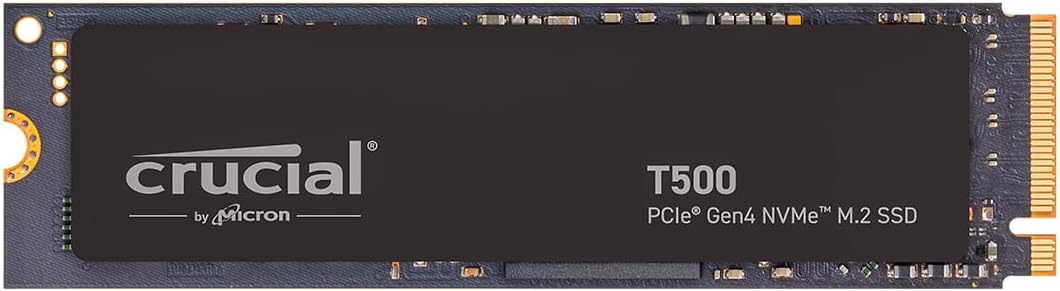
The Crucial T500 stands out as the top choice for users seeking top tier Gen4 performance without stepping into Gen5 territory. It earns a high rating due to its robust construction and consistent speeds.
We may earn a commission when you buy through this link, at no additional cost to you.
Its standout feature is the TLC NAND which ensures better endurance and sustained performance compared to QLC alternatives. The included Adobe Creative Cloud access adds significant value for creative professionals needing reliable storage for large assets.
While the price is higher than entry level options, the performance gains justify the cost for power users. The only trade off is the requirement for a PCIe Gen4 slot which older systems may lack.
Buy this if you need fast reliable storage for gaming or content creation on a Gen4 platform. It balances speed, capacity, and value better than most competitors in this segment.
Using TLC NAND ensures faster write speeds and longer lifespan compared to budget drives using QLC technology.
The included one month Adobe Creative Cloud subscription provides immediate value for designers and video editors starting new projects.
We may earn a commission when you buy through this link, at no additional cost to you.
The P310 offers an excellent balance of speed and price making it ideal for budget conscious upgrades. It delivers Gen4 speeds at a lower cost point than premium models.
We may earn a commission when you buy through this link, at no additional cost to you.
Its broad compatibility covers laptops desktops and handheld consoles like the ROG Ally. The inclusion of Acronis software helps users migrate data safely without buying extra tools.
While it may not match the T500 in endurance due to potential QLC NAND, it still performs well for general gaming and office tasks. The trade off is acceptable for those not doing heavy continuous writes.
Choose this drive for upgrading a laptop or budget PC where cost efficiency matters most. It provides modern speeds without the premium price tag.
This drive works seamlessly across a wide range of devices including modern handheld consoles and standard laptops.
Users benefit from included Acronis data recovery software which simplifies the process of cloning drives or recovering lost files.
We may earn a commission when you buy through this link, at no additional cost to you.
The T710 represents the pinnacle of Crucial storage technology with blistering Gen5 speeds. It is designed for enthusiasts who demand the absolute fastest data throughput available today.
We may earn a commission when you buy through this link, at no additional cost to you.
Security is enhanced with AES 256 bit hardware encryption protecting sensitive data without slowing down system performance. The 5 year warranty reflects confidence in its build quality.
However it requires a compatible Gen5 motherboard to reach these speeds otherwise it falls back to Gen4 performance. The high price is only justified if you need the maximum possible performance.
Invest in this if you are building a high end workstation or gaming rig with the latest hardware. It future proofs your storage investment against upcoming software demands.
AES 256 bit hardware encryption ensures your files remain secure from unauthorized access without impacting system speed.
With read speeds nearing 15000MB/s this drive prepares your system for next generation applications requiring massive bandwidth.
We may earn a commission when you buy through this link, at no additional cost to you.
This 2TB variant offers massive storage for users with large libraries of games and media. It maintains the same speed class as the 1TB model while doubling capacity.
We may earn a commission when you buy through this link, at no additional cost to you.
The 3D NAND ensures good reliability for everyday storage needs. It is a practical choice for those who run out of space on smaller drives.
Lacks the software bundles found in other models but compensates with sheer space. The trade off is acceptable for users prioritizing capacity over extra features.
Perfect for media hoarders or gamers with extensive back catalogs. It provides ample room to install everything without constant file management.
Two terabytes of space allows for extensive game installations and media libraries without needing external drives.
Buying the 2TB model often results in a lower cost per gigabyte compared to smaller capacity options.
We may earn a commission when you buy through this link, at no additional cost to you.
The P510 brings Gen5 performance into the affordable market. It offers a balanced entry point for users wanting next gen speeds without the highest price.
We may earn a commission when you buy through this link, at no additional cost to you.
Features TLC NAND and a bundled Adobe subscription making it attractive for creatives who want more speed than Gen4 offers. The thermal design ensures it stays cool under load.
It is slower than the top tier T710 but costs less. The trade off is ideal for those who want Gen5 benefits without overspending on marginal gains.
Select this for a balanced upgrade path where future proofing meets budget considerations. It is a smart buy for mid range enthusiasts.
This drive brings next generation speeds to a wider audience through a competitive price point.
Advanced thermal management keeps performance stable even during long sessions of heavy data usage.
We may earn a commission when you buy through this link, at no additional cost to you.
The E100 is an entry level option for basic system upgrades. It is significantly faster than SATA SSDs and affordable for budget builds.
We may earn a commission when you buy through this link, at no additional cost to you.
Its small size fits easily into slim laptops. While slower than other Gen4 drives it still boosts system responsiveness compared to older HDDs.
Capacity is limited at 480GB making it suitable for OS and key apps. The trade off is acceptable for secondary drive usage or simple upgrades.
Use this for upgrading an old laptop or building a budget home PC. It delivers reliable performance at the lowest cost.
Even at 4700MB/s this drive offers a massive improvement over traditional SATA storage options.
The slim M.2 form factor ensures it fits into laptops with limited internal space.
We may earn a commission when you buy through this link, at no additional cost to you.
This specific P310 variant uses 232L QLC NAND which offers high density storage. It is designed for read heavy workloads like gaming and media access.
We may earn a commission when you buy through this link, at no additional cost to you.
Micron quality ensures it remains reliable for typical consumer use. The Gen4 speeds are sufficient for most daily tasks and game load times.
QLC generally has lower write endurance than TLC. However for users who read more than they write this is an acceptable trade off for storage density.
Consider this if you need a cost effective storage drive for general computer use. It handles media and games well.
Utilizing 232L QLC NAND allows for competitive pricing while maintaining solid read performance.
Built by Micron this drive ensures consistent quality and performance across standard usage patterns.
We may earn a commission when you buy through this link, at no additional cost to you.
This T500 variant is specifically designed to meet Sony's strict requirements for PS5 storage expansion. It arrives with an integrated heatsink ensuring proper cooling during gaming.
We may earn a commission when you buy through this link, at no additional cost to you.
The integrated heatsink prevents throttling which is vital for console performance. You save time and money by not buying a separate heatsink.
While it has higher costs and is geared for console users it also works in PCs. The trade off is acceptable for seamless PS5 expansion.
Buy this if you are expanding your PS5 storage directly. It is the easiest most reliable way to add storage to your console.
Meets all official PlayStation 5 specifications ensuring instant recognition and stable performance in console.
The integrated cooling solution simplifies installation and ensures the drive stays within safe temperature limits.
We may earn a commission when you buy through this link, at no additional cost to you.
The T700 delivers strong Gen5 performance for enthusiasts. It supports both Intel and AMD platforms widely and offers a 5 year warranty.
We may earn a commission when you buy through this link, at no additional cost to you.
TLC NAND ensures it is durable for heavy use. While slightly slower than T710 it costs less and performs well in most real world tasks.
Without a dedicated heatsink it might throttle under heavy sustained loads. Adding a heatsink is recommended for consistent performance during large transfers.
Choose this if you want Gen5 speed without the highest cost. It is a solid performer for gamers needing fast load times.
Works with both Intel and AMD Gen5 processors offering broad upgrade options for different system builds.
A 5 year warranty provides peace of mind and covers long term usage reliability.
We may earn a commission when you buy through this link, at no additional cost to you.
This P310 model offers a budget friendly expansion solution for PS5 owners. It meets all console requirements while saving money compared to higher end models.
We may earn a commission when you buy through this link, at no additional cost to you.
The included heatsink ensures safe operation. While it is slower than the T500 PS5 it is still fast enough for most PS5 games.
For many users the cost difference justifies choosing this over the pricier option. The trade off is minor for typical gaming sessions.
Select this for a cost effective and reliable console expansion. It provides everything needed for smooth PS5 storage upgrades.
This drive provides a cheaper alternative to premium console drives while maintaining official compatibility.
Ready to install with the included heatsink so no extra accessories are required.
We may earn a commission when you buy through this link, at no additional cost to you.
Choosing the right Crucial internal NVME SSD requires understanding performance needs compatibility and budget constraints. This guide breaks down the key factors to consider before buying.
PCIe Gen4 and Gen5 NVME SSDs offer significant speed improvements over older SATA drives. Gen4 drives reach up to 7300MB/s while Gen5 drives exceed 10000MB/s. Ensure your motherboard supports the generation you choose to avoid bottlenecks.
Check your system specs before buying to ensure compatibility with the latest standards.
TLC NAND provides better endurance and sustained performance compared to QLC NAND. While QLC can be cheaper and have higher capacity TLC is better for writing large files regularly. Consider your workload when choosing between these types.
Opt for TLC if you frequently write large files or run demanding applications.
Storage capacity ranges from 480GB to 2TB in these models. Gamers and creators may need 1TB or more to store multiple AAA titles. Basic users might find 480GB sufficient for OS and apps.
Assess your storage requirements based on current data size and future growth.
High speed SSDs generate heat which can cause throttling without cooling. Some models include built-in heatsinks while others require separate purchase. Laptops and small form factors often have space constraints for extra heatsinks.
Ensure you have cooling solutions if your system lacks onboard M.2 cooling.
NVME M.2 drives fit most modern laptops and desktops. Console compatibility is strict especially for PS5. Check specific product descriptions for certified console models to avoid fit issues.
Verify device compatibility before purchase especially for laptops and consoles.
Some drives include software like Adobe CC or Acronis. These add value especially for creators needing tools. Check what is included to maximize your initial investment.
Look for value added software to gain extra benefits with your drive.
Crucial SSDs typically come with limited warranties ranging from 3 to 5 years. Longer warranties indicate better build quality and provide peace of mind. Check terms for coverage specifics.
Prioritize models with longer warranties for better long term protection.
Balance your budget against performance needs. Entry level drives offer good speed for general tasks while premium drives deliver max throughput for pro use. Determine your usage patterns to allocate funds wisely.
Choose a tier that matches your specific use case and budget limits.
Install the drive by inserting it into the M.2 slot on your motherboard. Secure it with the mounting screw and attach a heatsink if required.
Initialize the drive using Disk Management or a similar tool. Partition and format it to the desired file system like NTFS or exFAT.
Keep firmware updated through Crucial's official tools to maintain performance and security. Monitor drive health periodically to ensure longevity.
Yes some models like the P310 and T500 specific variants meet PlayStation 5 requirements. Ensure you buy the PS5 certified version with a built-in heatsink for best results.
Gen5 NVME SSDs offer faster read write speeds exceeding 10000MB/s compared to Gen4 speeds around 7300MB/s. Gen5 also requires newer motherboards to support the technology.
Most of these models use standard M.2 2280 form factors that fit modern laptops. Check your laptop manual to confirm the slot supports NVME before purchasing.
Some models come with built-in heatsinks while others do not. If your laptop or desktop lacks onboard cooling a heatsink is recommended to prevent performance throttling.
TLC NAND offers better endurance and write speeds than QLC. It ensures longer drive life and consistent performance for heavy workloads.
The Adobe Creative Cloud subscription is for one month. Acronis software usually provides limited functionality or trial periods unless upgraded separately.
Use Crucial's official storage management software to check and apply firmware updates. This ensures your drive runs optimally and safely.
Most Crucial NVME SSDs come with a 5-year limited warranty. Entry level models may have 3-year coverage. Check the product page for exact terms.
The Crucial Internal NVME SSD lineup offers options for every need from budget entry to high-end premium. Our top picks include the T500 for overall performance P310 for value and T710 for peak speeds.
Prioritize your performance needs and system compatibility. Ensure your motherboard supports the PCIe generation you choose and consider capacity based on your storage usage.
Always check current pricing and availability before purchasing. Prices fluctuate frequently so comparing today ensures you get the best deal for your investment.