
Nyko Charging Station for Xbox Series XS
4.2Editor score
Includes two 1100mAh batteries
Dual port charging design
Extra USB port included
This guide compares the top controller charging stations for Xbox Series X and One to help you find the best dock with batteries and fast charging.
Finding a reliable controller charging station for Xbox is essential for gamers who want to avoid interruptions during critical moments. These docks ensure your wireless controllers stay powered up and ready for action whenever you need them to play.
We compared ten leading charging stations based on battery capacity, charging speed, design quality, and overall compatibility. Each product was evaluated to ensure it meets the needs of both casual players and competitive gamers alike.
Each pick highlights key features and real-world performance to help you make an informed decision. Keep in mind that prices and availability may change over time, so check current listings before purchasing your next accessory.
4.2Editor score

4.6Editor score

4.6Editor score
This side-by-side comparison highlights the key specifications and unique selling points of each charging station to help you decide which one fits your gaming setup best.




This upgraded controller charger station stands out as the top pick due to its massive battery capacity and comprehensive packaging. It comes with two 6200mWh packs that promise up to 25 hours of gameplay on a single charge, reducing interruptions significantly.
We may earn a commission when you buy through this link, at no additional cost to you.
The unique X shape LED indicators provide a clear visual status without being too bright during gameplay. Safety features like over charge and over current protection ensure your controllers remain safe while docked for extended periods.
One trade-off is the initial cost compared to basic docks, but the included batteries make it a better value in the long run. Also, note that it works best with official controllers, which limits some flexibility for third party users.
If you prioritize extended playtime and reliable charging, this station is the best overall choice for your Xbox setup. It combines practical storage with powerful performance to keep your gaming experience uninterrupted.
The 6200mWh battery packs deliver significantly longer gameplay than standard disposable options, ensuring you finish sessions without recharging.
The X shape LED indicators show charge status clearly while maintaining a soft glow that does not distract during play.
We may earn a commission when you buy through this link, at no additional cost to you.
The Fosmon fast charging dock offers excellent value for gamers seeking a reliable dual-slot station without spending extra. It includes two 5280mWh rechargeable batteries and is SGS certified for safety, ensuring peace of mind during charging.
We may earn a commission when you buy through this link, at no additional cost to you.
Its place and charge design makes it effortless to dock controllers after a session, while the intelligent board stops charging when full. The limited lifetime warranty adds significant value to this budget friendly option.
The main limitation is compatibility with the Xbox Elite 2 controller, so owners of that model should look elsewhere. Otherwise, it delivers solid performance and durability for the average Xbox player.
For those on a budget who need a dependable charger, this Fosmon dock is the ideal choice. It balances cost and quality effectively to meet everyday gaming needs.
Being SGS certified means the product meets rigorous international safety standards for electronic accessories and battery charging.
The lifetime warranty provides long term assurance that defects or failures will be addressed by the manufacturer.
We may earn a commission when you buy through this link, at no additional cost to you.
The 8BitDo charging dock is designed to complement Xbox controllers with a sleek and officially licensed aesthetic. Its magnetic secure charging ensures your controller stays in place while it charges, making it easy to grab and go.
We may earn a commission when you buy through this link, at no additional cost to you.
The design is minimal and fits well on most gaming desks without taking up too much space. An internal storage compartment keeps small accessories organized alongside your controller for a tidy setup.
While it only supports one controller at a time, the premium build quality and secure connection justify the cost for single controller users. The LED indicator clearly shows charging status with amber for charging and white for full.
If you prefer high quality design and simplicity, this dock is the best premium option available. It adds a touch of elegance to your gaming area while providing reliable charging.
The magnetic system ensures the controller aligns perfectly for charging without needing precise manual placement every time.
Official Xbox licensing means the product meets specific design and quality standards set by Microsoft for peripherals.
We may earn a commission when you buy through this link, at no additional cost to you.
The PowerA Solo charging stand is a compact solution for those who primarily use one controller at a time. It is officially licensed and includes a 1100 mAh battery that offers decent playtime for casual gaming sessions.
We may earn a commission when you buy through this link, at no additional cost to you.
The stand allows you to display your controller neatly while keeping it powered up. Its simple design makes it easy to integrate into any setup without cluttering your desk or shelf.
The included battery doors ensure a seamless look when swapping in the rechargeable pack. However, the battery capacity is lower than multi-pack options, so frequent charging may be needed for heavy users.
If you want a tidy and reliable single controller solution, this stand is a solid choice. It balances functionality and cost for players who do not need dual charging capability.
Microsoft licensing ensures compatibility and design standards that match official Xbox controller aesthetics.
The small footprint makes it ideal for smaller gaming setups or shelves where space is limited.
We may earn a commission when you buy through this link, at no additional cost to you.
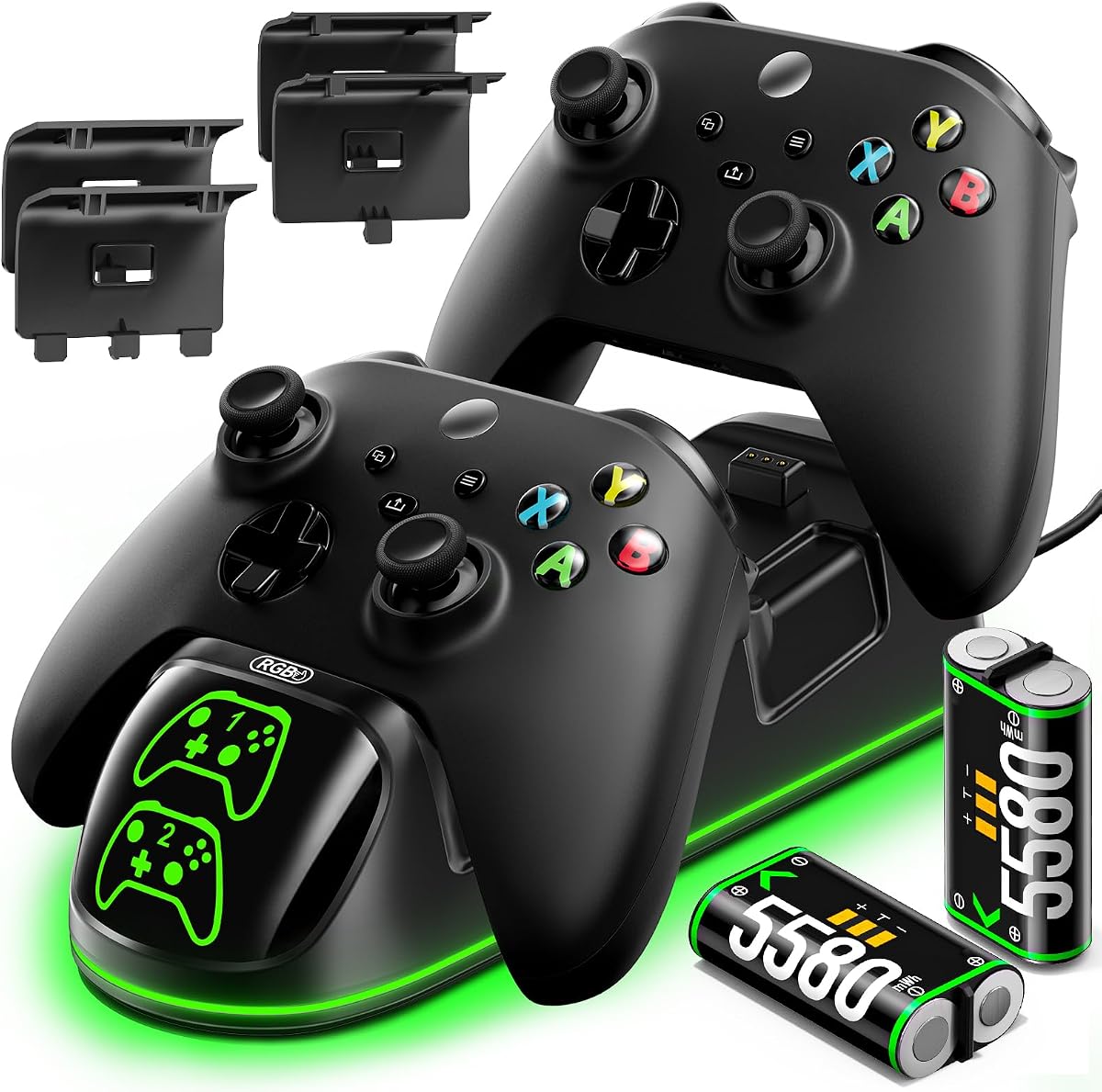
The OlVO XSX controller charger offers one of the fastest charging times available, fully recharging batteries in under 2.5 hours. This speed is ideal for gamers who need to switch controllers quickly between sessions.
We may earn a commission when you buy through this link, at no additional cost to you.
The 5580mWh batteries provide about 20 hours of playtime per charge and can be reused over 3000 times. This durability makes it a cost effective alternative to disposable batteries over the long term.
The package includes battery covers for both Series X and One controllers, ensuring broad compatibility. However, the design is functional rather than stylish, which may not appeal to those seeking premium aesthetics.
If speed and battery life are your top priorities, this charger is a top choice. It delivers efficient performance that keeps you in the game without long wait times.
Under 2.5 hour charging minimizes downtime so you can get back to gaming quickly after a short break.
The 3000 recharge cycles ensure the batteries remain effective for years of use without losing capacity.
We may earn a commission when you buy through this link, at no additional cost to you.
This charger station features a distinctive robot helmet-inspired design that adds a unique flair to your gaming space. It comes with two 5520mWh batteries and a storage compartment for keeping spares organized and out of sight.
We may earn a commission when you buy through this link, at no additional cost to you.
The battery life supports 18 to 25 hours of gameplay, which is sufficient for most users. LED indicators show charge status clearly, though the unit takes about 4 hours to fully charge the batteries.
The USB C cable ensures modern connectivity standards are met for charging the dock itself. While the design may not suit every aesthetic, it stands out as a conversation piece on any desk.
If you value style and practical storage, this station is an excellent pick. It balances functional charging with a visually engaging design that enhances your setup.
The robot helmet design adds a creative touch that differentiates it from standard black charging docks.
The built-in compartment keeps extra batteries safe and prevents them from getting lost in your gaming area.
We may earn a commission when you buy through this link, at no additional cost to you.
The Nyko charging station is an affordable entry level option that provides dual charging ports for two controllers. It includes two 1100mAh batteries that offer about 15 hours of playtime each, which suits casual gamers well.
We may earn a commission when you buy through this link, at no additional cost to you.
An extra USB port allows you to charge other accessories directly from the dock, adding convenience to your setup. The drop and charge design makes it easy to start charging immediately after gameplay.
The batteries have lower capacity compared to higher end models, so heavy players might need to charge more frequently. However, the low price point makes it a risk free option for trying out a charging station.
For budget conscious gamers who need basic functionality, this Nyko station delivers solid value. It provides the essentials without a high cost.
The additional USB port lets you charge headsets or other peripherals directly from the charging dock.
Charging two controllers at once ensures you always have a backup ready for multiplayer sessions.
We may earn a commission when you buy through this link, at no additional cost to you.
This stand is specifically designed to match the Pulse Red Xbox Series X controller with identical high quality materials and color. The magnetic contact system ensures a secure and perfect charge every time you dock your controller.
We may earn a commission when you buy through this link, at no additional cost to you.
It is ergonomically engineered to allow one handed navigation through your dashboard while the controller is charging. This feature adds significant convenience if you need to adjust settings without unplugging.
The single controller limitation means it is less versatile for multiplayer setups, and the price is higher than generic options. However, the aesthetic match and build quality are unmatched for Pulse Red owners.
If you own a Pulse Red controller and want a perfect match, this stand is the ideal accessory. It combines style and functionality seamlessly.
The Pulse Red color and material match create a seamless look that complements your controller perfectly.
Using the controller while docked allows you to navigate menus without interrupting the charging process.
We may earn a commission when you buy through this link, at no additional cost to you.
The Razer universal quick charging stand is compatible with nearly all Xbox controllers, making it a versatile choice for collectors. It can fully charge a controller in under 3 hours and features a magnetic system to keep it secure.
We may earn a commission when you buy through this link, at no additional cost to you.
The design matches official Xbox controller colors to ensure it fits well with your setup. One handed navigation allows you to use the controller while docked without losing charging connectivity.
While it supports many models, it excludes the Xbox Elite 2, which is a minor limitation. The single slot design also means you cannot charge multiple controllers simultaneously unless you buy two stands.
For those with multiple controller types who want a reliable charge, this stand is a strong option. It offers broad compatibility with premium build quality.
The stand works with a wide range of Xbox controllers, ensuring you have a solution for older and newer models.
Under 3 hour charging minimizes wait time so you can resume gaming faster.
We may earn a commission when you buy through this link, at no additional cost to you.
This controller charger station features 9 RGB lighting modes that let you customize the look of your charging dock. It includes two 6200mWh batteries that offer up to 30 hours of playtime, making it one of the longest lasting options.
We may earn a commission when you buy through this link, at no additional cost to you.
The lighting can be turned on or off via a switch, giving you control over your setup. Auto output adjustment ensures your controller receives the right current to prevent overcharging and overheating.
The RGB feature may not appeal to everyone who prefers a minimalist desk, but it adds immersion for many gamers. The bulkier size is a minor trade-off for the added lighting and battery capacity.
If you want a charger that doubles as a lighting feature, this station is the best pick. It combines high capacity with customizable style to enhance your gaming vibe.
Nine lighting modes let you switch colors to match your controller or room setup for a personalized look.
The 6200mWh packs provide some of the longest playtime in the category, reducing recharge frequency.
We may earn a commission when you buy through this link, at no additional cost to you.
Choosing the right controller charging station requires looking at battery capacity, compatibility, and design features to match your gaming habits.
Battery capacity determines how long you can play before recharging. Higher capacity packs like 6200mWh provide up to 25 hours, while standard 1100mAh packs offer about 15 hours. Check the mAh or mWh rating to understand longevity.
Look for high capacity batteries if you play in long sessions to avoid frequent interruptions.
Charging speed refers to how quickly the dock can recharge your batteries. Options range from 2.5 hours to 4 hours for a full charge. Faster charging is beneficial if you play in short bursts often.
Prioritize fast charging stations if you need to switch batteries quickly between gaming sessions.
Not all docks work with every controller model. Ensure the station supports your specific Xbox One, Series X, or Elite version. Some exclude Elite 2 or third party controllers, which could limit usability.
Verify compatibility with your current controller list before purchasing to avoid return hassles.
Dual slots allow you to charge two controllers at once, which is ideal for multiplayer gaming. Single slot stands are more compact but require a backup battery for uninterrupted play.
Choose dual slots if you frequently host multiplayer sessions to ensure constant availability.
Safety features like overcharge protection prevent damage to your controllers and batteries. Look for certifications like SGS or built-in protection systems to ensure safe charging.
Safety certified docks protect your expensive hardware from overheating or overvoltage risks.
Design choices include color matching, RGB lighting, or minimalist looks. Choose a style that fits your gaming room and desk setup. Some docks include storage compartments for extra accessories.
Select a design that complements your setup and provides the storage you need.
Most stations come with batteries and covers, but verify what is included. Some may need you to buy batteries separately. Check for USB cables and battery covers for your specific model.
Ensure the package includes all necessary parts to save time and money.
Warranty terms vary from limited to lifetime coverage. A longer warranty provides peace of mind for electronic accessories. Check the manufacturer support policies for defects or issues.
Opt for brands offering solid warranty terms to protect your purchase investment.
To use the station, connect it to a USB port on your Xbox or PC using the included cable. Place the controller into the dock or slot so the contacts align. The LED indicators will show when charging is active.
To maintain battery health, avoid leaving the controllers plugged in after they are fully charged. The docks usually stop charging automatically, but removing them ensures longevity. Store spare batteries in a dry place.
Clean the contacts regularly with a dry cloth to ensure proper charging. Dust or dirt on the metal contacts can prevent efficient charging. Check cables for wear and replace them if needed.
Some stations support Elite 1 but not Elite 2. Check the product details for Elite compatibility. The Fosmon and Razer stands explicitly note exclusions for Elite 2 controllers.
Charging times vary between 2.5 to 4 hours depending on the model. Faster options like OlVO take under 2.5 hours, while others may take up to 4 hours for a full charge.
Most stations are designed for official Xbox controllers. Third party models may not fit properly. Always check the compatibility list in the product description.
Yes, most stations have auto stop features to prevent overcharging. Safety certifications ensure they manage power correctly, but removing them when not in use is best.
mAh measures capacity while mWh measures energy including voltage. Higher numbers indicate longer battery life. Compare both when evaluating playtime claims.
Most modern docks support both Series X and S controllers. Ensure the model specifies compatibility with Series X/S to avoid fit issues.
Use a dry cloth to wipe the metal contacts on the controller and dock. Avoid liquids that could cause corrosion or shorting.
Prices include the station and batteries unless stated otherwise. Check product descriptions for any additional costs like extra cables.
The top picks offer a range of options from budget friendly dual docks to premium single stands. The Upgraded Controller Charger Station stands out for its high capacity and dual slots, while the 8BitDo dock offers elegant design.
Prioritize battery capacity and compatibility to ensure the station meets your play style. Consider safety features and warranty terms for long term reliability in your gaming setup.
Prices and availability may change, so check current listings before finalizing your purchase. Your gaming experience depends on reliable power, so choose a charger that keeps you in the game.