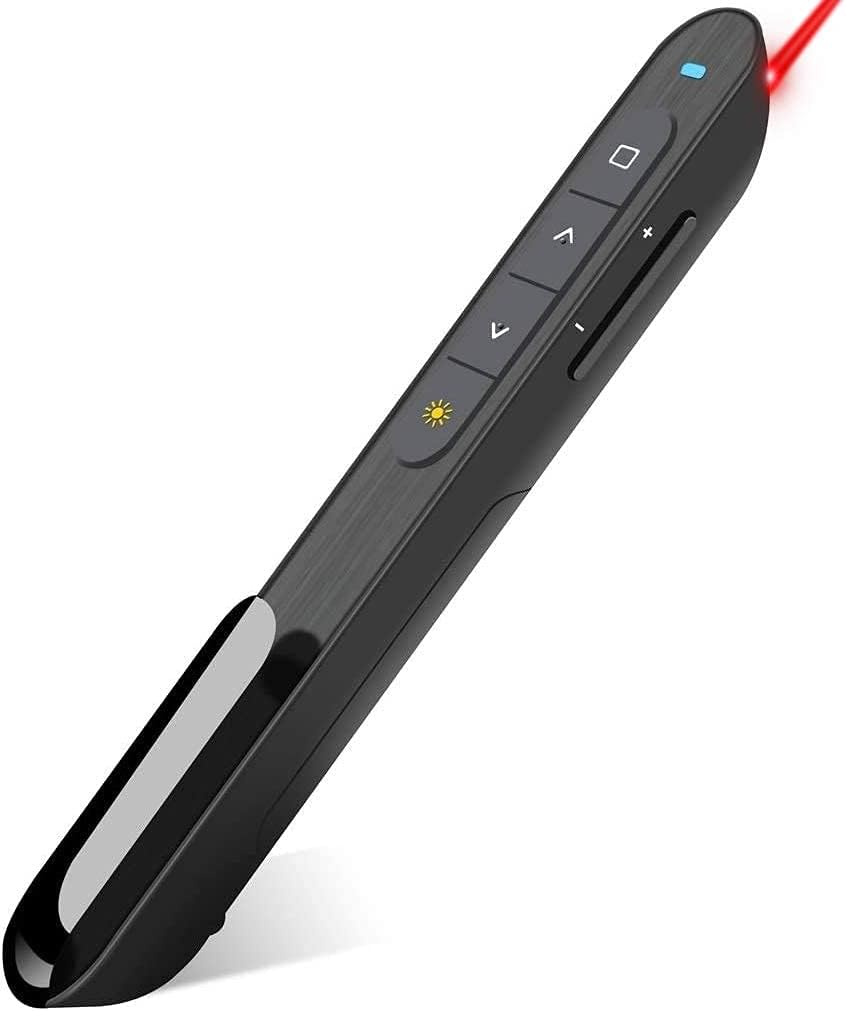
Hyperlink Volume Control Presentation Clicker
4.4Editor score
100 foot wireless range
Volume control support
Plug and play setup
This guide compares the top 10 clicker for power point presentations to help professionals and educators find reliable wireless remotes with laser pointers.
Finding the right clicker for power point presentations can transform how you deliver your message to an audience. A reliable remote ensures smooth transitions and keeps focus on your content rather than technical issues.
We compared ten highly rated devices based on connectivity range, ergonomic design, battery life, and compatibility with major operating systems. Each option offers unique features suited for different presentation environments.
Each pick highlights key strengths and potential drawbacks to help you make an informed decision. Prices and availability change frequently so please check current listings before purchasing your next presentation tool.
4.4Editor score

4.6Editor score

4.4Editor score
This side-by-side comparison highlights key specifications for each of the ten selected products to help you evaluate their suitability for your specific presentation needs.


This Logitech wireless presenter is a top choice for professionals seeking reliable performance during slide shows. It rates highly for its consistent connectivity and clear laser pointer that works well in most lighting conditions.
We may earn a commission when you buy through this link, at no additional cost to you.
The device features a simple plug and play design that works instantly without needing drivers. Users appreciate the intuitive touch keys that allow easy navigation through slides without looking down at the remote.
While it lacks advanced features like volume control, its core functionality is solid. The 50 foot range gives you enough freedom to move around a medium sized room without losing signal.
Buy this if you want a straightforward tool that just works. It is ideal for teachers and business presenters who value simplicity and reliability over extra features.
The Class 2 red laser provides bright visibility on screens and walls ensuring your audience follows your points clearly.
A built-in docking bay stores the USB receiver securely so you never lose it when packing up your presentation equipment.
We may earn a commission when you buy through this link, at no additional cost to you.
This clicker offers exceptional value by including features often reserved for pricier models like volume control and hyperlink support. It is a strong contender for budget conscious users who need more than basic slide advancing.
We may earn a commission when you buy through this link, at no additional cost to you.
The remote supports various functions beyond simple page navigation making it versatile for interactive presentations. The soft rubber buttons provide a comfortable grip and good tactile feedback during use.
While the build feels light compared to premium options it holds up well for regular use. The 100 foot range ensures you can move freely even in large conference halls without signal dropouts.
Choose this if you need extra functionality without spending a lot. It suits educators and corporate presenters who want control over audio and slide links during their talks.
Integrated volume buttons let you adjust media sound levels without switching back to your computer keyboard during a show.
The 100 foot wireless range allows you to walk around the stage while maintaining full control of your presentation slides.
We may earn a commission when you buy through this link, at no additional cost to you.
The Logitech Spotlight redefines presentation control by replacing the traditional laser with a digital cursor. This allows you to interact with content directly opening links or playing videos without touching your computer.
We may earn a commission when you buy through this link, at no additional cost to you.
Users can set time milestones in the companion app to receive vibration alerts when time runs short. This smart feature helps maintain pacing during important talks without looking at a clock.
While it requires the Logi Options app for customization it works universally across most presentation software. The build feels premium and the dual connectivity gives flexibility for both wired and wireless setups.
Invest in this if you deliver high stakes presentations often. The ability to interact with digital content remotely makes it invaluable for tech focused keynote speakers.
Instead of a red dot you move a cursor on screen to highlight details which works better on modern digital displays.
Configurable vibration notifications remind you of time limits discreetly so you can stay on schedule without visual distractions.
We may earn a commission when you buy through this link, at no additional cost to you.
This presentation clicker focuses on core usability with a design that prioritizes comfort during long sessions. It includes AAA batteries right out of the box which is a convenient touch for immediate use.
We may earn a commission when you buy through this link, at no additional cost to you.
The buttons are sized generously to prevent accidental clicks which is helpful when you are moving around a stage. It supports a wide range of systems including Windows Mac and Linux seamlessly.
While it does not have advanced features like volume control it performs its main function reliably. The wireless range is sufficient for most standard conference rooms and classrooms.
Select this if you need a no fuss remote that works with any computer. It is a solid choice for educators who value comfort and reliability over extra bells and whistles.
Included batteries mean you can start presenting right away without needing to buy power sources separately from a store.
Large buttons reduce the chance of hitting the wrong key during dynamic movements ensuring smooth slide transitions.
We may earn a commission when you buy through this link, at no additional cost to you.
This remote solves a common pain point by including both USB A and USB C connectors in one receiver. This eliminates the need for separate adapters when switching between old PCs and new Macs.
We may earn a commission when you buy through this link, at no additional cost to you.
It includes volume control and full screen options which adds versatility for multimedia presentations. The ergonomic design fits naturally in the hand with soft touch keys that reduce hand fatigue.
The magnetic storage keeps the receiver secure when not in use which helps prevent loss. Low power consumption ensures batteries last longer during extended periods of intermittent use.
Opt for this if you work with mixed device environments frequently. It is a practical solution for IT teams or consultants who travel with various computers.
One receiver handles both traditional USB and modern USB C ports reducing clutter in your tech bag.
Volume buttons allow you to manage audio levels during video clips without needing to reach for your keyboard.
We may earn a commission when you buy through this link, at no additional cost to you.
This remote is designed for portability with a lightweight profile that fits easily into pockets or small bags. It includes two AAA batteries so you are ready to present immediately upon arrival.
We may earn a commission when you buy through this link, at no additional cost to you.
The ergonomic design ensures a soft touch experience which is beneficial during long lecture sessions. It supports a wide range of software including Google Slides and MS Office applications.
While it lacks advanced customization it handles standard navigation tasks flawlessly. The dual port receiver allows connection to both USB A and Type C devices without extra steps.
Choose this if portability is your main concern. It suits students and teachers who need a reliable tool they can carry in a backpack every day.
Included batteries mean you can use the remote for presentations immediately without making an extra trip to the store.
The two in one receiver supports both USB A and Type C interfaces making it adaptable to different computer models.
We may earn a commission when you buy through this link, at no additional cost to you.
This presentation clicker stands out for including a fabric drawstring bag which keeps the remote and receiver safe from scratches. It has received high praise for its responsive button feedback during use.
We may earn a commission when you buy through this link, at no additional cost to you.
The laser pointer is bright and clear allowing you to highlight key points effectively on various backgrounds. The ergonomic design provides a comfortable grip that reduces strain during repeated clicks.
The internal storage for the USB dongle ensures you do not misplace it between presentations. While it lacks smart features it excels in basic reliability and durability.
Opt for this if you travel often and need protection for your gear. The included case makes it easy to keep your presentation tools organized and safe.
A fabric drawstring bag protects your remote from damage and keeps all components together in one neat package.
Buttons provide immediate feedback ensuring smooth slide transitions even in fast paced presentation environments.
We may earn a commission when you buy through this link, at no additional cost to you.
This remote combines presentation control with multimedia features like hyperlink support and volume adjustment. It includes a battery in the package which is convenient for immediate testing and use.
We may earn a commission when you buy through this link, at no additional cost to you.
The device supports a wide array of systems including Android which is rare among standard clickers. Its bright red light ensures visibility on most background colors for clear audience focus.
While macOS users might need a simple setup step it works reliably across Windows and Linux systems. The long control distance allows you to engage the audience without staying behind a podium.
Pick this if you need a versatile tool for varied environments. It is excellent for trainers who need to jump between different software platforms regularly.
Hyperlink and volume controls allow you to manage interactive content and media without pausing to use a computer mouse.
Support for Android and Linux makes it a rare choice for users outside the standard Windows Mac ecosystem.
We may earn a commission when you buy through this link, at no additional cost to you.
Weighing only 38 grams this remote is one of the lightest options available making it easy to hold for hours. It comes with a battery that can last up to two months on a single charge.
We may earn a commission when you buy through this link, at no additional cost to you.
The design is simple with a dark gray button scheme that conveys a minimalist aesthetic. A dedicated connect button on the back ensures quick pairing with your computer when needed.
The USB dongle stores inside the battery compartment to save space and prevent loss. It supports a broad range of software including PDFs and websites for versatile presentation needs.
Select this if you prioritize comfort and simplicity. It is ideal for speakers who value a light feel in their hand during extended keynote speeches.
At 38 grams the remote feels almost weightless in your hand reducing fatigue during long speaking events.
One battery can last approximately two months meaning fewer replacements and less downtime between presentations.
We may earn a commission when you buy through this link, at no additional cost to you.
This unique remote offers an air mouse feature that acts as a wireless cursor which is great for navigating complex slides. It is rechargeable via USB C eliminating the need for disposable batteries.
We may earn a commission when you buy through this link, at no additional cost to you.
The built-in 300 mAh battery charges in three hours to provide weeks of use. A pen clip design allows you to attach it securely to a pocket or book to prevent loss during travel.
The 164 foot range exceeds most competitors allowing you to move freely across large auditoriums. Sleep mode automatically turns it off when not in use to conserve energy efficiently.
Choose this if you want a modern rechargeable tool with advanced cursor capabilities. It is perfect for tech presenters who want to move beyond standard slide advancing features.
Cursor control mode turns the remote into a wireless mouse for navigating web slides or apps without a laptop.
USB C charging means you can power up with standard cables and avoid buying disposable batteries over time.
We may earn a commission when you buy through this link, at no additional cost to you.
Choosing the right presentation remote involves evaluating several key factors to ensure it meets your specific workflow requirements.
The wireless range determines how far you can move from your computer while maintaining control. For standard conference rooms a range of 50 to 100 feet is typically sufficient.
Look for devices that advertise at least 50 feet of range to ensure you can move freely without losing signal during your presentation.
Traditional clickers use a red laser pointer which is effective on physical screens but can struggle on some modern digital displays. Newer models offer cursor control for digital interaction.
Consider your primary presentation medium. A laser works well for projectors while cursor control is better for digital screens and hybrid settings.
Battery power sources affect convenience and long term cost. Some devices use disposable batteries while others offer rechargeable options via USB.
Choose rechargeable models if you present frequently to save money. If you need immediate use disposable batteries might be more practical.
A comfortable grip is essential during long speaking engagements. Look for rubberized buttons and an ergonomic shape that fits naturally in your hand.
Prioritize remotes with a comfortable feel to reduce hand fatigue and prevent accidental clicks during dynamic movement.
Ensure the clicker supports your operating system such as Windows Mac or Linux. Most modern devices are universal but some features may vary by platform.
Check product descriptions carefully to confirm compatibility with your specific computer and software before making a purchase.
The USB receiver connects to your computer so consider if you need dual port options. Some devices offer both USB A and USB C in one receiver.
Select a remote with the right port type for your computer to avoid needing separate adapters.
Beyond slide navigation some clickers offer volume control or screen blacking features. These can be useful for multimedia presentations.
Assess whether you need these extra functions based on the type of content you usually present to your audience.
Traveling presenters need durable devices that withstand being packed and unpacked frequently. Look for units with protective cases or sturdy construction.
Invest in a well built remote if you carry it daily in a bag to ensure it lasts through years of use.
To begin using your clicker insert the included USB receiver into a free port on your computer. Most devices do not require software installation and work immediately upon connection.
Insert batteries if required or charge the unit fully before your first presentation. Ensure you remove any plastic film from the battery compartment to allow power flow.
Store the USB receiver inside the remote when not in use to prevent loss. Keep the device in a protective case to avoid damage during travel.
Most clickers use a plug and play design meaning they do not require drivers. You simply plug in the receiver and start using the device immediately. However some advanced models may require optional software for extra features.
Yes most of the clickers listed are compatible with Mac OS systems. Always check the specific product description for any setup steps required for macOS before purchasing your device.
The laser itself has no battery limit but the device battery powers it. Most units last for weeks on a single set of batteries with normal use depending on the frequency of activation.
Yes the majority of these clickers work with Google Slides and other common presentation software. They function by sending standard keyboard commands which most apps recognize.
Most clickers do not support pairing with replacements once the original receiver is lost. It is important to store the receiver securely inside the remote to prevent accidental loss.
Absolutely these devices are designed to work with both desktops and laptops. The lightweight port makes them ideal for mobile presentations on portable computers.
The Logitech Wireless Presenter R400 remains a top choice for its reliability and ease of use. It balances cost and performance effectively for most standard presentation needs.
If you need advanced features like cursor control consider premium options like the Logitech Spotlight. Budget users might prefer models with volume control for better multimedia handling.
Always check the current price and availability before buying since these factors change regularly. Selecting the right tool ensures your focus stays on your message rather than technology.