
Canon PIXMA TS4320
4.0Editor score
Dual-band Wi-Fi connectivity
Automatic two-sided printing
Compact stylish design
Finding a reliable printer that fits your budget without sacrificing essential features like wireless connectivity can be challenging. This guide explores affordable options that deliver consistent performance for everyday printing tasks.
We evaluated ten popular models based on user feedback, technical specifications, and overall value. Our focus is on devices that support Apple AirPrint and offer seamless integration with modern smart home setups.
Each selection highlights key strengths and potential limitations to help you make an informed decision. Please note that product availability and pricing may change over time so check current listings before purchasing.
4.0Editor score

4.3Editor score

4.2Editor score
As an Amazon Associate we earn from qualifying purchases.
The following comparison table provides a side-by-side overview of the top ten affordable wireless printers available today. Each entry includes key specifications to help you quickly identify the model that best suits your specific printing needs and workspace requirements.


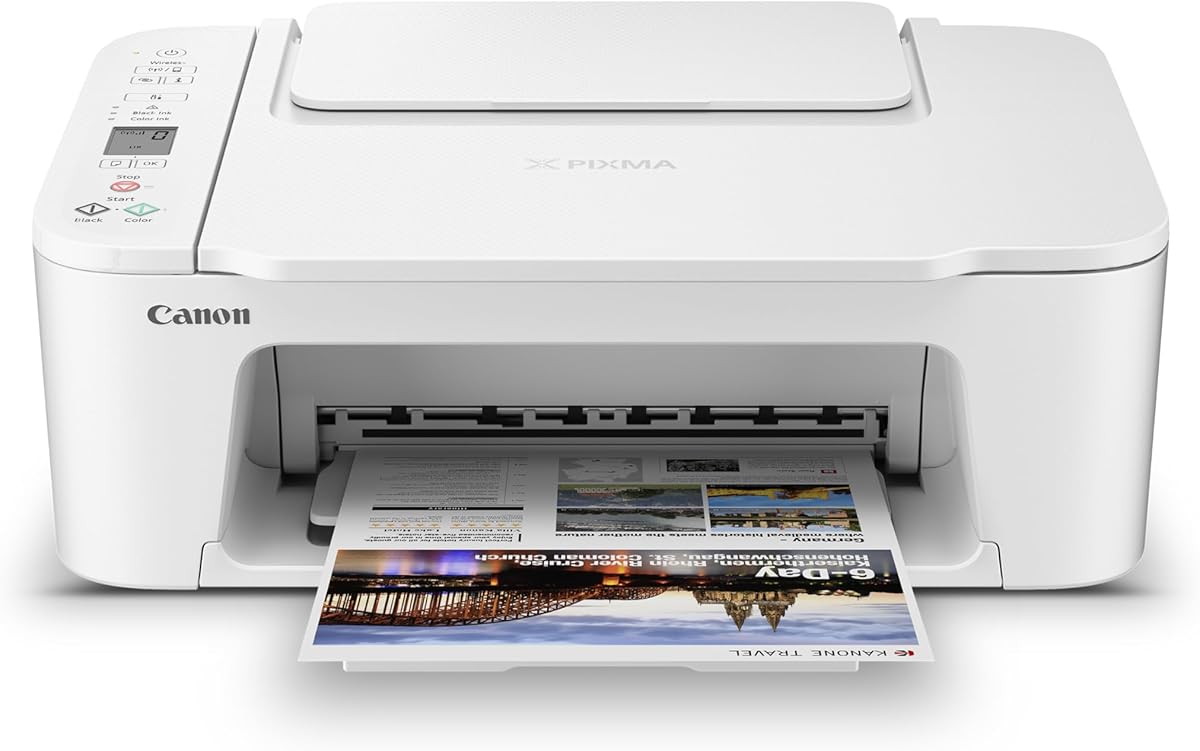

The Canon PIXMA TS4320 stands out as a highly accessible option for those seeking an all-in-one printer without breaking the bank. It holds a solid rating from users who appreciate its straightforward design and consistent performance for home tasks.
We may earn a commission when you buy through this link, at no additional cost to you.
This model excels in versatility, offering print, scan, and copy capabilities in a single unit. The dual-band Wi-Fi ensures you can connect from anywhere in your home, while the automatic two-sided printing helps save paper over time.
While it lacks a large display or advanced paper handling features, its simplicity is often a benefit for casual users. The setup process is intuitive, allowing you to start printing documents and photos within minutes of unboxing.
For students or remote workers needing a reliable device for everyday documents, this printer delivers excellent value. Its compact size fits well on small desks, making it a practical choice for limited workspace environments.
The Canon PRINT App and AirPrint support allow you to send jobs directly from your phone without needing a computer connection.
ENERGY STAR and EPEAT Silver certifications indicate this model is designed to minimize environmental impact during use.
We may earn a commission when you buy through this link, at no additional cost to you.
The Canon TS5320 combines functionality with style, appealing to users who want their tech to match their workspace decor. Its OLED display provides clear status updates, making it easy to manage tasks from a distance.
We may earn a commission when you buy through this link, at no additional cost to you.
Print quality is a strong suit for this model, thanks to the hybrid ink system that delivers sharp text and vibrant colors. It supports AirPrint natively, meaning iPhone and Mac users can print instantly without installing extra drivers.
Although it comes with a higher initial cost than some competitors, the convenience of its design and user-friendly interface often justifies the investment. The Amazon Dash Replenishment feature ensures you never run out of ink unexpectedly.
If you value aesthetics and ease of use alongside reliable performance, this printer is a compelling choice. It suits home offices where a professional yet modern look is important for client-facing environments.
The OLED screen shows deep accurate colors and the LED status bar gives quick visual cues about printer readiness.
Available in black white green and pink this printer lets you choose a finish that reflects your personal style.
We may earn a commission when you buy through this link, at no additional cost to you.
The HP DeskJet 2955 introduces AI capabilities to streamline your printing workflow by optimizing web pages and emails before they print. This feature reduces wasted paper and ensures your documents look professional every time.
We may earn a commission when you buy through this link, at no additional cost to you.
It offers basic but essential functions like color printing, scanning, and copying with a user-friendly icon LCD panel. The included Instant Ink trial provides convenience by delivering supplies automatically, though a fee applies after three months.
Built with recycled materials and certified for energy efficiency, this model appeals to environmentally conscious buyers. Its dual-band Wi-Fi helps maintain a stable connection even in homes with many connected devices.
Ideal for households with light printing needs, this printer balances cost and utility effectively. Just be aware of the subscription model for ink to avoid unexpected costs once the trial period ends.
HP AI analyzes documents to remove unnecessary content ensuring only the essential parts are printed to save paper.
Made with at least seventy percent recycled plastics this printer supports environmental goals without compromising performance.
We may earn a commission when you buy through this link, at no additional cost to you.
The Canon PIXMA TS6520 is designed for users who want advanced features in a small package. Its OLED display provides clear visibility of ink levels and status, making it easy to manage your printing tasks efficiently.
We may earn a commission when you buy through this link, at no additional cost to you.
Performance is strong with sharp text and vivid colors thanks to the hybrid ink system. It supports automatic two-sided printing which helps reduce paper usage and costs over time for everyday documents.
Setup is straightforward whether you are connecting via smartphone or computer. The dual-band Wi-Fi ensures a stable connection, allowing you to print from anywhere within your home or office network.
This printer is a great fit for hybrid workers who need reliable output without sacrificing desk space. While it lacks a large paper tray, its efficiency and quality make it a strong contender for home office use.
The 1.42 inch Monochrome OLED screen lets you monitor printer status and adjust settings at a glance easily.
Automatic 2-sided printing helps reduce paper consumption and speeds up your workflow for longer documents.
We may earn a commission when you buy through this link, at no additional cost to you.
The Brother Work Smart 1360 is built for productivity, offering features like an automatic document feeder and fast print speeds. It handles everyday office tasks efficiently, making it suitable for small teams or busy home offices.
We may earn a commission when you buy through this link, at no additional cost to you.
You can connect via wireless network or USB, and the color display allows easy navigation through cloud apps like Google Drive and Dropbox. This flexibility helps streamline your workflow without needing a direct computer link.
The Brother Mobile Connect app provides convenient control over printing and scanning from your smartphone. It also includes Page Gauge to monitor ink usage, helping you avoid running out of supplies unexpectedly.
If you need a reliable machine that can handle moderate volume without slowing down, this model is a strong candidate. Its compact design fits well in shared spaces while still delivering professional results.
Print from and scan to popular cloud apps directly from the printer display for seamless document management.
Automatic duplex printing and a 20-sheet ADF reduce manual handling and speed up repetitive tasks.
We may earn a commission when you buy through this link, at no additional cost to you.
The Canon PIXMA TS702a is a dedicated printing machine that excels in reliability and speed. With a large paper capacity and multiple connectivity options, it is ideal for users who primarily need to output documents and photos.
We may earn a commission when you buy through this link, at no additional cost to you.
It supports both Wi-Fi and Ethernet connections, giving you flexibility in how you integrate it into your network. The hybrid ink system ensures sharp text and rich colors, even for borderless photos up to legal size.
Despite lacking scanning functions, its focus on printing efficiency makes it a great secondary device or primary printer for those who scan digitally. The automatic two-sided printing helps manage paper usage effectively.
For businesses or individuals needing consistent output without the extra functions of an all-in-one, this model delivers outstanding value. Its compact design saves space while offering robust performance for daily tasks.
Connect with AirPrint Mopria Wi-Fi or Ethernet to ensure your device is always ready for printing tasks.
With a 350-sheet plain paper capacity this printer is ready to handle large print jobs without frequent refills.
We may earn a commission when you buy through this link, at no additional cost to you.
The HP LaserJet M110w brings laser speed and quality to small teams and home offices that primarily print text documents. Its fast output ensures that you can get your work printed quickly without waiting around.
We may earn a commission when you buy through this link, at no additional cost to you.
Wireless connectivity is robust with a self-reset feature that helps you stay connected even if network issues arise. The HP Smart app simplifies repetitive tasks, allowing you to scan to the cloud or print from your phone easily.
While it only prints in black and white, the crisp text quality is ideal for reports and contracts. The compact design fits almost anywhere, making it a versatile addition to any workspace.
If speed and reliability are your top priorities for document printing, this laser printer is a wise investment. It avoids the smudging issues of inkjets and provides consistent results over long periods.
This world smallest laser printer in its class fits anywhere while delivering precision laser printing quality.
The HP Smart app eliminates steps in repetitive tasks allowing you to scan and print from your smartphone.
We may earn a commission when you buy through this link, at no additional cost to you.
The Canon PIXMA TS3720 is designed for basic home printing needs with a focus on simplicity and ease of use. It offers print, copy, and scan features in a lightweight package that is easy to set up and maintain.
We may earn a commission when you buy through this link, at no additional cost to you.
Its dual-band Wi-Fi ensures a stable connection, allowing you to print schoolwork and documents from compatible mobile devices effortlessly. The intuitive LCD screen makes navigation straightforward for users of all ages.
You can print a variety of media types including envelopes and photos, giving you flexibility for creative projects. The 1-year warranty provides peace of mind for your purchase, ensuring support if issues arise.
For families or students needing a straightforward device for everyday tasks, this printer is a reliable choice. It balances cost and functionality well, making it an attractive option for budget-conscious buyers.
Get running in just a few minutes thanks to a streamlined and easy setup process out of the box.
Print envelopes photos and high resolution paper with borderless capabilities to match your creative needs.
We may earn a commission when you buy through this link, at no additional cost to you.
The A285M Thermal Printer is perfect for those who need to print on the go without carrying bulky equipment. It uses thermal technology, meaning you never have to worry about ink or toner cartridges during travel.
We may earn a commission when you buy through this link, at no additional cost to you.
Its lightweight design allows you to slip it into a backpack or briefcase easily, making it ideal for business trips or outdoor work. You can connect via Bluetooth to your phone or tablet to print documents and receipts instantly.
While it only supports black and white thermal paper, this limitation is acceptable for labels, notes, and basic documents. The cost savings on ink and the convenience of not clogging make it a smart choice for mobile users.
If you often find yourself needing to print lists, invoices, or boarding passes away from home, this device is indispensable. Just ensure you carry the right paper size to take full advantage of its versatile feed system.
Weighing only 1.5 pounds this printer fits easily into a backpack for on-the-go printing during business travel.
Advanced thermal technology means no ink toner or ribbon is required during printing eliminating clogging issues.
We may earn a commission when you buy through this link, at no additional cost to you.
The Epson EcoTank ET-2803 redefines value with its cartridge-free system, offering enough ink for years of regular printing. This model is ideal for high-volume users who want to avoid the recurring costs of traditional ink cartridges.
We may earn a commission when you buy through this link, at no additional cost to you.
Its high-capacity ink tanks are easy to fill and reduce the amount of waste sent to landfills. The unique Micro Piezo Heat Free technology produces sharp text and impressive color photos on virtually any paper type.
You can print using voice commands or the Epson Smart Panel app, adding a layer of convenience for busy households. The included ink set can last up to two years, minimizing interruptions for your workflow.
If you are looking for a long-term solution that prioritizes sustainability and cost efficiency, this printer is an excellent investment. It supports both wireless and voice-activated printing for seamless integration into modern smart homes.
Save with replacement ink bottles versus ink cartridges as each set is equivalent to about 80 individual cartridges.
Features wireless plus hands-free voice-activated printing for easy operation from your smart device.
We may earn a commission when you buy through this link, at no additional cost to you.
When selecting an affordable printer with AirPrint support, consider several key factors to ensure it meets your specific needs and workspace requirements.
Look for models that support both dual-band Wi-Fi and Bluetooth to ensure seamless connection with various devices. Ethernet support can also provide a more stable connection for shared offices.
Prioritize printers that allow wireless printing from multiple platforms to maximize convenience.
Check the pages per minute (ppm) ratings to ensure the printer can handle your typical workload without long wait times. Black and white speeds often differ from color speeds so consider your most common print type.
Higher resolution settings may be necessary if you frequently print photos or detailed graphics.
Calculate the cost per page by considering the price of ink cartridges or bottles relative to their yield. Some models offer subscription services that can save money but may lock you into a specific brand.
Consider EcoTank or similar systems if you print frequently to reduce long-term ink expenses significantly.
A larger paper tray reduces the frequency of refills which is essential for high-volume environments. Look for models with automatic duplex printing to save paper and reduce manual effort.
Check if the printer supports special media types like envelopes or photo paper if you have specific printing needs.
Measure your available desk space to ensure the printer fits comfortably without cluttering your workspace. Compact designs are often preferred for home offices or shared spaces where room is limited.
Choose a style that matches your environment to keep your workspace looking organized and professional.
Verify that the printer supports your preferred mobile apps such as AirPrint or Mopria for easy printing from phones. Cloud printing capabilities allow you to send documents from anywhere without needing a computer.
This feature is vital for remote workers who need to print from various devices throughout the day.
Consider if you need scanning and copying functions to avoid buying separate devices. An automatic document feeder (ADF) can speed up scanning multi-page documents efficiently.
Touch screens or OLED displays can simplify navigation and status monitoring for all users.
Check the length of the manufacturer warranty and the availability of customer support resources. A solid warranty can protect your investment against defects and mechanical failures.
Some brands offer extended support options or online troubleshooting tools to resolve issues quickly.
Begin by placing your printer on a flat stable surface away from direct sunlight and moisture. Connect it to your network using the built-in Wi-Fi setup wizard following the on-screen instructions carefully.
Regularly print a test page to keep ink flowing and prevent nozzles from drying out. Replace cartridges promptly when low indicators appear to avoid potential jams or uneven print quality.
Clean the exterior with a soft dry cloth and avoid using harsh chemicals that might damage the casing. Periodically check firmware updates through the manufacturer app to ensure optimal performance and security.
Yes most of these printers support Mopria Print Service or their own mobile apps for Android compatibility. You can typically print wirelessly from any Android phone or tablet that connects to the same Wi-Fi network. Just ensure you install the required app from the Google Play Store for full functionality.
Costs vary by model with cartridge-based printers generally having higher long-term ink costs compared to tank systems. For standard cartridge printers expect to pay for two to four cartridges depending on usage. Tank systems have a higher upfront cost but significantly lower per-page ink costs over time.
Most of these printers include a USB port allowing you to connect directly to a laptop via cable. This method is useful if wireless connectivity is unavailable or if you need a secure dedicated connection. Drivers must be installed on your computer for the USB connection to work properly.
Yes many models in this list deliver professional-quality text and graphics suitable for business use. Laser printers like the M110w excel at crisp text for reports while inkjets handle mixed media well. Always check resolution specifications if you plan to print detailed charts or marketing materials.
Ensure your iPhone and printer are on the same Wi-Fi network then open the document you wish to print. Select the share icon and tap print then choose your printer from the list without installing extra software. AirPrint is built into iOS so no additional drivers are needed for compatibility.
Most manufacturers offer a standard one-year limited warranty covering defects in materials and workmanship. Some models may include extended support or options to purchase additional coverage. Always review the warranty terms included with your purchase to understand what is covered.
We have reviewed ten excellent affordable printers that offer reliable AirPrint support and strong performance for everyday tasks. Each model brings unique strengths whether you prioritize speed, cost-efficiency, or compact design.
Consider your specific needs such as print volume and device compatibility to select the right option. Investing in a printer that fits your workflow will save you time and frustration in the long run.
Remember that product availability and features may evolve so verify current specifications before making a purchase. We hope this guide helps you find a printer that perfectly balances quality and affordability.