
Bluetooth 1D&2D Barcode Scanner, 3-in-1 Bluetooth & USB Wired & 2.4G Wireless QR Barcode Reader
4.3Editor score
Supports 1D and 2D codes
Three connection modes included
Long standby time available
Discover the top barcode scanner for iPad options compared by experts. This guide reviews connectivity, battery life, scan speed, and compatibility for retail
Finding the right barcode scanner for iPad can transform how you manage inventory or run a retail store. A good device should connect seamlessly, decode codes quickly, and last through long shifts without frequent recharging or connectivity issues.
We evaluated ten leading models based on their connection types, scanning capabilities, battery performance, and overall build quality. Each product was assessed for how well it integrates with iOS devices and handles common barcode formats in real world environments.
Every pick highlights specific strengths and limitations to help you match a device to your workflow needs. Keep in mind that stock levels and pricing can change, so verify details before making your final purchase decision today.
4.3Editor score
4.9Editor score

4.5Editor score
This comparison table outlines the key specifications and capabilities of each model to help you decide which scanner fits your specific requirements and budget constraints most effectively.


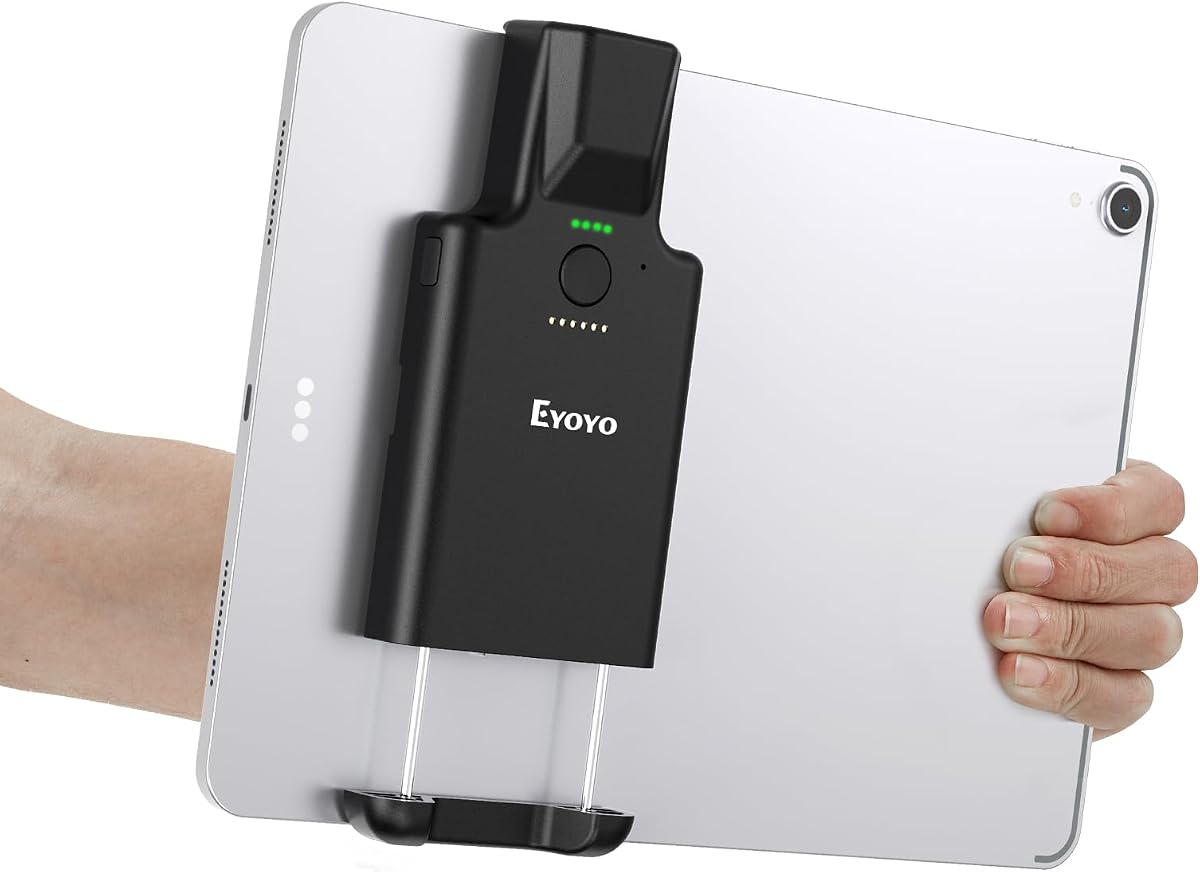
This Eyoyo model stands out as a top choice for iPad users needing reliable 1D and 2D scanning. It scores a high rating among users for its seamless integration with tablets and robust performance across different environments.
We may earn a commission when you buy through this link, at no additional cost to you.
The standout quality is its advanced imaging technology which handles damaged or curved barcodes with ease. It also features a unique clip that secures to larger tablets allowing for stable hands free scanning.
While it lacks 2.4G wireless support the Bluetooth connection remains stable. The higher cost may be a trade off but the extended battery life and durable design justify the investment for power users.
Ideal for retailers or warehouse staff who need consistent performance. We recommend it for anyone prioritizing reliability and ergonomics in their iPad based workflow today.
The 2D CMOS sensor reads paper labels and digital screens equally well including mobile coupons and e-wallets.
With a 3000mAh battery it delivers up to 30 hours of continuous use or a month on lighter daily scans.
We may earn a commission when you buy through this link, at no additional cost to you.
The NETUM Bluetooth scanner offers versatile connectivity options for iPad and other devices. It is rated well for its ability to decode damaged codes and maintain long battery life during intensive use.
We may earn a commission when you buy through this link, at no additional cost to you.
It supports 2.4G wireless Bluetooth and wired modes providing flexibility. The sensor handles worn or tightly spaced barcodes effectively even on screens or through shrink wrap.
Note that it requires scanning setting barcodes to configure properly. Also it does not support certain POS systems so check compatibility before buying for retail checkout.
Choose this if you need a versatile scanner with strong battery performance. It fits well for inventory tasks and general scanning needs on tablets or PCs.
Users can switch between 2.4G Bluetooth and USB wired modes depending on their specific connectivity needs.
The 2600mAh battery supports up to 200000 scans on a single charge ensuring minimal downtime.
We may earn a commission when you buy through this link, at no additional cost to you.
This scanner provides excellent value for iPad users needing both 1D and 2D capabilities. It receives positive feedback for its range and speed at a budget friendly price.
We may earn a commission when you buy through this link, at no additional cost to you.
It offers three connection types including 2.4G wireless which reaches up to 70 meters. The scanning speed is impressive at 350 times per second ensuring quick inventory updates.
The offline storage feature allows you to collect up to 130000 barcodes when out of range. However it lacks Square POS compatibility which may limit retail checkout use.
Perfect for small businesses or individuals on a budget. We suggest it for those who need 2D scanning without spending too much.
Reads a wide variety of 1D and 2D codes including QR and Data Matrix quickly and accurately.
Built-in storage allows saving thousands of scans when out of wireless range for later upload.
We may earn a commission when you buy through this link, at no additional cost to you.
The Eyoyo Mini is ideal for users needing a lightweight portable scanner for iPad or mobile use. It is praised for its small size and easy connection to various devices.
We may earn a commission when you buy through this link, at no additional cost to you.
Weighing only 35 grams it fits easily in a pocket. It supports 1D codes like UPC and EAN effectively with a range up to 50 meters via Bluetooth.
It is not suitable for scanning screen codes or 2D QR codes so consider this if you need those features. Also note it does not work with Square systems.
A great pick for librarians or retail staff needing a discreet device. It saves battery well and is simple to configure for daily tasks.
At just 35 grams it is one of the lightest options available for mobile scanning on the go.
Volume can be adjusted or switched to vibration mode making it suitable for quiet environments.
We may earn a commission when you buy through this link, at no additional cost to you.
This desktop model is perfect for fixed workstations where hands free scanning is preferred. It gets high marks for reliability and speed in busy retail or warehouse environments.
We may earn a commission when you buy through this link, at no additional cost to you.
The omnidirectional scanner reads barcodes automatically when an item is presented. Its anti-shock base ensures stability and durability even with frequent drops or heavy use.
Since it connects via USB it is not wireless for mobile iPad use but works well with iPads on stands. It does not support some POS systems like Square so verify compatibility.
Recommend for checkout counters or packing stations. It reduces manual handling and speeds up the workflow significantly for repeat scanning tasks.
Items placed in the field are read automatically freeing staff to handle other tasks simultaneously.
Designed with anti-vibration and non-slip features to withstand daily industrial use without damage.
We may earn a commission when you buy through this link, at no additional cost to you.
This NetumScan scanner comes with a dock that keeps it charged and organized. It is well received for its ease of pairing with iPads and iPhone devices.
We may earn a commission when you buy through this link, at no additional cost to you.
The dock acts as a data receiver allowing flexible setup. It supports 1D and 2D codes including QR making it versatile for various inventory needs.
Battery life is decent but not the longest on this list. The vibration mode is useful for quiet environments like libraries where noise is a concern.
Good for small to medium businesses needing a ready to use package. Ensure your software supports the connection protocol before purchasing for full compatibility.
The included base simplifies charging and can act as a receiver reducing the need for extra dongles.
Specifically optimized for seamless integration with iPhone and iPad ensuring reliable data transmission.
We may earn a commission when you buy through this link, at no additional cost to you.
This model improves on previous versions with better power control and connectivity. It scores a high rating for reliability and ease of use in daily operations.
We may earn a commission when you buy through this link, at no additional cost to you.
The dual button design prevents accidental shutdowns which is a common issue with other scanners. It also includes a dock that serves as both charger and receiver.
It is built to withstand drops up to 2 meters making it suitable for tough environments. Ensure your POS system is supported as Square is not compatible.
Ideal for warehouse or field work where durability matters. The silent mode ensures it is polite in shared spaces while maintaining performance.
Dual buttons separate power and scanning triggers to prevent unintended shutdowns during busy work.
Built to survive drops of up to 2 meters on concrete surfaces ensuring longevity in tough settings.
We may earn a commission when you buy through this link, at no additional cost to you.
This scanner offers broad compatibility and storage capacity at a reasonable price. It supports both 2.4G and Bluetooth for flexible connection options with iPads or computers.
We may earn a commission when you buy through this link, at no additional cost to you.
It includes offline storage for up to 50000 QR codes which is useful for field data collection. The ergonomic design reduces fatigue during extended scanning sessions.
The lower rating may indicate variability in quality control. Also it does not support Square or Shopify POS systems so verify software compatibility before buying.
A solid choice for non-POS inventory tasks. We recommend it for users who need offline storage capabilities without a high price tag.
Built-in memory stores up to 50000 QR codes for later upload when connectivity is restored.
Supports both 2.4G and Bluetooth connections providing users with multiple connectivity choices.
We may earn a commission when you buy through this link, at no additional cost to you.
This KUIIYER scanner offers high resolution imaging and solid battery life for iPad workflows. It is rated well for its ability to read complex or damaged barcodes easily.
We may earn a commission when you buy through this link, at no additional cost to you.
It supports both 1D and 2D codes with a CMOS sensor that reads screen and paper codes. The IP54 rating protects against dust and water making it suitable for warehouses.
The storage mode holds up to 50000 barcodes which is handy for offline work. However it does not support Square POS so check your software requirements first.
Great for users needing durability and flexibility. The auxiliary light helps in dim conditions and the language options make it accessible for international teams.
Adopts advanced CMOS technology with 800×600 pixels for faster and more accurate code reading.
With IP54 dust waterproof rating and shockproof build it is built for demanding environments.
We may earn a commission when you buy through this link, at no additional cost to you.
This Inateck scanner excels with long range Bluetooth connectivity making it ideal for large facilities. It gets high marks for battery standby and robust build quality.
We may earn a commission when you buy through this link, at no additional cost to you.
The connection reaches up to 115 feet which is rare for this category. It also supports 1D codes with strong recognition even in dim light conditions.
It includes a protective case that survives drops up to 6 feet. The higher price reflects premium features but it only reads 1D so check if you need 2D.
Perfect for large warehouses needing reliable long range scanning. We recommend it for teams prioritizing connectivity and durability over 2D code support.
Offers a connection distance up to 115 feet enabling scanning from across large storage spaces.
Allows editing prefixes or suffixes up to 32 digits to fit specific inventory formats.
We may earn a commission when you buy through this link, at no additional cost to you.
Selecting the right scanner involves balancing connectivity, battery life, and code compatibility with your specific workflow needs.
Ensure the scanner supports Bluetooth or 2.4G wireless for mobile use with your iPad. Wired USB is reliable for stationary setups but limits mobility significantly.
Check connection range to confirm it covers your workspace without dropouts during peak hours.
Look for scanners with at least 1500mAh capacity to last a full work shift on a single charge. Longer standby times reduce charging frequency and downtime in busy environments.
Consider models with charging docks if you need to keep devices powered during high volume periods.
Verify whether you need 1D only or 2D QR and Data Matrix support. Many modern workflows require screen and paper code reading flexibility for diverse tasks.
Check if the scanner handles damaged or low contrast codes to avoid failed scans in real world conditions.
Faster scan speeds like 300+ times per second improve productivity in high traffic areas. Accuracy with blurry or broken codes ensures fewer errors and re-scans.
Look for CMOS imaging sensors for better performance on screens and curved surfaces compared to laser types.
Choose models with drop protection ratings and anti-shock designs if used in warehouses or field work. IP54 ratings offer protection against dust and water spills.
Ergonomic grips reduce fatigue during prolonged use and improve handling in various positions.
Confirm the scanner works with your inventory or POS app on iPad. Some devices do not support specific platforms like Square which may limit checkout functionality.
Check for features like prefix suffix editing to align with your system formatting requirements.
If working in areas with poor connectivity, ensure the scanner stores thousands of codes locally before syncing. This prevents data loss during network outages or travel.
Storage mode allows data collection in remote zones for later upload to your system.
Plug and play devices reduce the need for software installation or complex pairing steps. Simple controls like dedicated power buttons prevent accidental shutdowns during busy work.
Adjustable volume or vibration modes help maintain discretion in quiet environments like libraries or offices.
Start by pairing the scanner with your iPad via Bluetooth settings ensuring the device is charged and in pairing mode. Refer to the manual for specific configuration barcodes if required.
Position the scanner at a proper distance and angle for the best read rate especially with 2D codes. Keep the lens clean and free of dust to maintain consistent performance.
Regularly recharge the battery and store the scanner in a protective case when not in use to extend its lifespan. Avoid exposing it to extreme temperatures or liquids beyond its rated protection.
Yes most modern Bluetooth barcode scanners are compatible with iPad via standard iOS settings. Ensure the scanner supports BLE or HID modes and follow pairing steps in Bluetooth settings for quick setup.
1D scanners read linear barcodes like UPC and EAN while 2D scanners read matrix codes like QR and Data Matrix. Most apps today need both for flexibility across paper and digital codes.
Most work with general inventory apps but some POS systems like Square may have specific compatibility restrictions. Always verify the scanner supports your chosen POS platform before purchasing.
Battery life ranges from 8 to 30 hours depending on usage and capacity. Models with larger batteries and power-saving modes can last several weeks with moderate daily scans.
2D scanners with CMOS sensors can scan codes from phone and computer screens. Ensure the device explicitly supports screen scanning as some 1D models only read printed labels.
Wireless ranges vary from 30 meters to 70 meters based on connection type. 2.4G models often provide longer range while Bluetooth may be shorter but more mobile friendly.
We reviewed ten top barcode scanners for iPad each with unique strengths from budget friendly options to premium durable models. The Eyoyo 1D 2D model stands out as our Editor's Choice for its balance of features and battery life.
When choosing prioritize connectivity options and barcode type support to match your daily workflow needs. Consider durability and battery capacity if you work in demanding environments like warehouses or retail floors.
Remember that stock and pricing can fluctuate so verify product details and current offers before completing your purchase. Investing in a compatible reliable scanner will streamline your inventory management tasks efficiently.