
SUPVAN T50M Pro Bluetooth Label Maker Machine
4.5Editor score
Bluetooth wireless connectivity
Free mobile app editing
Compact portable design
Choosing the right barcode printer for inventory management is essential for maintaining accurate stock levels and streamlining operations. A reliable thermal printer ensures your labels are scannable, durable, and produced quickly without the hassle of ink or toner replacements.
We evaluated ten top-rated models based on print speed, connectivity options, label compatibility, and software features. Our analysis focuses on machines that deliver consistent performance for small businesses, warehouses, and retail environments requiring precise inventory tracking.
Each pick highlights key strengths and potential trade-offs to help you find the best fit for your workflow. Note that product availability and specifications may change, so verify current details before making your final purchase decision today.
4.5Editor score

4.6Editor score

4.5Editor score
As an Amazon Associate we earn from qualifying purchases.
This side-by-side comparison highlights the key specifications and capabilities of each selected thermal printer to help you identify the model that best matches your inventory labeling needs.


The iDPRT SP310 Thermal Label Printer stands out as a versatile solution for inventory tracking needs with its support for labels ranging from 1 to 3.35 inches wide. It offers a professional desktop experience that eliminates proprietary chip restrictions while delivering reliable performance for small businesses and home offices.
We may earn a commission when you buy through this link, at no additional cost to you.
Its intelligent label calibration system automatically detects size and gap boundaries to ensure precise alignment. The dedicated software allows you to import bulk files and generate serialized tracking codes easily. USB connectivity ensures uninterrupted heavy printing without wireless dropouts affecting your workflow.
While the lack of Bluetooth might be a limitation for mobile users, the wired stability is ideal for fixed workstations. The open system saves costs by allowing any third-party brand labels instead of proprietary rolls. This trade-off is acceptable for users prioritizing consistent desktop output.
This printer is perfect for offices needing to print SKU tags, FBA barcodes, or shipping labels consistently. Its combination of speed, cost savings, and software features makes it a top recommendation for organized inventory management.
Supports labels from 1 to 3.35 inches wide to handle diverse inventory tagging needs including address and product labels.
Bypasses proprietary microchip limitations to reduce operating costs by using affordable third-party thermal label rolls.
We may earn a commission when you buy through this link, at no additional cost to you.
The SUPVAN T50M Pro Bluetooth Label Maker offers an accessible entry point for small businesses needing portable labeling solutions. Its free mobile app provides extensive customization options including fonts, frames, and icons without requiring registration or subscription fees.
We may earn a commission when you buy through this link, at no additional cost to you.
You can add images from your phone or tablet to design custom product info or QR codes easily. The Bluetooth connectivity allows you to print labels directly from your mobile device without cables. This makes it ideal for organizing storage bins or labeling items on the go.
The smaller label width might limit its use for large shipping labels but works well for product tags and file organization. The cost efficiency combined with versatile editing features makes it a strong budget contender for home offices or small retail shops.
This device is best suited for users prioritizing portability and cost over high-volume printing speeds. It delivers clear output for everyday labeling tasks and helps maintain organized inventory systems without breaking the bank.
Customize labels with over 30 fonts, 50 frames, and 660 icons through a completely free mobile application.
Connect wirelessly to smartphones or tablets to print labels without needing a computer or cables.
We may earn a commission when you buy through this link, at no additional cost to you.
The CLABEL CT327D 3 Inch Thermal Label Printer delivers premium performance for businesses needing larger label options. It handles label widths from 20 to 80mm making it suitable for diverse inventory tagging tasks ranging from retail price tags to SKU labels.
We may earn a commission when you buy through this link, at no additional cost to you.
Its high-speed printing reaches up to 152mm per second in 203 DPI resolution for sharp text and scannable barcodes. The smart label backfeed feature repositions labels before printing to reduce waste during setup. You can use Bluetooth with mobile devices or connect via USB for desktop editing.
While it comes at a higher price than smaller models the versatility and speed justify the cost for active warehouses or busy retail environments. The ability to switch between label sizes without changing printers streamlines workflow significantly.
This printer is ideal for businesses needing professional quality and efficiency in their labeling process. Its robust features ensure consistent output for product price and inventory labeling requirements.
Print up to 152mm per second to keep up with high-volume labeling tasks efficiently.
Precisely repositions labels before printing to help align the first label and reduce waste.
We may earn a commission when you buy through this link, at no additional cost to you.
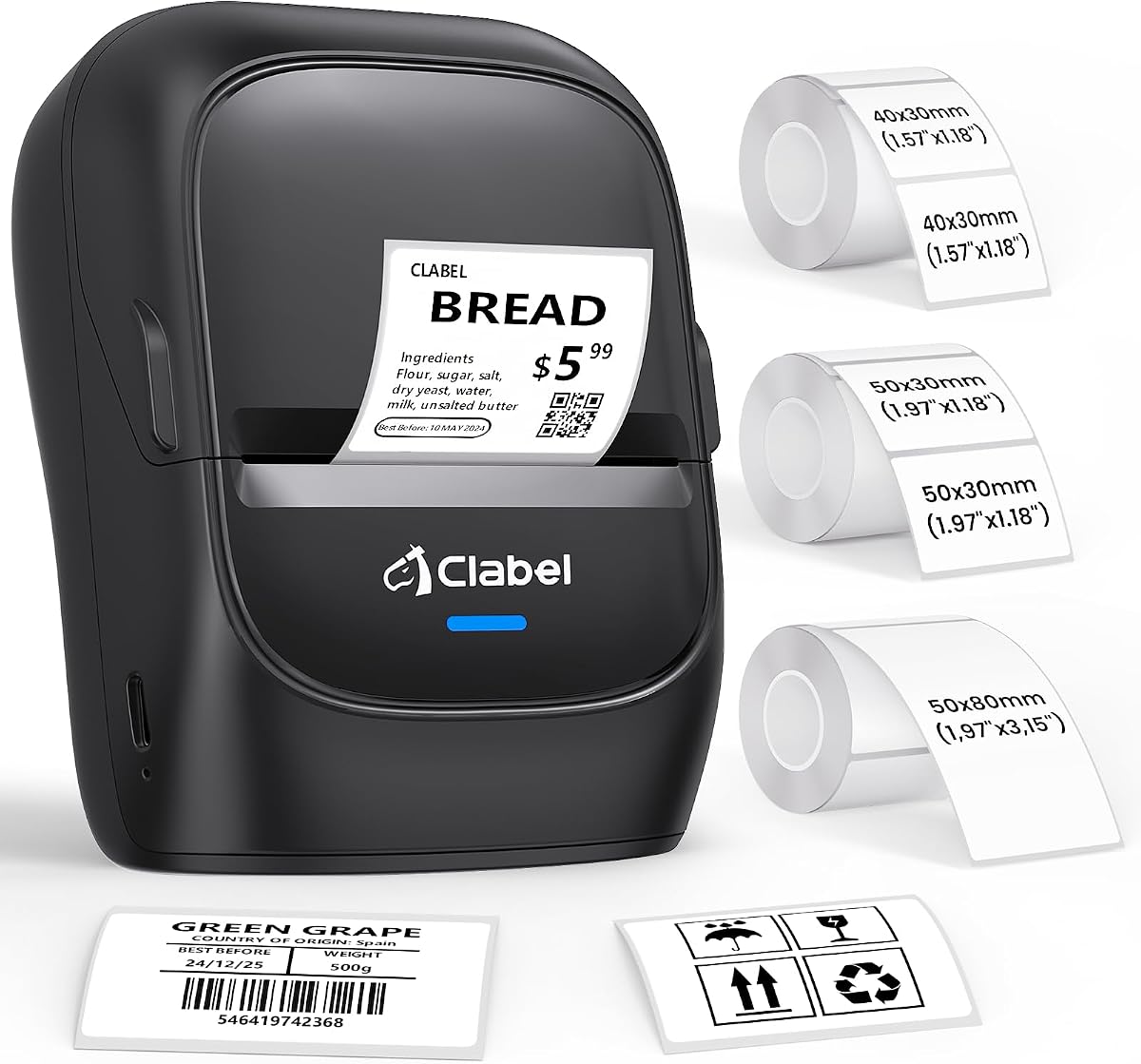
The CLABEL 221D 2" Bluetooth Barcode Label Printer offers a practical solution for small businesses needing flexible labeling options. It supports label widths from 25 to 50mm making it ideal for retail price tags product tags and file folders.
We may earn a commission when you buy through this link, at no additional cost to you.
Its open design avoids proprietary chip restrictions so you can use any universal thermal paper to reduce long-term costs. The Clabel trade app sets up quickly with free templates for retail and office needs. USB connection supports desktop bulk labeling while Bluetooth allows instant mobile design.
The label width limitation means it is not suitable for larger shipping labels but works well for item tagging. This balance of connectivity options and cost savings makes it a solid choice for small business inventory needs.
Ideal for retail shops or warehouses needing quick label setup without expensive consumables. Its versatile connectivity ensures you can label from either a computer or smartphone seamlessly.
Sick of pricey proprietary labels? Use any budget universal thermal paper online to drastically reduce costs.
Choose USB for high-volume bulk labeling or Bluetooth for instant wire-free design at your counter.
We may earn a commission when you buy through this link, at no additional cost to you.
The CLABEL 221D Desktop Thermal Barcode Label Printer is designed for efficiency and ease of use in office settings. Its compact and lightweight design does not take up much desk space and can be moved easily when needed.
We may earn a commission when you buy through this link, at no additional cost to you.
Setup takes less than five minutes with straightforward software installation and connection. The accompanying app features extensive customization options including over 300 icons and various fonts to create professional labels. Reuse existing rolls to save costs without compromising quality on product or content labels.
While it is optimized for 2 inch labels and desktop use it provides enough flexibility for daily small business needs. The powerful app updates regularly to add new features for better work efficiency.
This printer is best for small business owners starting out and needing reliable professional labeling. Its ease of use and cost-saving design make it a practical daily tool for organizing inventory.
Setup for the printer took less than 5 minutes with simple software download and connection.
Features 11 fonts, 58 templates, and over 300 icons to create custom label designs easily.
We may earn a commission when you buy through this link, at no additional cost to you.
The Labeer Bluetooth Thermal Shipping Label Printer offers robust capabilities for online sellers handling shipping and inventory. It supports labels from 1.57 to 4.41 inches wide making it versatile for products inventory and packaging tasks.
We may earn a commission when you buy through this link, at no additional cost to you.
The FlashLabel Pro app allows you to download PDF labels and print directly from iOS or Android devices. It automatically identifies label areas to remove margins for clean printing. Bluetooth connection provides wireless freedom while auto calibration keeps labels properly aligned.
The 203 DPI direct thermal printing ensures clear and scannable results without ink. While wireless convenience is great it relies on stable connectivity for heavy workloads. This makes it suitable for medium-volume tasks in home offices or warehouses.
Best for e-commerce sellers needing flexible labeling options beyond standard inventory tags. Its ability to handle shipping labels expands utility across multiple business workflows.
Download shipping labels as PDF and print directly from mobile devices with automatic margin removal.
Automatic label gap detection and calibration help keep labels properly aligned for efficient printing.
We may earn a commission when you buy through this link, at no additional cost to you.
The iDPRT SP310 Desktop Thermal Label Printer delivers high-speed performance ideal for processing bulk orders and inventory tasks. It prints at 4 ips with 203 DPI resolution handling up to 80 sheets of labels per minute efficiently.
We may earn a commission when you buy through this link, at no additional cost to you.
This open-system printer eliminates proprietary chip restrictions to cut ongoing label costs significantly. USB connectivity ensures uninterrupted heavy-duty printing without wireless dropouts. Smart auto-calibration with built-in sensors prevents misaligned prints and wasted labels.
The free HereLabel design software allows importing bulk files and generating serialized tracking codes. While it lacks wireless options the stable wired connection is perfect for fixed workstations. High throughput makes it excellent for fast-paced environments.
This printer is recommended for businesses needing reliable and fast labeling without ongoing consumable fees. Its consistent performance ensures efficient throughput for online stores and warehouses.
Print at 4 ips handling up to 80 sheets of 2×3 inch labels per minute for fast throughput.
Built-in sensors automatically detect label size and gap boundaries to ensure precise alignment.
We may earn a commission when you buy through this link, at no additional cost to you.
This Bluetooth Thermal Shipping Label Printer offers advanced features for businesses handling shipping and inventory labels. It prints up to 72 crisp 4×6 labels per minute using direct thermal technology that requires no ink or toner.
We may earn a commission when you buy through this link, at no additional cost to you.
Wireless freedom allows seamless connection via Bluetooth to iOS and Android devices using the Label Expert App. USB connection ensures zero-latency performance for continuous warehouse batch printing. The adjustable guide fits various labels from 1.54 to 4.1 inches wide.
The wide platform compatibility integrates with major platforms like Amazon Shopify and USPS. Its setup is designed to be frustration-free with included video tutorials. A 2-year warranty provides additional confidence in its long-term use.
Ideal for busy shipping centers needing speed and platform integration. Its dual connectivity options ensure flexibility whether you are using mobile or desktop systems.
Advanced 203 DPI direct thermal technology requires zero expensive ink and prints 72 labels per minute.
Built for continuous warehouse batch printing with stable USB connection ensuring zero-latency performance.
We may earn a commission when you buy through this link, at no additional cost to you.
The Phomemo M110 Label Makers are designed for portability and ease of use with a built-in display for quick adjustments. It connects via Bluetooth to mobile phones for convenient label creation anywhere.
We may earn a commission when you buy through this link, at no additional cost to you.
The Print Master app includes multiple templates and OCR features to recognize text on images in seconds. Stable Bluetooth 4.0 connectivity ensures quick connection and printing without hassle. The device supports label widths from 20mm to 50mm suitable for various small tasks.
While it does not support color printing or large shipping labels it is perfect for organizing materials and items. The compact design makes it a good assistant for home organization office sorting and commercial classification.
Best for users needing a lightweight solution for on-the-go labeling tasks. Its OCR feature adds efficiency for converting image text into editable formats quickly.
Print Master app supports OCR to recognize text on images in 4 seconds for faster editing.
Bluetooth 4.0 with 33 feet range and 2-second connection speed keeps your business running efficiently.
We may earn a commission when you buy through this link, at no additional cost to you.
The CLABEL 221B 2" Bluetooth Thermal Label Printer is designed for simplicity and cost-efficiency in small business settings. It supports label widths from 25mm to 50mm making it versatile for address price and jewelry labels.
We may earn a commission when you buy through this link, at no additional cost to you.
Open connectivity allows you to use any standard thermal label rolls without proprietary restrictions. The Clabel trade app offers quick Bluetooth connection and access to creative templates. Its matched thermal labels are waterproof and oil-proof to withstand high-traffic environments.
While it does not support iPad it works well with Android and iOS smartphones via Bluetooth. USB connection is available for computer use ensuring flexibility. The durable quality ensures stickers stay sharp and do not tear easily.
This printer is suitable for small businesses needing reliable and affordable labeling. Its no-brand lock-in policy and durable labels make it a practical choice for various retail and warehouse applications.
No RFID chips or brand lock-in means you can use any standard thermal label rolls you like.
Matched thermal labels are waterproof, oil-proof, and resistant to friction to stay sharp in busy settings.
We may earn a commission when you buy through this link, at no additional cost to you.
Selecting the right barcode printer involves evaluating several factors to ensure it fits your inventory workflow and budget effectively.
Determine the range of label widths you need for product tags shipping labels and inventory bins. Printers typically support widths from 0.75 inches to 4.5 inches so choose one that covers your specific requirements.
Consider whether you need Bluetooth for mobile printing or USB for stable desktop use. Some models offer both options allowing you to print from phones computers or tablets depending on your workspace setup.
Faster print speeds are essential for high-volume operations while resolution affects barcode readability. Look for at least 203 DPI for clear scannable labels that work reliably with standard scanners.
Check if the printer requires proprietary labels or supports third-party rolls. Open systems reduce long-term costs by allowing you to use affordable standard thermal paper from various brands.
Evaluate the design software included with the printer for ease of use and customization. Look for batch printing batch templates and import options to streamline label creation and tracking processes.
Choose a printer with durable construction that can withstand busy warehouse or retail environments. Waterproof and oil-proof labels are essential if you operate in conditions with spills or high humidity.
Balance the upfront cost of the printer with ongoing expenses for labels and maintenance. Budget-friendly models may lack premium features but can still meet basic labeling needs effectively.
Review the warranty period and availability of technical support to protect your investment. Responsive support ensures minimal downtime if issues arise during critical inventory periods.
Clean the printer head regularly using a soft cloth to remove dust or residue. Store labels in a cool dry place to maintain adhesive quality and prevent damage to the thermal paper surface.
Many modern thermal printers support third-party labels by eliminating proprietary chip restrictions. Check the product details to confirm if it allows open label usage before purchasing.
No most thermal printers use direct thermal technology that prints without ink toner or ribbons. This saves costs and reduces maintenance for high-volume labeling tasks.
Bluetooth offers flexibility for mobile work while USB ensures stable uninterrupted performance for desktop use. Some printers support both allowing you to choose based on your workflow needs.
A resolution of at least 203 DPI is recommended for clear and scannable barcode labels. Higher resolution improves text and image clarity but may slow down print speeds.
Calibration is usually done through the printer's software or buttons to detect label gaps. Follow manufacturer steps to ensure each label prints in the correct position.
Some thermal labels are specially coated to resist water oil and friction. Verify label specifications if you need durability for warehouse or outdoor use.
Always check current product availability and features before purchasing to ensure the model still meets your operational requirements today.