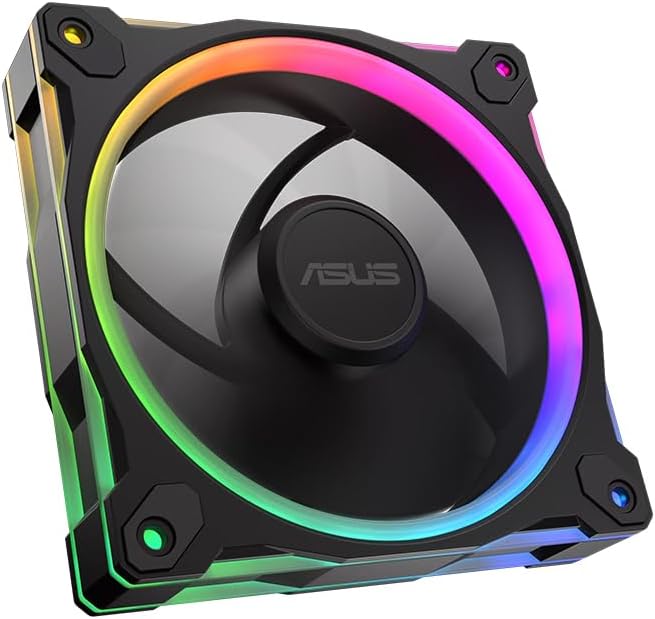
ASUS Prime MR120 ARGB Reverse Fan
4.6Editor score
28mm extra-thick frame
20 addressable RGB LEDs
Quiet 23dB(A) operation
This guide compares the top ASUS case fans for cooling and lighting, featuring PWM control and Aura Sync across various models to help you choose the right
Choosing the right cooling solution is critical for maintaining system stability and extending hardware life. ASUS case fans offer a blend of reliable performance and aesthetic appeal that suits many build styles.
We evaluated multiple models based on airflow, static pressure, noise levels, and RGB integration. Each product was assessed for its ability to handle diverse workloads from gaming to professional rendering tasks.
Every pick highlights specific strengths like quiet operation or high static pressure. Note that prices and availability change frequently so verify details before purchasing your components.
4.6Editor score

4.8Editor score

5.0Editor score
The following table provides a side-by-side overview of key specifications for every fan we reviewed. This helps you quickly identify models that match your specific airflow or lighting needs.


This triple pack delivers solid cooling and vibrant lighting at an attractive price point. With a 4.6 rating it remains a top choice for builders wanting balance.
We may earn a commission when you buy through this link, at no additional cost to you.
The 28mm frame provides ample airflow while the 20 ARGB LEDs create a dual-sided effect. PWM control allows you to adjust speeds up to 1600 RPM easily.
While it lacks white options the quiet 23 dB(A) operation ensures it does not distract during use. The Aura Sync integration is seamless for existing ASUS ecosystems.
Buy this if you need multiple fans for a full build and want reliable performance without breaking the bank. It fits most standard cases perfectly.
The 28mm thick frame allows for larger blades and better airflow dynamics than standard 25mm fans.
Dual-sided lighting means the LEDs look great from any angle without needing extra cables.
We may earn a commission when you buy through this link, at no additional cost to you.
Designed for professional workstations this fan prioritizes raw cooling power over flashy lights. Its 3000 RPM capability is among the highest in this category.
We may earn a commission when you buy through this link, at no additional cost to you.
LCP blades and a brass bearing housing ensure stability during high speed rotation. The daisy-chain design simplifies cabling for multiple units.
Without ARGB it suits cleaner setups where visual effects are not a priority. The noise level increases significantly at maximum RPM though.
Choose this for server racks or cases needing extreme airflow. It excels where silent operation is less important than thermal efficiency.
CNC milled brass ensures precise tolerances and consistent performance over long periods.
Daisy-chain connectors reduce clutter by linking fans together into a single cable.
We may earn a commission when you buy through this link, at no additional cost to you.
This fan features a reverse blade layout that lets you see the frame without cables blocking the view. It is ideal for front intake mounts.
We may earn a commission when you buy through this link, at no additional cost to you.
With 76.3 CFM airflow and 2.75mm H2O pressure it handles dense radiators effectively. The 16 individually addressable LEDs add customization.
The build quality is solid but it costs more than standard models. Cable management is the main benefit justifying the extra expense.
Buy this if you want a clean look for intake fans without using extension cables. It works well in modern cases with tempered glass.
Blades spin to pull air through the frame rather than pushing it, hiding the frame from view.
Optimized for pushing air through radiators or filters where resistance is higher.
We may earn a commission when you buy through this link, at no additional cost to you.
This triple pack offers the highest static pressure in the lineup making it perfect for radiator cooling. The 28mm frame adds rigidity and cooling surface.
We may earn a commission when you buy through this link, at no additional cost to you.
Dual Layer LED Matrix ensures bright and even lighting across all three units. PWM control gives you flexible speed options for noise reduction.
The only drawback is the thickness which may clash with cases designed for 25mm fans. Check clearance before buying.
Ideal for water-cooled systems needing intense cooling performance. The price per fan is competitive compared to buying singles.
3.3mm H2O static pressure ensures air moves through tight spaces like heatsinks easily.
Dual layer design provides uniform color output across all fans in the pack.
We may earn a commission when you buy through this link, at no additional cost to you.
This is the most affordable way to get reverse blade functionality without sacrificing core features. It keeps cable clutter down while maintaining a clean look.
We may earn a commission when you buy through this link, at no additional cost to you.
With 20 ARGB LEDs and a 28mm frame it delivers strong cooling and visuals. The 23dB(A) noise level is very low for an RGB fan.
It lacks the high pressure of TUF models but fits standard builds perfectly. One fan is cheaper but you may need more for full coverage.
Select this for budget builds wanting style. It is excellent for side or front intake where visibility matters most.
Offers reverse airflow benefits at a lower cost than many competitors.
Double sided lighting allows fans to be viewed from both sides clearly.
We may earn a commission when you buy through this link, at no additional cost to you.
This single fan carries a perfect 5.0 rating due to its exceptional build quality. It is designed for users who prioritize engineering over flashy RGB effects.
We may earn a commission when you buy through this link, at no additional cost to you.
LCP blades provide vibration damping and stable high speed operation. The CNC milled brass bearing housing ensures accuracy and reliability.
The lack of RGB limits it to professional or minimalist builds. It is quieter than many competitors despite its robust performance.
Invest in this for critical cooling tasks where reliability is non-negotiable. It suits workstations requiring silent yet effective thermal management.
LCP material naturally dampens vibration reducing noise and increasing lifespan.
Tight tolerances on the brass housing ensure consistent performance over time.
We may earn a commission when you buy through this link, at no additional cost to you.
This set delivers high cooling performance with a sleek white finish. It is a great choice for white-themed builds needing strong airflow.
We may earn a commission when you buy through this link, at no additional cost to you.
With 3.3mm H2O pressure it handles dense radiators well. The 16 addressable LEDs and Aura Sync ensure you match lighting easily.
The price is higher than black options but worth it for cohesive aesthetics. Check motherboard headers for RGB compatibility.
Choose this for white gaming rigs wanting high pressure cooling. It brings a premium look and solid functional performance to your system.
White blades and frames match white cases and components seamlessly.
Aura Sync support allows coordinated lighting effects across multiple devices.
We may earn a commission when you buy through this link, at no additional cost to you.
This single unit offers high airflow at 58 CFM with a clean white look. It is ideal for side intake or replacement upgrades needing style.
We may earn a commission when you buy through this link, at no additional cost to you.
The 28mm frame and 20 ARGB LEDs provide robust cooling and visuals. Double sided lighting makes it versatile for viewing from either side.
Noise levels stay low up to 1600 RPM. While one unit is less than a pack it is cheaper per fan in the pack.
Pick this for a specific cooling point where white and RGB are essential. It fits well in smaller builds needing high airflow.
58 CFM ensures ample airflow for general case cooling and CPU cooling.
White LEDs and frame create a bright and modern visual appeal.
We may earn a commission when you buy through this link, at no additional cost to you.
This fan emphasizes durability with a 250,000 hour rated life. It is great for users planning long term usage without frequent replacements.
We may earn a commission when you buy through this link, at no additional cost to you.
Anti vibration pads reduce noise and the dynamic plain bearing adds stability. The white frame and LED array provide a consistent look.
Airflow is standard but it is designed for quiet operation. The long life makes it a solid investment for basic setups.
Choose this if reliability and low noise matter most. It works well as a rear exhaust where static pressure is less critical.
The bearing design is built to sustain millions of hours of operation.
Anti vibration pads on the frame reduce case resonance and noise.
We may earn a commission when you buy through this link, at no additional cost to you.
While not an ASUS model this pack offers strong cooling and cabling options. It is a viable alternative if you prefer CORSAIR hardware.
We may earn a commission when you buy through this link, at no additional cost to you.
72.8 CFM airflow and AirGuide technology direct air efficiently. Magnetic Dome Bearings and a daisy-chain connection simplify setup.
The lack of Aura Sync might be a downside if you rely on ASUS ecosystem. However the cooling and ease of use remain strong.
Buy this if you need a budget triple pack with good airflow. It suits systems where cooling efficiency is more important than brand matching.
AirGuide vanes push air directly at hot components for targeted cooling.
Magnetic Dome Bearings reduce friction and improve overall lifespan.
We may earn a commission when you buy through this link, at no additional cost to you.
Selecting the right fans requires evaluating several factors like noise, pressure, and lighting. This section breaks down what to prioritize for your specific build.
Airflow measures volume in CFM while static pressure measures force in mmH2O. High airflow is best for open intake while high pressure is needed for radiators.
Prioritize static pressure if using thick heatsinks or radiators to ensure air passes through efficiently.
Noise is measured in dB(A) and typically ranges from 20 dB for silent to 30 dB for loud. Lower numbers mean a quieter experience.
Check maximum noise at full speed but note that PWM control helps reduce sound during idle periods.
ASUS fans often feature ARGB with Aura Sync support for color coordination. Some models have double sided lighting for better aesthetics.
Ensure your motherboard has 5V ARGB headers before buying addressable LED fans to avoid compatibility issues.
Most cases use 120mm fans but some support larger sizes. The thickness is usually 25mm but some premium models use 28mm frames.
Verify your case clearance to ensure thicker frames fit without blocking drive mounts or other components.
Different bearings like magnetic, hydraulic, or dynamic plain affect lifespan and noise. Better bearings last longer and vibrate less.
Look for models specifying long life or low vibration for a smoother long-term experience.
PWM fans use 4-pin connectors for speed control while daisy-chain options reduce cable clutter. Ensure your controller supports the connector type.
Daisy-chain connectors are ideal for builds wanting minimal cable management and simpler routing.
Materials like CNC brass or LCP blades improve durability and stability. High quality construction leads to consistent performance over time.
Choose models with reinforced frames or specific bearing housing for longer reliability.
Warranties vary by product and region so check the specific terms before purchasing. A longer warranty often indicates manufacturer confidence.
Prioritize brands offering at least two years of coverage for peace of mind.
Install fans with clear airflow direction labels usually found on the side. Typically fans should push air into the case from front and pull out from rear.
Connect RGB and PWM cables carefully to the motherboard headers. Ensure you do not force connectors which may damage the pins.
Clean dust regularly using compressed air to maintain cooling performance. Dust buildup can increase noise and restrict airflow significantly.
Most RGB models support Aura Sync but standard non-RGB fans do not. Verify product specs to ensure compatibility with your motherboard lighting system.
Yes most cases support 28mm fans but check depth clearance. Thick frames may block some internal components if space is tight.
Quiet fans often operate under 23dB which is barely audible. At full speed noise increases but PWM control keeps it manageable.
Reverse blades hide the fan frame and cables when viewed from the front. This creates a cleaner aesthetic for open air builds.
Daisy-chain connectors link multiple fans so they use only one cable per type. This simplifies installation and reduces motherboard cable clutter.
Yes you can mix fans but RGB control may vary. Ensure all addressable fans share the same voltage type to avoid issues.
We highlighted options like the Prime MR120 triple pack for value and the ProArt PF120 for premium quality. Each offers specific strengths for different needs.
Prioritize airflow if you have high heat output and quiet operation for general builds. RGB and aesthetics matter most for showpiece systems.
Always check current prices and availability before buying as they change often. Compare specifications carefully to match your case and cooling setup.