
Redragon BM4195 AI Wireless Optical Computer Office Mouse
3.9Editor score
Voice typing and translation features
Three-mode connectivity options
Type-C fast charging port
This guide compares the top AI Smart Wireless Mouse models featuring voice typing, translation, and AI tools to help you choose the best productivity device.
AI Smart Wireless Mouse devices are transforming how we interact with computers by integrating voice typing and real-time translation directly into the hardware. These innovative peripherals allow users to dictate text, manage documents, and communicate across languages without typing on a traditional keyboard. This shift towards voice-enabled productivity tools is reshaping workflows for professionals, students, and content creators alike.
To compile this comprehensive list, we evaluated ten leading models based on their voice recognition accuracy, connectivity options, battery life, and software capabilities. We examined features like multi-device switching, ergonomic design, and the depth of AI integration including transcription and summarization tools. Our goal is to highlight devices that offer genuine value and seamless integration into modern digital environments.
Each product in this roundup showcases unique strengths ranging from budget-friendly options to premium all-in-one productivity hubs with detachable components. We provide detailed insights into performance, compatibility, and specific use cases to help you find the right fit for your needs. Please note that product availability and pricing can change frequently so always check the latest details before purchasing.
3.9Editor score

4.1Editor score

5.0Editor score
The following comparison table provides a side-by-side overview of the ten top AI Smart Wireless Mouse models available this month. We highlight key specifications such as connectivity types, battery capacity, language support, and unique AI features to help you quickly identify the device that aligns with your specific workflow requirements and productivity goals.


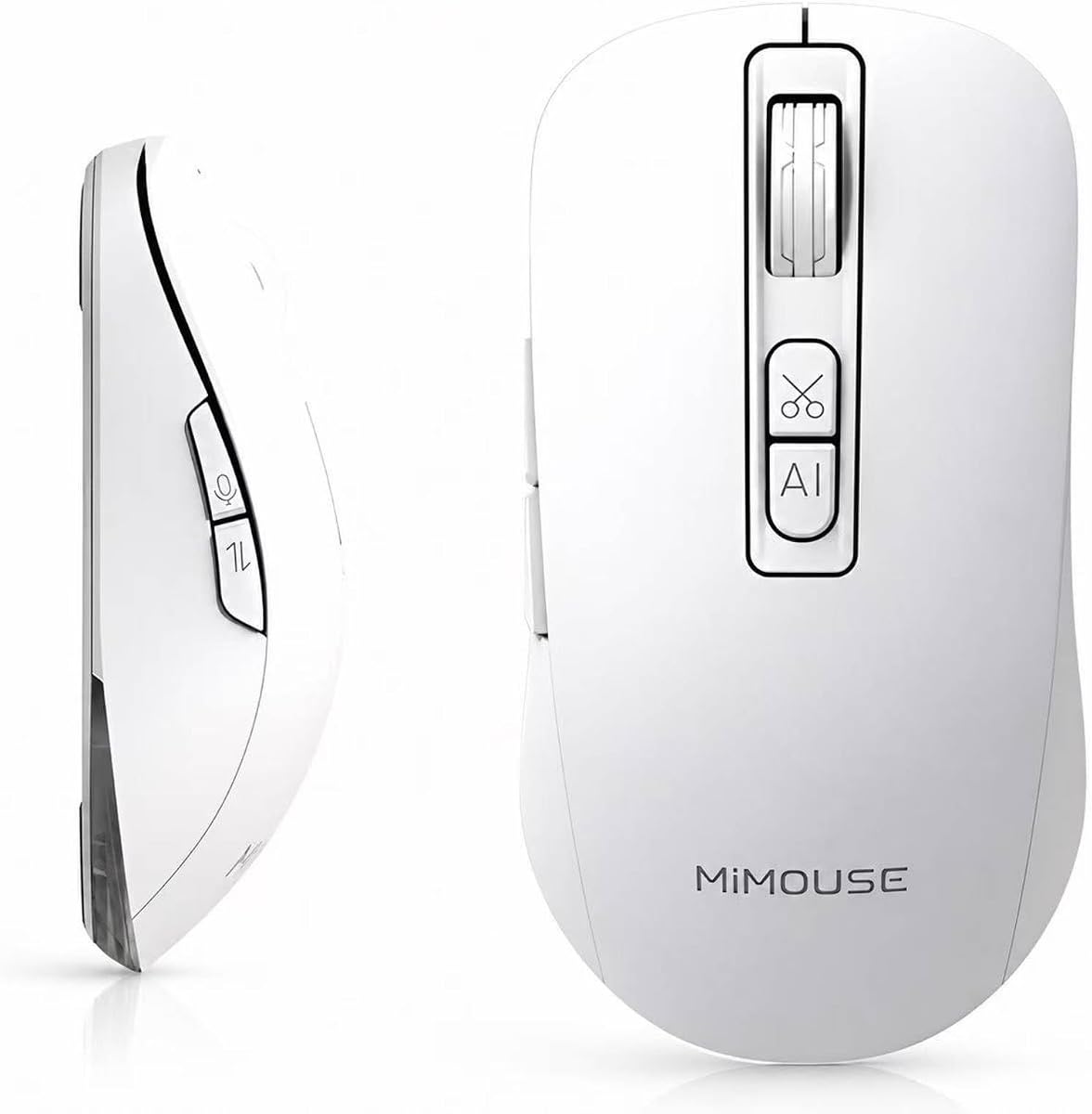


This device stands out as a leading option in the AI Smart Wireless Mouse category due to its impressive combination of voice typing accuracy and AI capabilities. With a rating reflecting user satisfaction, it offers a robust solution for those looking to streamline their workflow through voice commands and transcription services.
We may earn a commission when you buy through this link, at no additional cost to you.
The core strength lies in its ability to transcribe speech with high precision and support over two hundred languages for real-time translation. It includes extensive AI features like article writing, code generation, and image analysis which operate locally to protect your data privacy without relying on cloud storage.
While the performance is excellent, users should be aware that activating the full suite of features requires downloading the specific software application. The initial setup involves holding the scroll wheel to pair and launch the app which might be slightly more involved than plug-and-play peripherals.
This mouse is ideal for professionals, students, and writers who need reliable transcription and translation tools integrated directly into their pointing device. If you value privacy and want a device that can handle complex tasks like drafting documents or summarizing content, this is a top recommendation.
Dictate text with 98% accuracy and translate instantly across 200+ languages to break down communication barriers during meetings and research.
All voice and text data is processed locally on your device ensuring maximum security and privacy for your sensitive work documents.
We may earn a commission when you buy through this link, at no additional cost to you.
For those seeking an entry point into AI-enhanced peripherals, this model provides essential voice typing and translation features at a very accessible price. It delivers fundamental productivity gains without requiring a significant investment, making it suitable for casual users or budget-conscious professionals.
We may earn a commission when you buy through this link, at no additional cost to you.
The mouse supports switching between three different devices easily which is helpful for users who juggle between a desktop, laptop, and tablet. It also allows for customizable commands so you can assign specific functions to keys to improve your operational freedom and workflow efficiency.
The trade-off is that the build quality and software experience are more basic compared to premium models. You need to download specific software to activate the AI functions which adds a step to the setup process but remains straightforward for most users.
This device is best for students or office workers who want to try voice control without spending too much. It is a practical choice if you need a reliable mouse with added smart features that can keep you powered throughout your workday via Type-C charging.
Experience voice typing and translation capabilities without a high price tag making AI productivity accessible to a wider audience.
Toggle effortlessly between 2.4G and Bluetooth modes to connect across three devices instantly for uninterrupted workflow transitions.
We may earn a commission when you buy through this link, at no additional cost to you.
This mouse redefines the category by combining a standard pointer with presentation tools and AI recording into a single magnetic detachable unit. It is designed for professionals who lead meetings and need to switch between controlling slides and taking notes without carrying extra gadgets.
We may earn a commission when you buy through this link, at no additional cost to you.
The presentation mode allows you to glide the cursor and flip slides hands-free while a red laser helps highlight key points on a screen. This versatility is complemented by intelligent audio recording that transcribes meetings and saves notes directly to your computer for later review.
While the price is higher than standard mice, the replacement of multiple tools justifies the investment for frequent presenters. The battery lasts up to twenty days so you rarely need to recharge which is convenient for travel and busy office schedules.
Ideal for speakers, business leaders, and educators this device offers a streamlined approach to managing presentations and meetings. If you want to reduce desk clutter and have powerful AI transcription at your fingertips during collaborative sessions this is the premium choice.
Combines touchpad cursor control, slide flipping, and laser pointer into one portable device for confident and engaging presentations.
Double-tap to record and transcribe meetings automatically ensuring you never miss important details or action items during discussions.
We may earn a commission when you buy through this link, at no additional cost to you.
This model is engineered for global communication and multilingual workflows with strong support for over two hundred languages. It ensures privacy by processing data locally which is crucial for professionals handling sensitive information in a corporate environment.
We may earn a commission when you buy through this link, at no additional cost to you.
A notable feature is the battery display screen that shows remaining power at a glance so you are never caught off guard during important calls. The AI tools include summarization and content generation helping you draft emails or reports quickly without typing.
The software requires downloading to unlock full functionality but it provides deep customization for voice commands. For best results in noisy environments you may need to hold the mouse closer to your mouth to capture clear audio input for transcription.
Choose this device if you frequently work with international teams or require high levels of data privacy. It is an excellent tool for business meetings and language study where accurate translation and secure processing are top priorities.
Break language barriers with instant translation across 200+ languages to facilitate smooth communication during international meetings.
Keep your voice and text data private with local offline AI processing that avoids cloud storage risks entirely.
We may earn a commission when you buy through this link, at no additional cost to you.
This device stands out with vibrant RGB lighting while delivering the same powerful AI and voice typing capabilities as other top models. It combines style with function making it a great choice for users who want their desk setup to look dynamic and modern.
We may earn a commission when you buy through this link, at no additional cost to you.
The silent click mechanism ensures you work quietly in shared spaces like libraries or offices without disturbing others. It supports the same wide range of languages and offline processing features ensuring your workflow remains secure and efficient.
Keep in mind that using the lighting effects may reduce battery life slightly compared to keeping them off. However you can adjust settings to balance aesthetics with endurance so you still get reliable performance throughout the day.
Recommended for creators and gamers who appreciate a stylish setup without sacrificing productivity tools. If you want a mouse that looks great and handles text transcription and translation seamlessly this is a solid option.
Add a pop of color to your desk with customizable RGB lighting that enhances the visual appeal of your workspace.
Enjoy a peaceful work environment with silent clicks and an ergonomic shape designed for all-day comfort.
We may earn a commission when you buy through this link, at no additional cost to you.
Designed with comfort as a priority, this mouse features a lightweight ergonomic shape that reduces hand strain during long work sessions. It is perfect for users who spend hours on their PCs and need a device that feels natural in their hand.
We may earn a commission when you buy through this link, at no additional cost to you.
The quiet click mechanism ensures you can work in shared spaces without making noise while you type or navigate. It supports both Bluetooth and 2.4GHz connections so you can switch between devices seamlessly depending on your setup.
The voice typing capabilities allow you to dictate text up to 300 words per minute which speeds up note-taking and documentation. However software customization is somewhat basic compared to other models with advanced AI suites.
This mouse is a great choice for office workers who prioritize comfort and silence over complex AI features. If you need a reliable device that reduces fatigue and offers simple voice transcription this is a practical pick.
Work for hours without discomfort thanks to an ergonomic shape designed to fit the natural curve of your hand.
Use quiet clicks to avoid disturbing colleagues in libraries or shared offices while maintaining your productivity.
We may earn a commission when you buy through this link, at no additional cost to you.
This model offers a unique free centralized AI platform that integrates multiple powerful models for writing and meeting summarization. It is designed to be more than just a mouse by acting as a hub for various productivity tasks across different AI services.
We may earn a commission when you buy through this link, at no additional cost to you.
You can use it to generate content draft contracts or summarize meetings which makes it highly versatile for professionals. The battery life is impressive lasting up to thirty days so you can use it for weeks without needing to recharge.
The high polling rate ensures smooth cursor movement which is helpful if you need precision for graphics or design work. Connectivity allows switching between three devices so you can move between laptop desktop and tablet effortlessly.
Choose this device if you want to access a broad range of AI tools through a single interface. It is ideal for users who need reliable long-term battery and advanced summarization features to support their complex work routines.
Access multiple AI models for writing drafting and summarization through a free centralized platform built into the mouse.
Enjoy up to 30 days of battery life on a single charge so you can focus on work without frequent charging interruptions.
We may earn a commission when you buy through this link, at no additional cost to you.
This mouse is optimized for versatility across desktop and iPad making it a strong choice for remote workers who switch between devices. It supports seamless transitions between 2.4G and Bluetooth modes so you can connect to three devices instantly.
We may earn a commission when you buy through this link, at no additional cost to you.
It includes tools for summarization and PPT generation which can help you prepare presentations quickly using voice commands. The ergonomic shape provides a secure grip ensuring comfort during long remote work sessions or study hours.
The translation and transcription features are solid and work well for academic or business use. While it offers a wide range of functions the setup process may require some time to configure settings to your preference.
This device is highly recommended for students and professionals using tablets or laptops for daily tasks. If you need a reliable companion for taking meeting notes and translating content on the go this mouse delivers consistent performance.
Connect seamlessly to PCs Macs and iPads with triple-mode switching for a flexible and efficient workflow.
Use built-in tools to summarize meetings and generate presentation content quickly to save time on manual tasks.
We may earn a commission when you buy through this link, at no additional cost to you.
This model focuses on simplicity by offering effective voice-to-text and summary tools that help organize rough ideas quickly. It is designed to reduce repetitive typing and make everyday office work easier for users who prefer speaking to writing.
We may earn a commission when you buy through this link, at no additional cost to you.
You can communicate across languages with real-time translation which is useful for international collaboration. The silent clicks help reduce distractions during meetings ensuring a quiet environment for everyone involved in the session.
While it may not have as many advanced features as other models it covers the essentials well. The rechargeable wireless design keeps your desk clean and ensures you are always ready to work without battery anxiety.
Ideal for users who want straightforward tools to capture notes and emails without complexity. If your main goal is to dictate messages and translate content with minimal setup this is a practical and accessible option.
Turn spoken words into text instantly to draft emails and notes faster without spending hours at the keyboard.
Use AI writing and summary tools to turn rough ideas into organized content efficiently and quickly.
We may earn a commission when you buy through this link, at no additional cost to you.
This device offers proven reliability with a focus on long battery life and robust connectivity through Logitech's trusted platform. It is designed for users who prioritize stability and performance over advanced voice features and prefer a brand known for quality.
We may earn a commission when you buy through this link, at no additional cost to you.
The battery can last up to twenty-four months with the USB receiver ensuring you rarely need to change power sources. It connects via Bluetooth Low Energy and works well with both Windows and macOS systems for broad compatibility.
While it may not have voice typing built into the hardware it supports Logi Options+ which allows significant customization of buttons and settings. This makes it a versatile tool for those who rely on software to manage their workflow.
Ideal for professionals who need a dependable daily driver that handles demanding tasks without interruption. If you value long battery life and brand reliability this is a solid investment for your workspace setup.
Enjoy up to 24 months of battery life on a single set of AA batteries so you can work without frequent interruptions.
Benefit from Logitech's reputation for durability and performance with a reliable wireless connection that never fails.
We may earn a commission when you buy through this link, at no additional cost to you.
Choosing the right AI Smart Wireless Mouse requires balancing features with your specific needs to ensure it enhances your workflow. We have broken down key factors to help you evaluate options effectively and find a device that offers genuine value and performance.
Look for devices that claim high recognition accuracy often around 98% to ensure your dictated text matches what you intended. This feature is critical for productivity as errors can lead to extra time spent editing and correcting mistakes.
Choose a model that tests well in your specific environment whether it is a quiet office or a noisier space.
Evaluate the specific tools offered such as transcription, summarization, translation, or image analysis to match your daily tasks. Some mice focus on text while others offer broader tools like PPT generation or code writing to streamline various workflows.
Prioritize a device that includes the AI functions most relevant to your job to avoid paying for unused features.
Ensure the mouse supports multiple modes like 2.4G and Bluetooth to connect to your computer laptop and tablet simultaneously. Easy switching between devices allows you to move work seamlessly without unplugging receivers or re-pairing.
Select a mouse that supports at least three devices if you work with multiple screens or systems regularly.
Check the battery capacity and charging options such as Type-C to see how long the device lasts on a single charge. Long life and fast charging ensure you are not interrupted by low power during critical work sessions or meetings.
Opt for a model with a battery that meets your daily usage hours to maintain productivity throughout the day.
Prefer mice that process data locally offline to keep your voice and text information secure from cloud storage risks. This is especially important for professionals handling sensitive or confidential information who need to protect their data.
Choose a device that emphasizes local processing to maintain control over your personal and work data.
Look for an ergonomic shape and silent click mechanism to reduce hand strain and noise during extended use. Comfort is vital for users who spend many hours typing or navigating as poor design can lead to fatigue.
Pick a mouse that fits the size of your hand and allows for comfortable use over long periods.
Check if the mouse requires specific software or offers customization options to tailor buttons and features to your needs. Robust software support allows you to assign functions that improve efficiency while avoiding bloat.
Select a device with intuitive software that integrates well with your operating system for easy setup and use.
If you work internationally ensure the mouse supports the languages you need for real-time translation and voice typing. Multi-language support breaks down barriers and helps you communicate effectively with global teams.
Choose a mouse that covers your required languages and offers accurate translation to avoid misunderstandings.
To get started download the required software and activate the pairing mode usually by holding the scroll wheel for a few seconds. Follow the prompts to connect via Bluetooth or USB receiver and test the voice command by speaking into the device.
Clean the sensor surface regularly with a soft cloth to ensure accurate tracking and prevent dust buildup. Avoid exposing the mouse to extreme temperatures or moisture to maintain battery health and internal components.
Many models offer offline processing so you can type locally without internet but advanced features like cloud-based translation may require a connection. Always check the device specs to understand which functions need network access.
Most models support macOS but you should verify software compatibility and Bluetooth pairing steps for your specific system. Some may require drivers or apps to unlock all features on a Mac.
Accuracy can decrease in noisy environments but holding the mouse close to your mouth improves capture. Some models include noise cancellation but you may still need to find a quiet spot for best results.
Yes many models allow instant switching between two or three devices via dedicated buttons or software settings. This feature helps you manage workflows across a desktop laptop and tablet without reconnecting.
Most support tablets via Bluetooth so you can use them with iPads or Android devices. Confirm that the operating system version matches the device requirements for proper functionality.
Charge the mouse before it runs completely dead and avoid leaving it unused for long periods without power. Using sleep mode features helps conserve energy and extend the battery lifespan over time.
This guide highlights ten excellent AI Smart Wireless Mouse options that cater to different needs from budget-friendly voice typing to premium presentation tools. Each model offers unique strengths whether it is high accuracy transcription, privacy-focused local processing, or extensive language support.
When selecting a device prioritize the features that align most with your daily tasks such as translation for international work or ergonomic design for long hours. Ensure the mouse supports your operating systems and offers the battery life you need for uninterrupted work.
Remember that product availability and features may evolve so check current listings and reviews before making a decision. Investing in the right AI Smart Wireless Mouse can significantly boost your productivity and streamline your digital workflow.