
Newmen GM326
4.4Editor score
Affordable wired option
Hot-swap support included
Compact portable design
This guide compares ten top 75 percent mechanical keyboards for wireless connectivity, hot-swap switches, gasket mounting, and premium features in October 2026.
Finding the perfect 75 percent mechanical keyboard means balancing compact design with essential keys. These boards keep arrow and function keys while saving space for your mouse. Whether you game or type, a good layout improves workflow and desk organization significantly.
We evaluated ten real products based on connectivity, build quality, and customization options. Our analysis covers wireless modes, switch types, and acoustic performance. Each model was chosen for its ability to deliver reliable typing and gaming experiences across different budgets.
Each pick highlights unique strengths like gasket mounting or RGB lighting. Prices vary by retailer and may change over time. Check current listings for the latest deals before making your final decision on which board fits your needs best.
4.4Editor score

4.6Editor score

4.6Editor score
This side-by-side comparison helps you choose the right 75 percent mechanical keyboard by highlighting key specifications and features across all ten selected models available this month.




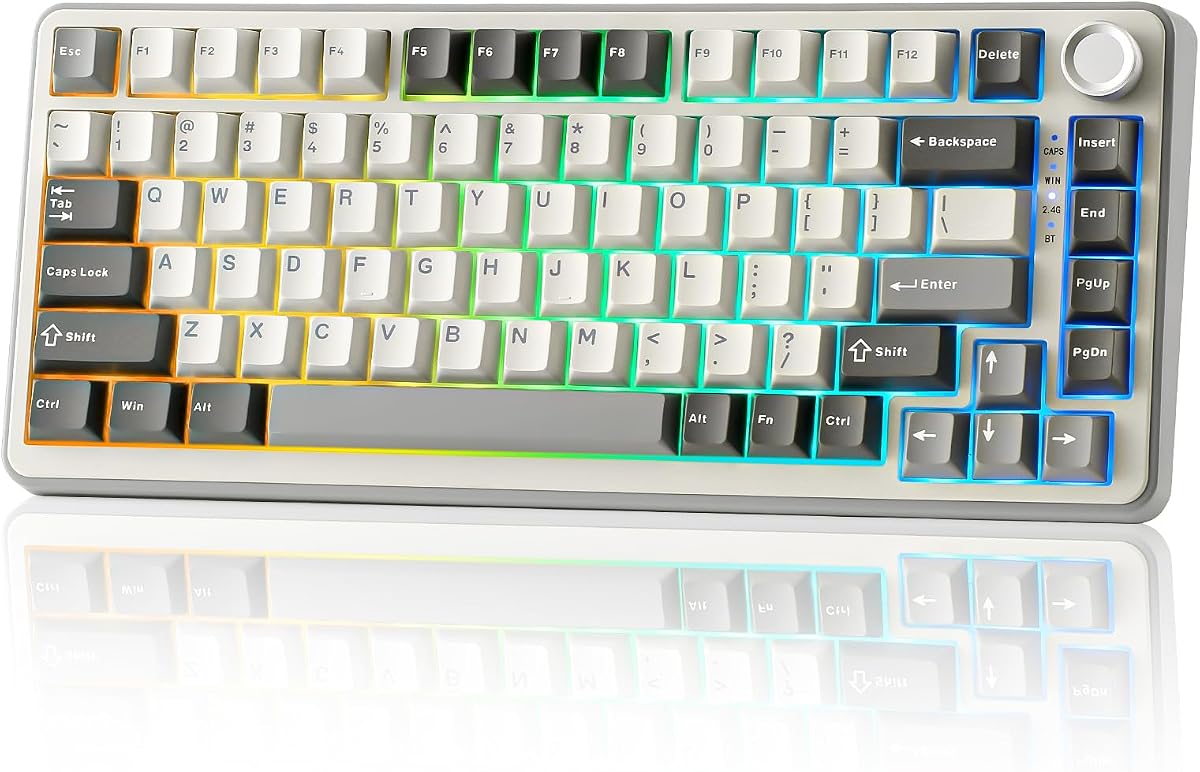

The AULA F75 Pro stands out as a top tier 75 percent mechanical keyboard option. With a strong 4.6 rating it offers a balanced mix of wireless flexibility and tactile performance. Its tri-mode connection supports Bluetooth 5.0 2.4GHz and USB-C making it versatile for many devices.
We may earn a commission when you buy through this link, at no additional cost to you.
Key strengths include its hot-swap capability which allows users to change switches without soldering. The pre-lubed Reaper switches deliver a smooth creamy sound right out of the box. Five layers of silencer material dampen noise ensuring a thocky sound profile that enthusiasts love.
One trade-off is that advanced RGB and screen features need the driver software which only runs on Windows in wired mode. However this is acceptable since most users only need basic functions wirelessly. The battery life is strong enough to last through long work weeks.
This keyboard is ideal for gamers and professionals who want a compact layout without losing arrow keys. It balances build quality and customization well. We recommend it for anyone seeking a reliable wireless option with premium features at a mid-range price point.
The F75 Pro connects to five devices simultaneously allowing quick switching between work and play.
Integrated silicone pads and PCB slotting reduce hollow sounds for a more premium feel.
We may earn a commission when you buy through this link, at no additional cost to you.
The RK ROYAL KLUDGE R75 brings a high-end gasket mount design to a competitive price point. Rated at 4.4 stars it delivers a solid typing experience with its advanced internal padding. The gasket structure helps isolate vibrations for a softer and quieter keystroke.
We may earn a commission when you buy through this link, at no additional cost to you.
It features pre-lubed Cream switches that are smooth and linear. This makes it excellent for fast gaming or continuous typing. The CNC metal knob adds a premium touch allowing easy volume control. Hot-swap sockets let you customize switches later without tools.
While it connects to three devices rather than five the connectivity is stable via Bluetooth or 2.4GHz. The 4000mAh battery ensures long usage between charges. RGB lighting enhances the setup but may be less vibrant when running on battery power.
This model suits users who prioritize tactile quality and build materials. It is a great alternative to more expensive brands. If you want a quiet and responsive keyboard for daily use this R75 is a strong contender.
The gasket mount uses five layers of sound-absorbing material for a refined feel.
Hot-swap sockets support 3-pin and 5-pin switches for future upgrades.
We may earn a commission when you buy through this link, at no additional cost to you.
The AULA S75 PRO is a standout choice for those seeking advanced features in a compact form. With a 4.6 rating it includes an LCD screen for status updates and GIF images. This screen adds a modern touch to desktop setups.
We may earn a commission when you buy through this link, at no additional cost to you.
Its tri-mode connectivity ensures reliable connection to up to five devices. The hot-swap base allows easy customization of switches. Pre-lubed stabilizers provide a solid typing feel. The screen can show time and connection mode without opening software.
However setting the screen image requires a Windows driver and a wired connection. This might inconvenience users who want full wireless control immediately. The battery life is good but using the screen drains power faster than standard RGB.
If you want a keyboard that feels custom and modern this S75 PRO is ideal. It bridges the gap between a toy and a tool. We recommend it for power users who love tech and visual customization.
The LCD screen displays time and battery status for quick glanceable info.
Five-device storage lets you switch between phone laptop and tablet easily.
We may earn a commission when you buy through this link, at no additional cost to you.
This R75 model from RK ROYAL KLUDGE offers a reliable mid-range experience. It scores 4.4 stars for consistent performance across daily tasks. The gasket mount structure reduces noise effectively making it quiet for shared spaces.
We may earn a commission when you buy through this link, at no additional cost to you.
The Cream switches are smooth and linear ideal for typing. Hot-swap sockets allow for future switch upgrades without soldering. The metal knob adds durability and a premium tactile feel. It connects via Bluetooth or 2.4GHz for flexibility.
While it lacks the five-device support of others it still handles common multitasking well. The 4000mAh battery is robust enough for long weeks. RGB effects are vibrant but may vary by mode.
This keyboard is perfect for users wanting quality without breaking the bank. It balances performance and price well. If you value sound dampening and switch flexibility this is a smart pick.
Five layers of padding and poron cotton reduce noise significantly.
The 1.2mm single-key slotted PCB ensures precise keystrokes.
We may earn a commission when you buy through this link, at no additional cost to you.
The V500 Retro Mechanical offers a unique look with a solid gasket mount design. Rated at 4.6 it delivers smooth typing with its pre-lubed White Jade switches. It is wired which ensures zero latency for gaming.
We may earn a commission when you buy through this link, at no additional cost to you.
The gasket mount adds cushioning for a softer feel. Five-layer padding improves acoustic quality. Hot-swap PCB allows easy switch changes. Full-key macro programmability enhances workflow for writers and coders.
Since it is wired you lose wireless freedom but gain stability. The retro styling might not suit modern minimalist desks. RGB lighting supports music rhythm effects for a fun visual touch.
This keyboard suits users who prefer a wired setup and value aesthetics. It is a great choice for gaming on a budget. We recommend it if you prioritize performance over portability.
Wired connection ensures instant response for competitive gaming needs.
Full-key macros allow complex command chains for efficiency.
We may earn a commission when you buy through this link, at no additional cost to you.
The MageGee 75% TKL is a straightforward compact keyboard. With a 4.1 rating it is reliable for basic gaming tasks. Its 87-key layout keeps arrow keys while saving space for mouse movement.
We may earn a commission when you buy through this link, at no additional cost to you.
Red linear switches offer smooth action without tactile bumps. Blue LED backlighting creates a classic gaming look. It is plug and play with no drivers needed. The metal panel adds durability.
Lack of wireless limits portability and modern setups. There is no software for macro customization. However it works on multiple systems like Windows and Linux easily.
This model fits users needing a simple reliable board quickly. It is great for students or small desks. If you want basic performance without extra features this is a solid pick.
The 87-key design fits easily in tight workspaces.
Full N-key rollover ensures accurate inputs during complex games.
We may earn a commission when you buy through this link, at no additional cost to you.
This 75% Gasket Wired keyboard offers premium features at a budget price. Rated at 4.6 it includes gasket mounting and hot-swap sockets. PBT keycaps resist wear better than ABS plastic.
We may earn a commission when you buy through this link, at no additional cost to you.
The gasket mount reduces vibration for a softer feel. Sound absorbing pads improve acoustics. RGB lighting is customizable via software. Hot-swap sockets let you change switches easily.
Wireless is missing which limits mobility. The software is basic compared to high-end models. However it covers essential needs for typing and gaming well.
Ideal for users who want quality without extra costs. It is a great entry point into gasket keyboards. If you need reliability and durability this is a smart buy.
PBT keycaps resist shine and wear for long-term use.
Gasket mounts reduce harsh impacts during typing sessions.
We may earn a commission when you buy through this link, at no additional cost to you.
The Keychron K2 V2 is a favorite for Mac users. Rated 4.4 stars it fits Apple devices with included keycaps. Bluetooth 5.1 ensures smooth connectivity across devices.
We may earn a commission when you buy through this link, at no additional cost to you.
White LED backlight is elegant for low-light typing. Super Red switches provide fast linear response. It connects to three devices and switches easily. Battery lasts up to 72 hours.
Lack of hot-swap limits future customization. LED lighting is not RGB so options are simpler. Still it is a trusted brand with good build quality.
This is perfect for Mac owners needing a reliable wireless board. If you prioritize brand reputation this is a great choice.
Extra keycaps allow easy switching between Mac and Windows layouts.
A large 4000mAh battery supports weeks of daily use.
We may earn a commission when you buy through this link, at no additional cost to you.
The YUNZII B75 PRO offers excellent wireless features for the price. With a 4.6 rating it uses Cocoa Cream V2 switches. Tri-mode connection supports Bluetooth 2.4GHz and USB-C.
We may earn a commission when you buy through this link, at no additional cost to you.
Gasket mount provides a premium typing feel. South-facing LEDs enhance backlight clarity. Hot-swap sockets allow easy upgrades. Multi-function knob adjusts volume and RGB.
Software support is limited to Windows which might hinder Mac users. However it is a great choice for most gamers. Build quality matches higher-end models.
This board is ideal for those seeking value without compromise. It balances performance and features well. If you need versatility this is a top recommendation.
Tri-mode connection ensures stable links to multiple devices.
The gasket mount reduces vibration for a softer keystroke.
We may earn a commission when you buy through this link, at no additional cost to you.
The Newmen GM326 is an affordable entry into mechanical keyboards. Rated 4.4 it offers hot-swap sockets and RGB lighting. Its compact design is ideal for travel or small desks.
We may earn a commission when you buy through this link, at no additional cost to you.
Hot-swap support allows switch customization easily. The multi-function knob helps control volume. RGB backlighting adds visual appeal. It works on Windows and Mac seamlessly.
Lack of wireless may limit some users. Build is basic but functional for daily use. It is a great budget pick for beginners.
This model suits those needing a portable and cheap option. If you want to try mechanical without spending much this works.
Hot-swap sockets are rare at this price point.
Detachable cable makes it easy to carry anywhere.
We may earn a commission when you buy through this link, at no additional cost to you.
The Womier SK80 stands out with its color multimedia screen. With a 4.7 rating it allows GIF images and status display. Gasket mount design ensures stable typing.
We may earn a commission when you buy through this link, at no additional cost to you.
South-facing diffusers provide even light. Hot-swap PCB supports custom switches. Music syncing adds fun visual effects. RGB is vibrant and adjustable.
Full customization needs drivers which can be cumbersome. Wired mode is best for settings. Still it offers a unique experience.
This is best for users who love visual flair. If you want a screen keyboard this is a top pick.
The screen shows connection modes and custom GIFs easily.
Gasket mount reduces noise for a cleaner sound.
We may earn a commission when you buy through this link, at no additional cost to you.
Choosing the right keyboard requires understanding key features that impact performance. This guide breaks down essential factors to consider before purchasing.
Wireless keyboards offer freedom from cables while wired ones ensure stable latency. Bluetooth and 2.4GHz are common wireless options. Check battery life if going wireless.
For competitive gaming wired is safer to avoid lag. For office use wireless reduces desk clutter.
Linear switches like Reds are smooth and fast. Tactile switches have a bump for feedback. Clicky switches are loud but satisfying.
Choose based on your preference for noise and feedback. Consider hot-swap options for future changes.
Hot-swap boards let you change switches without soldering. This is crucial for customization and repairs. It extends the keyboard's lifespan.
Always check if it supports 3-pin or 5-pin switches. This ensures you can upgrade later easily.
Gasket mounts offer a softer more premium typing feel. Plastic shells are lighter while metal ones feel durable. Check for sound dampening materials inside.
A solid build improves comfort during long typing sessions. Look for high-quality stabilizers to reduce rattle.
RGB lighting adds aesthetic value. South-facing LEDs look better through keycaps. Check if lighting modes are customizable via software.
Basic blue or white backlight is cheaper. RGB is for those who value visuals over cost.
Software allows macro programming and RGB settings. Some only work on Windows. Check compatibility if you use Mac.
Macros boost productivity for coding. Basic keys need no software. Decide if you need advanced customization.
Wireless models rely on battery capacity. 4000mAh is common for good life. RGB can drain battery faster.
Turn off lights to extend life. Long battery means less frequent charging. Check charging speed for convenience.
75% boards keep arrow and function keys. This saves space compared to full size. Ensure it fits your desk size.
Check if number row is included. Compact is better for small desks. Function keys help with media control.
To get the most out of your keyboard clean it regularly using compressed air. Dust can accumulate under switches and cause issues. Use a soft brush to remove debris from keycaps.
If your board is hot-swap try different switches to find your favorite feel. Always turn off the device before swapping to avoid damage. Use a puller included in most kits.
Store your keyboard in a dry place away from direct sunlight. Extreme heat or humidity can affect electronics. Use the included cable to keep it protected.
The 75% layout saves space by removing the number pad while keeping arrow and function keys. This provides a compact option that retains essential controls. It is perfect for those with limited desk space.
Yes modern wireless boards with 2.4GHz offer low latency comparable to wired ones. Just ensure you pick a model with good battery life. Avoid Bluetooth for competitive gaming due to potential lag.
Gasket mounts use rubber pads to isolate the plate. This creates a softer more bouncy typing feel. It also reduces vibration and noise significantly.
Check product details for hot-swap sockets. Usually they list 3-pin or 5-pin support. If unsure check the manufacturer website or manual for specifics.
Not strictly necessary it adds visual flair. Basic backlight is cheaper and simpler. Choose RGB only if you value aesthetics over budget.
Most switches last over 50 million keystrokes. This ensures durability for years. Look for rated lifespan in product specs before buying.
Yes many support both systems. Check for dedicated Mac keycaps or drivers. Some models like Keychron are optimized for Mac users.
Gamers prefer linear switches and low latency. Typists might like tactile feedback. Ensure the layout fits your daily needs and hand size.
We have highlighted ten excellent keyboards ranging from budget to premium options. Each offers unique strengths like gasket mounts or wireless modes. Your choice depends on your specific needs and style.
Prioritize features like hot-swap or battery life based on your workflow. A good keyboard improves daily productivity and comfort. Consider where you will use it most.
Always check current pricing as deals change frequently. Buying guides help narrow choices but personal preference matters most. We hope this list helps you find the perfect board.