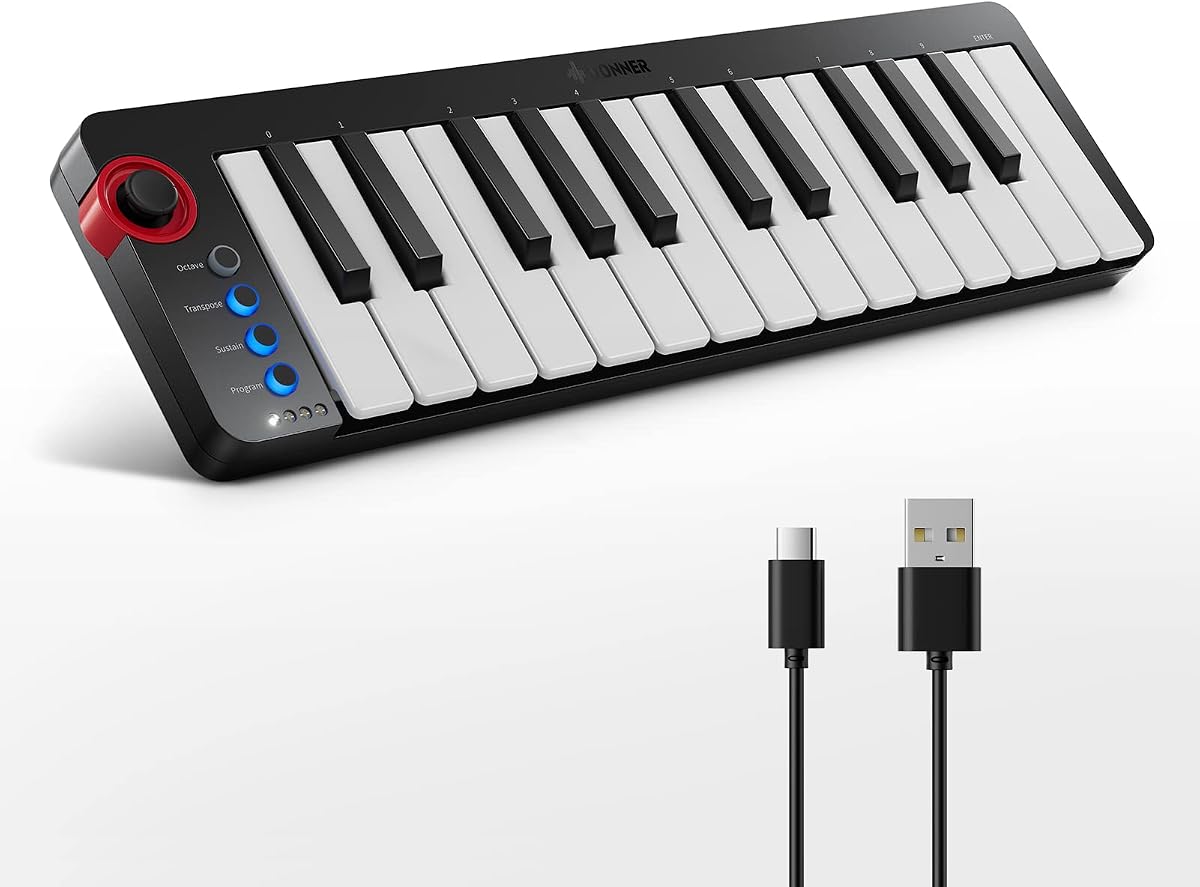
Donner Mini MIDI Keyboard N-25
4.1Editor score
Compact 25 mini keys
Light-up rocker buttons
Includes 40 teaching courses
This guide compares the top 25 Key MIDI Controllers for production and performance, evaluating features, compatibility, and value for musicians in 2026.
Finding the right 25 Key MIDI Controller can transform your music production workflow significantly. These compact devices offer essential controls for triggering samples, playing melodies, and managing software instruments without taking up much desk space. Whether you are a beginner or a seasoned producer, selecting the best model depends on your specific needs and budget constraints.
We have carefully evaluated ten leading options available on the market today to help you make an informed decision. Our comparison focuses on build quality, key responsiveness, software integration, and additional features like pads and knobs. Each product was analyzed based on user feedback and technical specifications to ensure accuracy and reliability in our recommendations.
Every pick in this list highlights unique strengths that cater to different styles of music creation and performance. You will find detailed insights into what each controller offers, from arpeggiators to DAW integration capabilities. Please note that prices and availability can change frequently, so verify current details before making your final purchase decision online.
4.1Editor score

4.6Editor score

4.6Editor score
The following table provides a side-by-side overview of all ten controllers discussed in this guide. It highlights key specifications and unique attributes to help you quickly identify which model aligns best with your production requirements and workflow preferences.


The Akai Professional MPK Mini MK3 stands out as a top choice for producers looking for a versatile compact controller. It has received consistently high ratings from users who appreciate its responsive keys and durable build quality. The integration of MPC-style pads makes it particularly strong for drum programming and sample triggering workflows.
We may earn a commission when you buy through this link, at no additional cost to you.
One of its key strengths is the comprehensive control surface it offers despite its small footprint. The eight backlit velocity-sensitive pads provide tactile feedback that is crucial for precise timing during beat creation. Additionally, the four-way thumbstick allows for dynamic pitch and modulation control without needing to reach for separate knobs.
However, some users might find the mini keys less comfortable for extended playing sessions compared to full-sized keyboards. This is a common trade-off with portable controllers but does not significantly detract from its overall performance capabilities. The learning curve for mapping all features might also require some initial setup time for new users.
This controller is highly recommended for anyone serious about music production who needs a reliable tool for both studio and live use. Its strong software ecosystem and universal compatibility ensure it remains relevant as your skills evolve. Ultimately, it balances portability with professional features better than most competitors in its class.
The velocity backlit velocity-sensitive MPC-style pads offer precise triggering for drums and samples, enhancing your beat-making workflow significantly.
Eight 360-degree knobs and a thumbstick give you extensive control over virtual instruments and FX parameters without touching the screen.
We may earn a commission when you buy through this link, at no additional cost to you.
The Donner Mini MIDI Keyboard N-25 is an excellent entry point for beginners who want to explore music production without a large financial commitment. Its compact design makes it easy to fit into small spaces or travel bags. The inclusion of teaching courses adds significant value for those new to the basics of melody creation.
We may earn a commission when you buy through this link, at no additional cost to you.
A standout feature is the light-up rocker buttons which provide visual feedback during use. This can be particularly helpful for learners trying to understand rhythm and timing without relying solely on audio cues. The velocity-sensitive keys ensure that dynamics are captured accurately, allowing for expressive performances even on a budget device.
While the build quality is functional, it does not feel as robust as higher-end models. This might be a concern for heavy daily use but is acceptable given the price point. The feature set is basic compared to premium options, lacking advanced controls like touch strips or extensive knob arrays.
This controller is ideal for students or hobbyists looking for a simple tool to start composing music. It works seamlessly with popular DAWs and mobile apps, making it versatile for different setups. For the price, it offers a complete package that encourages creativity without overwhelming the user with complexity.
The included 40 entertaining keyboard-teaching courses help beginners progress from novice to advanced levels with structured learning.
Light-up buttons provide a fun visual display of your playing, enhancing engagement during practice sessions.
We may earn a commission when you buy through this link, at no additional cost to you.
The Novation Launchkey Mini 25 MK4 is designed for producers who demand premium features in a portable package. It receives high marks for its responsive keybed and sophisticated integration with major digital audio workstations. The inclusion of Scale Mode is a game-changer for musicians who want to create melodies without worrying about music theory.
We may earn a commission when you buy through this link, at no additional cost to you.
One of its most impressive aspects is the set of sixteen FSR drum pads which support polyphonic aftertouch. This allows for complex expression on drum hits and chords, adding depth to live performances and recordings. The controller comes bundled with Ableton Live Lite and other software, providing immediate value upon purchase.
The main drawback is the higher price compared to entry-level models, which might be a barrier for some buyers. Additionally, while it works with other DAWs, its strongest optimization is with Ableton Live, which could be limiting for others. However, the build quality justifies the cost for professional environments.
This controller is best suited for intermediate to advanced users who want a reliable tool for both studio production and live shows. Its intuitive workflows and high-quality components ensure a smooth experience during creative sessions. If you value expressiveness and software synergy, this model is a strong investment for your studio setup.
Scale Mode ensures you never hit a wrong note, allowing you to trigger lush chords from a single key effortlessly.
Sixteen responsive FSR pads with polyphonic aftertouch serve as step sequencers and clip launchers for versatile control.
We may earn a commission when you buy through this link, at no additional cost to you.
The Akai Professional LPK25 is a minimalist choice for users who prioritize simplicity and portability above all else. It features a sleek design that fits perfectly alongside other studio equipment without cluttering the workspace. The responsive keys allow for dynamic performance, making it suitable for writing melodies and bass lines effectively.
We may earn a commission when you buy through this link, at no additional cost to you.
A key feature is the built-in arpeggiator which provides creative control over sound sources using just a USB cable. This tool helps users generate complex patterns quickly, enhancing productivity during composition. The eight programmable preset slots allow you to recall mappings instantly, streamlining your workflow significantly.
One limitation is the lack of drum pads, which may restrict users who rely heavily on pad-based workflows. The control surface is basic compared to other models, focusing primarily on keyboard functionality. However, this simplicity can be a benefit for those who do not need extra hardware controls.
This controller is ideal for songwriters and performers who want a reliable keyboard for travel and quick inspiration. Its universal compatibility with popular DAWs ensures it works seamlessly in various environments. For users valuing a clean setup and ease of use, this model delivers excellent performance at an accessible price point.
Use the built-in arpeggiator and clock for creative control of any sound source like instruments or synthesizers.
Eight programmable preset slots allow you to instantly recall your mappings for DAWs and virtual instruments.
We may earn a commission when you buy through this link, at no additional cost to you.
The Akai APC Key 25 MK2 is tailored specifically for users of Ableton Live who need extensive clip launching capabilities. Its bright 5×8 RGB pad matrix offers visual color feedback for launching clips instantly, making it perfect for live performances. The controller is pre-mapped for seamless integration with Ableton 11.2.7 onwards out of the box.
We may earn a commission when you buy through this link, at no additional cost to you.
One of its strongest features is the set of forty RGB pads which allow you to trigger loops, vocals, and melodic samples easily. The directional arrow buttons help you navigate large groups of clips quickly, enhancing workflow efficiency during concerts. Eight assignable rotary knobs provide control over volume, pan, and effects automation.
The main drawback is that it is less versatile for other DAWs compared to more general-purpose controllers. Additionally, the keys are not as responsive as some dedicated keyboard controllers, which might limit expressive playing. However, for Ableton users, these limitations are often outweighed by the specific integration benefits.
This controller is the top recommendation for live performers and producers who use Ableton Live as their primary tool. It bridges the gap between a traditional keyboard and a clip launcher effectively. If you want to maximize your ability to launch sounds and control sessions live, this device offers unmatched value.
The 40 RGB pads launch clips in Ableton Live with visual feedback for instant creativity during performances.
Four directional arrow buttons move around large groups of clips to access loops and sounds instantly.
We may earn a commission when you buy through this link, at no additional cost to you.
The Akai MPK Mini Play MK3 offers a unique standalone experience for musicians who want to create without connecting to a computer. It features a built-in speaker and OLED display that provide immediate feedback on sounds and settings. This makes it perfect for jamming on the go or when a DAW is not available.
We may earn a commission when you buy through this link, at no additional cost to you.
A key feature is its ability to run on batteries, allowing you to power up anywhere with ease. It includes over 100 internal drum and instrument sounds, so you can start making music immediately. The dynamic keybed and velocity-sensitive pads ensure that your performances are expressive and accurate.
However, relying on internal sounds might limit you compared to using full software instruments. The battery is not included, which is a minor inconvenience for new users. Additionally, software control features are secondary to its standalone capabilities, which may not suit professional studio workflows.
This controller is ideal for songwriters and kids who need a self-contained tool for inspiration. It captures the essence of MPC control in a portable form factor. If you value independence from your computer and want instant creative access, this model is a fantastic choice for portable music making.
Power up with batteries or USB mains to take it on the go without needing a computer.
Over 100 internal sounds allow you to start creating instantly without external software.
We may earn a commission when you buy through this link, at no additional cost to you.
The M-VAVE 25 Key Controller stands out for its wireless capabilities, allowing you to connect to devices without cables. It features a 2000 mAh battery that lasts for about 16 hours, providing freedom to create anywhere. This is ideal for performers who need a portable setup that works on a stage or cafe.
We may earn a commission when you buy through this link, at no additional cost to you.
A key feature is the touch stripes for pitch bend and modulation which offer modern control options. The eight RGB backlit pads and eight assignable rotary encoders provide extensive control over your software plugins. This ensures you have the necessary tools for mixing and tweaking synth controls efficiently.
One limitation is that wireless connectivity can sometimes be less stable than wired USB connections. The build quality feels somewhat plastic which might not appeal to professional users seeking heavy-duty gear. However, for casual and intermediate users, these factors are often acceptable given the price.
This controller is great for musicians looking to reduce cable clutter in their setup. It works with major DAWs and supports touch features that enhance expression. If you value wireless freedom and modern touch controls, this model offers a compelling package for modern music production.
Connect wirelessly with Bluetooth and work for about 16 hours on a single charge for studio or travel.
Touch stripes for pitch bend and eight knobs provide dynamic control over your plugins.
We may earn a commission when you buy through this link, at no additional cost to you.
The Rhymo 25 Key Controller offers modern connectivity options with USB-C and Bluetooth MIDI support. This slim and compact design is powered directly via USB-C, making it easy to use with tablets and computers. The X-Y joystick provides dynamic pitch and modulation control for expressive performances.
We may earn a commission when you buy through this link, at no additional cost to you.
A key feature is the arpeggiator with latch and multiple modes that allow for creative musical ideas. The velocity-sensitive keyboard delivers dynamic playing suitable for beginners and experienced producers alike. Additionally, the sustain pedal interface allows for professional performance expressions when needed.
One drawback is the basic build quality which may not withstand heavy daily handling well. The software bundle is limited compared to premium models, requiring you to source your own sounds. However, the connectivity options and features make it a strong contender for budget-conscious users.
This controller is ideal for digital nomads and mobile producers who need flexible connection types. It supports major DAWs and systems out of the box with no drivers needed. If you value modern ports and Bluetooth functionality, this model offers excellent utility for its price range.
USB-C and Bluetooth MIDI allow hassle-free connection with Mac, PC, and iOS devices.
X-Y joystick and sustain pedal input ensure expressive control during your tracks.
We may earn a commission when you buy through this link, at no additional cost to you.
The Arturia MiniLab 3 is designed to adapt to your personal workflow and style seamlessly. It offers an easy keyboard controller experience that lets you control instruments and adjust tracks with a fluid movement. The premium velocity-sensitive keys provide a tactile experience that inspires creativity without frustration.
We may earn a commission when you buy through this link, at no additional cost to you.
A key feature is the eight pad drums and four faders that give you comprehensive control over your mix. The design encourages hands-on interaction so you can forget you even need a mouse for certain tasks. This adaptability makes it suitable for a wide range of production styles and genres.
One potential drawback is the minimalist design which might feel limiting to users who prefer extensive knob matrices. The visual layout is clean but may require time to get used to for those coming from heavier units. However, the simplicity aids in focus and speed during creation.
This controller is best for creators who value workflow and ergonomics over complex feature sets. It supports all major DAWs and integrates well with standard software. If you want a tool that adapts to your habits rather than forcing a rigid workflow, this model is an excellent choice.
MiniLab 3 adapts to your needs and style for a fluid music-making experience.
Four faders and eight pads allow you to mute tracks and mix without using a mouse.
We may earn a commission when you buy through this link, at no additional cost to you.
The Akai MPK Mini MK3 Black offers the same robust features as the standard version in a classic black finish. It maintains the high-quality build and responsive keys that have made the MPK series a favorite among producers. The included Splice subscription adds value by unlocking a vast sample library for your projects.
We may earn a commission when you buy through this link, at no additional cost to you.
A key feature is the integration with Native Kontrol Standard which streamlines control over your presets. The eight velocity-sensitive pads and four-way thumbstick provide the essential tools for beat making and live performance. Its design fits seamlessly into any studio setup without distracting from the visual environment.
One limitation is that it shares many features with the white version which might limit differentiation for color seekers. The price point is slightly higher than entry-level models, but the software bundle justifies it. This makes it a solid middle-ground option for serious hobbyists.
This controller is ideal for those who want a proven tool with modern connectivity and software perks. It supports all major DAWs and offers reliable mapping out of the box. If you prefer a classic look with powerful internals, this model delivers consistent performance for music production.
Get two months of Splice to unlock the ultimate sample library with your purchase.
Eight knobs and a thumbstick offer complete command of virtual instruments and FX.
We may earn a commission when you buy through this link, at no additional cost to you.
Choosing the right controller involves assessing several factors that affect your workflow and creative process. Consider these elements to narrow down your options and find a device that supports your musical goals.
The quality of the keys is crucial because it determines how expressive your playing can be. Look for velocity-sensitive keys that respond to how hard you press, allowing for dynamic changes in volume and tone. Semi-weighted keys may offer better feedback but add weight, while mini keys maximize portability but reduce physical comfort.
Prioritize a keybed that feels comfortable for your hands to avoid fatigue during long sessions. Testing in a store if possible ensures the tactile response matches your expectations before buying.
Seamless integration with your Digital Audio Workstation saves time and enhances workflow efficiency. Some controllers come pre-mapped for specific software like Ableton or Logic, which means you do not have to spend hours setting up controls. Additionally, check if the device includes any free software or plugins to add value to your purchase.
Ensure the controller supports the DAWs you use regularly to avoid compatibility issues during production. A good software bundle can often tip the balance when choosing between similar hardware options.
If you plan to travel or perform live, the size and power requirements of the controller are vital. USB-powered models are convenient but require a computer connection, whereas battery-powered options offer more independence. USB-C and Bluetooth connectivity are modern features that improve convenience and reduce cable clutter in your setup.
Consider where you will use the controller most often to decide on portability features. A compact and lightweight design is ideal for on-the-go creators while larger units may suit studio environments.
Additional controls like drum pads, knobs, and faders expand the range of what you can create. Pads are essential for beat-making and triggering samples while knobs and faders help with mixing and automation tasks. The number and quality of these controls depend on your production style and how much tactile interaction you prefer.
Look for controls that are assignable so you can map them to your specific software needs. A versatile control surface can grow with your skills and provide more creative freedom as you advance.
Your budget plays a significant role in determining which features you can access in a controller. Entry-level models offer basic functionality at a low price point while premium options include advanced features and better build quality. Always weigh the cost against the included software and long-term utility to get the best value.
Investing in a slightly more expensive model can save money later by avoiding the need to upgrade sooner. Balance cost with durability and features to ensure a smart financial decision.
Consider whether the controller allows for future expansion through software updates or add-on hardware. Some manufacturers release firmware updates that add new features or improve compatibility with new versions of software. A controller that supports a wide range of MIDI channels and protocols will remain useful as technology evolves.
Choose a device that supports modern standards like USB-C and MIDI 2.0 if possible for better longevity. Future-proofing ensures your investment remains relevant as your production needs change.
The physical layout of the controller impacts how naturally you can reach and use different controls during performance. Look for a design that keeps your hands in comfortable positions to reduce strain over time. Clear labeling and intuitive grouping of controls help you focus on creativity rather than figuring out the interface.
A well-organized layout can improve your speed and reduce errors during live performances. Test the ergonomics by simulating your typical workflow to ensure it feels right.
Reading reviews from other users provides insight into real-world performance and potential issues. Look for common praises and complaints to see if a model fits your specific needs and expectations. A strong community and active developer support ensure that you can find tutorials and troubleshooting help easily.
Prioritize brands with a history of reliable customer service and regular updates. This support network can be invaluable when you encounter technical challenges or need advice.
Start by connecting your controller to your computer or device using the appropriate cable or Bluetooth connection. Ensure your DAW is running and set to accept MIDI input from the specific device. Most modern controllers are plug-and-play and do not require additional drivers to function properly.
Take time to explore the software that comes with your device and learn how to map controls to your favorite plugins. This customization allows you to tailor the interface to your workflow and improve efficiency. Refer to the user manual for specific steps on setting up arpeggiators or drum pads for your projects.
To maintain your controller, keep it in a clean and dry environment to protect it from dust and moisture. Wipe the keys and pads with a soft dry cloth regularly to remove oils and debris. Avoid placing heavy objects on the device and transport it in a padded case if you travel frequently.
Most modern 25 Key MIDI controllers are class compliant which means they work without extra drivers on major operating systems. You can simply plug the device into your computer and your DAW will recognize it automatically. However, some specific software features might require installing an editor application to map controls manually.
Many 25 Key MIDI controllers support USB connection which works with tablets and phones using the right adapter. Some models also feature Bluetooth MIDI capabilities that allow wireless connection to mobile apps. Always check the specifications to confirm compatibility with iOS or Android devices before purchasing.
Velocity-sensitive keys respond to how hard you press them allowing for dynamic changes in volume and tone during performance. Non-velocity keys play at a fixed volume regardless of pressure which limits expressiveness. For serious music production, velocity sensitivity is an essential feature to capture realistic performances.
Yes, many professional producers use 25 Key MIDI controllers due to their portability and control features. While they lack the range of full-sized keyboards, they offer enough functionality for writing melodies and managing instruments. The additional pads and knobs on many models make them versatile for various production tasks.
The arpeggiator feature allows you to create musical patterns by playing chords or single notes. You can often adjust the speed range and style of the arpeggio using dedicated buttons on the controller. This tool is helpful for creating complex sequences quickly without needing to program every note manually.
Many 25 Key MIDI controllers come bundled with free versions of DAWs and virtual instruments to get you started. Packages often include Ableton Live Lite or similar software plus sound packs from partners like Native Instruments. Always check what software is included with the specific model you are considering.
First check that the USB cable is functioning and the connection is secure to your computer. Restarting your DAW and checking MIDI input settings often resolves recognition issues. If problems persist try connecting to a different computer or port to isolate whether the issue is with the device or system.
We have explored ten top-rated 25 Key MIDI controllers that offer unique benefits for different music creation needs. Whether you need budget-friendly entry tools or advanced performance features there is a strong option available for everyone. Our top picks highlight the best balance of portability functionality and value for 2026.
Prioritize features like key sensitivity software integration and connectivity to match your workflow. A controller that supports your specific production style will help you create music more efficiently and expressively. Consider what tasks you perform most often to decide which controls matter most to you.
Remember to verify current pricing and availability as these factors can change regularly on retail sites. Investing time in selecting the right tool now will save you frustration and enhance your creative output. We hope this guide helps you find the perfect controller to bring your musical ideas to life.