
AJAZZ AK029 Magnetic Switch One Handed Gaming Keyboard
4.5Editor score
Hall Effect Rapid Trigger
8KHz polling rate speed
Compact 29-key layout
Discover the top left handed gaming keyboards for 2026. We compare ergonomic designs, key layouts, and performance features to find your perfect match.
Finding the right input device is crucial for left handed gamers who need precision and comfort during long sessions. Standard keyboards often force awkward hand positions that can lead to fatigue over time. This guide explores specialized options designed specifically for southpaw users to enhance their gaming experience significantly.
We evaluated ten distinct products ranging from compact keypads to full layout mechanical keyboards with left sided numpads. Each entry was assessed based on build quality, connectivity options, switch types, and overall ergonomics for left hand use. Our goal is to help you find a device that fits your specific gaming style and budget requirements today.
Every recommendation includes detailed insights into unique features like Hall Effect switches or wireless connectivity. Please note that product availability and pricing can fluctuate frequently on major retail platforms. Always verify current specifications before making a purchase to ensure you get the exact model you expect for your setup.
4.5Editor score

4.6Editor score

4.6Editor score
This side by side comparison highlights the key differences between each model to help you make an informed decision quickly.



The RK ROYAL KLUDGE L98 stands out as the top pick for left handed gamers seeking a full keyboard experience. It features a unique Southpaw layout that moves the numpad to the left side, freeing up space for mouse movement. With a rating of 4.6 stars, users appreciate the balance between function and comfort during long gaming marathons.
We may earn a commission when you buy through this link, at no additional cost to you.
This model uses a gasket-mounted structure with five sound-dampening layers for a quiet and smooth typing experience. It supports tri-mode connectivity via Bluetooth, 2.4GHz wireless, and USB-C. The massive 8000 mAh battery ensures you can game for days without needing a recharge, making it ideal for wireless setups.
While the wireless mode is convenient, there is a minor latency compared to wired connections which might affect competitive players. The size is also larger than compact keypads, so desk space should be considered. However, these trade-offs are acceptable given the versatility and premium build quality offered at this price point.
Gamers who want a traditional keyboard feel without sacrificing left handed ergonomics should strongly consider this device. The hot-swappable PCB allows for easy customization of switches to suit personal preference. It is the most well-rounded option on this list for serious players who need reliability and comfort.
Relocating the numpad to the left allows the right hand to move freely for mouse control without interference from keys.
Five layers of internal padding and a gasket mount ensure a solid feel with minimal hollow sounds during intense sessions.
We may earn a commission when you buy through this link, at no additional cost to you.
The RedThunder One Handed Gaming Keyboard is a cost-effective solution for those who want a dedicated one-handed device without breaking the bank. With 35 anti-ghosting keys, it covers essential inputs for most PC games. Users give it a solid 4.4 rating for its ability to streamline complex gameplay actions into a single hand.
We may earn a commission when you buy through this link, at no additional cost to you.
It features macro recording capabilities via simple key combinations, allowing you to program complex sequences easily. The ergonomic design includes a wrist rest to reduce fatigue during long sessions. RGB backlighting adds a nice visual touch with static or breath modes to match your setup.
The trade-off here is the lack of mechanical switches which may not provide the same tactile feedback as premium options. The build is primarily plastic which feels less durable than aluminum alternatives. However, for the price, it offers excellent functionality for casual gamers or those testing one-handed setups.
This device is perfect for users on a tight budget or those needing a portable option for LAN parties. The driver-free operation means it works immediately on any system without software. If you need basic one-handed control without extra features, this is a reliable choice to consider.
Built-in macro recording lets you assign complex commands to single keys for faster gameplay responses.
The compact size makes it easy to store in a bag or transport to different gaming locations seamlessly.
We may earn a commission when you buy through this link, at no additional cost to you.
The AZERON Gaming Keypad Cyborg II offers a unique solution by integrating a Hall Effect thumbstick with programmable keys. This allows for smooth analog movement in compatible games which digital keys cannot match. It holds a 4.3 rating from users who value precision and advanced customization in their gaming peripherals.
We may earn a commission when you buy through this link, at no additional cost to you.
The thumbstick eliminates stick drift common in traditional joysticks by using magnetic sensors. You can map zones for directional inputs and fine-tune sensitivity settings through dedicated software. The keypad itself is 3D printed for custom fit and comfort, ensuring it adapts to your hand size rather than forcing your hand to fit it.
Despite its innovation, the price is significantly higher than standard keyboards and the setup requires time to configure properly. It is not plug and play like simpler devices, so users need patience to maximize its potential. However, the performance benefits for FPS and simulation games are unmatched by other options.
This keypad is ideal for competitive gamers who need every advantage and are willing to invest in a custom setup. The ability to function as a mouse and keyboard hybrid is a game changer for specific titles. If you prioritize movement precision over budget, this device is a top-tier recommendation.
Hall Effect technology enables 360-degree movement without drift for superior control in simulation and racing games.
Adjustable parts and 3D printing allow the keypad to match your specific hand dimensions for maximum comfort.
We may earn a commission when you buy through this link, at no additional cost to you.
The AZERON Keyzen takes the premium option to a new level with the addition of genuine Cherry MX switches. This ensures a high-quality tactile feel that mechanical keyboard fans crave while retaining the benefits of a one-handed layout. With a 4.6 rating, it is praised for its durable construction and adjustable ergonomic design.
We may earn a commission when you buy through this link, at no additional cost to you.
It features a 360 Hall-Effect joystick for drift-free movement and customizable RGB lighting across profiles. The build uses modular components that can be replaced or upgraded over time, extending its lifespan significantly. Multiple onboard profiles let you save different layouts directly to the device for instant access during gameplay.
The main drawback is the cost which places it out of reach for many average buyers. It also requires some initial calibration and setup to fully utilize its potential capabilities. However, for enthusiasts who want the best mechanical switches combined with advanced control features, this is the ultimate tool.
This device suits users who demand the highest build quality and switch performance in a compact form factor. The combination of Cherry MX switches and a magnetic joystick is rare in the market today. If budget is not a constraint, the Keyzen offers a luxurious and highly functional gaming experience.
Choose between Red Brown or Blue switches to tailor the tactile feedback to your specific typing and gaming needs.
Replaceable components mean you can upgrade parts as new technology emerges without replacing the entire unit.
We may earn a commission when you buy through this link, at no additional cost to you.
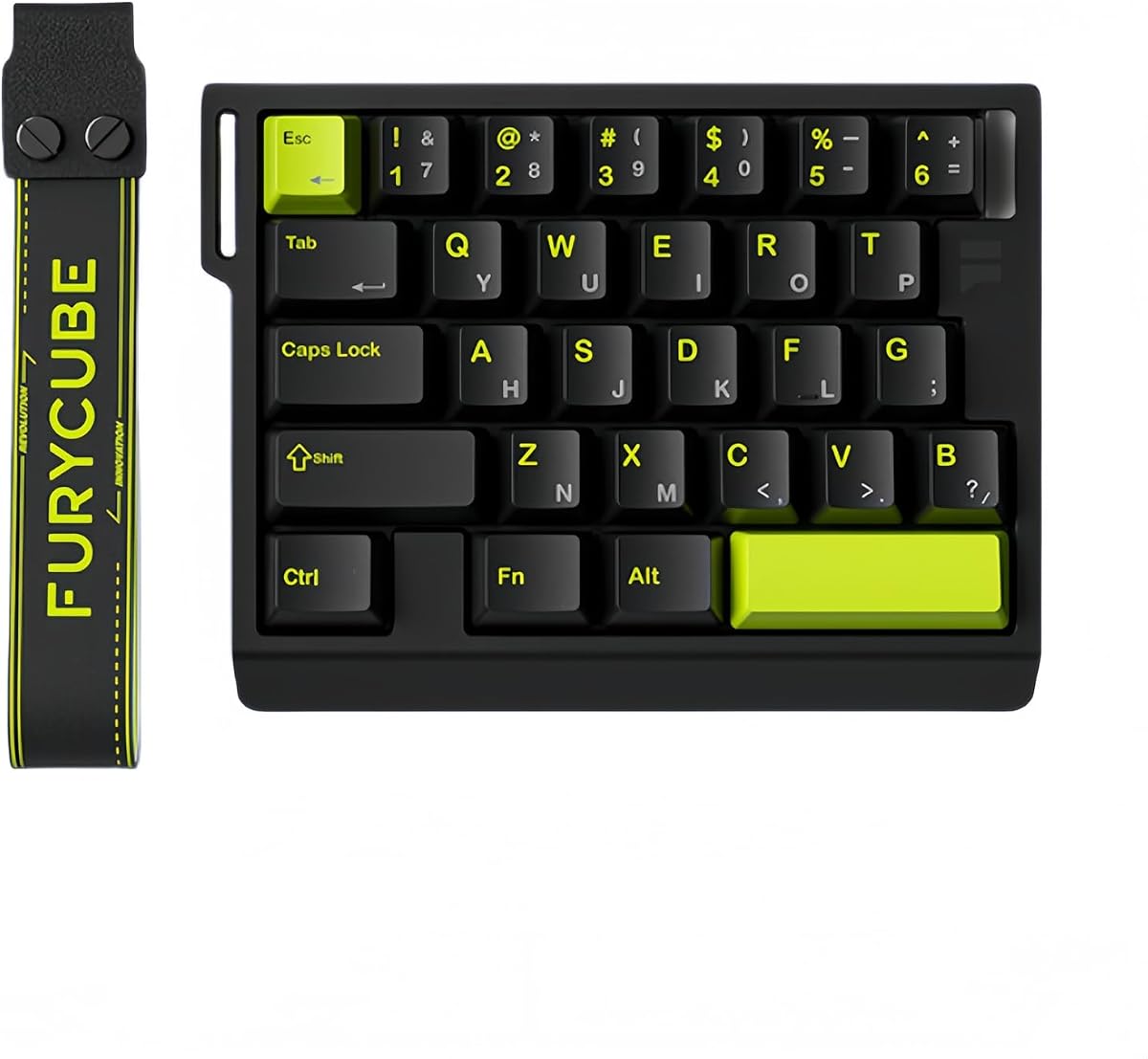
The AJAZZ AK029 delivers high-end magnetic switch technology at a budget-friendly price. It uses Hall Effect sensors for ultra-precise actuation with rapid trigger support. This ensures key resets happen instantly which is critical for competitive FPS games requiring fast movement corrections. It holds a 4.5 rating for performance reliability.
We may earn a commission when you buy through this link, at no additional cost to you.
It features advanced SOCD and DKS technologies to prevent movement conflicts and allow dynamic keystrokes. The 8KHz polling rate ensures every input is registered with near-zero latency. Built with an aluminum alloy plate it feels sturdy and premium despite its low cost. The layout is compact to maximize mouse space.
The main limitation is the limited key count which may not cover all needs for MMO games without macros. It is also strictly wired so you miss out on wireless freedom. These trade-offs are minor considering the price and performance it offers for serious gamers on a budget.
This keypad is ideal for FPS players who need speed and precision without spending a fortune. The rapid trigger feature sets it apart from standard membrane or mechanical alternatives. If you prioritize raw performance and build quality over extra keys, this is an exceptional value pick.
Rapid trigger technology eliminates actuation dead zones for faster response times during high intensity play.
Integrated SOCD and DKS features ensure your inputs are fair and recognized by competitive gaming anti-cheat systems.
We may earn a commission when you buy through this link, at no additional cost to you.
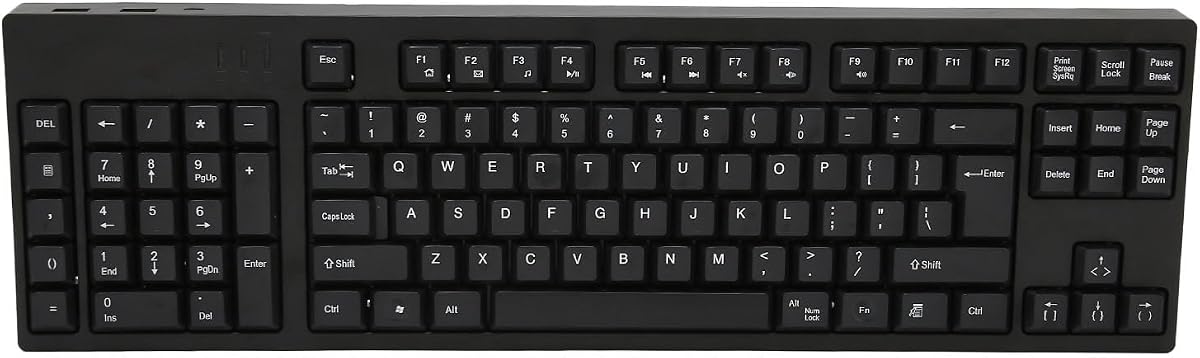
This Ergonomic Left Handed Keyboard focuses on productivity and comfort for users with shoulder or wrist strain. It uses patented Natural_A keycaps to improve posture and reduce fatigue over long typing sessions. While designed for business and accounting, the 4.4 rating shows it is well liked by general users seeking ergonomic solutions.
We may earn a commission when you buy through this link, at no additional cost to you.
It includes eight multimedia hotkeys for quick access to common functions like volume or browser controls. The layout places the numpad on the left to keep the right hand free for a mouse. It is compatible with Windows and Mac systems and uses simple plug and play connections without extra software.
The lack of RGB lighting or mechanical switches means it is not designed for fast gaming but it is comfortable for long work hours. The aesthetic is older compared to modern gaming peripherals. For those needing a practical ergonomic solution for daily tasks, this remains a solid choice.
This keyboard is best for office workers or students who need to type extensively without causing discomfort. It is a practical tool for those who prioritize health and posture over flashy gaming features. If you need a reliable input device for business use, this model fits the bill well.
Patented keycaps and layout help prevent carpal tunnel and shoulder strain during extended work days.
Multimedia hotkeys provide quick access to common tasks improving workflow speed without leaving your desk.
We may earn a commission when you buy through this link, at no additional cost to you.
The Keychron C0 HE 8K brings Hall Effect switch technology to a web-based configuration platform. This allows you to customize mapping and lighting without installing heavy software on your PC. With a 4.2 rating, it is appreciated by streamers and power users who need quick access to macro commands.
We may earn a commission when you buy through this link, at no additional cost to you.
It features 35 programmable keys for MMO and MOBA gameplay with per-key RGB lighting. The 8K polling rate and rapid trigger support ensure responsiveness for competitive gaming. It is fully compatible with both Windows and macOS, making it versatile for different system setups.
The reliance on a web browser for settings might be less convenient for some users who prefer a dedicated app. It also lacks onboard memory for profiles so settings are saved in the browser. Despite these points, the ease of setup and cross-platform support make it a strong contender.
This keypad is great for streamers who need to control OBS scenes or shortcuts easily. It is also suitable for gamers who want modern switch tech without complex drivers. If you value simplicity and web-based tools, the Keychron C0 HE 8K is an excellent choice.
Web-based config saves storage space and works on any system without installing extra local drivers.
Perfect for triggering scenes or shortcuts during live streams with dedicated macro functionality.
We may earn a commission when you buy through this link, at no additional cost to you.
This Left Handed Keyboard features a full 109-key layout with the numpad on the left side. It is designed for business and design tasks where a full numeric input is necessary. With a perfect 5.0 rating, users report high satisfaction with its ergonomic design and ease of use for daily work.
We may earn a commission when you buy through this link, at no additional cost to you.
It connects via Micro USB and includes two extra USB ports for peripherals like mice or drives. The ergonomic layout relieves hand fatigue by allowing a more natural positioning of the right hand. It requires no drivers, so it is ready to use immediately upon connection to your computer.
While it has a high rating, the plastic build feels less premium than mechanical alternatives and it is wired only. This limits portability and flexibility compared to wireless options. However, for stationary office setups where full numeric keys are needed, it performs its function reliably.
This device is ideal for accountants or designers who need frequent numeric access and left-handed comfort. It is a simple solution for work environments without needing gaming features. If you require a full layout keyboard for productivity with left-handed ergonomics, this is a solid option.
A complete 109-key layout ensures you have all essential keys for data entry and design work.
Included extra USB ports provide convenient connectivity for additional peripherals without separate hubs.
We may earn a commission when you buy through this link, at no additional cost to you.
The FKZ M30HE offers hot-swappable switches alongside rapid trigger magnetic technology. This allows users to change switches easily without soldering which is a rare feature at this price. With a 4.0 rating, it is a niche choice for those who want customization in a one-handed gaming setup.
We may earn a commission when you buy through this link, at no additional cost to you.
It supports adjustable actuation points from 0.1 to 3.4mm for precise control over key triggers. The web driver allows for remapping keys and adjusting lighting effects directly from a browser. The north-facing LEDs provide better visibility when using keycaps which blocks light in other orientations.
The lower rating suggests some users find the software less intuitive than competitors. Build quality is decent but does not match the premium feel of other brands. However, the hot-swap feature adds significant value for hobbyists who want to try different switches.
This keypad is best for enthusiasts who want to experiment with different switch types. If you value the ability to change switches easily, this model offers unique flexibility. For budget conscious users seeking customization, the M30HE is a viable option to consider.
Hot-swap capability lets you change switches to suit your preference without soldering tools or advanced skills.
North facing LEDs ensure backlight shines through keycaps effectively for better visibility in dim settings.
We may earn a commission when you buy through this link, at no additional cost to you.
The A4tech Ergonomic Left Handed Keyboard is a legacy model focused on health and productivity. It uses patented natural layouts to reduce back and shoulder strain over time. With a 4.3 rating, it remains popular for those who prefer traditional keyboards over gaming devices.
We may earn a commission when you buy through this link, at no additional cost to you.
It includes eight multimedia hotkeys for convenient access to functions like volume or media playback. The layout is designed to alleviate RSI and carpal tunnel symptoms for users with long-term health concerns. It is a simple wired USB device that works out of the box without extra drivers.
This keyboard lacks modern gaming features like RGB or mechanical switches. It is better suited for office environments than gaming setups. For those seeking a proven ergonomic solution for work, it continues to serve well despite its age.
This device is ideal for older users or office workers prioritizing comfort over aesthetics. If you have existing wrist issues and need a reliable ergonomic keyboard, this model offers a trusted solution. For standard business needs, it is a dependable choice.
Patented design reduces strain on hands and shoulders during daily typing sessions.
Plug and play USB connection ensures immediate functionality on any compatible computer system.
We may earn a commission when you buy through this link, at no additional cost to you.
Selecting the right keyboard requires understanding your specific gaming style and ergonomic needs. Below are key factors to consider.
Ensure the keyboard places the numpad on the left side to free your right hand for mouse movement. This separation is crucial for comfort during extended gaming sessions.
Look for Southpaw or ergonomic layouts designed specifically to reduce strain on your dominant hand.
Mechanical switches offer better tactile feedback and durability compared to membrane options. Hall Effect switches provide advanced precision with adjustable actuation points.
Choose switch types like linear or tactile based on your preference for key feel and sound.
Decide between full-size, tenkeyless, or compact keypad designs based on your desk space. Smaller keys save room for mouse movement but may lack essential keys.
Ensure the layout includes all necessary keys for your specific games like MMO or FPS titles.
Wireless keyboards provide flexibility but may introduce slight latency. Wired options ensure stable connections for competitive play.
Check for USB-C or Bluetooth support to ensure compatibility with your computer setup.
Look for macro recording and programmable keys to streamline complex inputs. Advanced software allows you to map keys to specific actions easily.
Hot-swappable PCBs let you change switches without soldering for long-term flexibility.
Materials like aluminum or 3D printed construction offer better durability than plastic. Gasket-mounted designs provide cushioning for a more comfortable typing experience.
A solid build ensures your keyboard can withstand heavy use over long periods.
RGB lighting adds aesthetics and helps visibility in dark environments. Per-key lighting allows for distinct color coding for different keys.
Ensure the lighting effects are customizable to match your personal style preferences.
Set a realistic budget as prices vary widely between basic and advanced models. Higher prices often come with better materials and extra features.
Balance cost with features to find the best value for your specific gaming needs.
Connect your keyboard via USB or Bluetooth and ensure drivers are installed if required. Test each key to confirm proper function before gaming.
Clean the keys regularly using a soft brush or compressed air to remove dust. Use a damp cloth to wipe the surface but avoid liquids entering the switches.
Adjust key settings using the provided software to map macros and actuation points. Properly configuring your device will optimize your performance and comfort during play.
Most modern options support both Windows and macOS natively. Always check the product details for compatibility to ensure full functionality with your system.
Some models offer Bluetooth or 2.4GHz wireless connectivity for flexibility. Check specifications carefully if you need wireless options for your setup.
Yes, many models include macro recording software or onboard memory for storing custom sequences. This helps streamline complex in-game actions efficiently.
Hall Effect switches use magnetic sensors for actuation allowing precise control and rapid trigger features. They are ideal for competitive gaming requiring fast inputs.
Full keyboards offer more keys but take up space. Keyboards are compact and maximize mouse movement. Choose based on your space and game requirements.
Quality models are built with durable materials like metal or high-grade plastics. Regular maintenance will extend their lifespan significantly over time.
Most are plug and play, but drivers enhance customization features like RGB or macros. Check if software is required for advanced settings.
Yes, many options like the RK L98 balance both uses well. Look for ergonomic layouts that reduce strain during long work or game sessions.
We explored ten distinct options ranging from compact keypads to full mechanical keyboards. Each offers unique advantages depending on your need for precision or layout.
Prioritize ergonomics and switch quality to ensure comfort during long sessions. Features like Hall Effect technology can provide a competitive edge.
Always check current prices and availability as retail listings change frequently. Choose the device that best fits your specific setup requirements today.