
Learning Resources Code & Go Robot Mouse
4.5Editor score
Screen-free coding for ages 4+
Includes maze grids and walls
Builds critical thinking skills
This guide compares the top coding toys for kids, covering screen-free and app-based options to help you choose the best educational robot for your child.
Coding toys have revolutionized how children learn technology by turning abstract programming concepts into tangible play. These interactive robots and kits allow young learners to develop logical thinking and problem-solving skills without needing a computer screen. Parents and educators seek options that balance fun with educational value to ensure sustained engagement.
We evaluated ten leading coding toys based on ease of use, educational depth, build quality, and age appropriateness. Our comparison includes screen-free mechanical kits and app-enabled robots designed to teach sequencing loops and algorithms. Each product was analyzed for its ability to foster creativity and technical confidence in young students.
Every selection in this list highlights unique strengths ranging from simple button coding to advanced block-based programming. Please note that availability and pricing may fluctuate over time so verify current details before purchasing. This guide aims to simplify your decision-making process for finding the perfect coding companion.
4.5Editor score

4.1Editor score

4.6Editor score
This side-by-side comparison outlines the key specifications and learning outcomes for each of the top ten coding toys selected for this guide. By examining build requirements, coding methods, and included accessories parents can quickly identify which robot aligns with their child’s developmental stage and learning goals.





This award-winning robotic chameleon offers a unique screen-free coding experience for children aged eight and up. It combines mechanical assembly with interactive programming using physical action cards to control movement and color changes. The kit is designed to inspire engineering thinking through hands-on building and nature-inspired design lessons.
We may earn a commission when you buy through this link, at no additional cost to you.
The robot features articulated joints for realistic movement and uses color and infrared sensors to react to its environment. Kids can program sequences using colored cards or engage in wild mode where the pet mimics its surroundings. The comprehensive manual guides assembly and explains the engineering principles behind the robot’s functionality.
While the build process is engaging it may take time and adult assistance for younger children. The sensors sometimes require careful placement to ensure accurate reactions during coding sessions. Despite these minor hurdles the tactile learning experience provides a refreshing alternative to screen-based programming tools.
This toy is ideal for families seeking a durable screen-free robot that teaches coding logic and mechanical engineering. It serves as an excellent gift for curious minds who enjoy building and experimenting with technology. The combination of play and education makes it a standout choice in the coding toy category.
Using physical cards instead of apps allows children to focus on logic without digital distractions.
The kit teaches how nature inspires engineering solutions through detailed assembly and exploration guides.
We may earn a commission when you buy through this link, at no additional cost to you.
The Makeblock mBot is a versatile entry-level robot that bridges the gap between basic play and serious engineering. It supports both Scratch and Arduino programming allowing children to grow their skills over time. The kit includes metal parts and a clear instruction manual for easy assembly within minutes.
We may earn a commission when you buy through this link, at no additional cost to you.
Kids can build the robot quickly and then use mobile apps or software to program functions like line-following or obstacle avoidance. The open-source system enables compatibility with hundreds of add-on modules for creating custom projects. This flexibility keeps the learning experience fresh as children master basic coding concepts.
Users should note that batteries for the remote and robot are not included which may delay initial play. Setting up the software environment requires a computer or tablet which might be a barrier for some households. However these requirements are standard for educational robotics and provide significant long-term value.
This robot is perfect for kids who want to explore electronics and coding deeply without spending thousands on pro gear. It works well in classrooms or home environments where expandability and community resources are valuable. The mBot delivers a robust foundation for future engineers and tech enthusiasts.
The open-source design allows connection to over one hundred electronic modules for endless project possibilities.
Learning progresses from visual blocks to text-based code ensuring smooth skill development for students.
We may earn a commission when you buy through this link, at no additional cost to you.
Sphero Mini packs advanced robotics into a tiny ball size of a ping pong for maximum portability. It offers three coding methods from drag-and-drop blocks to JavaScript for flexible learning paths. The included cones and pins turn any space into an obstacle course for active play sessions.
We may earn a commission when you buy through this link, at no additional cost to you.
The Sphero Edu app enables users to draw programs or write code that drives the ball through tasks. Drive modes allow manual control via tilting or joystick for instant fun without coding. This dual approach makes it suitable for both beginners and those ready to tackle complex programming challenges.
Because the robot is small it can easily get lost under furniture or misplaced during active play. Charging requires a specific cable which might be inconvenient if not kept organized. These are minor drawbacks considering the high quality of sensors and educational content provided with the kit.
Families looking for a compact coding toy that doubles as a game controller will love this ball. It works well for travel or small spaces where larger robots might be impractical. The combination of gaming and coding creates an engaging experience that keeps kids coming back to learn.
Use the ball as a controller for arcade games while simultaneously teaching movement logic and sequencing.
Create custom games by programming light patterns and movement paths through the free app interface.
We may earn a commission when you buy through this link, at no additional cost to you.
This coding mouse is designed specifically for young children to learn sequencing and logic without needing a tablet. The mouse moves across a grid based on commands entered via simple buttons on its back. It includes walls and tunnels to create challenges that grow with the child's skills.
We may earn a commission when you buy through this link, at no additional cost to you.
Parents and teachers can set up the maze easily and let kids test their codes to find the cheese. The tactile nature of the buttons helps reinforce cause-and-effect thinking in a playful way. The activity guide offers structured lessons that introduce problem-solving strategies progressively.
The robot relies on basic button inputs which limits advanced coding features found in more expensive models. It also requires three AAA batteries that must be purchased separately for operation. Despite these limits the toy excels at introducing core concepts to preschoolers and early elementary students effectively.
This set is perfect for classrooms or homes where screen time is limited but tech education is desired. Its simplicity ensures that very young children can succeed quickly and build confidence. The sturdy construction makes it a practical choice for repeated use in educational settings.
The grid system teaches spatial awareness and planning skills through physical maze navigation tasks.
Durable components and clear instructions make this kit ideal for small-group rotations or center time.
We may earn a commission when you buy through this link, at no additional cost to you.
The Mech-5 is a building kit that emphasizes mechanical principles alongside basic coding logic. It uses a unique button wheel system to trigger actions like lifting kicking or drawing. The assembly process is a core part of the learning experience requiring patience and attention to detail.
We may earn a commission when you buy through this link, at no additional cost to you.
Kids engage with the robot through mission-based tasks that require physical interaction rather than app control. This approach highlights how mechanical engineering and code work together to produce real-world movement. The detailed instructions guide builders through creating a functional machine step by step.
The build process takes multiple hours which might be challenging for younger children seeking quick results. There is no smartphone app involved which may limit remote control options compared to modern robots. However this design ensures children focus on the physical mechanisms and logic sequences directly.
This toy suits older kids who enjoy construction and want to understand the mechanics behind automation. It stands out by prioritizing physical assembly over digital interfaces in an increasingly screen-based world. The result is a rewarding project that combines craftsmanship with introductory coding concepts.
Building the robot teaches assembly and mechanical linkages essential for understanding real-world machinery.
Structured missions provide clear goals that encourage strategic thinking and systematic debugging.
We may earn a commission when you buy through this link, at no additional cost to you.
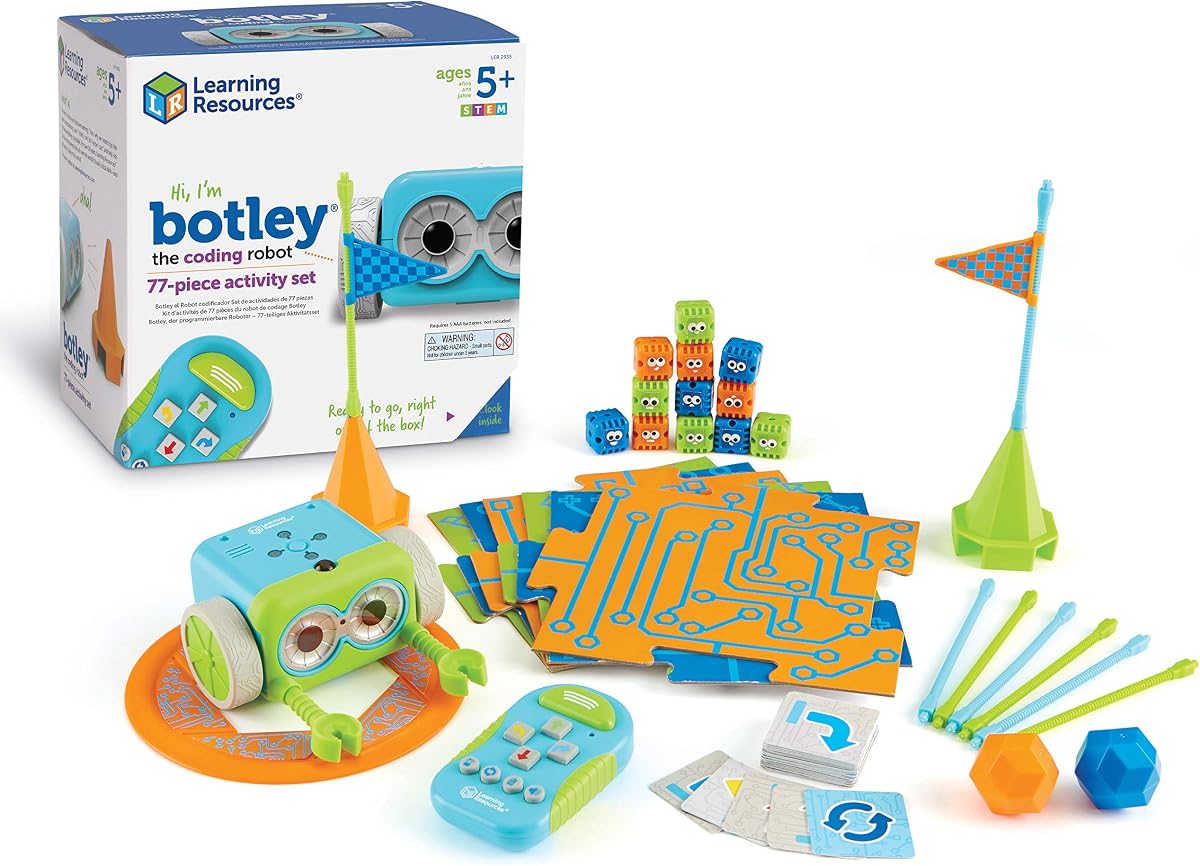
Botley is a robust coding robot that supports advanced logic like looping and object detection without apps. The set includes detachable arms and a wide variety of tiles and obstacles for creative play. It uses a remote programmer to input commands making it accessible for young beginners.
We may earn a commission when you buy through this link, at no additional cost to you.
Children can create complex paths and scenarios that require planning and critical thinking. The robot senses objects in front of it allowing for dynamic interactions during play. This feature introduces conditional logic concepts in a playful and intuitive manner.
Setting up Botley requires a Phillips screwdriver and several batteries which adds to the initial prep. The volume of pieces can be overwhelming if not organized properly for storage. Despite these setup needs the educational value and replayability make it a strong investment for families.
This set is excellent for schools or homes wanting a comprehensive coding tool that grows with the child. Its screen-free nature appeals to parents seeking tech-free alternatives for STEM learning. The combination of accessories and smart features ensures long-term engagement for young coders.
Looping and obstacle detection teach fundamental programming logic like iteration and conditional statements.
Detachable arms and modular tiles allow kids to invent unique stories and robotic adventures.
We may earn a commission when you buy through this link, at no additional cost to you.
The Ozobot Evo kit offers a premium blend of screen-free color coding and online Blockly programming. It includes markers that allow kids to draw paths that the robot reads and follows. With five skill levels it adapts to changing abilities ensuring long-term educational value.
We may earn a commission when you buy through this link, at no additional cost to you.
Educators and parents benefit from access to over seven hundred free lessons covering various subjects. The robot is built to withstand classroom use and comes with a durable zip case for storage. This makes it a practical solution for busy environments requiring organized tools.
The higher price reflects the depth of content and durable build quality but may be a barrier for some. Using color codes requires colored paper or mats which adds to the required accessories. Still the comprehensive nature of the kit justifies the cost for serious STEM learning.
This kit is ideal for families or schools seeking a scalable coding solution that supports both digital and physical play. It covers a wide range of learning styles and ages effectively. The inclusion of markers and lessons ensures immediate start without additional purchases.
Drawing colored lines teaches coding concepts without screens making it accessible for all learners.
Hundreds of lessons provide continuous learning opportunities across science math and art subjects.
We may earn a commission when you buy through this link, at no additional cost to you.
Botley 2.0 enhances the original with object sensing and multi-step coding paths for deeper challenges. It includes lights and sounds that give feedback during coding making the process more engaging. The remote programmer allows kids to design complex sequences that refine planning skills.
We may earn a commission when you buy through this link, at no additional cost to you.
Children can unlock secret code combinations that add an element of discovery to their play. The kit includes stackable obstacles and boards for building custom mazes. This variety ensures that each play session can offer a fresh challenge or story.
Like other battery-powered toys it needs power sources that are not included with purchase. The added features increase complexity which might require parental help for younger users. However the educational gains from advanced logic tasks are significant and worth the effort.
This version is perfect for kids who have mastered basic coding and need more complex challenges. It bridges the gap between simple commands and multi-step algorithms effectively. The interactive elements keep interest high while reinforcing STEM skills in a fun way.
Designing multi-step paths teaches children how to break down complex tasks into smaller steps.
Lights and sounds provide immediate feedback helping kids understand code execution clearly.
We may earn a commission when you buy through this link, at no additional cost to you.
Dash is a fully assembled robot designed to start coding immediately after unboxing. It responds to voice commands and integrates with five different apps for varied learning experiences. The app ecosystem supports visual programming and creative projects that adapt to different skill levels.
We may earn a commission when you buy through this link, at no additional cost to you.
The robot can sing dance and navigate obstacles making it a lively companion for kids. With five hours of battery life it offers extended play sessions without frequent interruptions. This reliability makes it a preferred choice for classrooms with limited downtime.
Dash requires a tablet or phone to operate which means screen time is unavoidable during use. The lack of assembly means less mechanical learning compared to build-your-own kits. Still its polish and app support make it a standout for pure coding and entertainment.
Families who value ease of use and app integration will find Dash highly satisfying. It is robust enough for daily use and versatile enough for creative coding projects. The focus on apps ensures children stay engaged with modern coding techniques.
Five dedicated apps provide diverse coding challenges and creative tools for all interests.
No assembly required allows kids to start learning and playing right away without delays.
We may earn a commission when you buy through this link, at no additional cost to you.
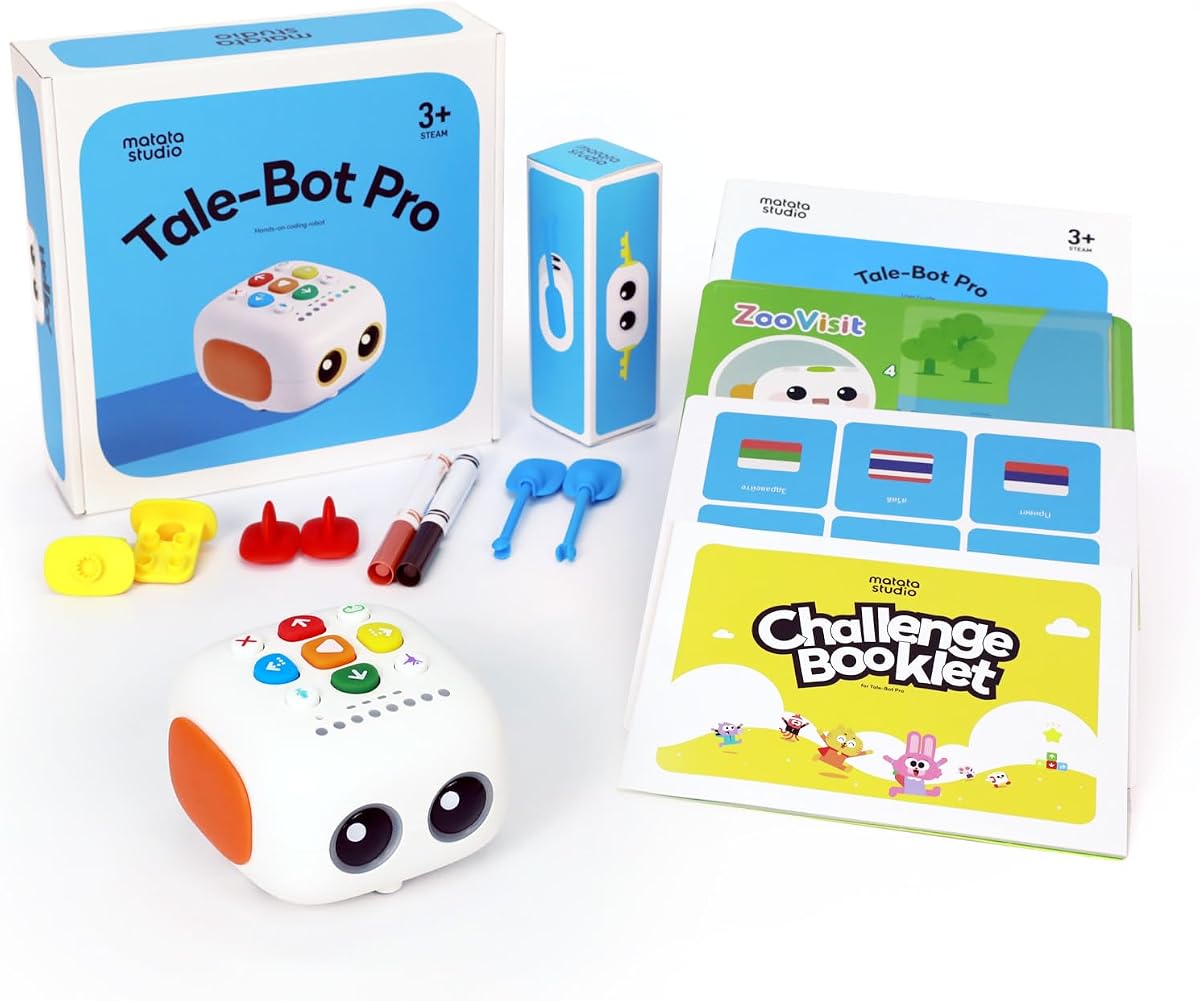
TaleBot Pro is a screen-free robot tailored for toddlers and preschoolers to introduce early tech concepts. It combines coding with storytelling using an interactive map and voice feedback. Children can record their voices and create narratives that bring their play to life.
We may earn a commission when you buy through this link, at no additional cost to you.
The robot responds to simple commands on buttons making it accessible for young fingers. It supports multiple languages allowing diverse households to engage with the toy in their native tongue. The included challenge booklet offers structured play to guide initial learning experiences.
Advanced coding features are limited compared to models for older kids focusing instead on engagement. The map needs space and setup which may be challenging in smaller homes. Despite this the focus on creativity and language makes it valuable for early development.
This toy is perfect for introducing STEM concepts to very young children through play. It helps build communication and basic logic skills in a fun and accessible way. The storytelling element sets it apart as a creative learning tool for preschoolers.
Recording and playback features let kids create stories that integrate coding with narrative.
Ten supported languages make the robot inclusive for diverse families and global users.
We may earn a commission when you buy through this link, at no additional cost to you.
Selecting the right coding toy involves considering age, skill level, and whether your child prefers screen-free or app-based learning. Below are key factors to help you evaluate options.
Coding toys vary widely in complexity from simple buttons for toddlers to full programming for teens. Ensure the robot matches your child's motor skills and cognitive ability to avoid frustration.
Always check the recommended age range on the packaging before purchasing.
Screen-free toys use physical cards or buttons for programming reducing screen exposure whileapp core logic. App-based robots offer advanced coding and visual feedback but require a tablet or phone.
Choose based on your family's screen time preferences and the depth of learning desired.
Look for toys that teach sequencing loops and conditionals clearly through intuitive interfaces. Some use drag-and-drop blocks while others rely on physical command cards or code cards.
A clear progression path helps kids build skills systematically over time.
Robots used in classrooms or by multiple children need durable materials and sturdy parts. Metal components and secure joints often last longer than plastic alternatives.
Invest in well-constructed robots to ensure longevity and safety.
Some kits support add-on modules or integration with other building systems like LEGO. This allows children to extend their projects as they grow more skilled.
Choose expandable systems to maximize long-term educational value.
Kits that include activity guides lesson plans or online tutorials add significant value. These resources help parents and teachers integrate the toy into structured learning.
Prioritize sets with clear instructions and challenge cards for independent play.
Check if batteries are included and how long the robot runs on a single charge. Rechargeable models can save money over time compared to disposable options.
Consider ease of charging and availability of replacement parts when deciding.
Prices range from budget-friendly mice to premium robots with extensive app support. Determine your budget but prioritize educational quality over extra features.
Often mid-range options provide the best balance of price and learning depth.
Start by reading the instruction manual thoroughly to understand assembly steps and battery requirements. Most robots need initial setup before programming so plan a quiet time for setup.
Encourage children to follow the included challenge cards before creating their own projects. This builds confidence and helps them understand the basic command structure effectively.
Store all pieces and accessories in a labeled container to prevent loss between play sessions. Keep robots away from water and direct sunlight to ensure their electronic components stay safe.
Yes most coding toys are designed for beginners and start with simple commands. They teach foundational concepts like sequencing and loops without requiring any prior knowledge. As children progress they can tackle more complex challenges independently.
No many options use physical buttons or cards for programming and work without screens. App-based robots offer advanced features but require a device to control them. Always check the product details to confirm connectivity needs before purchasing.
Coding toys teach spatial reasoning logic and problem-solving which are essential for math and science. Planning paths for robots involves geometry and measurement while debugging improves analytical thinking. These skills transfer directly to classroom subjects over time.
Children as young as three can start with simple screen-free robots focused on sequencing. More complex kits are ideal for ages eight and up when they can grasp abstract logic. Start simple and advance as interest and skills grow.
Most durable coding toys can last several years with proper care and storage. Battery-powered robots may need replacements or upgrades as children outgrow features. Choosing expandable systems helps extend the toy's usefulness across age ranges.
Coding toys offer hands-on learning that reinforces abstract concepts with physical actions. They are often more engaging for younger children than screen-only courses. A combination of both can provide a well-rounded education in computer science.
The ten coding toys in this guide offer a range of options for different ages and learning styles. From screen-free mice to app-enabled robots each pick provides a unique way to introduce STEM concepts effectively.
Prioritize toys that match your child's current skills and offer room to grow. Hands-on interaction and clear educational goals will ensure lasting engagement and meaningful learning outcomes.
Remember to check current availability and pricing before purchasing since these details may change. We hope this guide helps you find the perfect coding companion for your young innovator.