
Seagate 2TB Game Drive for Xbox
4.5Editor score
Two terabytes of capacity
Xbox certified compatibility
Integrated Xbox green LED bar
This guide compares the top 10 external SSDs for Xbox Series X storage including capacity, speed, and compatibility to help you expand your game library
Finding the right external storage for your console is crucial for modern gaming. You need fast speeds to reduce load times and ample space to keep your library ready to play.
We compared ten top-rated drives based on official compatibility, real-world performance, and build quality. Our selection covers various budgets and storage needs for every type of gamer.
Each pick below highlights unique strengths and trade-offs to help you decide. Prices and availability change frequently so check current listings before you buy to ensure the best deal.
4.5Editor score

4.8Editor score
4.6Editor score
This side-by-side comparison highlights the key specifications and features of the ten selected drives to help you find the perfect match for your gaming setup.


The WD_Black C50 Expansion Card stands out as the premier choice for expanding your console storage. It boasts an impressive rating from users who appreciate its perfect compatibility.
We may earn a commission when you buy through this link, at no additional cost to you.
Its key strength is the ability to play games directly without needing to move them between drives. The NVMe core ensures zero compromise on load times compared to the internal storage.
While it offers fewer terabytes for the price compared to external SSDs, the performance advantage makes it worth the trade-off. You lose no visual fidelity or speed.
This drive is ideal for players who demand the absolute best experience and want to keep their library ready to play. It is the top recommendation for serious Xbox fans.
The C50 utilizes the same NVMe technology as the console itself ensuring your games run just as fast as if stored internally.
Simply slot the card into the back of your console and you are ready to expand your game library immediately.
We may earn a commission when you buy through this link, at no additional cost to you.
The Seagate 2TB Game Drive offers exceptional value for gamers who need space without breaking the bank. It has a strong track record of reliability and compatibility.
We may earn a commission when you buy through this link, at no additional cost to you.
Its main benefit is the generous two terabyte capacity which can hold a large library of titles. The built-in LED adds a nice visual touch to your setup.
Users should note that Xbox Series X games must be moved to internal storage to play which adds a small step to the process. This is a fair trade for the price.
This drive is perfect for storing older titles or managing a vast collection. It is the best choice if you prioritize capacity over raw transfer speed.
Seagate includes Rescue Data Recovery Services giving you extra peace of mind regarding your important game saves and files.
The drive features a refined design with an Xbox green LED bar that illuminates your gaming center for a professional look.
We may earn a commission when you buy through this link, at no additional cost to you.
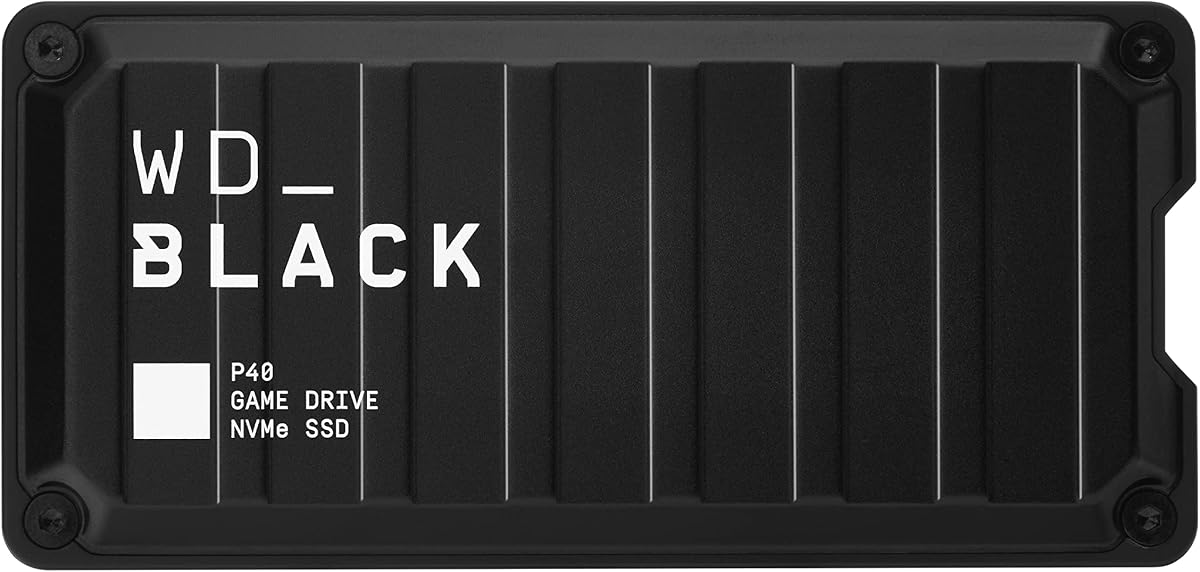
The Western Digital P40 Game Drive is a high performance SSD designed for gamers who want speed and style. It delivers exceptional transfer rates for a portable drive.
We may earn a commission when you buy through this link, at no additional cost to you.
Its standout feature is the ability to handle massive files quickly which minimizes wait times when moving games around. The rugged build ensures it can handle travel well.
While it may be pricier than standard drives the speed difference is noticeable when dealing with large modern titles. The RGB elements add a unique flair to your desk.
Buy this if you want a premium SSD experience that also works with PC and Mac setups. It is a robust choice for multi platform enthusiasts.
With speeds reaching up to two thousand MB per second this drive cuts down wait times significantly compared to older USB 3.0 options.
The drive is built to survive drops of up to two meters ensuring your data stays safe even if you travel often with your console.
We may earn a commission when you buy through this link, at no additional cost to you.
The Lexar ES3 offers a compact solution for expanding your storage needs with a slim design that fits easily in any bag. It is a versatile drive for various devices.
We may earn a commission when you buy through this link, at no additional cost to you.
It supports high speeds which help in transferring large game files efficiently. The inclusion of encryption software is a nice touch for securing your personal data.
However because it is not officially licensed for Xbox you may face compatibility hurdles with certain titles. It works better for general storage rather than direct play.
Choose this drive if you need a portable option for PC and console usage. It is a solid middle ground between size and performance for budget conscious buyers.
Weighing only forty two grams this drive is smaller than a credit card making it incredibly easy to carry in your pocket.
The included Lexar DataShield software provides twenty five six bit AES encryption to keep your files secure from unauthorized access.
We may earn a commission when you buy through this link, at no additional cost to you.
The Seagate Game Drive SSD is a reliable option for users who want the speed of an SSD with the official Xbox branding. It offers consistent performance for storing titles.
We may earn a commission when you buy through this link, at no additional cost to you.
It supports both Xbox One and Series X titles ensuring you have a versatile library. The LED bar matches the console perfectly for a cohesive look.
Users might find the one terabyte limit restrictive for larger libraries. However for a dedicated expansion drive it provides excellent value and reliability.
This model is great for those who prefer a seamless official accessory experience. It balances speed and convenience well for most console gamers.
Being Xbox certified ensures you will not face any driver or compatibility issues when connecting the drive to your console.
The three year limited warranty combined with Rescue Services gives you robust protection against hardware failures and data loss.
We may earn a commission when you buy through this link, at no additional cost to you.
The Samsung T7 is a widely respected portable SSD known for its durability and speed. It is a top pick for users who need reliability on the go.
We may earn a commission when you buy through this link, at no additional cost to you.
It performs very well in general file transfers which can be useful for managing game libraries. The aluminum body feels premium and helps with heat dissipation.
Note that while it works with Xbox you may need an adapter since Xbox uses USB-A. It is not designed specifically for console game launching.
Select this drive if you need a versatile storage solution for multiple devices. It is perfect for users who already own one for PC or Mac.
The solid aluminum unibody construction makes the drive resistant to shocks and drops up to six feet ensuring longevity.
It adapts to every need connecting easily to PCs mobile phones and consoles with the right cable setup.
We may earn a commission when you buy through this link, at no additional cost to you.
The WD P50 Game Drive SSD provides massive storage capacity for gamers who want to keep hundreds of games at their fingertips. It is a powerhouse in terms of size.
We may earn a commission when you buy through this link, at no additional cost to you.
It offers speeds up to two thousand MB per second which ensures quick access to your content. The drive is built to handle the rigors of travel.
The larger size means it might not be as pocket friendly as smaller drives. However the capacity benefits outweigh this for stationary setups.
This is an excellent choice for power users with large libraries. It is the best option if you want to eliminate the need to delete games often.
The SuperSpeed USB interface provides the bandwidth needed to fully utilize the SSD performance for faster data access.
Despite the capacity the portable form factor allows you to take your entire library wherever you go with ease.
We may earn a commission when you buy through this link, at no additional cost to you.
The Lexar 2TB ES3 External SSD is a strong contender for users looking for ample space and reasonable speed. It features a sturdy design that stands up to daily use.
We may earn a commission when you buy through this link, at no additional cost to you.
Its graphite sheets help keep the drive cool during fast transfers which is vital for long gaming sessions. This prevents throttling and ensures consistent performance.
The lack of Xbox certification means you may need an adapter to connect to your console. This is a minor inconvenience given the storage benefits.
Choose this drive for general storage and backup needs. It is a reliable option for those who want a simple way to expand their digital library.
Built-in double layer graphite sheets conduct heat efficiently keeping the drive cool even during blazing fast transfers.
The drive offers instant storage expansion allowing you to back up data quickly and effortlessly with no complex setup.
We may earn a commission when you buy through this link, at no additional cost to you.
The ADATA SE880 stands out with its unique titanium finish and impressive speed capabilities. It is a great choice for those who want style and performance.
We may earn a commission when you buy through this link, at no additional cost to you.
It supports fast speeds that make moving large files a breeze. The lightweight design makes it easy to carry in a laptop bag or backpack.
While it is not Xbox certified specifically it supports the necessary protocols for general use. It is a premium feel product at a competitive price.
This drive is ideal for users who value aesthetics as much as function. It is a solid pick for tech enthusiasts who want a modern look.
The titanium finish gives the drive a sleek modern look that stands out from typical plastic external storage options.
Supporting USB 3.2 Gen2 x2 the drive delivers high speeds that reduce wait times during data transfers significantly.
We may earn a commission when you buy through this link, at no additional cost to you.
The WD_Black 6TB P10 Game Drive is a massive storage solution for keeping your entire library accessible. It offers the highest capacity on this list for a great value.
We may earn a commission when you buy through this link, at no additional cost to you.
With six terabytes you can store hundreds of titles without needing to manage space constantly. It is perfect for long term storage of older favorites.
Keep in mind it is a mechanical drive so speeds are slower than SSDs. It requires archiving Series X games to play which is a minor process.
This drive is the best choice for archiving large collections. It is an economical way to ensure you never have to delete your favorite games.
The world first six TB capacity allows you to hold up to 150 games in one portable unit.
It works with PlayStation Xbox and PC making it a versatile solution for multi platform households.
We may earn a commission when you buy through this link, at no additional cost to you.
Choosing the right storage expansion requires understanding several technical factors to ensure your games load fast and run smoothly.
The size of your game library dictates how much space you need. Modern games can take up 100GB or more so a 1TB drive might fill up quickly.
Choose at least 2TB if you want to store multiple large titles without constant management.
SSDs offer much faster speeds than traditional hard drives which reduces wait times. If you plan to play directly off the drive an SSD is essential.
Hard drives are cheaper and better for archiving titles you play less often.
Ensure the drive is certified for Xbox Series X to avoid compatibility issues. Official drives guarantee you can play and archive games without errors.
Non-certified drives may work for storage but might not launch games directly.
Look for USB 3.2 Gen 2 or higher interfaces to ensure fast data transfer. Speeds of 1000MB/s or more are ideal for moving large files efficiently.
Faster drives mean less waiting when switching between games or installing updates.
Portable drives should be resistant to shocks and drops if you travel often. Look for models with shock resistant structures or solid aluminum bodies.
A durable casing protects your data from accidental damage during transport.
Compare the cost per terabyte to find the best deal. SSDs are more expensive than HDDs so decide if the speed upgrade is worth the extra cost.
Balance your budget with your need for speed and capacity to make a smart purchase.
Some drives offer software tools for data recovery or encryption which can be useful. Built-in LED lights or cooling features are nice bonuses for desk setups.
These extras can enhance your experience but are not critical for core performance.
To begin connect your external drive to one of the USB ports on the back of your console. If the drive is not powered you may need a separate power source.
Next go to the settings menu on your console and select storage options. You can then choose to move existing games or save new downloads directly to the external drive.
For maintenance keep the drive in a cool dry place when not in use. Avoid moving the drive while it is actively transferring data to prevent corruption.
Yes you can play Xbox Series X games directly from an SSD that is connected via USB or the expansion slot. However hard drives require you to archive games to internal storage before playing.
The internal SSD is built into the console and offers the fastest access. External SSDs are more affordable and offer more capacity but use USB ports which can be slightly slower than the internal slot.
Most modern SSDs come with a USB cable but check if your Xbox uses USB-A or USB-C ports. You might need an adapter if the drive uses a different connector type.
Go to My Games and Apps select the game you want to move choose Move, and select your external drive from the list. This process transfers the data without deleting it from your internal storage.
If the SSD is compatible and fast enough it will not negatively affect speed. However using a slow hard drive for active gameplay may result in longer loading times compared to internal storage.
Yes most external SSDs are compatible with PCs and Macs allowing you to use them for file storage as well. Just ensure you format the drive correctly for the other system.
We reviewed ten top options ranging from the official C50 expansion card to budget friendly HDDs. Each offers unique benefits depending on whether you prioritize speed or capacity.
Consider your budget and how many games you want to store before making a decision. The right drive enhances your console experience by reducing clutter and wait times.
Always check the current pricing and warranty details before buying to ensure you get the best value. Prices fluctuate so comparing deals at the time of purchase is wise.