
Upgraded USB Computer Speaker
4.2Editor score
USB Plug-and-Play connectivity
Dual 3W high-excursion drivers
Single cable for audio and power
This guide compares the top external speakers for MacBook users, evaluating connectivity, sound quality, and design to help you find the perfect audio setup
Enhancing your MacBook with external speakers transforms your daily workflow and entertainment. A good setup delivers clear audio, reliable connectivity, and a design that fits your desk. We explore options ranging from budget-friendly clips to premium studio monitors.
Our team analyzed ten top-rated speakers based on compatibility with macOS, sound clarity, and ease of setup. We prioritized models that offer USB-C or Bluetooth connectivity to match modern Mac ports. Each product was evaluated for build quality and acoustic performance.
Each pick highlights unique strengths like bass response, space-saving clips, or studio-grade accuracy. Prices and availability change frequently, so verify current details before purchasing. This guide aims to simplify your search for the ideal audio companion.
4.2Editor score

4.4Editor score

4.5Editor score
This table provides a side-by-side overview of the top ten speakers, highlighting key specifications like connectivity options, power output, and unique design features to help you compare them quickly.




The Logitech Z207 stands out as a versatile choice for MacBook users who need both wired and wireless options. With a rating of 4.4 stars, it offers reliable performance for everyday listening. Its ability to switch between Bluetooth and 3.5mm inputs makes it ideal for transitioning between your Mac and phone.
We may earn a commission when you buy through this link, at no additional cost to you.
Key strengths include the Easy-Switch technology, which allows you to pause audio on one device and play on another without complex pairing. The passive radiator enhances bass response, providing a fuller sound than typical desktop speakers. The on-speaker controls for volume and power add convenience.
While the bass is improved by the passive radiator, it may not satisfy audiophiles seeking deep low-end resonance. The Bluetooth range is functional but not exceptional. However, these trade-offs are acceptable given the price point and flexibility offered to the user.
This speaker is best for students and professionals who switch between devices frequently. If you need a reliable speaker that handles both music and calls well, the Z207 is a strong recommendation. It balances cost and performance effectively for most setups.
This feature simplifies multi-device workflows by letting you control playback without re-pairing. Simply pause on one device and hit play on the other to switch sources instantly.
The compact footprint ensures these speakers fit easily on crowded desks. The included stand allows for proper ear-level positioning, optimizing the stereo imaging for critical listening.
We may earn a commission when you buy through this link, at no additional cost to you.
For budget-conscious MacBook users, the Upgraded USB Computer Speaker offers impressive value. Rated at 4.2 stars, it delivers surprisingly loud sound for its size. The USB plug-n-play setup means no drivers are needed, making it ready to use right out of the box.
We may earn a commission when you buy through this link, at no additional cost to you.
Its main strength lies in its simplicity and cost. The dual 3W high-excursion drivers and passive radiator provide better bass and volume than standard laptop speakers. The single cable design keeps your desk tidy, which is crucial for those with limited workspace.
The build quality is functional but not premium, which explains the low price. It lacks modern wireless connectivity like Bluetooth, which might limit portability. However, for a stationary desk setup where audio is needed, it performs admirably.
Ideal for students or anyone needing basic audio enhancement without spending much. If your priority is getting more volume and clarity than your MacBook provides for free, this speaker is a smart investment. It proves you don't need to spend much to improve audio.
This speaker requires no software installation. Just connect the USB cable to your Mac's port, and the system will recognize it automatically as an audio output device.
Despite the low cost, the drivers deliver clear mids and highs. The passive radiator helps extend the bass response, making it suitable for movies and casual listening sessions.
We may earn a commission when you buy through this link, at no additional cost to you.
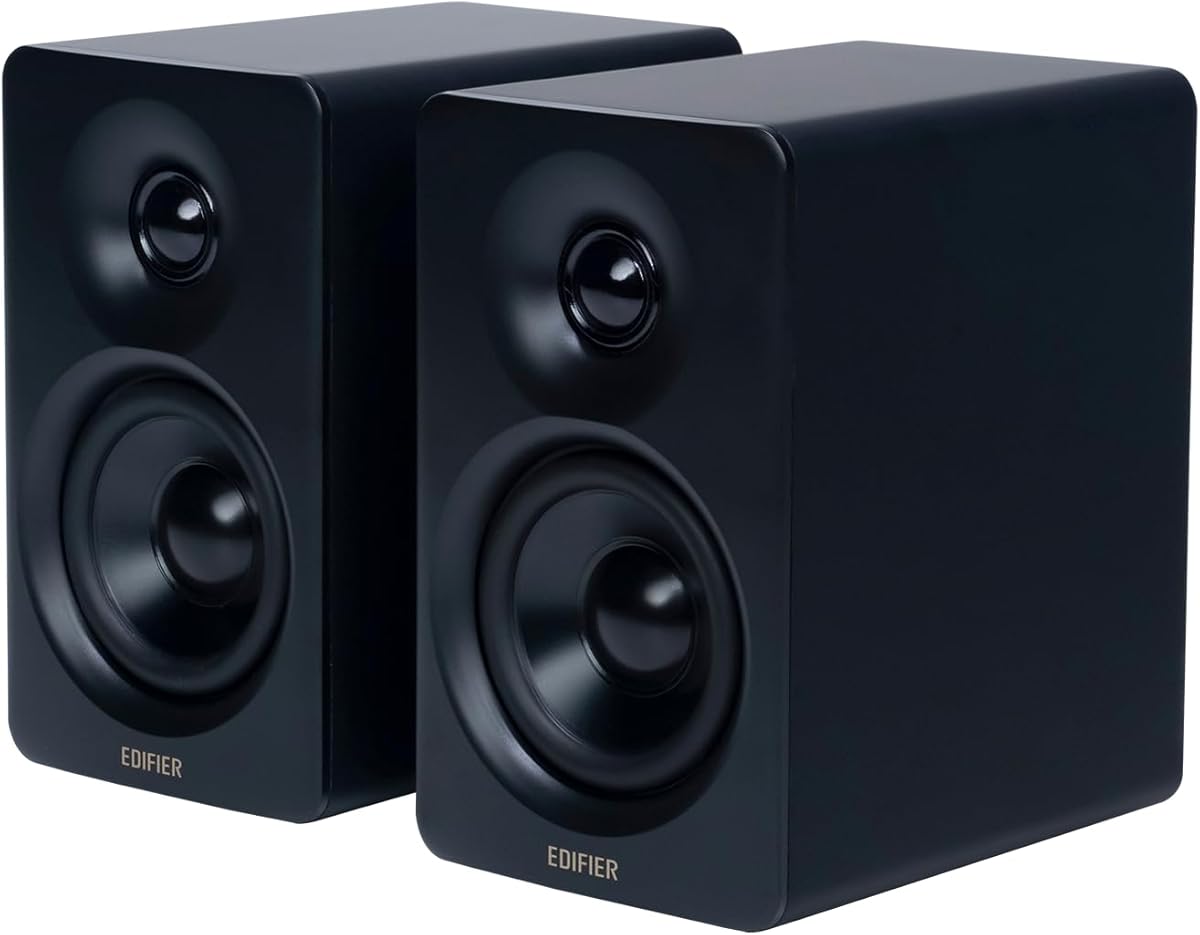
The Edifier MR3 is designed for users who demand accuracy and clarity in their audio. With a 4.5-star rating and Hi-Res Audio certification, it delivers a flat frequency response ideal for critical listening. It bridges the gap between casual speakers and professional studio monitors.
We may earn a commission when you buy through this link, at no additional cost to you.
Its strengths include the 18Wx2 RMS output and balanced TRS inputs, which reduce noise for cleaner signal transmission. The app allows fine-tuning of sound modes, ensuring you can adjust the EQ to fit your room or music genre. The cabinet material reduces unwanted vibrations.
The trade-off is the higher price and weight, which makes it less portable than lighter options. It may be overkill for casual video watching but is essential for music production or audiophiles. The investment pays off in sound fidelity and longevity.
Recommended for creators and music lovers who value precision. If you edit videos, mix audio, or simply appreciate detailed sound, the MR3 is worth the cost. It transforms your MacBook into a high-fidelity listening station.
These monitors prioritize accuracy over coloration, meaning you hear music as it was intended. This is crucial for editing tasks where audio balance matters significantly.
The included app lets you switch between music, monitor, and custom modes. You can also adjust EQ settings to compensate for room acoustics or personal preference.
We may earn a commission when you buy through this link, at no additional cost to you.
This speaker is unique for its clip-on design, which mounts directly to your monitor. With a 4.2 rating, it appeals to those with limited desk real estate. The adaptive channel switching ensures left and right audio remain correct whether the speaker is clamped top or bottom.
We may earn a commission when you buy through this link, at no additional cost to you.
Its standout feature is the space-saving form factor. By placing the speakers on the monitor, you keep your desk clear for paperwork or other peripherals. The USB-C adapter ensures compatibility with newer MacBook models without extra dongles.
The touch controls are convenient but can be accidentally triggered. Also, heavy speakers might not suit very thin monitor frames. These issues are manageable if your monitor is sturdy. The audio quality is loud and bass-rich despite the compact footprint.
Best for compact home office setups where desk space is premium. If you want audio close to your ears without cluttering your workspace, this is a great choice. It combines utility with performance for modern laptops.
A built-in G-sensor detects the orientation of the speaker. It automatically swaps the left and right audio channels to maintain stereo imaging regardless of how you mount it.
The included adapter allows direct connection to USB-C ports found on recent MacBooks. This eliminates the need for separate power bricks or audio jacks.
We may earn a commission when you buy through this link, at no additional cost to you.
The Edifier M60 brings high power and elegance to the desktop. Rated 4.5 stars, it delivers 66W RMS output, ensuring volume without distortion. The minimalist design fits modern aesthetics, while the touch panel offers a premium user experience.
We may earn a commission when you buy through this link, at no additional cost to you.
Its key strength is the combination of power and aesthetics. The included aluminum stands elevate the speakers to ear level, improving sound direction. Hi-Res Audio certification ensures playback of detailed tracks. The touch controls light up when approached, adding a tech-forward feel.
It requires a power outlet, which adds a cable to your setup. The size is larger than soundbars, needing more desk space. However, the sound quality and build justify the space for those seeking a statement piece.
Ideal for users who want both performance and style. If you frequently host guests or want a speaker that looks as good as it sounds, the M60 is a top contender. It elevates your setup significantly.
The 15-degree angled stands direct sound toward your ears. This placement minimizes floor reflections and improves clarity, especially for mid-range frequencies.
With Bluetooth 5.3, USB-C, and AUX inputs, you can connect virtually any device. This flexibility ensures the speakers remain useful as your tech evolves.
We may earn a commission when you buy through this link, at no additional cost to you.
Amazon Basics continues to deliver value with these 2.0 speakers. Holding a 4.4 rating, they are a staple for simple audio needs. The USB power means no extra adapter is needed, and the inline volume control allows quick adjustments without touching the computer.
We may earn a commission when you buy through this link, at no additional cost to you.
Their strength is straightforward functionality. The 3.5mm aux input lets you connect non-USB devices easily. The metal finish adds a touch of durability and style compared to all-plastic rivals. They are plug-and-play for most systems.
The sound is clear but lacks deep bass compared to more expensive options. There is no Bluetooth for wireless streaming. However, for basic office work or studying, they provide consistent and reliable audio quality.
Best for users who prefer simplicity and reliability. If you want a speaker that just works without extra features or setup, these are a safe bet. They provide solid performance for the price.
The control on the cable allows you to adjust volume quickly. This is useful during calls or when switching between loud and quiet media.
The metal finish resists scratches better than plastic. The padded base ensures the speakers stay stable on your desk during use.
We may earn a commission when you buy through this link, at no additional cost to you.
The Creative Pebble V3 combines modern USB-C convenience with Bluetooth flexibility. With a 4.4 rating, it offers 50% louder output than previous models. The Clear Dialog feature ensures voices in videos remain intelligible, which is vital for remote work or watching content.
We may earn a commission when you buy through this link, at no additional cost to you.
Its key strength is the dual connectivity. USB-C powers and transmits audio, reducing cable clutter. Bluetooth 5.0 allows wireless streaming when desired. The gain switch lets you boost volume when connected to high-power ports.
Bluetooth pairing may require resetting if not detected quickly. Also, using USB-C for audio consumes a port on newer MacBooks. Still, the included USB-C to USB-A adapter helps with older systems. The elevated drivers aim sound directly at you.
Ideal for versatile users who switch between wired and wireless. If you value modern connectivity and clear dialogue, this speaker fits well. It brings advanced features to a compact package.
This audio processing isolates vocal frequencies to make speech clearer. It prevents background music from overpowering voices during movies or meetings.
The 45-degree angle directs sound toward ear level. This design improves stereo imaging and prevents sound from getting lost in the desk surface.
We may earn a commission when you buy through this link, at no additional cost to you.
The FUNLOGY Speaker offers a unique ergonomic tilt for better sound delivery. Rated 4.2 stars, it delivers 14W of power in a palm-sized unit. The 30-degree angle ensures sound reaches your ears directly, improving the listening experience without needing to adjust speaker placement.
We may earn a commission when you buy through this link, at no additional cost to you.
Its strength lies in the thoughtful design. The gold-plated AUX input minimizes static noise, ensuring clean sound during startup. The build quality is praised for its durability and finish. It is a Japanese brand with award-winning standards.
It lacks Bluetooth connectivity, relying on USB and AUX. The volume dial is analog, which some may find less precise. However, the physical build and sound quality compensate for these minor limitations in a desk environment.
Best for those who prioritize build quality and ergonomics. If you want a speaker that looks good and sounds clear without complexity, the FUNLOGY is a great pick. It focuses on essential audio quality.
The upward angle directs sound upward toward your ears. This prevents sound from dispersing across the desk and ensures more volume reaches you.
Gold plating on the AUX input reduces oxidation and static. This results in a cleaner audio signal, especially when switching between devices frequently.
We may earn a commission when you buy through this link, at no additional cost to you.
The Dell Speakerphone is specialized for professional video conferencing. With a 4.2 rating, it is certified for Teams and Zoom. Its AI noise cancellation filters background noise, ensuring you are heard clearly even in busy environments.
We may earn a commission when you buy through this link, at no additional cost to you.
Its primary strength is call clarity. The full duplex audio allows multiple people to speak simultaneously without cutting each other off. The dedicated Teams button gives quick access to meetings. LED indicators show call status clearly.
While it plays music, the sound is tuned for voice. It may not satisfy those seeking rich music playback. The price is higher than standard speakers. However, for remote work, it offers unmatched call efficiency and ease of use.
Best for remote workers and frequent callers. If your primary use case is meetings and calls, this device streamlines your workflow. It is a professional tool for a productive workspace.
This feature filters out background noise like typing or traffic. It ensures your voice remains clear during critical moments of a meeting.
Unlike half-duplex systems, this allows simultaneous listening and speaking. This mimics natural conversation flow, making group calls feel more organic.
We may earn a commission when you buy through this link, at no additional cost to you.
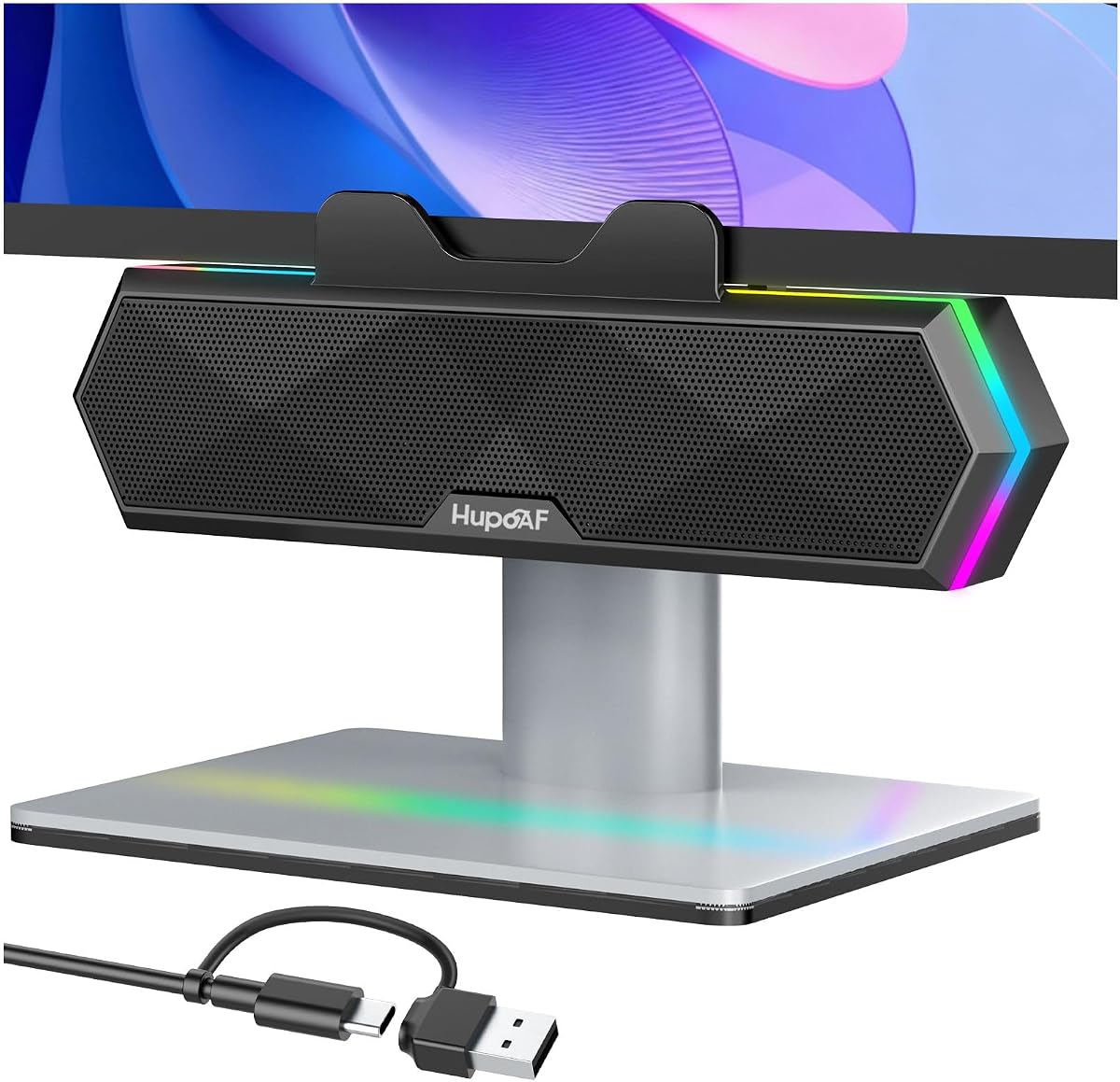
This speaker stands out for its RGB lighting features combined with a clip-on design. With a 4.6 rating, it appeals to gamers and users who value visual aesthetics. The six dynamic lighting modes allow you to match your setup or mood easily.
We may earn a commission when you buy through this link, at no additional cost to you.
Its strength is the dual appeal of sound and style. The dual ultra-magnetic drivers provide deep bass, while the clip-on mount saves desk space. Controls on the top let you adjust volume and lighting without reaching for the computer.
The lighting might be distracting during focused work but can be turned off. The clamp has a thickness limit of 1.6 inches. These constraints are manageable if you verify your monitor compatibility beforehand.
Best for gamers or setup enthusiasts. If you want a speaker that enhances your visual setup while delivering strong audio, this is a top choice. It brings a fun factor to your desk.
Six vibrant modes allow you to cycle through colors or effects. You can also turn off the lights for a distraction-free environment.
Despite its size, it delivers resonant bass and crisp highs. The passive radiators enhance low-end frequencies for a satisfying audio experience.
We may earn a commission when you buy through this link, at no additional cost to you.
Selecting the right speakers involves evaluating connectivity, power, and design. We break down key factors to help you make an informed decision.
Modern MacBooks often lack traditional 3.5mm jacks, making USB-C or Bluetooth essential. Check if the speakers support USB-C for both audio and power to reduce cable clutter. Bluetooth offers wireless flexibility but may introduce latency.
Choose a model that matches your ports. USB-C is preferred for simplicity and quality, while Bluetooth is useful for mobile setups. Ensure compatibility with your specific MacBook generation.
RMS wattage indicates real power output. Higher wattage allows louder sound without distortion. Look for features like passive radiators or subwoofers for better bass response if you enjoy movies or music.
Prioritize speakers with enough power for your room size. A compact setup may not need high wattage, but larger spaces benefit from stronger output. Check user reviews for volume performance.
Measure your desk before buying. Soundbars save space but lack stereo separation, while separate speakers offer better imaging. Consider clip-on models if you want to keep your desk clear.
Choose a design that fits your workflow. If you work with papers or tools, a vertical or wall-mounted setup might be better. Ensure the speakers are stable on your surface.
Look for volume controls and mute buttons on the speakers. Features like EQ settings or touch panels add convenience. Some models offer app control for deeper customization.
Convenience controls save time during use. Physical knobs are often more reliable than touch controls. Ensure you can adjust settings easily without interrupting your work.
Materials like MDF or metal reduce vibrations and resonance. Plastic bodies are lighter but may sound hollow. A good build ensures longevity and consistent sound over time.
Invest in speakers with solid construction. Check for sturdy bases and high-quality ports. Durability matters if you plan to move speakers frequently.
Set a budget but consider long-term value. Cheaper models may save money now but lack features like wireless connectivity. Mid-range options often offer the best balance of price and performance.
Avoid the cheapest options if you need reliability. Aim for a model that meets your needs without unnecessary extras. Read reviews to ensure quality at that price point.
Define your primary use: gaming, music, or calls. Speakers for calls may include microphones, while gaming speakers focus on bass and surround. Music listeners may prefer flat frequency responses.
Tailor your choice to your main activities. A general-purpose speaker might lack specialized features. Ensure the speakers suit your specific content consumption habits.
Consider if you need multiple inputs for phones and laptops. Some speakers allow simultaneous connections for versatile setups. Check for headphone jacks if you want private listening options.
Versatile inputs future-proof your purchase. This allows you to switch devices without unplugging cables. Ensure the ports match your other devices for seamless integration.
Start by connecting the speakers to your MacBook using the appropriate cable. If using USB-C, ensure it supports data transmission for audio, not just power. Go to System Settings and select the speaker as the output device.
Place speakers at ear level for the best sound. Keep them away from walls to reduce bass boom. Adjust the volume to a comfortable level to protect your hearing and the speakers.
Clean the speakers with a dry cloth to remove dust. Avoid water or chemicals that could damage the drivers. Store them in a dry place if you plan to remove them occasionally.
Most modern USB and Bluetooth speakers are plug-and-play. macOS automatically installs necessary drivers. For best results, keep your OS updated to ensure compatibility.
Yes, but you may need a USB-C to USB-A adapter. Check the port types on your laptop. Most speakers come with adapters to ensure broad compatibility.
Update your macOS and speaker firmware to the latest versions. Keep the speaker close to your computer. If possible, use a wired connection for zero latency.
Active speakers have built-in amps and work with USB or Bluetooth. Passive speakers need external amps and are complex. Active models are easier for general use.
It depends on the software and Bluetooth capabilities. Some apps allow multi-device streaming. Bluetooth usually connects one pair, but USB hubs may work for specific models.
Check if the cable is damaged or ports are dirty. Restart your computer and reconnect the device. Ensure the audio output is set to the speaker in Sound settings.
Quality clips have rubber pads to prevent scratches. Ensure your monitor frame is strong enough. Check the weight limit to avoid bending the screen.
USB audio bypasses the computer's internal DAC for better quality. 3.5mm is analog and often lower fidelity. USB is recommended for modern MacBooks.
We've highlighted ten speakers ranging from budget-friendly to premium studio options. Whether you choose the Logitech Z207 for versatility or the Edifier MR3 for accuracy, there is a fit for every need.
Prioritize connectivity and desk space when making your choice. Ensure the speakers match your daily activities like calls, music, or movies to get the most value.
Always check current prices and availability before buying. Deals fluctuate often, and verifying details ensures you get the best deal for your specific MacBook setup.