
Thrustmaster T-Flight Hotas X USB Flight Sim Stick & Throttle
4.4Editor score
Detachable throttle design
Twelve programmable buttons
Adjustable resistance dial
This guide compares the top 10 airplane controllers for PC including yokes and sticks to help you choose the best flight simulator gear for your setup.
Finding the right airplane controller for PC transforms your flight simulator into a realistic cockpit experience. Quality controllers offer precision, ergonomic design, and programmable buttons for immersive gaming.
We evaluated ten top-rated controllers based on build quality, sensor accuracy, software support, and user feedback. Each entry was compared for compatibility with popular simulators and overall value for dedicated pilots.
Every pick highlights specific strengths like magnetic sensors or detachable throttles. Please note that product availability and pricing may change frequently, so check current listings before purchasing to ensure the best deal.
4.4Editor score

4.0Editor score
4.6Editor score
The following table presents a side-by-side comparison of all ten controllers including key specifications and ratings to help you quickly identify the model that fits your flight simulation needs.





The Logitech G X56 H.O.T.A.S stands out with its massive array of over 189 programmable controls and military-grade precision. It earned a 4.0 rating from users who appreciate the detailed customization options available for complex flight scenarios.
We may earn a commission when you buy through this link, at no additional cost to you.
Its hall-effect sensors ensure consistent performance without wear, while the dual throttle system offers friction adjusters for realistic resistance. The RGB lighting allows you to match your rig aesthetics, and the mini analog sticks provide granular control over aircraft surfaces.
The main trade-off is the physical footprint, as the full HOTAS setup requires a large desk to accommodate both the throttle and joystick comfortably. Additionally, mastering the sheer volume of programmable buttons may take time for new users.
Ideal for serious simulators seeking maximum control and immersion, this controller delivers high-end features at a competitive price. We recommend it for pilots who want every aircraft function accessible without touching the keyboard.
Mini analog sticks allow precise pitch and yaw adjustments while separate weapons controls keep combat maneuvers organized during intense missions.
The advanced four-spring system lets you modify stick force to match your preference for heavy fighter jets or light civilian aircraft.
We may earn a commission when you buy through this link, at no additional cost to you.
The Logitech G PRO Flight Yoke System provides a professional commercial flight experience with realistic controls designed for muscle memory building. It received a 4.3 rating for its robust construction and accurate axis movement suitable for both new and experienced pilots.
We may earn a commission when you buy through this link, at no additional cost to you.
Its stainless steel shaft ensures smooth movement, while the three-position mode switch expands button functions to over fifty-four controls. The included desk clamp offers flexible mounting, and the throttle quadrant adds essential flight management tools for complete cockpit simulation.
While the setup involves connecting separate cables for the yoke and throttle, the stability gained justifies the effort. Some users may prefer USB over PS/2 for the throttle, but the system remains solid for long sessions.
This set is best for those focused on commercial airliner simulation who want an authentic yoke experience without building a custom rig. It delivers reliable performance and realism for aspiring airline pilots.
The stainless steel shaft offers a smooth and accurate feel that mimics actual aircraft controls for immersive and professional simulation.
Mode switches and programmable buttons allow you to map most aircraft functions to your fingertips for streamlined in-flight operation.
We may earn a commission when you buy through this link, at no additional cost to you.
The Thrustmaster T-Flight Hotas X offers an affordable entry point into flight simulation with its detachable throttle and ergonomic design. Users rated it 4.4 stars for its comfort during long flights and instant takeoff readiness without complex configuration steps.
We may earn a commission when you buy through this link, at no additional cost to you.
It features twelve fully programmable buttons and five axes, allowing for custom setups across various flight titles. The resistance dial lets you fine-tune stick tension, while the detachable throttle provides flexibility for smaller desk arrangements or separate mounting.
Though it lacks the advanced features of higher-end models, the preconfigured memory ensures you save your settings even when disconnected. This simplicity makes it ideal for casual gamers who want reliable controls without a steep learning curve.
We recommend this controller for beginners or those on a budget seeking a complete HOTAS solution. Its balance of price and performance makes it one of the best values in the category.
Skip complicated configuration and start flying immediately with preconfigured controls and built-in memory that saves your custom programming.
Wide hand rests and natural positioning allow you to fly for hours without fatigue during extended simulator sessions.
We may earn a commission when you buy through this link, at no additional cost to you.
The Logitech G Saitek X52 Pro Flight Control System is known for its illuminated LCD display and precise axis control. It holds a 3.8 rating reflecting mixed experiences with older driver software, but praised for its tactile feedback and command visibility.
We may earn a commission when you buy through this link, at no additional cost to you.
The LCD lets you check programmed commands before activation, reducing errors during critical flight phases. Its progressive throttle includes detents for afterburner and idle, while the no-contact technology on X and Y axes ensures consistent centering over time.
Users note that software setup might require an internet connection for optional downloads, which can be a hurdle if connectivity is limited. However, the five-position handle adjustment accommodates different hand sizes effectively for comfortable operation.
This controller suits those who prefer visual feedback on their commands without relying on secondary screens. It remains a solid choice for users who can access the necessary software updates for full functionality.
The illuminated display shows all programmed commands on your HOTAS before activating them for quick verification during flight.
Adjustable resistance with detents for afterburner and idle offers realistic control over your aircraft engine settings.
We may earn a commission when you buy through this link, at no additional cost to you.
The PXN 2113PRO provides an accessible flight controller option with vibration feedback and solid button layout. It has a 3.6 rating primarily due to specific driver requirements but offers good value for users wanting immersive haptic responses.
We may earn a commission when you buy through this link, at no additional cost to you.
With twelve programmable buttons and four axes, it covers essential flight functions effectively. The vibration feature adds realism to impacts and turbulence, though you must enable it in the driver settings and ensure the strength is set appropriately.
Some users report that the unit only works with Windows and not other platforms, which limits flexibility. Installation is straightforward after downloading the driver from the official site, and the suction cups help stabilize the unit on smooth surfaces.
We recommend this stick for budget-conscious PC gamers who prioritize vibration feedback over advanced flight mechanics. It serves well for casual simulation sessions and offers a solid introduction to flight controller basics.
Vibration switch at the bottom allows you to feel impacts and turbulence when strength is set to fifty percent or higher.
Advanced software supports custom adjustments and keyboard mapping to enjoy exciting controls tailored to your flight style.
We may earn a commission when you buy through this link, at no additional cost to you.
The Logitech G X52 Flight Control System features non-contact magnetic sensors for longevity and accuracy. It earned a 4.3 rating for its reliability and comprehensive command mapping across three modes, making it a strong all-rounder for serious pilots.
We may earn a commission when you buy through this link, at no additional cost to you.
The multifunction LCD display lets you check programmed commands and includes a built-in clock for timing flight plans. With 282 programmable commands, you can keep most functions under your fingertips, and the twist axis with rudder lock enhances control precision.
While it lacks a detachable throttle, the grip system maintains ergonomic comfort without stretching to reach buttons. The magnetic sensors ensure your controls remain calibrated over years of use, which is crucial for consistent performance.
This unit is ideal for gamers who want long-term durability and deep customization without investing in premium hardware. It strikes a good balance between features and cost for dedicated flight simulation enthusiasts.
X and Y axis sensors provide enhanced longevity and pinpoint accuracy by eliminating physical contact wear.
Check all programmed commands before activating them with a built-in clock for timing your flight plan effectively.
We may earn a commission when you buy through this link, at no additional cost to you.
The Thrustmaster TCA Yoke & Quadrant Boeing Edition brings an official licensed replica of the Boeing 787 to your desk. It holds a 4.4 rating for its smooth pendular mechanism and authentic controls, delivering a true airliner cockpit experience.
We may earn a commission when you buy through this link, at no additional cost to you.
Its metal internal structure ensures durability, while thirty-five action buttons cover a wide range of flight functions. The throttle quadrant includes the iconic autopilot function, and compatibility with TFRP rudder pedals expands the setup further for realism.
The main consideration is the space required; this unit is substantial and requires a sturdy desk with mounting clamps. However, the realistic motion and responsive controls justify the investment for enthusiasts focused on high-fidelity airliner simulation.
We recommend this pack for simmers seeking premium commercial flight realism and official Boeing aesthetics. It is a top-tier choice for those ready to build a serious flight deck at home.
The pendular mechanism replicates the movement of a Dreamliner for smooth and responsive control during takeoffs and landings.
Fly with confidence using officially licensed controls and professional-grade realism designed with Boeing input.
We may earn a commission when you buy through this link, at no additional cost to you.
The Thrustmaster TCA Sidestick Airbus Edition offers a compact solution for Airbus A320 enthusiasts. It received a 4.3 rating for its drift-free magnetic sensors and integrated throttle, making it a complete solution without needing extra peripherals.
We may earn a commission when you buy through this link, at no additional cost to you.
With seventeen action buttons and four swappable head modules, you can tailor the layout to your needs. The rudder control via handle rotation adds convenience, and the unique thrust reverser mechanism supports precise speed management.
Its space-saving design is ideal for smaller desks, though you may need to install rudder pedals for full control. Setup is simple with plug and play connectivity, and it supports Microsoft Flight Simulator out of the box.
This stick is best for pilots focused on Airbus aircraft who value precision and a clean setup. It delivers a professional feel at a mid-range price point.
Contactless magnetic sensors eliminate potentiometer wear to ensure flawless accuracy and unlimited lifespan.
Eliminate extra peripherals with a built-in throttle axis featuring a unique thrust reverser mechanism.
We may earn a commission when you buy through this link, at no additional cost to you.
The Turtle Beach VelocityOne Flightstick is designed for versatility with support for both PC and Xbox Series X|S. It holds a 4.2 rating for its non-contact axes and unique OLED display that simplifies flight configuration.
We may earn a commission when you buy through this link, at no additional cost to you.
With twenty-seven programmable buttons and eight axes, it offers comprehensive control. The integrated OLED management display and configuration wheel make setup intuitive, and RGB lighting adds a modern touch to your setup.
The touchpad navigation sensor provides full cursor control, which is useful but may require adjustment. While the throttle levers are customizable, some users may want more advanced throttle quadrants for full simulation needs.
We recommend this controller for gamers who want a single controller across multiple platforms without sacrificing flight features. It balances ease of use with professional functionality well.
Use across Xbox Series X|S and PC for a unified flight experience without buying separate controllers.
Integrated OLED display provides clear visibility of your flight settings and data during gameplay.
We may earn a commission when you buy through this link, at no additional cost to you.
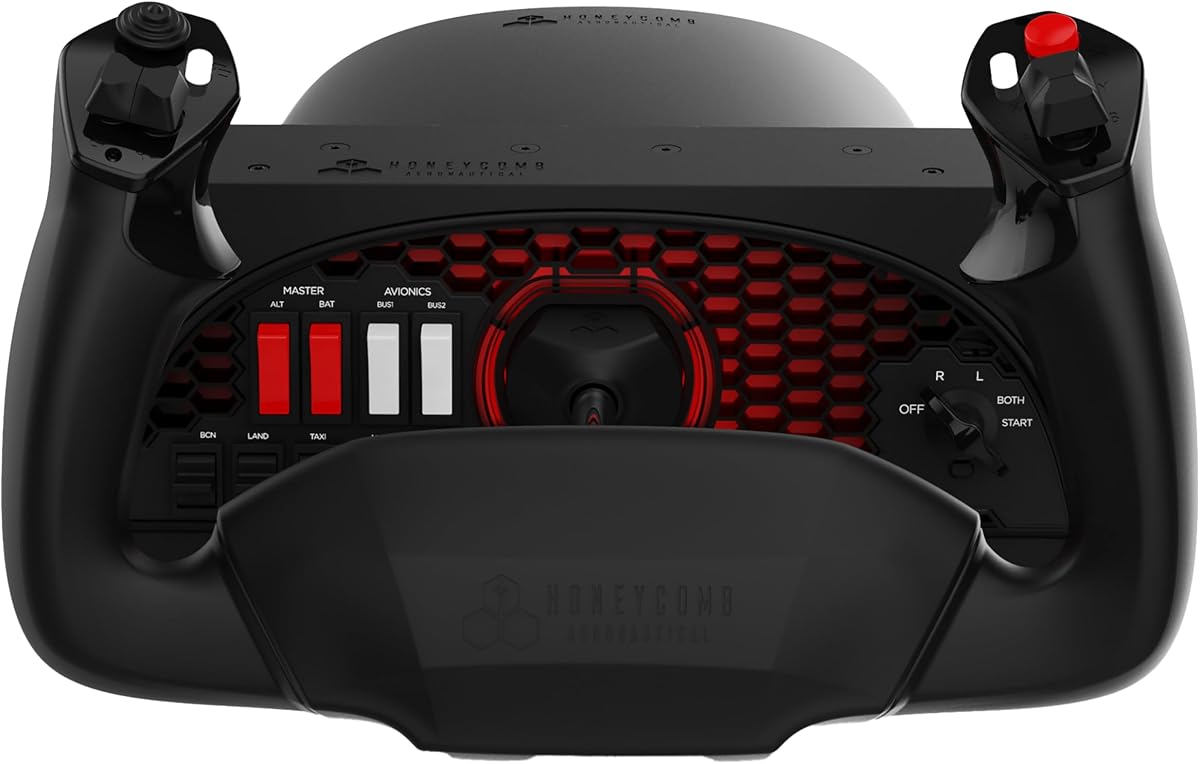
The Honeycomb Alpha Flight Controls Yoke & Switch Panel provides a true-to-life commercial flight experience. With a 4.6 rating, users praise its solid steel shaft and integrated switch panel that brings cockpit functionality directly to your desk.
We may earn a commission when you buy through this link, at no additional cost to you.
Its self-centering mechanism with minimal deadzone ensures effortless and accurate maneuvers. The integrated switches for avionics and lights are essential for realism, and the dual mounting solutions offer flexibility for different table thicknesses.
While initial setup might take time to configure, the quality materials and responsive controls make it worthwhile. Designed by aerospace engineers, it delivers reliability and precision that serious simmers expect.
We recommend this for dedicated pilots seeking premium build quality and authentic cockpit features. It stands out as one of the most reliable and realistic yokes available.
Experience immersive flight simulation with one hundred eighty degree rotation and a solid steel shaft for smooth control.
Main alternator and avionics switches with red LED backlighting ensure good operability during night flights.
We may earn a commission when you buy through this link, at no additional cost to you.
Selecting the right controller depends on your flight style, available space, and budget. These factors help narrow down the most suitable options.
Choose between HOTAS (hands on throttle and stick) for fighter jets or a yoke for commercial airliners. Each type offers different ergonomic benefits and control layouts tailored to specific aircraft.
Match the controller type to the aircraft you fly most often to maximize realism and reduce input confusion during complex maneuvers.
Look for magnetic or hall-effect sensors to ensure your controls maintain accuracy over time. These technologies prevent the friction-based wear found in older potentiometer designs.
High-quality sensors provide consistent response and longevity, which is crucial for long-term simulator performance.
More buttons allow you to map essential functions directly to the controller instead of keyboard shortcuts. Consider how many controls you need for your specific aircraft model.
A higher button count increases versatility but may require more time to learn and configure effectively.
Metal shafts and reinforced plastics improve durability and reduce flex during aggressive maneuvers. A solid base helps keep the unit stable during intense flight sessions.
Investing in sturdy materials ensures the controller lasts longer and feels more realistic during use.
Verify the controller supports your specific flight simulator software and operating system. Most modern units work with Microsoft Flight Simulator and X-Plane but checking before purchasing avoids issues.
Ensure USB drivers are available for your OS to enable all features like vibration or displays.
Secure mounting prevents the controller from sliding during use. Look for heavy-duty clamps or suction pads depending on your desk thickness and stability needs.
A stable mount improves immersion and protects your desk surface from damage during gameplay.
Controllers range from affordable sticks to premium yoke sets. Determine how much you are willing to spend for essential features versus advanced realism.
Higher price often brings better build quality and extra axes but entry-level models still offer enjoyable experiences.
Comfort during long sessions is vital. Choose a design with adjustable grips or padding to reduce hand fatigue.
An ergonomic layout ensures you can focus on flying rather than physical discomfort during extended flights.
Before starting, install the latest drivers from the manufacturer to enable all customizable features and ensure software compatibility with your flight simulator.
Map controls based on your preferred cockpit layout to avoid reaching for keys during critical moments. Regularly check that your mounting clamps are secure to prevent drift.
Keep the unit dust-free with a soft cloth and store it in a dry environment to protect sensitive electronics. Avoid exposing the cables to tension or sharp bends to extend their lifespan.
Most modern controllers support popular simulators like Microsoft Flight Simulator and X-Plane. However, you may need to configure settings within the game to map buttons correctly. Always check manufacturer compatibility lists before buying to ensure full functionality with your specific software.
Some manufacturers support macOS while others focus on Windows. You should check product specifications for Mac compatibility. If you use a Mac, look for controllers with dedicated drivers or cross-platform support to avoid connection issues.
Yes, most flight controllers use USB for connection. You will need at least one available port and some models require two for separate throttle and stick connections. Ensure your computer has the necessary ports before purchasing to avoid adapter needs.
Use a soft, dry cloth to wipe down the surface regularly. Avoid liquid cleaners near buttons or connectors. For stubborn grime, slightly dampen a cloth with water but ensure it is fully dry before reconnecting the device to your PC.
Some models require vibration to be enabled in the driver settings or game options. Check that the strength is set to an appropriate level and that the game supports haptic feedback. Not all flight sims use vibration for safety and performance reasons.
Most controllers have fixed parts but some brands offer modular options. Upgrading components like grips or buttons may not be supported by all manufacturers. Check if your model is part of an ecosystem with compatible add-ons before buying.
A yoke mimics commercial aircraft steering with a rotating wheel while a joystick uses a single stick for movement. Joysticks are common for fighter jets, and yokes are preferred for airliners. Choose based on the type of aircraft you simulate most.
Quality controllers with magnetic sensors can last years with proper care. Avoid excessive force or pulling on cables to prevent damage. Regular maintenance and gentle handling extend the lifespan of your flight simulation equipment significantly.
The Logitech G X56 H.O.T.A.S stands out as our top choice for its extensive controls and precision features. It balances professional-grade performance with reasonable cost for serious enthusiasts.
Prioritize build quality and sensor accuracy over extra features if you want consistent long-term performance. Comfort during long sessions and reliable mounting options should guide your final selection.
Prices and availability change frequently so verify current offers before buying. Investing in the right controller will significantly elevate your flight simulation experience for years to come.