
GETPALS Wireless Charger iPhone Charging Station for Apple Multiple Devices
4.2Editor score
3 in 1 wireless charging
Foldable portable design
Safe charging base features
Discover the top charging dock for multiple Apple devices. Our expert guide compares wireless stations and multi-port hubs to simplify your tech setup in 2026.
Managing multiple Apple devices often leads to cable clutter and scattered chargers. A dedicated charging dock consolidates power needs into one sleek solution. This guide helps you find the right station for your home or office desk setup.
We evaluated ten top-rated charging docks based on compatibility, charging speed, and build quality. Each product was analyzed for its ability to handle iPhones, watches, and AirPods simultaneously. Our goal is to highlight the most reliable options available right now.
Every review below details key features, pros, and potential trade-offs for each model. You will see how each dock performs with modern devices like the iPhone 16 and Apple Watch Series 10. Please note that product availability and prices may change over time.
4.2Editor score

4.5Editor score

4.6Editor score
This side-by-side comparison highlights the key specifications and capabilities of the ten leading charging docks. We focus on port counts, wireless capabilities, and compatibility with the latest Apple ecosystem devices to help you make an informed decision.
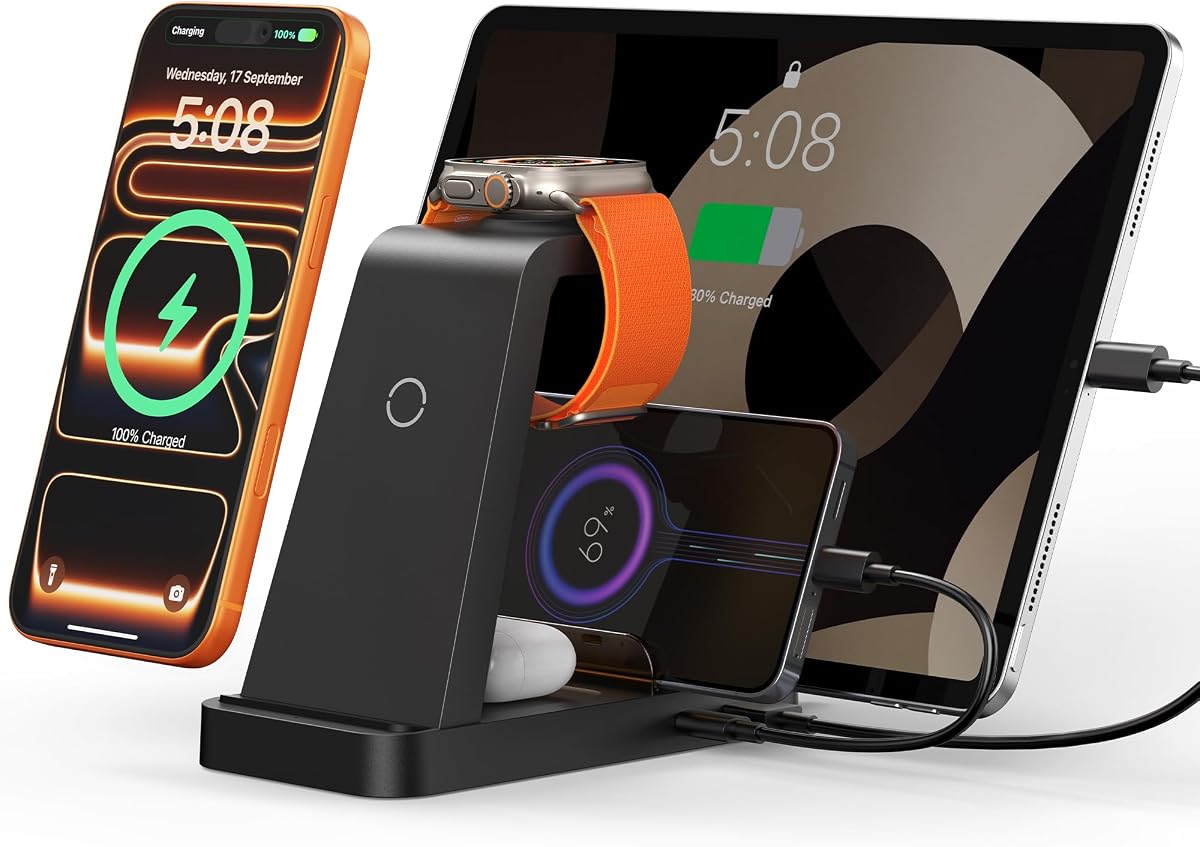


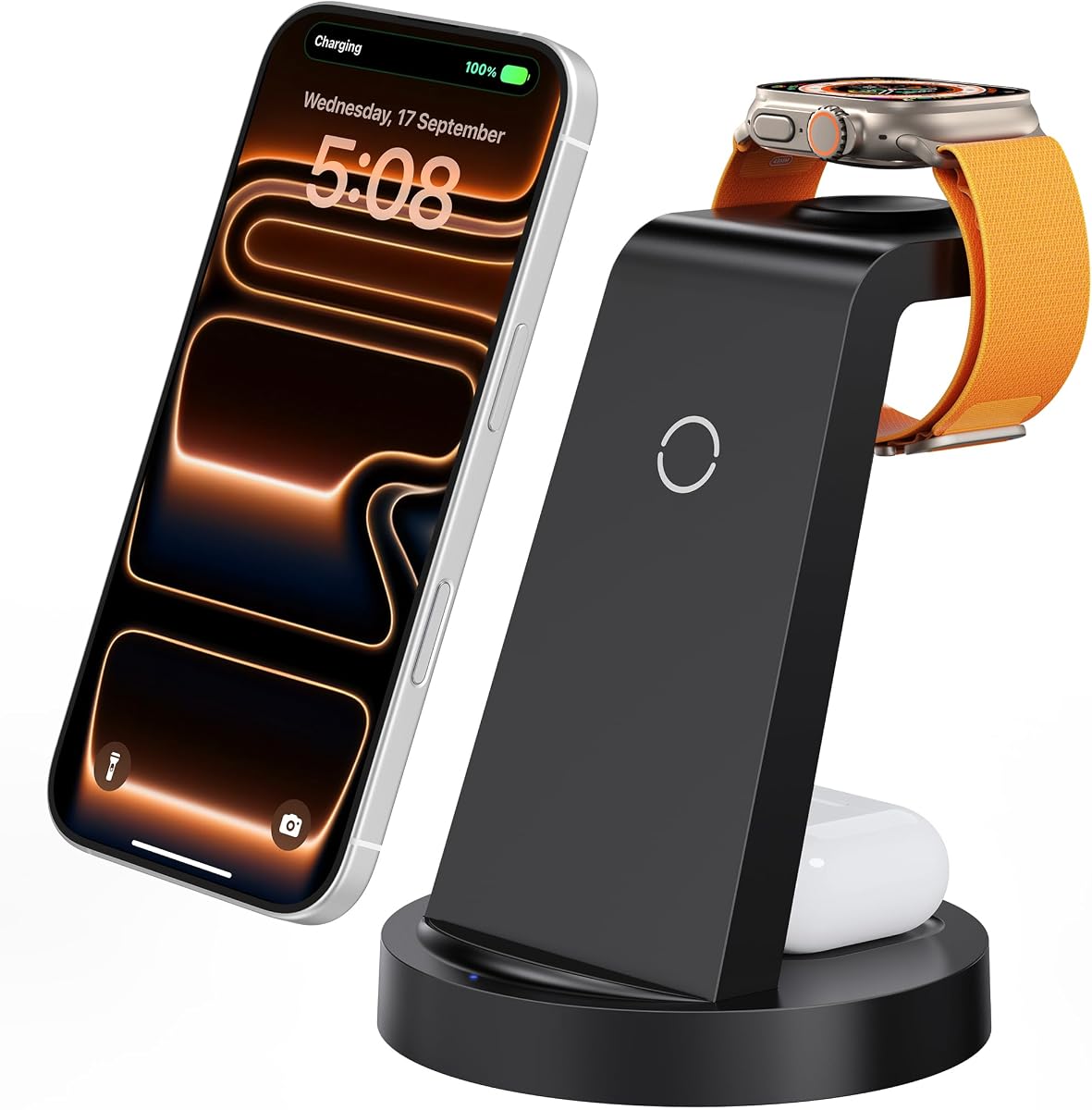


The GETPALS Wireless Charger stands out as an affordable entry point for those needing a charging dock for multiple Apple devices. With a 4.2-star rating, it offers a 3-in-1 solution that handles iPhone, Apple Watch, and AirPods simultaneously. It is designed to be a practical accessory for home or travel use.
We may earn a commission when you buy through this link, at no additional cost to you.
This station provides up to 7.5W for phones and includes safety features like overcurrent and overheating protection. Its foldable design makes it easy to pack for trips, and it works with cases up to 4mm thick. The non-slip surface keeps devices secure while charging.
While it charges slower than high-wattage hubs, its compact size and low cost make it a strong budget contender. Users should note that AirPods 2, 3, and 4 require a MagSafe case to work properly with this dock. It is ideal for those prioritizing value over speed.
If you need a simple, reliable charging dock for multiple Apple devices without spending much, the GETPALS model is a solid pick. It keeps your nightstand tidy and ensures your essential devices are powered up every morning.
This charger is designed to fit easily into bags, making it ideal for travel and remote work. The lightweight structure ensures it does not add bulk to your luggage.
Built with multiple safety features including overcurrent and overheating protection. The LED indicators offer clear charging status for peace of mind.
We may earn a commission when you buy through this link, at no additional cost to you.
This 5-in-1 wireless charger is designed to simplify your desktop by allowing simultaneous charging for up to five devices. It supports a wide range of iPhone models and accessories like Apple Watch and AirPods. The included 36W adapter ensures efficient power delivery for all connected gadgets.
We may earn a commission when you buy through this link, at no additional cost to you.
The station features over-current and over-voltage protection with 16 air vents for heat dissipation. It includes cables for iPad and Android devices, adding flexibility beyond just Apple products. A partition helps organize your devices while they charge, keeping your workspace tidy.
However, you must remove the phone case for charging to avoid affecting speed, which might be inconvenient for some users. Also, the case thickness must be less than 5mm to ensure proper connectivity. Despite this, it offers great value with a 24-month warranty.
For anyone looking to simplify their charging experience and maintain a tidy workspace, this dock is a strong contender. It provides the necessary ports and wireless areas to handle your daily tech needs effectively.
Comes with a 36W fast charging adapter that efficiently charges up to 5 devices in 2-3 hours. It is faster than the original charging adapter for most devices.
Allows you to personalize your charging life with USB and Type-C ports for your own cables. It supports accessories like power banks and electric toothbrushes.
We may earn a commission when you buy through this link, at no additional cost to you.
The 320W Charging Station is a powerhouse for families or offices with many devices. It features 10 ports including USB-C and USB-A, capable of charging up to 10 devices simultaneously. This high-capacity dock is perfect for eliminating tangled wires and wall adapters.
We may earn a commission when you buy through this link, at no additional cost to you.
It includes 2 x 65W and 3 x 30W PD USB-C ports for fast charging. Smart chips automatically detect devices to provide accurate current and avoid overcharging. The design includes an anti-slip middle partition and eight rubber pads to protect your desk surface.
While it handles laptops and tablets well, note that the Apple Watch charger holder does not include the watch cable. Also, the wide slots allow devices with cases but it may take up significant space. The 8 free cables add great value to the package.
If you need a reliable charging dock for multiple Apple devices along with Android gadgets and laptops, this is an excellent choice. It simplifies your charging needs with high power and organized ports.
Equipped with 2 x 65W and 3 x 30W PD USB-C ports. These provide lightning-fast charging speeds for laptops and tablets.
Built-in advanced smart chips automatically detect devices and provide accurate charging current. This avoids overcharging and ensures safety for all connected devices.
We may earn a commission when you buy through this link, at no additional cost to you.
This Acer Gadget dock offers a unique combination of charging and functionality with a smart clock. It supports up to six devices at once including two wireless chargers for phones and wired ports for other accessories. The Bluetooth time sync ensures the clock stays accurate.
We may earn a commission when you buy through this link, at no additional cost to you.
The ambient lighting feature allows you to customize warm or cool lighting to match your room's vibe. It also includes USB-A and USB-C ports to power items like power banks or electric toothbrushes. The design refreshes your nightstand space by eliminating cable clutter.
However, it is not compatible with Samsung watches and requires cases to be less than 2mm thick for proper charging. Also, AirPods must be centered on the pad for charging to work. These limitations are acceptable given the extra clock feature.
If you want a charging dock for multiple Apple devices that also serves as a stylish clock, this is a great pick. It adds convenience and a touch of luxury to your bedside table.
The iphone and apple watch charging station includes a smart clock with automatic time synchronization via Bluetooth. Simply enable Bluetooth and connect to S1.
Supports wireless charging for iPhones and also Galaxy phones. Wired ports allow power for anything from AirPods to USB-compatible toothbrushes.
We may earn a commission when you buy through this link, at no additional cost to you.
The Anlmz 3-in-1 station is a straightforward solution for charging iPhone, Apple Watch, and AirPods. It comes with an 18W adapter and uses a non-MagSafe design that requires centering your device. This simplicity makes it a reliable companion for daily use.
We may earn a commission when you buy through this link, at no additional cost to you.
It features a soft blue LED indicator that is comfortable for bedside charging without harsh light. The ABS housing supports heat dissipation and includes foreign object detection to pause charging if metal accessories are detected. It works with cases up to 5mm thick.
While it lacks magnetic alignment found in more premium docks, it offers solid performance at a reasonable price. Just remember to remove metal or magnets from your case to avoid charging interruption. It is a practical tool for keeping devices organized.
For those who need a simple charging dock for multiple Apple devices without extra bells and whistles, this model works well. It ensures your essential gadgets stay powered up without cluttering your nightstand.
ABS housing supports heat dissipation for daily use. A soft blue LED shows charging status and foreign object detection can pause charging when metal accessories are detected.
Works with iPhone 8 and newer wireless charging models. Supports Apple Watch Series and AirPods with a wireless charging case.
We may earn a commission when you buy through this link, at no additional cost to you.
This charging dock is designed for portability with a magnetic suction design for accurate charging. It can fold up into a compact shape that fits easily in bags for travel. The magnetic alignment works best with iPhone 12 and above series.
We may earn a commission when you buy through this link, at no additional cost to you.
The 180-degree foldable mat can become a phone stand for viewing while charging. It comes with an 18W adapter and includes temperature and overvoltage protection. This setup is perfect for home, office, and travel situations.
However, AirPods support is limited to versions with magnetic charging cases. While it is FCC certified and safe, it is best for lighter use rather than heavy daily powering of multiple devices. The convenience of folding outweighs the wattage for travelers.
If you are looking for a travel-friendly option that handles your Apple essentials, this dock is ideal. It keeps your setup neat and ensures you can charge on the go.
The wireless charging pad contains a magnetic suction which automatically charges iPhone 12 and above series. It is also compatible with Apple Watch Ultra and AirPods.
It only needs one cord to charge three Apple products at the same time. The mat can be changed into a phone stand in seconds.
We may earn a commission when you buy through this link, at no additional cost to you.
The Lcssio 300W Charging Station offers powerful output for laptops and tablets. It features 5 USB-C ports and 3 USB-A ports totaling 300W. This is great for families with many devices needing fast charging simultaneously.
We may earn a commission when you buy through this link, at no additional cost to you.
The housing is sturdy and non-disassembled with two wider slots in the middle for thicker devices. It helps reduce cable clutter on your desktop with 4 anti-slip rubber pads. The station also comes with a 6-pack of short mixed charging cables.
While it lacks wireless charging, its wired power is strong enough for demanding devices like MacBook Pro. However, it may be bulky for small nightstands. The enhanced protection system ensures safe charging for all connected devices.
For users who need a charging dock for multiple Apple devices with strong wired power, this is an excellent pick. It handles laptops efficiently and keeps your power needs organized.
This multi device charging station can significantly meet your daily charging needs. Dual 65W ports can power your laptops like MacBook Pro or Air.
We specially design two wider and higher slots in the middle to accommodate some thicker devices even with cases. The housing is solid and cannot be disassembled.
We may earn a commission when you buy through this link, at no additional cost to you.
This station combines a 10-port USB charging station with a 3-in-1 wireless station for up to 13 devices. It features 2 powerful 100W USB-C ports designed for laptops and other efficient ports for phones. It offers a massive power solution for tech heavy users.
We may earn a commission when you buy through this link, at no additional cost to you.
It is equipped with GaN 5 technology to ensure fast and safe powering. The base has non-slip points and the wireless stand has an LED that turns off after 5 seconds to avoid disturbing you at night. It handles Apple family devices and Android devices.
The only note is that the USB-C port on the iwatch wireless stand is non-charging. Still, the total capacity makes it a great all-in-one desk organizer. It eliminates the need for multiple chargers cluttering your space.
If you need a high-capacity charging dock for multiple Apple devices and laptops, this unit delivers. It is perfect for those with extensive device needs in a single home setup.
Charges up to 13 devices simultaneously. This desktop phone charging station features 2 powerful 100W USB-C ports designed specifically for charging laptops.
The compact design lets you fulfill all your device charging needs with one device. The phone stand has 2 LED indicator that turns green then off.
We may earn a commission when you buy through this link, at no additional cost to you.
The Anker MagGo 3-in-1 Charging Station is a premium choice for those wanting fast reliable charging. It harnesses full 15W power for consistent wireless charging aligned with MagSafe technology. It fits ideally on any desk to keep your workspace clutter-free.
We may earn a commission when you buy through this link, at no additional cost to you.
It boasts official certification enabling you to power your Apple Watch from 0 to 100% in just 1 hour and 13 minutes. You can set your preferred angle up to 45 degrees for optimal viewing and StandBy mode. This offers convenience and functionality.
While the price is higher than budget options, the speed and certification justify the cost. The included 40W USB-C adapter is high quality. It is a perfect fit for users who value efficiency and Apple ecosystem features.
For those seeking a high-quality charging dock for multiple Apple devices with certified performance, this is the top pick. It ensures your devices are powered efficiently and safely every day.
Harness full 15W charging power giving your essential devices the quickest charge. It is consistent with the original MagSafe technology.
Boasts official certification enabling you to power your Apple Watch Series 10 from 0 to 100% in just 1 hour and 13 minutes.
We may earn a commission when you buy through this link, at no additional cost to you.
This charging station powers up to 15 devices with 8 USB-C and 4 USB-A ports plus a 3-in-1 wireless station. It features a wide slot to secure laptops even with thick protective cases. The GaN III technology maintains low temperatures while charging.
We may earn a commission when you buy through this link, at no additional cost to you.
The 3-in-1 wireless station charges your iPhone, iWatch, and AirPods. A soft LED indicator turns off after 5 seconds to ensure zero light pollution at night. It is designed to blend into nightstands or hotel desks seamlessly.
The extra-wide slot is a great feature for those with bulky laptops. However, it may take up space on a small desk. If you value power capacity and case-friendly design, this station delivers well.
For users needing a robust charging dock for multiple Apple devices and larger gadgets, this is a strong option. It consolidates all cables into one organizer.
Features a specially designed side slot measuring 1.57 inch wide by 1.77 inch high. It easily secures your laptop or child's iPad even with a thick protective case on.
Built with the intelligent GaN III chipset delivering dual 100W PD fast charging while maintaining low temperatures. It is equipped with 8-layer safety protection.
We may earn a commission when you buy through this link, at no additional cost to you.
When selecting a charging dock for multiple Apple devices, consider compatibility, speed, and design. This guide outlines the factors that will help you choose the right dock for your specific needs.
Ensure the dock supports your specific iPhone models and Apple Watch series. Some docks may not work with the latest iPhone 16 models or older watches. Always check the product specs for full compatibility lists before purchasing.
Check the product specs for full compatibility lists before purchasing to avoid buying a dock that does not work with your devices.
Look for docks that offer fast charging capabilities such as 15W for phones and sufficient wattage for other devices. Faster charging helps you save time in the morning. Some docks come with high-wattage adapters to support multiple devices at once.
Faster charging helps you save time in the morning and ensures all your devices are ready for use quickly.
A sturdy dock made of flame-retardant materials ensures safety and durability. Avoid cheap plastic units that might overheat or degrade over time. Look for docks with non-slip pads to keep your devices secure.
Avoid cheap plastic units that might overheat or degrade over time to ensure longevity and safety.
Decide if you need wireless charging or wired USB-C and USB-A ports. Some docks offer both which provides flexibility for different devices. More ports mean you can charge more items without extra outlets.
More ports mean you can charge more items without needing extra wall outlets.
Safety features like overcurrent and overheating protection are essential. These protect your devices from damage during charging. Docks with FCC certification often meet higher safety standards.
These protect your devices from damage during charging and ensure safe operation.
If you travel often, a foldable or compact design is beneficial. Lightweight docks fit easily in bags. Portable options usually have simple designs with fewer ports.
Lightweight docks fit easily in bags for travel without adding too much weight.
Choose a design that fits your home or office decor. Minimalist docks blend in better than bulky ones. Some offer features like ambient lighting or clocks for extra utility.
Minimalist docks blend in better with your existing furniture and decor.
Higher priced docks often offer more ports and faster charging. Budget options might be slower or less durable. Determine your needs to find the best value for your situation.
Determine your needs to find the best value for your specific situation.
Start by plugging the dock into a power outlet and ensuring the adapter is securely connected. If the dock includes multiple cables, organize them neatly to prevent tangling.
Place your devices on the charging pads or in the designated slots. For wireless charging, ensure the phone is centered for the best connection. Remove thick cases if they interfere with charging.
Regularly clean the dock with a soft dry cloth to remove dust. Keep the vents clear to avoid overheating. Do not use water or harsh chemicals on the dock surface.
Yes many docks allow charging with cases up to 5mm thick. However for you may need to remove metal or magnetic rings. Check the specific dock compatibility for your case type.
Some docks come with adapters included to ensure fast charging. If not you may need to buy a compatible adapter separately. Using the wrong adapter might slow down the charge.
Most modern docks have overcharge protection to stop charging when full. It is safe to leave devices overnight but check the product manual for specific advice.
MagSafe uses magnets to align the charger perfectly for faster efficient charging. Standard wireless requires you to place the phone on the pad without alignment. MagSafe is more convenient.
Many docks support both Apple and Android devices through USB ports. Some also support wireless charging for other phones. Check the product specs for compatibility.
LED lights show charging status but some can be distracting. Look for docks with auto-off features or dim lights if you plan to use them as nightstand chargers.
Use a soft dry cloth to wipe the surface gently. Avoid liquids which can damage internal components. Keep the area dust free to ensure good charging connection.
We have reviewed ten top options for charging docks that simplify your home setup. From budget picks to high-speed stations there is a model for everyone. Your choice depends on your specific device count and needs.
Prioritize safety features and speed when making your decision. A good dock will protect your devices and save you time daily. Also consider design to match your home style.
Remember that prices and availability change so check the current links before buying. We hope this guide helps you find the perfect solution for your charging needs.