
AI Drawing Projector for Kids
4.4Editor score
50 built-in pictures ready to use
Transform photos into traceable art
Educational sound for words and numbers
This guide compares the top AI drawing projectors for kids and artists, evaluating features like AI generation, app control, and projection quality for
AI drawing projectors are transforming how children and artists create art by turning ideas into traceable outlines instantly. These devices use advanced software to generate images from text or photos, making drawing accessible for beginners while offering precision for professionals seeking new creative tools.
We analyzed ten leading models based on user reviews, technical specifications, and real-world performance. Our comparison focuses on ease of use, image clarity, AI capabilities, and versatility across different surfaces. This list helps you find the right tool whether you need a toy for kids or a professional projector for artists.
Each selection highlights specific strengths like built-in patterns, photo-to-art conversion, or high-resolution projection. Keep in mind that features and availability may change over time, so check current details before purchasing. These reviews aim to guide your decision with honest insights into what each product offers for your creative needs.
4.4Editor score

4.6Editor score

4.0Editor score
The following table provides a side-by-side comparison of all ten AI drawing projectors. Each entry lists key specifications such as resolution, connectivity options, and unique features to help you quickly identify which model aligns best with your artistic goals and technical requirements.




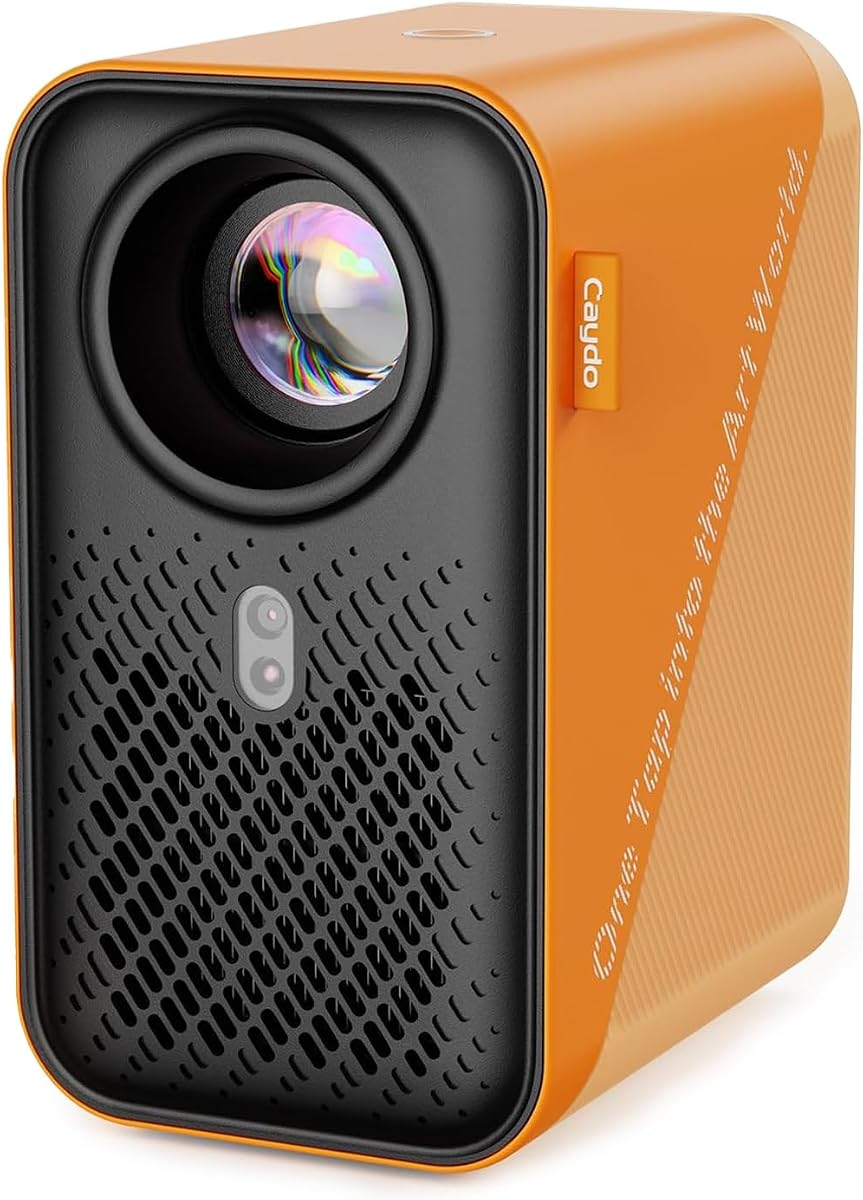

The Caydo T3 AI Drawing Projector stands out as the top choice for families seeking both educational value and technical capability. With a solid rating of 4.6 stars, it balances ease of use for children with advanced features like native 720P projection and AI generation.
We may earn a commission when you buy through this link, at no additional cost to you.
This device excels in transforming imagination into reality by allowing users to type ideas like a dinosaur riding a skateboard and instantly generate traceable outlines. The step-by-step guidance ensures beginners build confidence without frustration, while the native projector allows for streaming cartoons after drawing sessions.
While the price is higher than basic toys, the versatility justifies the investment. The light is designed to shine downward onto paper, protecting eyes, and the auto-brightness feature adapts to any room. The included timer helps manage screen time effectively during creative play.
Parents looking for a tool that grows with their child will appreciate the comprehensive features here. It serves as an art companion, a movie player, and a music speaker all in one, making it an excellent long-term investment for creative development.
The AI feature allows children to type any concept and receive a custom outline to trace and color instantly.
After drawing, the unit can stream videos or play music via Bluetooth, extending its utility beyond just art.
We may earn a commission when you buy through this link, at no additional cost to you.
This budget-friendly model is perfect for introducing children to the magic of AI art without a large financial commitment. With a rating of 4.4 stars, it offers essential features like text-to-image generation and a library of built-in pictures right out of the box.
We may earn a commission when you buy through this link, at no additional cost to you.
The projector allows kids to type ideas and see custom pictures appear to trace and color. It also includes 50 built-in images for immediate play. The educational aspect is enhanced by a built-in speaker that speaks numbers and English words when Learning Packs are selected.
The main trade-off is that it requires a constant power connection via USB, limiting portability. However, for stationary creative time, this ensures consistent operation. The lack of batteries keeps the cost low and the device lightweight for children to handle safely.
For parents seeking an affordable gift that sparks creativity, this is an ideal choice. The packaging is designed as a thoughtful gift for birthdays, and the combination of AI generation and educational sound makes it a standout value in its price range.
When a Learning Pack is selected, the speaker says numbers and English words to reinforce learning while drawing.
No SD cards are required to use the 50 built-in pictures available for immediate creative play.
We may earn a commission when you buy through this link, at no additional cost to you.
For serious artists, the Caydo P3 offers professional-grade capabilities with its native 1080P resolution and 400 ANSI lumens brightness. This model ensures crisp, vivid images even during the day, making it superior for detailed work compared to standard projectors designed for children.
We may earn a commission when you buy through this link, at no additional cost to you.
The exclusive drawing assistant includes tools like zoom, rotation, and artistic modes such as Gridify and Sketchify. These features help adapt the image to any workflow. The auto-focus and keystone correction algorithms lock clarity quickly, ensuring perfect proportions without manual tweaking.
While the price is higher, the build quality and brightness justify it for professionals. The 30,000-hour lamp life ensures long-term value. You can transfer images via USB or QR code to work offline, which is crucial for uninterrupted creative sessions in studios.
If you need precision and flexibility for large projects or murals, this projector is the right tool. It eliminates the need for extra stands with its swivel base, allowing you to project onto various surfaces easily for versatile artistic creation.
With 400 ANSI lumens, you can project clearly even in well-lit rooms without needing a dark space.
Select from Gridify, Sketchify, Comicize, and Monochromize to adapt the reference image to your specific style.
We may earn a commission when you buy through this link, at no additional cost to you.
This projector is specifically designed for older kids, teens, and adults who need realistic detail rather than simple cartoons. With a high rating of 4.7 stars, it builds real drawing skills by training hand-eye coordination and proportion through tracing.
We may earn a commission when you buy through this link, at no additional cost to you.
You can describe ideas by voice or text to generate clean, traceable outlines in high resolution. The ability to send photos from your phone to trace family or pets makes it versatile for preserving memories. It comes with a 30-image inspiration cartridge to get started immediately.
The focus on detail sets it apart from toddler-focused models. It allows for projects like decorating cookies or tracing on canvas. However, the price reflects this advanced targeting. The new generation product does not use older cartridges, so ensure compatibility if you have legacy items.
For teenagers transitioning to serious art hobbies, this is an excellent bridge. It encourages creativity without the frustration of drawing complex scenes from scratch, offering a screen-free way to finish meaningful artworks that can be displayed or gifted.
Unlike toddler models, this handles detailed realistic images suitable for tween and teen artistic projects.
Describe what you want to draw by voice or typing to let the AI create the outline instantly.
We may earn a commission when you buy through this link, at no additional cost to you.
This projector is tailored for flexibility with its web control feature, allowing you to manage settings directly from a browser. It holds a 4.5 rating and uses a dual-band WiFi chip for low-latency tracing of intricate lines from your phone or tablet.
We may earn a commission when you buy through this link, at no additional cost to you.
You do not need to download an app to control the projector, which simplifies the user experience. Simply scan a QR code to access the control panel. The adjustable stand allows you to project onto horizontal canvases or vertical walls with maximum versatility for different creative environments.
Offline functionality is a key advantage here, as it works flawlessly in remote locations without WiFi. This ensures your workflow is uninterrupted even when internet access is poor. The manual focus adjustment button helps fine-tune the focal length for sharp images.
Whether for architectural plans or teaching art, this tool accelerates skill development. It is an exceptional gift for students and professionals who prioritize web-based control and offline reliability over built-in toy features found in other models.
Scan the QR code to control projection settings directly from your phone browser without downloading any software.
Designed to work without WiFi so your creative projects stay seamless in remote locations.
We may earn a commission when you buy through this link, at no additional cost to you.
This model focuses on connectivity performance with an upgraded 5G dual-band chip that significantly reduces latency. With a rating of 3.5 stars, it is ideal for tracing intricate lines and complex sketches from your phone with seamless real-time accuracy.
We may earn a commission when you buy through this link, at no additional cost to you.
The app-free web control lets you manage settings through your browser. The sturdy mount adapts to various workspaces, allowing quick customization of height and tilt. FCC ID certification ensures safety and performance standards are met for daily use.
While the rating is lower, the technical focus on stability is beneficial for professional use where lag is unacceptable. It supports both online and offline connections for continuous workflow. The versatility makes it suitable for architectural tracing and cookie decorating alike.
If stable connectivity is your priority over AI features, this is a solid choice. It turns mobile photos into tangible art efficiently. The upgrade over standard models offers fluid real-time tracing of professional-grade sketches for users who value speed and precision.
The upgraded 5G chip offers high-speed connections that reduce lag for smooth real-time drawing experiences.
Fully FCC ID certified to ensure the device meets safety and performance benchmarks for creative work.
We may earn a commission when you buy through this link, at no additional cost to you.
The Caydo P2 delivers reliable performance with 250 ANSI lumens of brightness and accurate color contrast. It is designed to be a true art projector that allows you to project onto walls, ceilings, or tilted canvases without extra stands due to its rotating base.
We may earn a commission when you buy through this link, at no additional cost to you.
The exclusive drawing assistant includes intuitive tools like 0-200% zoom and 3×3 grid for scaling reference images. It supports offline work so you can function in basements with poor internet. Bluetooth 5.4 enables two-way audio use, allowing you to pair it as a speaker.
Auto focus and keystone correction algorithms lock clarity quickly to ensure sharp images at all times. With projection distances from 2.3 ft to 5.8 ft, it offers flexibility for different room sizes. The 30,000-hour lamp life ensures longevity for your studio setup.
For artists needing adaptability and basic smart features, this is a strong option. The rotating base gives seamless adaptability across different angles, making it easier to work on various surfaces. It combines drawing tools with entertainment features effectively.
Unlike mirroring, the drawing tools remain fully functional offline so you can work anywhere.
Bluetooth 5.4 allows two-way audio use so you can connect external speakers or headphones easily.
We may earn a commission when you buy through this link, at no additional cost to you.
The Caydo P1 is designed for artists seeking a compact yet powerful tool. With a sealed optical core that prevents dust entry, it ensures long-lasting performance without black spots. It supports multiple screen mirroring options for easy image transfer.
We may earn a commission when you buy through this link, at no additional cost to you.
The drawing assistant features zoom, rotation, and unique artistic modes like Gridify. You can transfer images via QR code or USB to start work immediately without worrying about internet connections. It also supports 4K video playback and up to 10,000 hours of lamp life.
Dual-band WiFi ensures faster transmission and lower latency compared to standard networks. Bluetooth 5.0 allows connection to mobile devices as a standalone speaker. The compact design makes it portable enough for both home studios and on-location creative sessions.
For professionals needing portability and core features, this fits the bill. Take off the lens cover before using for best results. The combination of HD video capability and drawing tools makes it versatile for entertainment and artistic creation alike.
The fully sealed optical core prevents dust entry to ensure high quality performance over time.
Enjoy movie entertainment through multiple screen mirroring options including EShare and AirPlay.
We may earn a commission when you buy through this link, at no additional cost to you.
This projector is engineered for stability with a sturdy yet lightweight adjustable stand. It holds a 3.7 rating but offers a wobble-free experience crucial for precise tracing work. The intuitive focus adjustment button allows easy tuning for clarity on any surface.
We may earn a commission when you buy through this link, at no additional cost to you.
The web interface allows you to manage rotation and zoom directly through your browser. Establishing a stable connection takes under 30 seconds. Whether working on intricate cookie decorating or large-scale canvas drawing, the portable setup offers a balance of precision and convenience.
Support for online and offline modes ensures flexibility. The design transforms digital images into tangible masterpieces for students and professionals. The FCC certification ensures safety and performance standards are met for creative projects in various environments.
If you need a straightforward tool without complex app dependencies, this is a strong option. The stable mount provides a secure experience for detailed work. It is perfect for enhancing artistic creativity on any surface without requiring technical expertise.
The stable mount provides a wobble-free experience allowing you to customize height easily.
Establish a stable connection in under 30 seconds following instructions in the manual.
We may earn a commission when you buy through this link, at no additional cost to you.
This projector is tailored for flexibility with its web control feature, allowing you to manage settings directly from a browser. It holds a 4.5 rating and uses a dual-band WiFi chip for low-latency tracing of intricate lines from your phone or tablet.
We may earn a commission when you buy through this link, at no additional cost to you.
You do not need to download an app to control the projector, which simplifies the user experience. Simply scan a QR code to access the control panel. The adjustable stand allows you to project onto horizontal canvases or vertical walls with maximum versatility for different creative environments.
Offline functionality is a key advantage here, as it works flawlessly in remote locations without WiFi. This ensures your workflow is uninterrupted even when internet access is poor. The manual focus adjustment button helps fine-tune the focal length for sharp images.
Whether for architectural plans or teaching art, this tool accelerates skill development. It is an exceptional gift for students and professionals who prioritize web-based control and offline reliability over built-in toy features found in other models.
Scan the QR code to control projection settings directly from your phone browser without downloading any software.
Designed to work without WiFi so your creative projects stay seamless in remote locations.
We may earn a commission when you buy through this link, at no additional cost to you.
Choosing the right AI drawing projector depends on your specific needs, whether for children learning to draw or professionals seeking precision. Here are key factors to consider before making your purchase.
Resolution determines how sharp the projected lines appear on your paper. For children, standard definitions are sufficient, but professionals should look for native 1080P projectors to see fine details clearly. Brightness measured in ANSI lumens is critical for daylight use. Models with 250 to 400 lumens allow you to draw without needing a dark room.
Prioritize brightness and resolution if you work in well-lit environments or need high precision for detailed art.
AI features range from simple text-to-image generation to voice recognition and photo-to-outline conversion. Check if the device supports turning your own photos into traceable outlines. Some models allow you to type ideas into a companion app to generate custom designs instantly without searching for images.
Choose a model with text or voice input if you want your child to generate unlimited unique designs easily.
Most projectors rely on Wi-Fi to connect to smartphones or tablets. Dual-band Wi-Fi (5GHz and 2.4GHz) ensures a stable connection with less lag during real-time tracing. Bluetooth support is useful for connecting external speakers or headphones. Some models offer offline modes or USB transfer for users with limited internet access.
Ensure the device supports dual-band Wi-Fi to avoid interruptions during complex tracing tasks.
The companion app controls the projection settings and provides access to art libraries. Some models offer app-free web control via QR codes, which is convenient for users who prefer not to download extra software. Check if the app includes features like zoom, rotation, and grid lines to help compose the image.
Look for intuitive apps or web controls that simplify the drawing process for your skill level.
For children, eye safety is a top concern. Look for projectors certified with RG0 blue light safety. The design should shine light downward onto the paper rather than directly into the eyes. Some devices include timers to remind children to take breaks, ensuring healthy usage habits.
Always select a model with safety certifications to protect young eyes during extended drawing sessions.
Some projectors are designed for tabletop use with adjustable stands, while others are compact enough for travel. Check if the device requires constant power via a cable or if it supports batteries. Built-in batteries allow for use in remote locations without outlets but may need frequent charging.
Decide based on whether you need a fixed studio setup or a portable option for use on the go.
Built-in content libraries vary widely. Some models come with hundreds of patterns for animals, space, and holidays. Others rely on the internet to download images. If you want offline access, ensure the model includes a substantial offline library or supports SD card storage.
A large built-in library ensures you have ideas ready even without an internet connection.
Art projectors are often used by children who may handle them roughly. Look for sturdy construction and protective lens covers. A good warranty covers electronic defects and lamp life issues. Some professional models offer longer lamp lifespans up to 30,000 hours.
Check the warranty terms and physical build quality to ensure the device lasts through years of creative use.
To begin using your AI drawing projector, connect it to a power source and place it on a stable surface. Download the companion app or scan the QR code provided in the manual to establish a connection with your device. Ensure your smartphone or tablet is connected to the same Wi-Fi network as the projector for optimal performance.
Once connected, select the type of content you wish to draw. You can choose from built-in patterns, type a description into the AI feature, or upload a photo to trace. Adjust the focus knob or use the auto-focus feature to ensure the image is sharp on your paper. Use the zoom and rotation tools to frame the image perfectly.
For maintenance, keep the lens clean by gently wiping it with a soft cloth to avoid dust buildup. Avoid touching the projection bulb directly to prevent oils from damaging the surface. Store the device in a cool, dry place when not in use to extend its lifespan and protect internal components from humidity and temperature extremes.
An AI drawing projector uses software to generate or convert images into traceable outlines. It projects these lines onto paper so you can trace them by hand. This helps beginners create accurate drawings and allows artists to transfer designs to canvas or walls efficiently.
It depends on the model. Many support offline modes using built-in libraries or USB drives to transfer images. However, features like AI text-to-image generation typically require internet access to process requests and generate new custom content.
Most modern projectors are designed with eye safety in mind. They use safety certifications to limit blue light exposure. The light shines downward onto the paper rather than directly at the eyes, reducing strain. Many models also include timers to encourage breaks.
Yes, most models allow you to upload photos via a companion app. Once uploaded, the software converts the photo into a clean outline. You can then project this outline to trace and preserve the image on paper or canvas.
You can project onto paper, canvas, walls, easels, and even cookies depending on the model. Ensure the surface is flat and stable for best results. Some projectors offer adjustable angles to accommodate vertical or horizontal setups easily.
Newer models often rely on digital libraries or SD cards rather than physical cartridges. Always check the product specifications to confirm compatibility. Some brands use cloud libraries that update automatically without the need for physical media.
Lamp life typically ranges from 10,000 to 30,000 hours depending on the model. LED projectors generally last longer than traditional bulb models. This ensures the device remains functional for years of regular creative use without frequent replacements.
Some models include smart features allowing video streaming. However, many are optimized for static images to reduce glare. If streaming is important to you, check for native 720P or 1080P projection and built-in speakers for playback.
The AI drawing projectors we reviewed offer a diverse range of options for creators of all skill levels. Whether you need an affordable toy to spark a child's imagination or a professional tool for precise artistic work, there is a model to fit your needs.
Consider what matters most to you, be it AI features, resolution, or portability. Prioritize models with safety certifications for children and high brightness for professional use. The right device should enhance your creativity without adding technical frustration.
Remember that technology evolves quickly so check current prices and availability before purchasing. This guide provides a comprehensive overview to help you make an informed decision and start creating amazing art today.