
Weilisi Desk Ring Light
4.5Editor score
360 degree rotation
C-clamp base design
10 brightness levels
Explore the top 10 key lights for streaming in 2026. Our expert guide compares brightness, color accuracy, and design to help you choose the perfect setup.
Streaming has evolved into a professional art form where lighting quality defines viewer retention. A good key light ensures your face is well-lit, reducing shadows and enhancing skin tones. Without proper illumination, even the best camera struggles to capture crisp video in low light.
We analyzed ten top-rated models based on brightness output, color temperature range, and ease of control. Each product was evaluated for desk compatibility, heat management, and software integration. Our goal is to help you find the right balance between cost and performance for your studio.
Every pick highlights unique strengths like app control or flexible mounting. Note that prices and availability fluctuate often on major marketplaces. Check the links for the latest deals before making your final decision on this essential piece of gear.
4.5Editor score

4.5Editor score
4.7Editor score
This table provides a quick side-by-side view of the ten selected lighting solutions. We compare their key specifications so you can spot differences in brightness, control methods, and physical design at a glance.



The Elgato Key Light stands out as the industry standard for streaming setups. It delivers 2800 lumens of light which is enough to illuminate large spaces effortlessly. Its 4.5 star rating reflects its reliability and performance over years of use.
We may earn a commission when you buy through this link, at no additional cost to you.
This light shines with its Wi-Fi capabilities allowing you to control settings without touching the panel. You can fine-tune brightness and color temperature via the desktop app. The opal glass face ensures the light spreads evenly without creating harsh hotspots on your face.
While it is pricier than generic panels the build quality justifies the cost. The OSRAM LEDs run cool meaning you do not need to worry about fan noise during recording. However some users may find the desktop software requirement adds a step to setup.
Streamers seeking a professional look with minimal hassle should choose this model. It integrates well with other Elgato devices like Stream Decks for full automation. The investment pays off in consistent video quality that keeps viewers engaged.
The high lumens output ensures your face remains bright even in a dim room.
Wireless control means you can adjust lights hands-free during a broadcast.
We may earn a commission when you buy through this link, at no additional cost to you.
The Logitech Litra Glow is designed specifically for those who stream directly from laptops. It uses TrueSoft technology to deliver balanced full-spectrum light. Its frameless diffuser creates a flattering look that softens shadows effectively.
We may earn a commission when you buy through this link, at no additional cost to you.
This light is incredibly easy to set up thanks to its USB powered design. You can plug it directly into your laptop or use a wall adapter. The G HUB desktop app allows you to save presets for different streaming scenarios.
While it lacks the raw power of studio lights it excels in compact setups. It is safe for all-day streaming so you can wear it on for long sessions without worry. The adjustable mount ensures you can tilt it to the perfect angle.
If you need a simple plug and play solution for Zoom or gaming this is ideal. It is lightweight enough to travel with easily. The only trade-off is that it may not be bright enough for large dark rooms.
TrueSoft technology ensures your skin tones look natural on camera.
The patent-pending mount attaches securely to most monitors.
We may earn a commission when you buy through this link, at no additional cost to you.
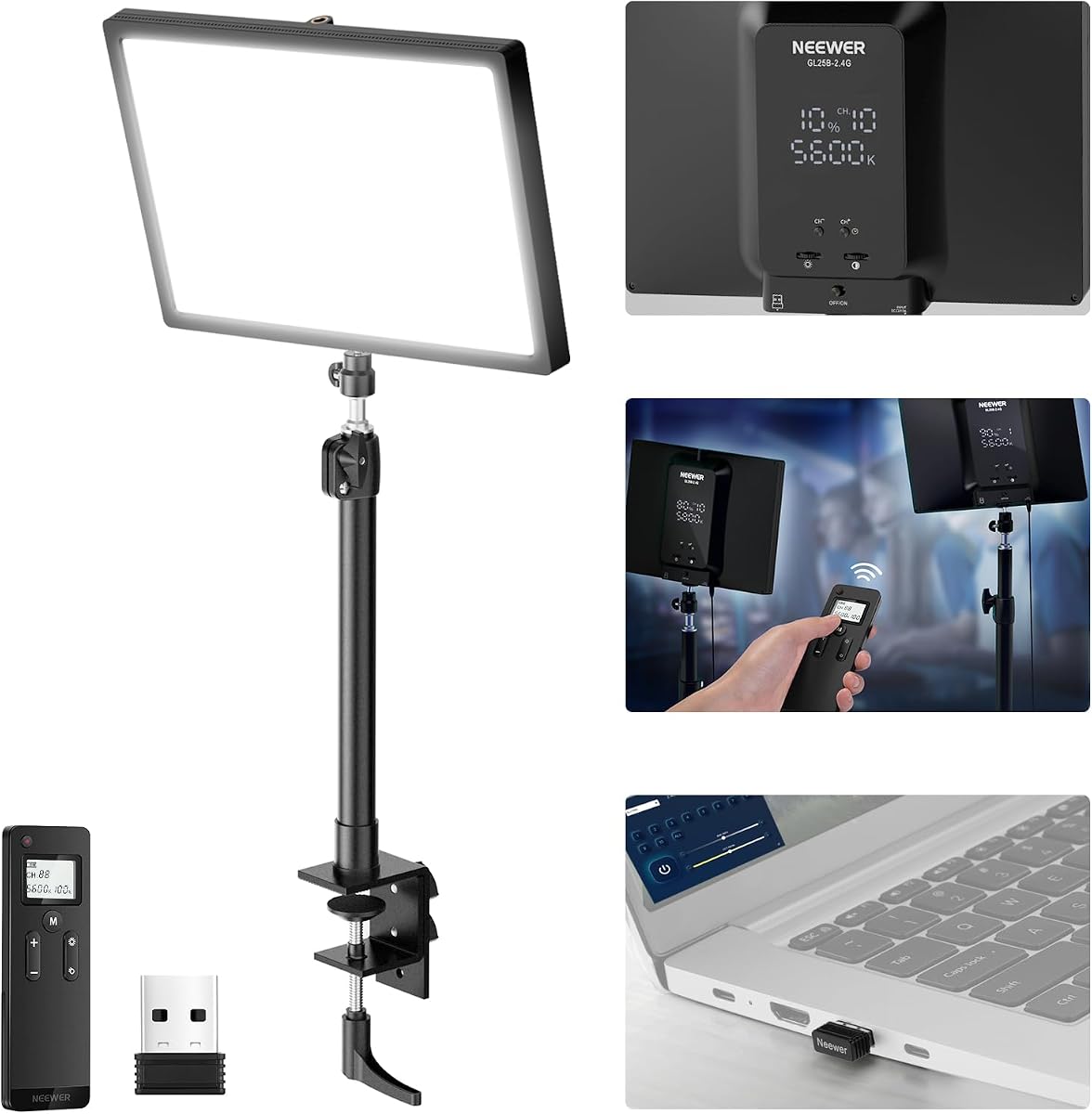
The NEEWER GL25B offers premium performance with a 25W output. It produces 2300lux of light which is incredibly bright for a desk panel. Its 4.7 rating highlights its exceptional build quality and light performance.
We may earn a commission when you buy through this link, at no additional cost to you.
One of its best features is the fanless cooling system. It uses thermal materials to dissipate heat ensuring the light stays completely silent. This makes it perfect for audio recording since there is no fan noise to pick up.
The color rendering index is over 98 which means colors look true to life. You can control it via the panel or a 2.4G remote for convenience. The edge emitting technology ensures the light is soft and even.
Content creators who need bright accurate lighting without noise should choose this. It works well for both streaming and video production. Just ensure your desk has enough space for its slightly larger frame.
Fanless cooling ensures a silent environment for clear audio recording.
A CRI over 98 ensures your products and skin look natural.
We may earn a commission when you buy through this link, at no additional cost to you.
The Elgato Key Light Air MK.2 is a slimmer version of the classic model. It delivers 2100 lumens which is bright enough for most home studios. The panel is edge-lit to reduce glare on your face.
We may earn a commission when you buy through this link, at no additional cost to you.
Power is flexible with this unit as it accepts USB-C or a battery bank. You can control it via touch buttons or the desktop app. This flexibility makes it great for portable setups where you might not have a wall outlet.
The rating is slightly lower than the original due to brightness complaints. However the anti-glare technology is very effective for reducing eye strain. The MagSafe ring allows you to attach batteries for power on the go.
If you value style and portability over raw brightness this is a strong choice. It fits beautifully on a clean desk. Just keep in mind that it might need to be closer to your subject for maximum effect.
Use USB-C or batteries to run the light anywhere.
Edge-lit tech ensures soft light without harsh reflections.
We may earn a commission when you buy through this link, at no additional cost to you.
The Weilisi 10.2 Desk Ring Light is an excellent entry-level option. It provides uniform light that enhances subject features. With a 4.5 star rating it offers great value for the price point.
We may earn a commission when you buy through this link, at no additional cost to you.
Its design allows for 360 degree rotation and a telescoping stand. You can clamp it to any desk edge up to 2.34 inches thick. This saves space and keeps your desk clutter-free.
While the build is mostly plastic it is sturdy enough for casual use. The three color temperatures let you adjust the mood easily. It is perfect for Zoom calls or short video clips.
Budget conscious users will find this hard to beat. It does not look as premium as Elgato products but it works well. If you need a simple light for home office use this is the way to go.
The C-clamp saves valuable desk space.
Rotate the head to hit the perfect angle.
We may earn a commission when you buy through this link, at no additional cost to you.
This kit from NiceVeedi gives you two lights for a low price. Each panel has 356 LED beads for ample output. The high CRI of 97 plus ensures good color rendering for your videos.
We may earn a commission when you buy through this link, at no additional cost to you.
Both lights come with adjustable tripod stands and a phone holder. This makes it easy to set up a small studio quickly. The lights can be powered via USB-C making them versatile for battery packs.
The stands are lightweight but can be less stable on uneven surfaces. You need to tighten the knobs securely to avoid the lights falling. The remote allows you to control brightness from a distance.
This is a great option for creators who need fill lights. You can place one as a key light and the other as a fill. It is perfect for photography as well as streaming.
Get two lights and stands in one package.
Power lights with laptops or portable banks.
We may earn a commission when you buy through this link, at no additional cost to you.
This set offers two lights with gooseneck tubes for maximum flexibility. The LCD display on the panel lets you see exact settings easily. It has a very high 4.8 rating indicating strong user satisfaction.
We may earn a commission when you buy through this link, at no additional cost to you.
You can bend the tubes to angle the light precisely at your face. The metal clamp is sturdy and saves desk space. The memory function remembers your last settings which is very convenient.
The cables are a bit short so check your desk distance. Also the clamp only fits desks up to 3.3 inches thick. These are minor issues considering the price and functionality.
For podcasters who need overhead or angled light this is perfect. It is great for detailed video recording. The two-light setup gives you enough illumination for most rooms.
Adjust the flexible tubes to hit any angle.
LCD screen shows brightness and color clearly.
We may earn a commission when you buy through this link, at no additional cost to you.
The Godox ES45 is designed for comfort during long streams. Its soft diffused panel minimizes harsh shadows on your face. The edge-lit OLED panel ensures even illumination from every angle.
We may earn a commission when you buy through this link, at no additional cost to you.
It comes with a magnetic remote that snaps onto the back of the light. This remote recharges automatically so you never have to change batteries. You can adjust settings without reaching behind the light.
While it is expensive for a desk light the quality is there. It focuses on reducing eye fatigue for the streamer. The Godox Light App lets you control multiple units at once.
Professionals who stream for hours will appreciate the eye comfort. It keeps your face looking polished and camera-ready. The remote convenience makes it a joy to use daily.
The remote snaps to the back and charges automatically.
Soft light reduces strain during long hours.
We may earn a commission when you buy through this link, at no additional cost to you.
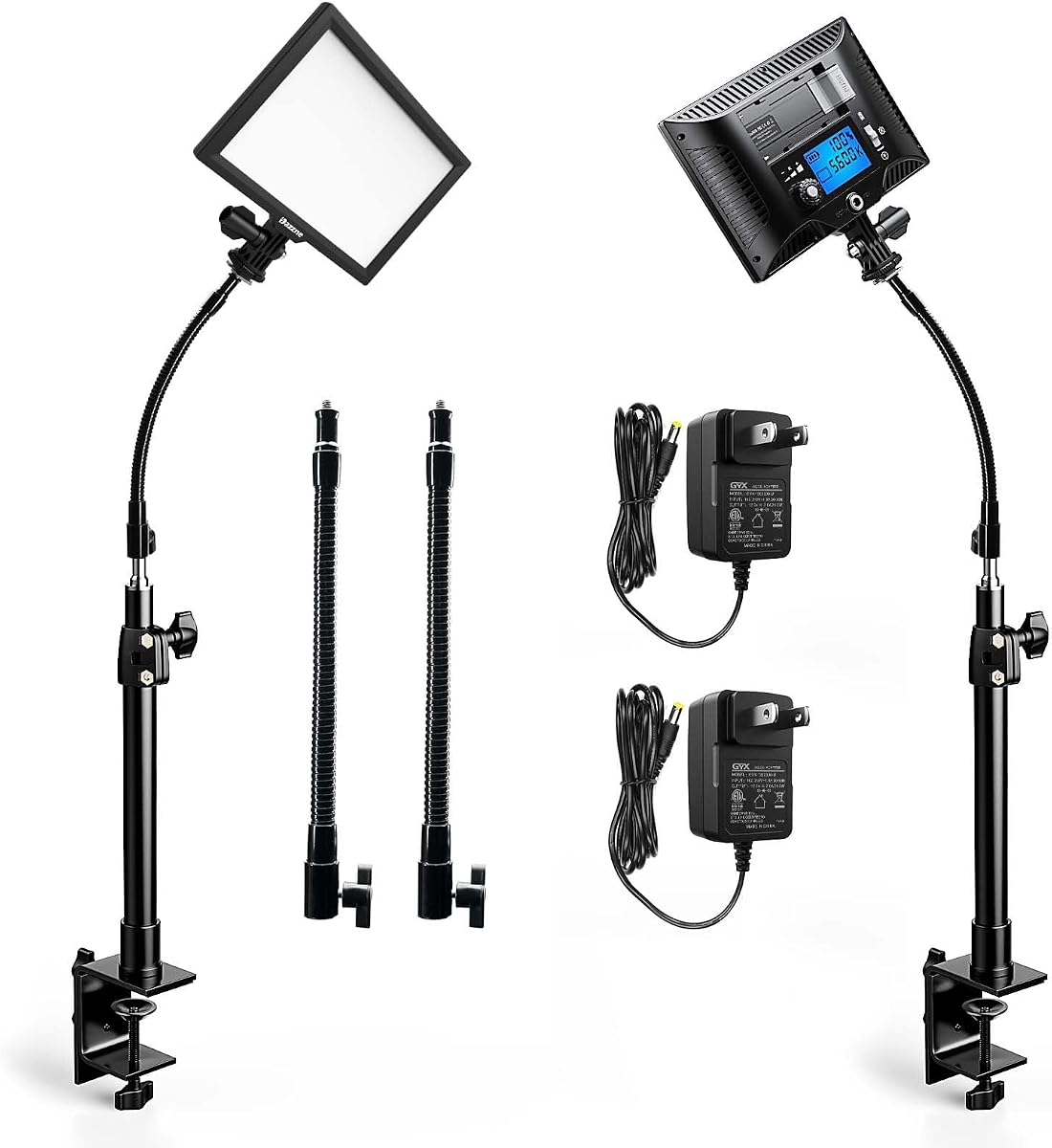
Dazzne focuses on professional photography lights and this kit reflects that. The LCD display shows parameters clearly. It provides two lights with gooseneck tubes for versatile positioning.
We may earn a commission when you buy through this link, at no additional cost to you.
The high CRI of 95 plus ensures details show clearly. This is great for craft videos or makeup streams. The memory function remembers settings so you do not reset every time.
Some users report build quality is mixed compared to premium brands. The power cords are standard length so plan accordingly. The metal brackets are sturdy enough for most desks.
If you need two lights for a setup this is a solid choice. It works well for YouTube video recording. The detailed display helps you dial in the exact look you want.
Check brightness and temperature at a glance.
Adjust the necks for perfect angle placement.
We may earn a commission when you buy through this link, at no additional cost to you.
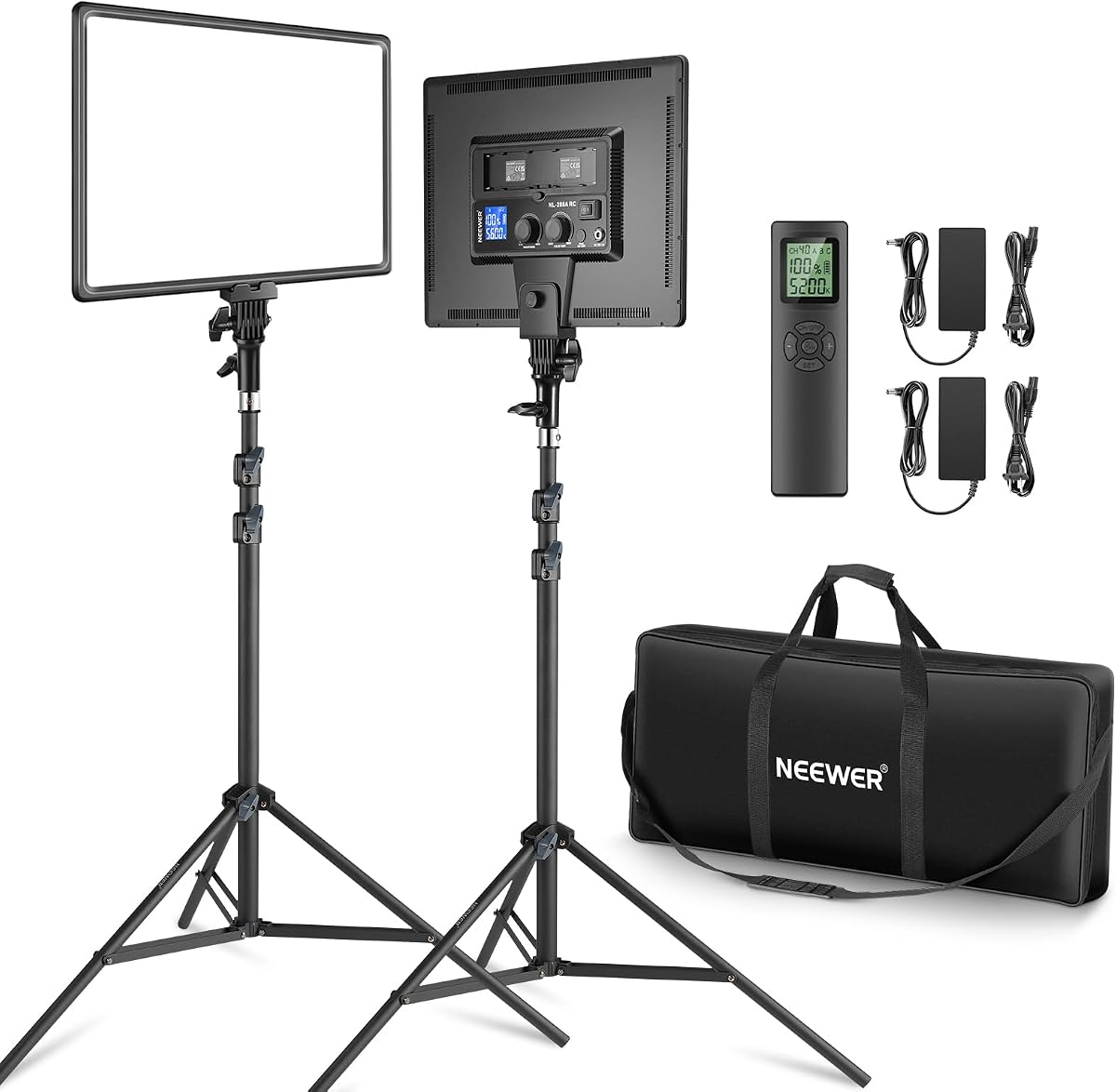
This is a high output kit with two 45W panels. The total light output is massive making it suitable for large studios. It has a 4.6 rating for its reliability and brightness.
We may earn a commission when you buy through this link, at no additional cost to you.
The stands are aluminum alloy and very stable. They can go up to 73 inches high. The remote allows you to control multiple lights at once which is convenient.
Battery operation is possible with Sony NP-F batteries. This is great for outdoor streaming or events. The panels are portable but the stands add weight to the setup.
Streamers needing maximum brightness should choose this kit. It is excellent for video production. The 2.4GHz remote helps avoid interference with your other wireless gear.
45W per panel ensures bright professional results.
Use Sony batteries to move away from outlets.
We may earn a commission when you buy through this link, at no additional cost to you.
Choosing the right key light involves understanding your specific streaming needs. We have identified key factors that will help you select the perfect light for your setup.
Brightness is measured in lumens and determines how well your face is lit. Higher lumens are better for larger rooms. Look for at least 2000 lumens for serious streaming.
More lumens ensure you can maintain quality even in low light.
Color temperature ranges from warm 3200K to cool 6500K. Streaming requires a wide range to match your room lighting. A bi-color light gives you the most flexibility.
A broad range helps you adapt to different environments easily.
CRI measures color rendering accuracy. A high CRI above 90 ensures skin tones look natural. For professional results aim for CRI 95 plus.
High CRI prevents washed out or unnatural colors.
Apps and remotes allow you to change settings without interrupting your stream. Touch controls are fast but apps are more precise. Ensure the device has your preferred control method.
Good controls make adjustments seamless during broadcasts.
Desk clamps save space while tripods offer flexibility. Monitor mounts are great for laptops. Choose a mount that fits your desk thickness.
Correct mounting ensures the light stays steady.
USB-C and wall power are common. Some lights support battery packs for portability. If you stream on the go consider battery compatibility.
Flexible power options keep you running longer.
Fanless cooling is essential to avoid microphone noise. LED panels should remain cool. Check reviews for heat management feedback.
Silent operation ensures your audio stays clean.
Metal frames last longer than plastic. Premium materials protect against wear. Check warranty terms for added security.
Durable build prevents breakage and extends lifespan.
Place the light slightly above eye level and tilt it down to avoid glare. This position reduces shadows under your eyes and nose. Keep the light at least 4 feet away for soft illumination.
Use apps to save presets for different moods. Adjust brightness based on your room lights. This consistency helps your audience recognize your brand instantly.
Clean the panel with a soft dry cloth regularly. Avoid liquid cleaners which can damage the LEDs. Check mounting hardware monthly to ensure stability.
A bright light should deliver at least 2000 lumens. This ensures your face is well-lit even in a dark room. Higher brightness allows you to control the look better.
Daylight around 5600K to 6500K is standard for streaming. It matches most cameras and screens. However a wide range allows you to match room lighting.
For basic streaming a single key light is enough. A fill light helps reduce shadows if you are alone. It depends on how professional you want your look.
Yes most desk lights work perfectly for video calls. They improve your video quality significantly. Make sure it does not glare into your camera.
Most lights come with a C-clamp or tripod. Check your desk thickness before buying. A clamp is stable and saves desk space.
Yes modern USB-C lights are quite bright. They are perfect for laptops and small setups. Ensure you use a high wattage adapter for full power.
Our top pick the Elgato Key Light offers the best balance of power and control. It is ideal for streamers who want reliable professional results every time.
If you are on a budget the Weilisi Desk Ring Light is a great alternative. It provides soft light without breaking the bank. Consider your room size and camera quality first.
Prices change quickly so check current deals before buying. Investing in good lighting is the best way to improve your video quality. A better image leads to more engaged viewers.