
Guermok Video Capture Card
4.4Editor score
4K HDMI input
USB 3.0 support
Plug and play
HDMI recorders have become essential tools for anyone looking to capture high-definition video from consoles, cameras, or set-top boxes without relying on a computer. These devices allow users to record gameplay, live streams, and important meetings directly to external storage. Selecting the right model depends on your specific needs like resolution support, portability, and whether you need standalone functionality. The market offers a wide range of options from affordable capture cards to premium standalone recorders with built-in screens. Understanding the differences between these models ensures you invest in a device that meets your recording demands effectively and efficiently over time.
To compile this comprehensive list we evaluated ten real products based on their technical specifications user ratings and compatibility with various video sources. We focused on factors such as resolution capabilities frame rates latency and ease of use for both beginners and professionals. Each product was analyzed for its ability to handle HDMI inputs outputs and additional analog connections if available. We also considered storage options software requirements and overall build quality to provide a balanced view. This approach helps you compare features side by side and find the best fit for your setup.
Each pick in this guide highlights key strengths potential drawbacks and ideal use cases to help you make an informed decision. We include detailed reviews of every product along with a buying guide covering essential factors to consider before purchasing. Keep in mind that prices and availability can change frequently so verify current details on the product pages. Our goal is to provide accurate up-to-date information based on manufacturer data and user feedback. With this resource you can confidently choose an HDMI recorder that delivers the performance and reliability you need for your projects.
4.4Editor score
4.0Editor score

4.1Editor score
As an Amazon Associate we earn from qualifying purchases.
The following table provides a side-by-side comparison of all ten products listed in this guide. It highlights key specifications and features to help you quickly identify which recorder meets your specific requirements for resolution connectivity and standalone use.





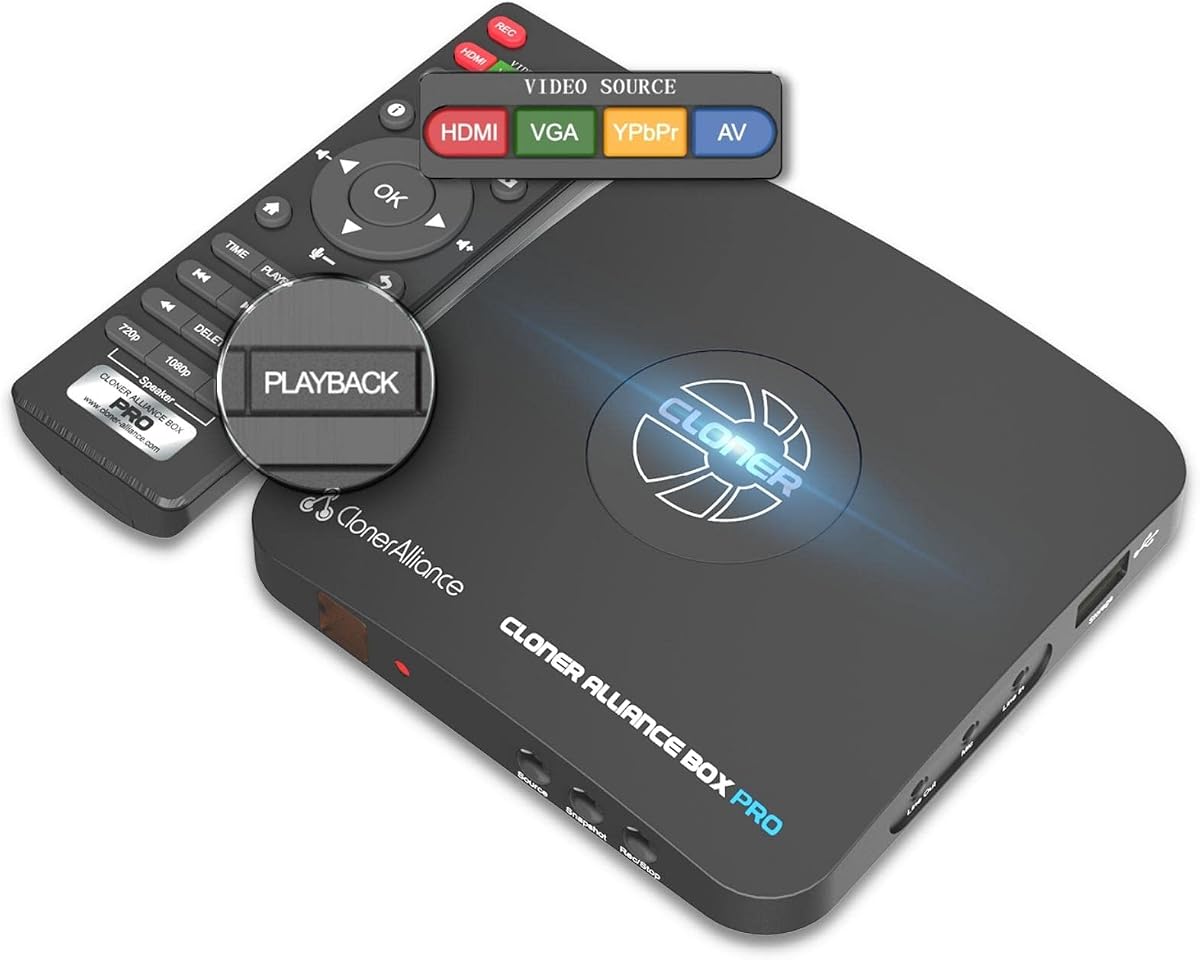
The ClonerAlliance Box Pro stands out as a versatile standalone video recorder designed to capture high-definition content without needing a computer. It supports 1080p recording at 60 frames per second making it ideal for gaming or live events. Users can save files directly to USB storage devices and play them back on a TV using the included remote. This device bridges the gap between analog and digital formats supporting inputs like RCA VGA and component besides HDMI. Its reliability and ease of use make it a strong choice for archiving old tapes or capturing modern console gameplay.
We may earn a commission when you buy through this link, at no additional cost to you.
One of the key strengths of this recorder is its ability to operate independently which is rare for many capture devices. You can connect it to various sources including VHS players game consoles or set-top boxes and start recording immediately. The ultra-low latency of under 90ms ensures that what you see on screen is accurately captured without noticeable delay. It also supports multiple file systems so you can save recordings on different types of drives easily. The included remote control allows for convenient playback and navigation without needing extra hardware.
While the device offers many benefits there are some limitations to consider before purchasing. It does not support HDCP protected content which means streaming services like Netflix cannot be recorded directly. Additionally audio formats like Dolby should be disabled during recording to avoid issues. The software included is only for Windows systems limiting Mac users unless they find third party alternatives. Despite these constraints it remains a powerful tool for users who need a reliable standalone recorder for specific video sources.
This recorder is best suited for individuals who want to digitize analog tapes or capture gameplay without running a PC. It is also great for small businesses or educators who need to record lectures or presentations. If you need a device that works with older equipment and modern HDMI sources this is a solid option. We recommend it for anyone looking for simplicity and performance in a standalone capture box.
The device supports multiple analog inputs like RCA VGA and component allowing users to preserve old VHS tapes camcorder footage or educational DVDs. This feature is invaluable for archiving historical content or personal memories that would otherwise degrade over time.
Users can set up automatic recording tasks so the device starts and stops at specific times. This is particularly useful for capturing live events or TV programs when you cannot be present to press record manually.
We may earn a commission when you buy through this link, at no additional cost to you.
The Guermok Video Capture Card offers an affordable entry point for users looking to capture HDMI video on their computers. It supports input resolutions up to 4K at 30Hz and outputs 1080p at 60fps making it suitable for streaming or recording gameplay. The card connects via USB 3.0 and USB C ensuring high-speed data transfer with most modern laptops. It is designed to be plug and play requiring no drivers for installation which simplifies the setup process significantly. This makes it an excellent choice for beginners or those on a tight budget who still want good video quality.
We may earn a commission when you buy through this link, at no additional cost to you.
One of the main advantages of this capture card is its compatibility with a wide range of operating systems and software. It works well with OBS Studio Zoom VLC and other popular platforms allowing users to stream or record content easily. The aluminum alloy build helps with heat dissipation ensuring stable performance during extended use. Low latency is another key feature which is crucial for live gaming or video conferences where timing matters. Users appreciate the portability of the device as it can be carried in a bag for mobile streaming setups.
However it is important to note that this device requires a computer to function and does not record independently. You need capture software to view or save the video which might be a hurdle for some users. Additionally using it with USB 2.0 ports may reduce performance so ensuring a USB 3.0 connection is recommended. There have also been reports of audio setup issues where restarting the software is needed after configuration. Despite these minor drawbacks it remains a strong contender in the budget category for PC-based capture.
This capture card is ideal for students streamers or content creators who need a reliable way to record HDMI sources without spending much. It is best used with a computer setup where you can control the recording process directly. If you need a standalone device this is not the right choice but for PC users it offers great value. We recommend it for anyone seeking a cost effective solution for capturing high quality video streams.
The card leverages USB 3.0 technology to ensure fast data transmission which is essential for high resolution video capture. This prevents bottlenecks during recording and helps maintain smooth frame rates for live streaming.
Its small and lightweight build makes it easy to carry for outdoor live streams or remote work. You can set it up quickly in different locations without needing extra power supplies or bulky accessories.
We may earn a commission when you buy through this link, at no additional cost to you.
The ClonerAlliance UHD Pro is a premium standalone 4K video recorder designed for users who need high fidelity capture without a computer. It supports 4K recording at 24 or 30 frames per second and provides 4K 60fps passthrough so you can watch content while recording. The device uses both H.264 and H.265 codecs which offer efficient compression and high-quality output. It saves files directly to USB storage or TF cards making it easy to manage recordings. This model is perfect for archiving UHD content or capturing gameplay with cinematic quality.
We may earn a commission when you buy through this link, at no additional cost to you.
A major benefit of this recorder is its ability to handle high-resolution video efficiently thanks to the H.265 codec support. This allows for better quality at lower file sizes compared to older codecs which is useful for storage. The pause and resume feature lets you keep important moments in one file without interruption. It also includes schedule recording tasks so you can automate the capture of specific events or programs. The ultra-low latency ensures that the video you see is accurately recorded which is critical for competitive gaming.
While the device offers top-tier features it comes at a higher price point than basic capture cards. It also does not support HDCP protected content which limits its use with certain streaming services. Users should ensure their video source does not use Dolby audio or HDR during recording to avoid compatibility issues. Despite these limitations it remains one of the best standalone options for 4K capture on the market today. The included software supports basic editing on Windows but Mac users might need third party tools.
This recorder is best for professionals or enthusiasts who need to capture UHD content for professional use or archiving. It is suitable for those who want a reliable standalone solution without managing a PC during recording. If you need high-quality 4K video and schedule features this is a strong investment. We recommend it for users who prioritize video quality and flexibility in their recording workflow.
The support for H.265 allows for smaller file sizes with the same visual quality as H.264. This is particularly helpful for storing long recordings without filling up storage drives quickly.
Users can set the device to start recording at specific times which is useful for capturing scheduled events or live broadcasts. This automation ensures you never miss important content even when you are not available.
We may earn a commission when you buy through this link, at no additional cost to you.
This Capture Card 4K HDMI is a robust device designed for gamers and streamers who need reliable video capture on their computers. It supports video sources up to 4K at 30Hz but records at 1080p 60fps which is ideal for most streaming platforms. The HDMI loop-out feature allows you to play games on your monitor without lag while the card captures the feed. It also includes a microphone input so you can add commentary directly to your stream. The device is plug and play and works with popular software like OBS and Streamlabs making it easy to use.
We may earn a commission when you buy through this link, at no additional cost to you.
One of the key strengths of this card is its HDMI loop-out functionality which ensures minimal delay during gameplay. This is crucial for competitive gamers who need to react quickly while streaming their session. The mic-in port supports 3.5mm headsets allowing for clear voice commentary without extra mixers. It is compatible with a wide range of consoles and cameras providing versatility for different setups. The high-speed USB 3.0 connection ensures that data is transferred smoothly without dropping frames.
However it is important to note that while it accepts 4K input it records at 1080p which may not satisfy those needing 4K recording. It also requires a computer to function so standalone users will not benefit from this model. Some users have reported that audio settings need to be adjusted carefully to avoid sync issues. Despite these points it offers great value for streamers who prioritize smooth gameplay and easy setup. The compact design makes it easy to transport for LAN parties or events.
This card is best for streamers who want to capture gameplay from consoles like PS5 or Xbox on their PC. It is also suitable for content creators who need a microphone input for commentary. If you need a reliable capture tool for broadcasting this is a solid option. We recommend it for users who value low latency and compatibility with streaming software.
The loop-out port sends the video signal directly to your monitor ensuring no delay during gameplay. This allows you to focus on the game while the card captures the feed in the background.
You can connect a standard 3.5mm microphone to add commentary to your stream without extra hardware. This simplifies the setup for solo streamers who want to engage with their audience.
We may earn a commission when you buy through this link, at no additional cost to you.
The Audio Express AXHDCAP is a video capture card that allows users to connect cameras or consoles to their computers for streaming or conferencing. It accepts 4K input at 30Hz and outputs 1080p at 30Hz which is sufficient for video calls or basic recordings. The device connects via USB 2.0 and does not require drivers making it easy to plug and play. It works with popular platforms like Zoom OBS and YouTube allowing for versatile use cases. The low latency ensures that real-time preview is smooth for live broadcasts or teaching.
We may earn a commission when you buy through this link, at no additional cost to you.
One of the primary advantages of this capture card is its affordability and ease of use for educational settings. Teachers and students can connect webcams or document cameras to record lectures or presentations without technical issues. The real-time preview allows for immediate adjustments during live sessions ensuring quality output. It is compatible with multiple operating systems including Windows and Mac which broadens its usability in diverse environments. The compact design makes it easy to store or carry in a laptop bag for mobility.
However the USB 2.0 connection limits the bandwidth which may result in lower frame rates compared to USB 3.0 devices. The output is capped at 30fps which might not be ideal for fast-paced gaming or high-motion content. Users should ensure their USB ports are functioning properly to avoid connection issues. Despite these limitations it remains a strong choice for static video recording or conferencing. The thermal dissipation design ensures it stays cool during extended use in classrooms.
This capture card is best for educators or professionals who need to capture video for meetings or online teaching. It is also suitable for home users who want to record simple presentations or conferences. If you need a budget-friendly option for non-gaming video capture this is a good choice. We recommend it for users who prioritize simplicity and cost over high frame rates.
The device allows teachers to connect cameras to computers for recording lessons or live streaming classes. This ensures students can see the content clearly without complex setup requirements.
The build includes features to dissipate heat effectively which prevents overheating during long recording sessions. This is important for maintaining consistent performance in warm environments.
We may earn a commission when you buy through this link, at no additional cost to you.
This Capture Card 4K USB 3.0 is a compact device designed for gamers who want to stream gameplay on their computers. It supports 1080p recording at 60 frames per second and works seamlessly with consoles like PS5 Xbox and Switch. The USB 3.0 connection ensures high-speed data transfer which is vital for smooth streaming. It is plug and play and compatible with software like OBS and Streamlabs for easy setup. The lightweight design makes it easy to carry for travel or LAN parties.
We may earn a commission when you buy through this link, at no additional cost to you.
One of the key benefits of this card is its low-latency performance which ensures smooth streaming during competitive gaming. It is compatible with a wide range of devices allowing users to switch setups without issues. The pass-through feature lets you play without lag while recording the feed in real time. Users appreciate the portability as it fits easily in a bag for on-the-go streaming. The build quality is solid for the price point ensuring durability over time.
However it requires a computer to function which limits use for standalone recording needs. Some users have reported that cable quality can affect performance so using the included cables is advised. The device does not support 4K recording but 1080p is sufficient for most streamers. Despite these minor points it offers excellent value for mobile content creators. It works well with various operating systems including Windows and Linux.
This capture card is best for gamers who need a portable solution for streaming on different computers. It is also suitable for travelers who want to record gameplay while on the road. If you need a reliable capture tool for broadcasting this is a solid option. We recommend it for users who prioritize portability and performance in their streaming setup.
The USB 3.0 interface ensures fast data transfer which prevents bottlenecks during high-resolution capture. This allows for smooth streaming and recording without frame drops.
Its small form factor makes it easy to carry in a laptop bag or backpack. This is ideal for streamers who travel frequently or change gaming setups often.
We may earn a commission when you buy through this link, at no additional cost to you.
The 4K60 Video Capture Box is a standalone recorder that supports two HDMI inputs for capturing from multiple sources. It features a built-in 7-inch screen which allows you to preview and playback videos without a TV. The device supports Picture in Picture and Picture over Picture modes for multi-screen management. It can be powered by a battery or AC adapter making it portable for field use. You can save recordings to USB flash drives or hard disks for easy storage and transfer.
We may earn a commission when you buy through this link, at no additional cost to you.
One of the main strengths of this box is its ability to handle two HDMI inputs simultaneously. This is useful for interviews or presentations where you need to switch between cameras or devices. The built-in screen makes it easy to verify recordings on the spot without additional equipment. The battery support allows for use on the go which is ideal for events or outdoor shoots. The device works with a wide range of systems including consoles and PCs for versatility.
However it is important to note that it does not support HDCP protected content which limits use with streaming services. Some users have reported issues with compatibility that require resetting to default settings. The screen size is small compared to full HD monitors so previewing might be challenging for detailed work. Despite these limitations it offers unique features for standalone recording in the field. The USB and SD ports allow for flexible storage options.
This capture box is best for professionals who need to record from multiple sources on location. It is also suitable for interviews or events where a built-in screen is convenient. If you need a standalone solution with dual inputs this is a strong choice. We recommend it for users who value flexibility and mobility in their recording workflow.
The ability to connect two HDMI sources allows for dynamic switching during recordings. This is useful for interviews or multi-camera setups where you need to switch between angles.
The built-in screen lets you preview and playback recordings without needing a monitor. This saves time and ensures quality control during recording sessions.
We may earn a commission when you buy through this link, at no additional cost to you.
The ZowieREC 4K HDMI is a standalone video recorder designed with a premium aluminum casing for durability and style. It supports recording up to 4K at 30 frames per second without needing a computer. The device also offers 4K pass-through so you can watch content on your TV while recording. It includes features like pause resume and schedule recording for better control over sessions. Storage options include both TF cards and USB drives giving users flexibility in how they save files.
We may earn a commission when you buy through this link, at no additional cost to you.
One of the key benefits of this recorder is its high-quality build which ensures it withstands regular use. The schedule feature allows for automatic recordings which is useful for capturing content while you are away. The pass-through ensures that the video output to your display remains smooth without lag. It works with a wide range of devices including consoles and laptops for versatility. The compact design makes it easy to place on a desk or shelf.
However the device has limited support for HDCP content which prevents recording from certain streaming platforms. Users have also reported issues with customer service or warranty claims that can take time. The price point is higher than basic capture cards which might not fit all budgets. Despite these points it remains a stylish and functional choice for standalone recording. The included software supports basic editing on Windows systems.
This recorder is best for users who value design and standalone functionality in their setup. It is suitable for those who want to record 4K content without a computer. If you need a reliable tool for home or office use this is a good option. We recommend it for users who prioritize build quality and ease of use.
The durable aluminum casing ensures the device withstands regular use in home or professional environments. This build quality adds to the longevity and aesthetic appeal of the recorder.
You can set the device to start recording at specific times to capture events you cannot be present for. This automation ensures you never miss important content or gameplay sessions.
We may earn a commission when you buy through this link, at no additional cost to you.
The ClonerAlliance ViewPro is a portable standalone recorder that features a built-in 7-inch LCD for previewing videos. It supports 1080p recording at 60 frames per second and accepts analog inputs like AV VGA and YPbPr. This makes it ideal for digitizing old VHS tapes or camcorder footage without a TV. The device includes an IR remote for easy navigation and playback. You can save recordings to USB or SD cards and transfer them to a computer later.
We may earn a commission when you buy through this link, at no additional cost to you.
One of the key strengths of this device is its ability to convert analog signals to digital. This allows users to preserve old content that might otherwise be lost over time. The built-in screen means you can review recordings on the spot without extra equipment. It is also portable so you can take it to different locations for recording. The schedule recording feature ensures you can capture content automatically without manual intervention.
However streaming requires Windows software which limits options for Mac users or non-PC setups. It does not support HDCP protected content which restricts use with certain streaming services. The audio quality depends on the source input so external microphones might be needed for clear commentary. Despite these limitations it offers great value for archiving analog media. The device is robust and designed for long-term use in various environments.
This recorder is best for users who need to digitize old VHS tapes or analog camcorder footage. It is also suitable for portable recording where a TV is not available. If you need a standalone solution with a screen this is a strong choice. We recommend it for users who prioritize analog conversion and portability.
The large LCD screen allows you to preview and playback videos directly on the device. This makes it easy to verify quality without needing an external monitor.
The device accepts analog inputs like AV VGA and YPbPr allowing you to digitize old tapes. This is essential for preserving memories or educational content on older media.
We may earn a commission when you buy through this link, at no additional cost to you.
The Blackmagic Design UltraStudio Express is a professional-grade video recorder that supports SDI inputs for broadcast quality capture. It features loop output and high-speed SDI options to handle various video formats efficiently. This device is designed for use with professional software and offers extensive control over settings. It is suitable for broadcast environments where reliability and quality are paramount. The build is rugged ensuring it can withstand the demands of professional studios.
We may earn a commission when you buy through this link, at no additional cost to you.
One of the main benefits of this recorder is its support for SDI which is standard in broadcast workflows. This allows for stable and high-quality signal transmission over long distances. The loop output enables monitoring or processing without disrupting the main signal. It integrates well with professional editing software for seamless post-production workflows. Users appreciate the reliability and precision it brings to recording sessions.
However it requires a computer and professional software to function which adds complexity. The price point is significantly higher than consumer capture cards limiting accessibility. It might be overkill for casual users who do not need broadcast features. Despite this it remains a top choice for professionals who need SDI support. The device includes extensive technical documentation for setup.
This recorder is best for professional studios or broadcast environments requiring SDI input. It is suitable for users who need reliable high-quality video capture for post-production. If you need a tool for professional workflows this is a strong option. We recommend it for users who prioritize broadcast standards and stability.
The SDI input allows for high-quality broadcast-grade signal transmission. This is essential for professional studios where stable video feeds are required.
The loop output lets you monitor the signal without affecting the recording. This is useful for live broadcast environments where real-time checks are needed.
We may earn a commission when you buy through this link, at no additional cost to you.
Choosing the right HDMI recorder depends on your specific needs and technical requirements. Here are key factors to consider before making a purchase.
When selecting an HDMI recorder consider the maximum resolution and frame rate it supports. Some devices record at 1080p 60fps while others support 4K at 30fps or 60fps. If you need to capture high-motion content like gaming look for higher frame rates. For static content such as conferences 1080p 30fps might be sufficient. Ensure the device matches your source quality to avoid bottlenecks.
Always check the input and output specs to ensure they align with your needs.
Decide whether you need a standalone recorder that works without a computer or a capture card that requires one. Standalone units are easier to use for archiving and live events but capture cards offer more flexibility with software. If you plan to stream or edit live capture cards are preferable. Standalone units are better for simple recording tasks without setup. Your workflow will determine which type is best.
Consider where and how you will use the device regularly.
Check what inputs the recorder supports such as HDMI VGA RCA or component. Some devices have multiple inputs for switching between sources like cameras and consoles. Outputs should also match your display requirements for previewing. If you need to connect to older devices look for analog input support. Compatibility ensures you can connect all your desired sources.
Verify that the ports match your existing equipment before buying.
HDMI recorders usually save files to USB drives or SD cards. Ensure the device supports large capacity storage for long recordings. Some models support exFAT or NTFS formats for larger files. If you need to transfer files easily consider the type of drive supported. Proper storage management helps avoid running out of space.
Look for models that support the storage types you already own.
If using a PC-based capture card check what software is compatible with it. Some work with OBS or Zoom while others require proprietary apps. Standalone units might include basic editing software on specific systems. Ensure the software supports your operating system and editing needs. Compatibility helps streamline your workflow and reduces frustration.
Research the software ecosystem before purchasing a device.
If you plan to record at different locations choose a compact and portable design. Lightweight capture cards or standalone boxes with battery support are ideal. Check the dimensions and weight to ensure it fits in your bag. Portability allows you to capture content on the go without heavy setup. This is crucial for travelers or field journalists.
Look for models that fit your travel or mobility needs.
Low latency is essential for gaming or live streaming to avoid delays. Some devices introduce millisecond-level latency which can affect gameplay. Check product descriptions for latency claims to ensure smooth performance. High latency can cause sync issues between video and audio. Prioritize low latency models for real-time applications.
Consider the latency specs especially for interactive content.
Prices vary from affordable capture cards to premium standalone units. Determine your budget and compare features within that range. Higher price often means better build quality and features. However sometimes budget models offer sufficient performance for basic needs. Balance cost with the essential features you require.
Ensure you get the best value for your specific needs.
To start using your HDMI recorder connect the input source via HDMI cable to the device and the output to your TV or monitor. Ensure all cables are secure and the device is powered on. Select the input source on the recorder to begin previewing the video signal. You may need to adjust settings to match your source resolution for optimal quality.
For standalone recorders insert a USB drive or SD card into the designated slot before recording. Press the record button to start capturing video and stop when finished. Playback recordings using the device buttons or remote to verify quality. Transfer files to a computer for editing or storage management if needed.
To maintain your recorder keep it in a cool dry place away from dust or moisture. Clean ports periodically with compressed air to prevent buildup. Avoid forcing cables into ports to prevent damage to connectors. Regularly update firmware if available to ensure compatibility with new devices.
No most HDMI recorders do not support HDCP protected content like Netflix or Hulu. When connected to such sources the device will display a black screen. This is a copyright protection feature and not a defect. You can record unprotected sources like consoles or cameras without issues.
Not all recorders require a computer. Standalone units like the ClonerAlliance box work independently to capture video to USB drives. Capture cards however need a PC or Mac to function. Check the product specifications to determine if it is standalone or PC-based.
For 4K recordings use high-capacity USB drives or SD cards formatted to exFAT or NTFS. Large files require sufficient space so choose drives with at least 64GB capacity. Faster storage speeds help maintain consistent frame rates during capture.
Audio sync issues can occur if the source video has high latency. Ensure you use high-quality cables and check settings in the capture software. Some devices allow you to adjust audio delay manually. Testing before recording helps resolve these issues early.
Yes many standalone recorders support analog inputs like RCA or YPbPr. This allows you to connect VHS players or camcorders to digitize tapes. Ensure your recorder has these ports or use an analog to HDMI converter.
Input means the recorder can accept 4K signals while output means it can display or record in 4K. Some devices accept 4K but only record at 1080p. Check the specs to ensure both match your needs.
We have reviewed ten top HDMI recorders ranging from budget capture cards to premium standalone units. Each device offers unique features suited for different use cases like gaming education or professional recording. The ClonerAlliance Box Pro stands out as a reliable standalone option for archiving and live capture.
When choosing prioritize the features that matter most to your workflow such as resolution or portability. Consider whether you need a device that works without a computer or one that offers software flexibility. Balancing these factors ensures you select a recorder that meets your specific goals.
Prices and availability change frequently so always verify current details on the product pages. This guide aims to help you make an informed decision based on technical specs and user feedback. With the right HDMI recorder you can capture high-quality video content for years to come.