
ASUS Prime AP201 Micro-ATX PC Case
4.7Editor score
Quasi-Filter Mesh Panels for airflow
Optimized for Cooling with radiators
Industry-Leading Spatial Efficiency
Compare the top ASUS PC Case models for performance and style. This guide reviews ten top-rated options to help you choose the perfect chassis for your build.
Finding the right chassis is crucial for any custom build. An ASUS PC Case offers robust protection, excellent airflow, and distinctive design elements that elevate your setup.
We evaluated ten top-rated models based on build quality, cooling potential, and user feedback. This list covers full-tower and mid-tower options to suit various hardware needs.
Each pick highlights key features like tool-free panels and RGB support. Prices fluctuate frequently, so check current listings before purchasing to ensure the best deal.
4.7Editor score

4.8Editor score

4.6Editor score
This side-by-side comparison highlights the key specifications and unique features of each ASUS PC Case model to help you make an informed decision quickly.


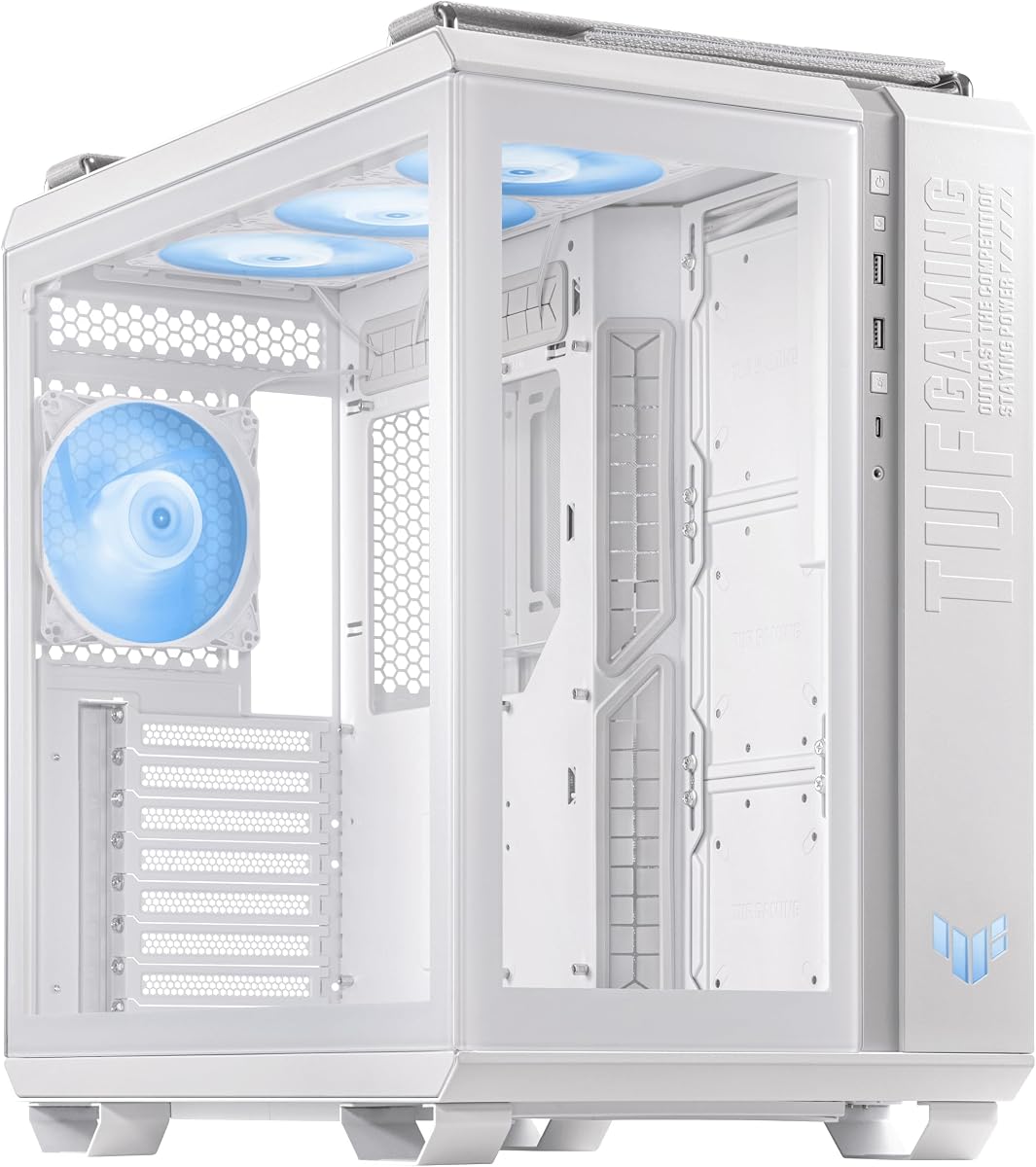
This full tower stands out as a top choice for enthusiasts. With a 4.8 rating, it delivers durability and style in equal measure.
We may earn a commission when you buy through this link, at no additional cost to you.
The custom TUF gaming spatter pattern adds a unique look. You get support for EATX boards and extensive cooling options including liquid setups.
Handling it can be tricky due to its weight. However, the woven cotton handles help mitigate this issue during transport.
Anyone building a high-end gaming rig will appreciate the space. It balances performance with aesthetics effectively.
Support for seven fan-mounting points ensures optimal airflow for hot components.
A thick metal chassis protects sensitive parts from physical damage.
We may earn a commission when you buy through this link, at no additional cost to you.
Ideal for budget-conscious builders needing efficient cooling. The mesh design prioritizes airflow with over 57000 holes.
We may earn a commission when you buy through this link, at no additional cost to you.
It fits ATX PSUs and GPUs well despite its small footprint. The clip mechanism for side panels is secure and simple.
Limited space might challenge large custom loop builders. But for most, it offers a compact and functional solution.
This case proves you do not need to spend a lot. It delivers solid performance for entry to mid-range builds.
Supports ATX PSUs up to 180mm long despite its 33L size.
Strategic cutouts and a 32mm gap keep wires hidden effectively.
We may earn a commission when you buy through this link, at no additional cost to you.
This chassis is a statement piece for high-end setups. It features a sturdy diecast aluminum alloy frame that is built to last.
We may earn a commission when you buy through this link, at no additional cost to you.
The semi-open structure maximizes airflow for demanding hardware. A built-in storage drawer adds convenience for small parts.
The cost reflects its premium positioning significantly. Only those seeking the best may find it justified.
If you want top-tier aesthetics and function choose this. It sets a new standard for enthusiast cases.
A built-in drawer keeps screws and tools handy during builds.
Two front Type-C ports support fast charging and data transfer.
We may earn a commission when you buy through this link, at no additional cost to you.
Dual chamber design separates CPU and GPU zones. This ensures independent cooling which boosts overall thermal performance.
We may earn a commission when you buy through this link, at no additional cost to you.
Panoramic tempered glass panels offer a full view. A hidden button allows for easy panel removal without tools.
The design can attract smudges on the glass. Regular cleaning keeps it looking pristine though.
Gamers wanting distinct zones and style should consider this. It is a solid mid tower option for most users.
Chambers establish independent zones to prevent heat soak between components.
USB 10 Gbps Type-C on the front supports rapid transfers.
We may earn a commission when you buy through this link, at no additional cost to you.
This case optimizes cable management for hidden connectors. It ensures a clutter-free setup with clean lines throughout.
We may earn a commission when you buy through this link, at no additional cost to you.
Four ARGB fans come pre-installed for immediate effect. The 8 degree angled base improves airflow and viewing.
Build quality feels slightly less robust than others. It remains a good option for basic aesthetic builds.
Those prioritizing cable aesthetics will like this choice. It offers value with some unique design touches.
Built for hidden connectors to maintain a clean and tidy setup.
Supports GPUs up to 380mm long for most modern cards.
We may earn a commission when you buy through this link, at no additional cost to you.
A striking white version of the popular GT501. It matches white themed components perfectly for a cohesive look.
We may earn a commission when you buy through this link, at no additional cost to you.
Features the same robust cooling as the black model. The spatter pattern adds character without looking messy.
Light colors reveal dust more quickly than dark ones. You may need to clean it more often.
This is the top choice for white builds. It maintains the durability and function of the original series.
Three RGB illuminated fans enhance the white theme with vibrant lights.
Ready for control via Fan Xpert 4 software with TUF gear.
We may earn a commission when you buy through this link, at no additional cost to you.
The GT301 offers style in a compact package. Its honeycomb front panel aids airflow while looking stylish.
We may earn a commission when you buy through this link, at no additional cost to you.
An integrated RGB controller hub is a nice plus. You get four pre-installed fans for immediate cooling performance.
It might feel a bit tight for very large parts. But for standard ATX builds it works well.
Ideal for gamers needing a smaller footprint. The headphone hanger adds a practical touch to the build.
A dedicated hub and button create stunning lighting effects easily.
Perforated honeycomb front ensures air reaches internal components efficiently.
We may earn a commission when you buy through this link, at no additional cost to you.
This model enhances the GT502 with a white finish. The tempered glass provides an unobstructed view of the internals.
We may earn a commission when you buy through this link, at no additional cost to you.
Four pre-installed ARGB fans ensure balanced cooling. The front panel supports high speed storage with USB Type-C.
Cleaning the glass can be tedious due to smudges. It remains a strong choice for white enthusiasts.
Those wanting a clean white panoramic case will love it. It delivers on both function and visual appeal.
Panels on the front and sides provide a completely unobstructed view.
USB 20Gbps Type-C port supports high-speed storage devices.
We may earn a commission when you buy through this link, at no additional cost to you.
With a 4.9 rating, this case impresses users. It supports motherboards with concealed connectors for better cable management.
We may earn a commission when you buy through this link, at no additional cost to you.
The angled base improves airflow efficiency significantly. It offers a wide compatibility range for various components.
Build quality feels solid but lacks advanced RGB features. This suits those who prefer simplicity over lighting.
A top pick for reliability and airflow. It is worth considering if you want a proven performer.
Optimized cable management for motherboards with hidden connector options.
The 8 degree base improves airflow and viewing angle simultaneously.
We may earn a commission when you buy through this link, at no additional cost to you.
This variant emphasizes modularity and independent cooling zones. The modular design allows most panels to be removed easily.
We may earn a commission when you buy through this link, at no additional cost to you.
It features a high-speed USB Type-C port. The tinted glass view showcases your build with clarity.
Installation is straightforward thanks to the tool-free panels. It offers flexibility that other cases lack.
Ideal for builders who value customization. It remains a strong contender in the TUF lineup.
Dual chamber design configures independent zones for CPU and GPU.
Side panels can be removed by pressing a hidden button.
We may earn a commission when you buy through this link, at no additional cost to you.
Selecting the right chassis involves evaluating dimensions cooling and features.
ATX and Micro-ATX sizes determine motherboard compatibility. Choose one that fits your board and components comfortably.
Ensure the case supports your specific motherboard size for a perfect fit.
High airflow is vital for performance. Look for mesh panels and ample fan mounting points to reduce heat.
Prioritize cases with open designs if you use high performance hardware.
Many ASUS cases include ARGB fans and controllers. Check if the lighting integrates with your motherboard ecosystem.
Choose cases with sync options if you want a unified aesthetic.
Hidden connectors and large gaps help hide wires. Clean builds improve airflow and visual appeal.
Look for trays and cutouts that simplify routing.
Metal chassis offer better protection than plastic. Steel and aluminum resist dents and corrosion over time.
Prioritize sturdy materials for durability and longevity.
Vertical GPU slots allow for better cable management. Standard slots may be more compatible with older parts.
Check if the case supports your GPU orientation needs.
USB Type-C on the front provides modern speeds. Ensure the case supports the latest transfer standards.
Choose cases with high-speed ports for future proofing.
Ergonomic handles make transport easier. Heavy towers need secure grips for safe movement.
Look for woven cotton or sturdy metal handles for support.
Clean dust filters regularly to maintain airflow. Use a soft brush or vacuum to remove debris without damaging parts.
Install components according to the manual. Use the provided screws and mounting points to avoid damage.
Handle the case with care during moves. Use the ergonomic handles to prevent drops and protect internals.
Several models like the TUF GT501 and ROG Hyperion GR701 support EATX boards. These full towers offer the necessary room for large components.
Many models like the A31 PLUS and GT502 come with pre-installed ARGB fans. Others may require separate purchases for lighting.
Dual chamber cases separate CPU and GPU zones for better cooling. Standard cases have one large area for all components.
Micro-ATX options like the AP201 are compact enough for HTPCs. Ensure you choose a small footprint model.
Look for cases with hidden connectors and large gaps. TUF GT502 features independent zones that simplify routing.
Yes models like the AP201 and GT502 offer tool-free side panels. This makes installing hardware and cleaning much easier.
Some models like the TUF GT501 feature vertical GPU expansion slots. This allows for better aesthetics and cable access.
The TUF GT501 White Edition and GT502 Horizon TG ARGB are perfect for white builds. They offer consistent aesthetics and cooling.
We explored ten top models ranging from budget friendly to premium options. Each offers unique strengths for cooling and aesthetics.
Prioritize cooling and form factor first. Your components will perform better with proper airflow and space.
Always verify current prices and stock before buying. Deals change often so act quickly when you find the right fit.