
16Pin GPU RTX 4070 Super Power Adapter Cable 90 Degree
4.7Editor score
90 degree right angle connector design
13 inch length for tighter case builds
Supports up to 400 watt peak output
This guide compares the top GPU power adapters for modern graphics cards including 12VHPWR and PCIe 6 to 8 pin options for safe and efficient power delivery.
GPU power adapters are essential components for PC builders who need to connect their graphics cards to compatible power supply units. These cables ensure stable energy delivery while protecting your expensive hardware from potential electrical issues or connection failures.
We analyzed ten top-rated products based on user feedback, technical specifications, and build quality. Our comparison covers everything from classic 6 to 8 pin converters to the latest 12VHPWR extension cables for next generation graphics cards.
Each pick highlights specific strengths like cable length, connector durability, and safety ratings to help you find the right match for your system. Please note that availability and pricing may vary over time so always verify details before purchasing.
4.7Editor score

4.7Editor score

4.2Editor score
This table provides a side-by-side view of all ten adapters including their primary use cases, connector types, and key compatibility notes so you can quickly identify the right fit for your hardware.


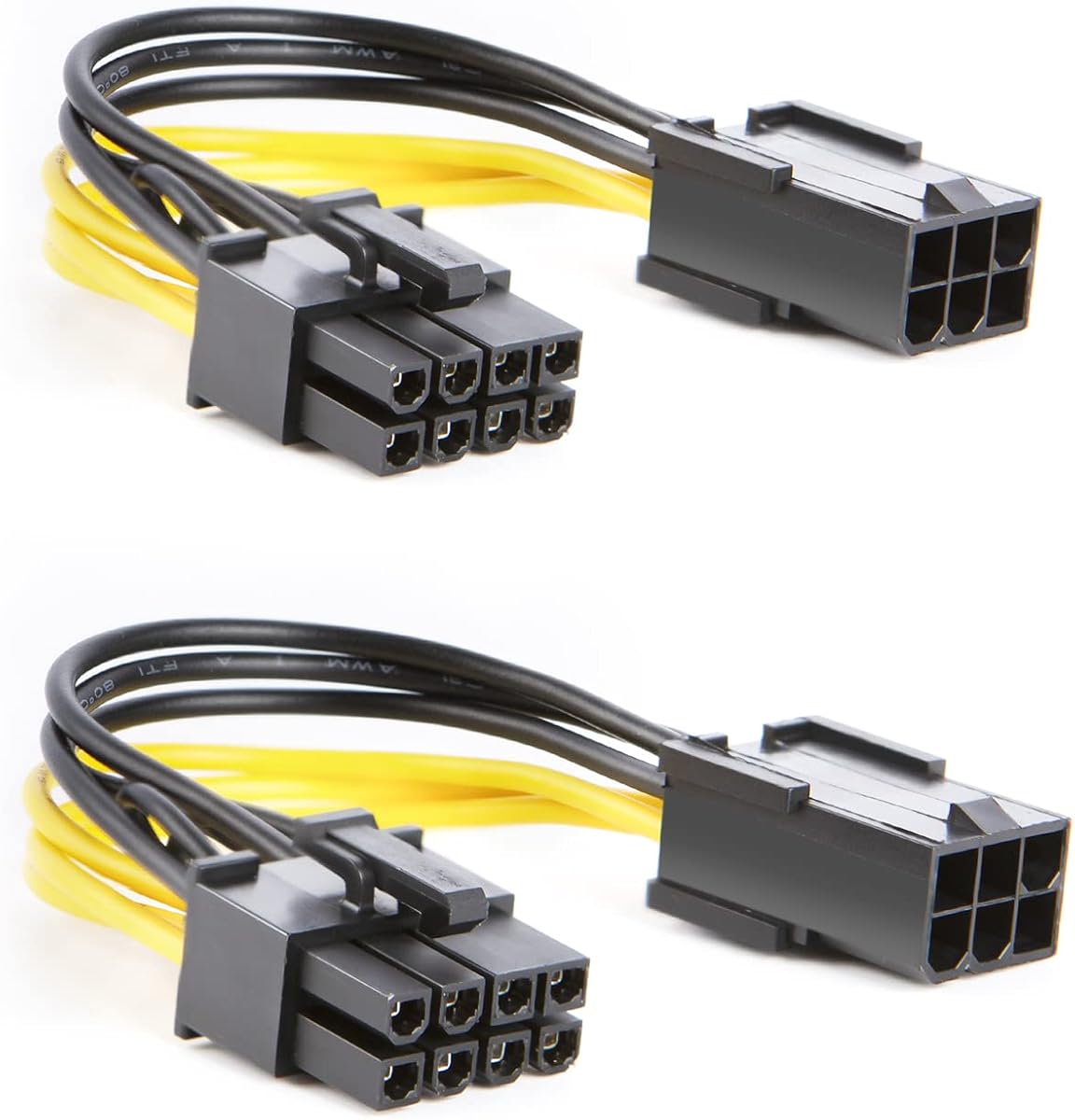


The Cable Matters 2-Pack adapter is a trusted choice for connecting 6-pin power supplies to 8-pin GPU inputs. With a 4.7 rating from thousands of users, it proves reliable for standard graphics cards that need extra power pins.
We may earn a commission when you buy through this link, at no additional cost to you.
Its standout quality is the secure locking latch on the 8-pin male connector which prevents accidental disconnection during system vibration. The keyed housing on the 6-pin side ensures proper alignment every time you plug it in.
Keep in mind that this adapter does not increase the total wattage available from your power supply. It simply bridges the connector gap so ensure your existing PSU can handle the GPU load before installation.
This adapter is ideal for budget builders upgrading older PSUs with new cards that need 8-pin connectors. Its two-pack value means you can use one as a spare or on a secondary system without extra cost.
The locking latch ensures the cable stays firmly attached even if the PC case is moved frequently or if the GPU is heavy.
Getting two adapters allows you to keep a spare on hand or support dual GPU setups without buying additional cables.
We may earn a commission when you buy through this link, at no additional cost to you.
This adapter offers an affordable solution for RTX 4070 and similar cards that need a 12VHPWR connection. The 90 degree design solves overheating issues caused by bent adapters in tight PC cases.
We may earn a commission when you buy through this link, at no additional cost to you.
The 13 inch length gives more room to bend the cable which reduces stress on the GPU port. Constructed with 16AWG tinned copper wire it ensures stable voltage transmission for your graphics card.
Users appreciate the included transparent cable comb clips which help maintain a neat build. The braided sleeve protects the internal wires from damage during installation or future component swaps.
Buy this if you need a cost effective way to connect newer GPUs without buying a new PSU. It works well for most 40 series cards but check compatibility with older 12pin models first.
The 90 degree bend keeps the cable away from the case side panel preventing pressure that could cause heat or connection failure.
Four cable combs are included to organize the extension cord and keep your interior looking clean and professional.
We may earn a commission when you buy through this link, at no additional cost to you.
NZXT offers a premium adapter designed for users with existing NZXT power supplies who want to upgrade to a 40 series GPU. It delivers up to 600 watts ensuring enough power for high performance cards.
We may earn a commission when you buy through this link, at no additional cost to you.
The cable is notably more compact than standard NVIDIA adapters which reduces clutter inside the case. This helps with airflow and makes cable management easier for builders with limited space.
While it is optimized for NZXT C-Series Gold PSUs it works with any ATX 2.X supply. The rating ensures safe power delivery without needing to replace your entire power supply unit.
Choose this if you value build quality and brand trust. It provides a clean solution for 40 series GPUs with the power headroom needed for future upgrades or heavy gaming sessions.
The 600W rating means this adapter can handle power hungry GPUs without risk of voltage drop or overheating under load.
You can use older ATX 2.X PSUs with new GPUs without buying a completely new power supply saving money on your upgrade.
We may earn a commission when you buy through this link, at no additional cost to you.
The Fasgear adapter is built for modern RTX cards requiring a 12VHPWR connection. Its 16AWG tinned copper wire ensures stable voltage transmission and protects against oxidation over time.
We may earn a commission when you buy through this link, at no additional cost to you.
It supports up to 600W output making it suitable for high-end GPUs. The three hundred millimeter length gives ample space for routing cables neatly inside most PC cases.
Users note the included acrylic clips help keep the cables organized. The braided fiber sleeve adds durability and prevents the cable from tangling during installation.
Select this if you need a long and sturdy extension for your GPU. Remember to connect two 8-pin ports from your PSU to ensure safe operation and avoid system damage.
Tinned copper reduces oxidation risk ensuring long term electrical reliability even in humid environments.
The cable combs make it easy to style the extension cord for a cleaner looking PC build.
We may earn a commission when you buy through this link, at no additional cost to you.
This conversion cable is designed for ATX 3.0 and 3.1 power supplies with native 12VHPWR outputs. It converts the PSU connector to dual 8-pin for older or mid-range GPUs.
We may earn a commission when you buy through this link, at no additional cost to you.
Its six point eight inch length is ideal for tight spaces where bulky cables would cause strain. The 16AWG copper wire supports up to 600W for reliable power delivery.
It works well with GPUs like the RTX 4070 or 3060 but not newer 16pin models. This makes it a specific solution for users with native 12VHPWR PSUs and older graphics cards.
Buy this if you have a modern PSU but a legacy GPU. It ensures compatibility without needing to buy a new graphics card or power supply.
If your PSU already has a 12VHPWR cable this adapter lets you use it with standard 8-pin GPUs safely.
The short length helps maintain clean airflow and reduces cable clutter inside the PC case.
We may earn a commission when you buy through this link, at no additional cost to you.
This extension cable provides a sturdy connection for RTX 4070 and similar models. The 13 inch length gives enough slack to route cables without bending the GPU port too much.
We may earn a commission when you buy through this link, at no additional cost to you.
It uses 16AWG tinned copper wire for stable voltage transmission. The nylon braided fiber sleeve protects the internal wires from physical damage during installation.
The included transparent clips help manage the cord for a clean look. It supports up to 450W peak output which covers most mainstream high-end cards.
Use this if you need a reliable 12VHPWR extension for your 40 series GPU. It is a cost effective way to manage cables without sacrificing power stability.
The braided sleeve shields the wires from cuts and abrasion ensuring long term safety and reliability.
Tinned copper conductors ensure the voltage stays consistent even when the GPU draws high current.
We may earn a commission when you buy through this link, at no additional cost to you.
CableCreation offers a reliable 6-pin to 8-pin adapter for older GPUs. It supports up to 36W which is suitable for low power cards needing extra pins.
We may earn a commission when you buy through this link, at no additional cost to you.
The 18AWG pure copper conductors ensure safe power delivery. It is RoHS certified meaning it meets environmental safety standards for PC components.
The two pack allows you to keep a spare or use both on different systems. It works with popular brands like Gigabyte and Radeon graphics cards.
This is a great choice for budget builds or repairs. It provides a safe and affordable bridge for older power supplies connecting to modern graphics cards.
RoHS certification ensures the materials used are safe for the environment and free from hazardous substances.
Buying a two pack is more cost effective than purchasing single adapters separately.
We may earn a commission when you buy through this link, at no additional cost to you.
Corsair offers a specialized adapter for routing power cables around the GPU in a neat fashion. The 180 degree bend prevents the cable from pressing against the case side.
We may earn a commission when you buy through this link, at no additional cost to you.
It handles high temperatures up to 105 degrees Celsius ensuring reliability during intense gaming sessions. The design focuses on clean aesthetics and component safety.
This bridge is only for RTX 40 series GPUs so verify compatibility before buying. It helps prevent damage to the GPU port caused by bent cables.
Choose this if you prioritize a clean build look. It is a specialized tool for managing cables on the latest NVIDIA graphics cards.
The 180 degree bend directs the cable upwards keeping it away from the case wall for better airflow and looks.
High thermal endurance ensures the adapter won't fail even when the GPU runs hot for long periods.
We may earn a commission when you buy through this link, at no additional cost to you.
EVGA PowerLink improves cable management for older NVIDIA graphics cards. It supports various connections with adjustable spacing to fit different card models.
We may earn a commission when you buy through this link, at no additional cost to you.
Integrated solid state capacitors filter power noise for stable performance. This helps protect the GPU from electrical fluctuations during heavy use.
Installation is straightforward making it easy to integrate into existing builds. It supports a wide range of EVGA and NVIDIA cards from GTX 1050 to RTX 2080.
Use this if you have an older EVGA card needing cleaner cabling. It provides a practical solution for power stability and aesthetics on legacy systems.
Capacitors in the adapter help smooth out electrical noise ensuring the GPU receives clean power.
Adjustable spacing lets you fit the adapter to different GPU models easily.
We may earn a commission when you buy through this link, at no additional cost to you.
This adapter supports high-end GPUs with a 16-pin to triple 8-pin configuration. It is rated for up to 600W delivering stable power for demanding graphics cards.
We may earn a commission when you buy through this link, at no additional cost to you.
The 90-degree angled connector reduces port strain improving airflow in compact builds. It uses aluminum alloy construction for durability during high-performance operation.
The Type B pin layout accommodates specific chassis or motherboard configurations. Ensure your PSU has three free 8-pin ports for proper installation.
Select this for maximum power delivery to your GPU. It is designed for users who need high wattage support with a clean angled design.
Using three 8-pin connectors distributes power load evenly reducing stress on each individual port.
Aluminum alloy materials ensure the adapter withstands heat and wear over time.
We may earn a commission when you buy through this link, at no additional cost to you.
Choosing the right adapter requires understanding connector types power ratings and cable length. This guide breaks down the key factors to ensure you select a safe and compatible option.
Always verify the connector types on both your power supply and graphics card. A 6-pin to 8-pin adapter bridges standard ports while a 12VHPWR adapter connects to modern RTX 40 series cards.
Check product descriptions carefully to ensure the adapter supports your specific GPU model and PSU output type.
Adapters have maximum wattage limits. For high-end cards you need adapters rated for 600W or more to handle power peaks safely.
Do not exceed the adapter's rated capacity as this can lead to overheating or system instability during gaming sessions.
Measure the distance from your PSU to the GPU port. Adapters range from 4 inches to 13 inches so choose a length that avoids tight bends.
Longer cables allow for better airflow but may clutter the interior. Shorter cables are neat but can strain the GPU port if routed poorly.
Thicker wires like 16AWG transmit power more efficiently than thinner ones. Tinned copper prevents oxidation and maintains conductivity over time.
Look for adapters specifying 16AWG or 18AWG copper conductors for reliable and safe power delivery to your hardware.
Right angle or 90 degree adapters reduce stress on the GPU port preventing accidental disconnection. Locking latches ensure the cable stays secured during PC movement.
Choose designs that fit your case layout to avoid cables pressing against side panels causing potential heat issues.
Reputable brands offer better quality control and safety certifications like RoHS. These ensure the adapter uses non-toxic materials and meets safety standards.
Read user reviews to check for real-world reliability and any reported electrical issues with the adapter.
Some adapters come in 2-packs offering better value for multi-system users. This allows you to keep a spare for emergencies or use on multiple PCs.
If you only need one adapter a single pack might be sufficient but buying a pair often reduces the price per unit.
Ensure your power supply has enough available connectors. Adapters like the 12VHPWR may require two or three 8-pin ports to function safely.
Connecting fewer pins than required can damage the system so always check your PSU capabilities before installing high-wattage adapters.
Before installation always power off your PC and disconnect it from the wall outlet. Ground yourself to prevent static electricity from damaging sensitive components inside the case.
Plug the adapter firmly into the PSU and GPU ports ensuring you hear a click. Avoid forcing the cable which can bend pins or weaken the connector over time.
Periodically check the adapter for signs of heat or wear. If you notice discoloration or loose connections replace the adapter immediately to protect your GPU.
Yes reputable adapters are safe when used correctly within their power limits. Choose adapters with proper wire gauges and safety certifications to avoid risks like overheating or electrical failure.
No 12VHPWR adapters are designed for new RTX 40 series cards. Older GPUs need standard 6-pin or 8-pin PCIe adapters so check your graphics card requirements carefully.
Adapters may get slightly warm during heavy load but excessive heat usually means your PSU isn't providing enough power. Ensure you connect all required pins from your power supply.
Not always. Many adapters let you use existing PSUs with modern GPUs. However ensure your PSU has enough wattage and compatible connectors to support your graphics card.
8-pin connectors carry more power than 6-pin ones. An adapter bridges the gap so your card can use available 6-pin ports while receiving the needed 8-pin power.
Measure the distance between your PSU connector and GPU power port. Add a few inches of slack to avoid strain but avoid excessive length that clutters the build.
We reviewed ten top adapters ranging from classic 6 to 8 pin converters to modern 12VHPWR extensions. Each option offers unique benefits for different PC building scenarios.
Prioritize connector type power rating and cable length when deciding. Safe reliable adapters protect your investment and ensure stable performance for your graphics card.
Always double check compatibility before purchasing. Verify that your PSU provides sufficient power and the correct ports for your chosen adapter.