
Anycubic Kobra 3 Camera
4.5Editor score
Easy to Assemble DIY Frame
Real-Time Remote Monitoring
Ultra Clear Resolution
Discover the top 3D printer camera for remote monitoring solutions compared in this guide to ensure reliable, high-quality printing from anywhere.
Monitoring your 3D prints remotely is essential for modern makers who need reliability and efficiency. A good camera captures real-time visuals, detects errors early, and saves valuable filament by alerting you to issues like spaghetti or layer shifting before they ruin a long print.
We evaluated ten top-rated 3D printer cameras based on resolution, connectivity, compatibility, and features like time-lapse generation and night vision. Our analysis focuses on ease of setup, app functionality, and how well each unit integrates with popular printer ecosystems to deliver consistent performance.
Each pick highlights specific strengths, from budget-friendly DIY frames to official kits with advanced AI detection. Keep in mind that prices and availability change frequently, so check current listings for the best deals on these essential monitoring tools for your 3D printing workspace.
4.5Editor score

4.3Editor score

4.1Editor score
This side-by-side comparison evaluates all ten cameras across key specifications including resolution, compatibility, and unique features to help you find the perfect match for your specific 3D printer model and monitoring needs.



The Creality Official Nebula Camera stands out as a top contender for remote monitoring with its 4.3-star rating and comprehensive feature set. It is designed to integrate seamlessly with specific Creality ecosystems, offering users a hassle-free experience from unboxing to first print monitoring.
We may earn a commission when you buy through this link, at no additional cost to you.
Its standout features include automatic time-lapse generation and a built-in 940nm infrared fill light that ensures clear visibility even in dark conditions. This allows makers to track 24-hour prints without disturbing the environment or compromising image quality during night cycles.
While it requires specific printer compatibility such as the Sonic Pad or Ender-3 V3 KE, the ease of connection via USB and WiFi makes it a robust choice. The only minor trade-off is the need for initial WiFi configuration, but the detailed manuals simplify this process.
This camera is ideal for Creality users who want reliable real-time alerts and automated video creation without complex third-party setups. For anyone invested in the Creality ecosystem, this official accessory offers the best balance of convenience and performance.
The embedded code system captures images at each layer completion, generating videos effortlessly for sharing on social media or reviewing print quality.
Infrared technology illuminates the print bed without affecting photosensitive materials, ensuring you can spot filament jams or layer adhesion issues anytime.
We may earn a commission when you buy through this link, at no additional cost to you.
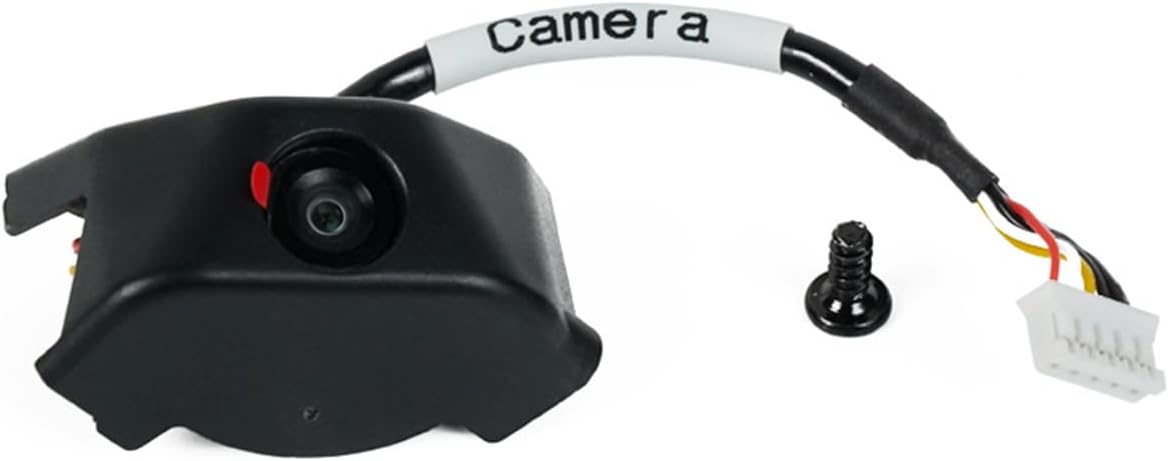
The Anycubic Kobra 3 Camera earns its place as a budget-friendly option with a high 4.5-star rating. It delivers essential remote monitoring capabilities without a steep price tag, making it accessible for hobbyists who need basic oversight of their prints.
We may earn a commission when you buy through this link, at no additional cost to you.
Its DIY frame design allows users to customize the camera setup to fit their specific printer enclosure, adding a creative element to the installation process. The ultra-clear resolution ensures that details like filament jams are visible on the Anycubic APP for timely intervention.
While the frame assembly might take a few extra minutes, the straightforward connection via USB interface makes the setup quick and intuitive. The main limitation is reliance on the proprietary app for full functionality, which may be less flexible than open-source alternatives.
This camera is perfect for users on a budget who want reliable monitoring and are willing to engage in light DIY customization. It offers excellent value for money while maintaining high standards for image clarity and remote access.
The replaceable frame lets you tailor the camera position for optimal angles, ensuring you never miss a critical detail during the print process.
The Anycubic APP provides a user-friendly interface for viewing status and controlling the camera, streamlining the remote monitoring experience.
We may earn a commission when you buy through this link, at no additional cost to you.
The Official Original FLASHFORGE AD5M Camera Smart Kit is tailored for users of the Adventurer 5M series, providing a premium integration experience. With a 4.1-star rating, it focuses on seamless functionality and high-definition imaging to elevate your printing workflow.
We may earn a commission when you buy through this link, at no additional cost to you.
Key strengths include the ability to record entire printing processes into shareable videos and the use of the Flash Maker APP for remote control. The HD quality ensures that every layer is captured with precision, helping you troubleshoot issues before they escalate.
The installation is designed to be straightforward with provided guides and videos, reducing setup friction. The primary trade-off is the cost and compatibility limited strictly to Flashforge models, which may not appeal to owners of mixed printer fleets.
Ideal for Flashforge owners seeking an all-in-one official solution, this kit ensures optimal performance without the guesswork of third-party mounts. It is a solid investment for those who prioritize official support and guaranteed fit over budget flexibility.
Designed specifically for the AD5M series, this kit fits perfectly without requiring adapters, ensuring stability during long-duration prints.
Automatic video capture allows you to compile impressive time-lapses or review print quality frame-by-frame after the job is complete.
We may earn a commission when you buy through this link, at no additional cost to you.
Recurring in our list, the Creality Official Nebula Camera is again highlighted for its exceptional night vision capabilities. The 940nm infrared fill light ensures that prints running overnight are monitored clearly, making it a reliable choice for continuous production environments.
We may earn a commission when you buy through this link, at no additional cost to you.
The compact design allows for effortless connection via cable to the printer, followed by a quick setup using the Creality Cloud APP. This simplicity reduces downtime and ensures that users can start monitoring their projects almost immediately after unboxing the device.
Users should note that this camera is optimized for specific Creality models, so compatibility checks are necessary before purchase. However, the benefits of automated time-lapse generation and remote print stopping make it a valuable addition to any compliant setup.
This model is recommended for makers who run prints during night hours and need assurance that their equipment will alert them to any errors. It combines advanced features with a user-friendly interface to deliver peace of mind.
Whether day or night, the camera maintains clear visibility so you never lose track of your progress or potential print failures.
If an anomaly is detected, you can instantly pause the print via the app to save material and prevent damage to the machine.
We may earn a commission when you buy through this link, at no additional cost to you.
The Creality Official Nebula Camera variant with 24-hour monitoring and manual focus provides precise control over image quality. With a 4.4-star rating, it stands out for users who want to tweak the focal length manually to ensure sharp details on small prints.
We may earn a commission when you buy through this link, at no additional cost to you.
Its USB port makes connecting to supported printers incredibly convenient without complex steps. The night vision function ensures that the camera remains useful in low-light conditions, which is often necessary for long prints that extend into the evening.
While the manual focus knob offers flexibility, it does require a bit of initial calibration to get the perfect shot. This is a small trade-off for the gain in image sharpness and the ability to adjust the angle horizontally and vertically.
This camera is best suited for detail-oriented makers who prioritize image clarity and are comfortable with slight manual adjustments. It delivers high performance in environments where consistent visual quality is critical for quality control.
The adjustable-focus lens allows you to fine-tune the depth of field for perfectly clear images of complex prints and intricate details.
Rotating the lens lets you frame the print from multiple perspectives, giving you a comprehensive view of the entire build.
We may earn a commission when you buy through this link, at no additional cost to you.
The FLASHFORGE Camera Kit for Adventurer 5M and AD5X printers offers a streamlined approach to remote monitoring for owners of these specific models. With a 4.0-star rating, it focuses on simplicity and integration without unnecessary complexity.
We may earn a commission when you buy through this link, at no additional cost to you.
Its main selling point is the easy installation process that includes all necessary components for a quick setup. Users can view and control the printer from anywhere using the Flash Maker App, providing flexibility for busy makers who cannot always be near the machine.
While it lacks some advanced features found in other kits, such as night vision or time-lapse generation, it covers the essential needs of remote oversight. This makes it a practical choice for those who prefer a straightforward tool that just works.
Recommended for Flashforge users who want an official accessory without spending on premium features, this kit ensures reliable connectivity and ease of use. It is a functional and efficient solution for maintaining print oversight from a distance.
Designed for speed and simplicity, this kit requires minimal configuration to start capturing real-time video of your 3D prints.
The Flash Maker App provides a direct link to your printer, allowing you to manage prints and check progress from any device.
We may earn a commission when you buy through this link, at no additional cost to you.
The Anycubic Kobra 3 Camera V2 is praised for its wide compatibility and strong community support. With a 4.4-star rating, it offers ultra-clear resolution and remote monitoring that works with Kobra 3 and Kobra 2 series printers as well as Klipper setups.
We may earn a commission when you buy through this link, at no additional cost to you.
It is designed for ease of use with a simple USB connection and comprehensive installation videos to guide users through the process. The promise of lifetime technical support adds a layer of security for buyers who want long-term reliability from their monitoring equipment.
The only downsides are the reliance on an internet connection for remote access and the need for the specific app to unlock all features. However, the performance and clarity of the feed make these minor compromises acceptable for most users.
This camera is a strong candidate for those looking for a versatile solution that bridges official and open-source printing ecosystems. It delivers high-quality visuals and dependable remote tracking for a broad range of popular printer models.
Whether you use an official Anycubic model or a custom Klipper build, this camera adapts to provide reliable monitoring capabilities.
Access to ongoing technical assistance ensures that you can resolve any setup or software issues quickly without losing print time.
We may earn a commission when you buy through this link, at no additional cost to you.
The Creality K1 AI Camera is specifically engineered for the K1 series, offering a high-performance 1080P HD experience. With a 4.5-star rating, it ensures that users can track their prints in sharp detail via the Creality Cloud or Creality Print apps.
We may earn a commission when you buy through this link, at no additional cost to you.
The camera interface is reserved on the printer for effortless installation, minimizing setup time and maximizing printing time. It automatically generates time-lapse videos after printing, making it easy to showcase your work without manual intervention.
While it is limited to the K1, K1 SE, and K1 Max models, the dedicated optimization ensures that the hardware works flawlessly with the printer's firmware. The main requirement is a stable cloud connection, which is standard for modern smart printing workflows.
This camera is the definitive choice for K1 owners who want an integrated AI solution with excellent video quality and automated features. It enhances efficiency and adds a professional touch to your 3D printing workflow with minimal effort.
The native interface on the printer ensures that the camera is recognized instantly, allowing for immediate monitoring and control.
End-of-print time-lapse generation means you get a perfect video of your project automatically, ready to share or archive.
We may earn a commission when you buy through this link, at no additional cost to you.
The Creality Official Nebula Camera emphasizes anomaly detection with a system that reminds users to pause printing when issues are detected. With a 4.4-star rating, it offers a balance of manual control and smart features to protect your prints from waste.
We may earn a commission when you buy through this link, at no additional cost to you.
Its night vision function uses a built-in 940nm infrared fill light to maintain visibility in dark environments. The ability to manually adjust focus ensures that the image quality remains high, allowing for accurate visual assessments of filament and layer adhesion.
Users should note the specific compatibility list which includes various Ender and Sonic Pad models. The setup process is straightforward with the Creality Cloud APP, though it does require a WiFi connection to enable full remote monitoring capabilities.
This camera is excellent for users who want advanced protection against failed prints without relying solely on third-party AI tools. It provides reliable monitoring and essential quality control features directly through the native ecosystem.
The system alerts you to potential problems in real time and can pause the print to prevent material waste and machine damage.
With manual focus control, you can ensure every detail is crisp, allowing for precise visual inspection of the build surface.
We may earn a commission when you buy through this link, at no additional cost to you.
The Flashforge Camera Kit for Adventurer 5M and AD5X offers a straightforward way to record print processes with high definition. With a 4.1-star rating, it focuses on the core utility of capturing footage that can be exported and reviewed after printing.
We may earn a commission when you buy through this link, at no additional cost to you.
It includes a longer cable to fit the 3D printed enclosure, making installation a breeze for existing users. Turning on the video switch allows for file generation that can be saved to a USB flash drive for viewing or sharing with the community.
While it relies on manual export for video files rather than automatic cloud uploading, this provides flexibility in how you store your data. The kit is designed to work seamlessly with the Flash Maker APP for remote monitoring needs.
Ideal for makers who prefer local storage and simple setup, this kit is a practical addition to the Adventurer series. It balances ease of installation with the ability to capture and review the entire printing process efficiently.
Exporting video files to a USB drive gives you direct control over your data without needing a constant internet connection.
The upgraded cable length ensures a neat and secure installation inside your printer enclosure without stretching or strain.
We may earn a commission when you buy through this link, at no additional cost to you.
Selecting the right camera involves understanding your printer model, desired features, and budget constraints.
Ensure the camera supports your specific printer model to avoid mounting issues or software incompatibility. Official kits often provide the best integration for brands like Creality or Flashforge.
Check the compatibility list carefully before purchasing to confirm it works with your machine's firmware and interface.
Look for HD resolution such as 1080p to clearly identify print failures like layer shifting or spaghetti tangles. Higher clarity reduces the chance of misinterpreting a print issue remotely.
Opt for cameras with manual focus options if you need to adjust sharpness for small or intricate details on your prints.
A built-in infrared light allows you to monitor prints in low-light conditions without affecting the printer's operation or the print itself. This is vital for overnight runs where visibility is limited.
Prioritize models with active night vision if you frequently print at night or in enclosed spaces without ambient lighting.
Verify that the companion app offers reliable remote access so you can check status from anywhere. Look for features like remote pause and stop to save material when issues occur.
Choose cameras with robust apps that send timely notifications so you can respond quickly to failures even when you are away.
Many cameras offer automatic time-lapse generation which helps you visualize progress and create shareable content easily. This feature is great for documenting projects without manual editing.
Ensure the recording function allows you to export or save videos in a format that fits your storage preferences and sharing goals.
Consider how easy it is to install the camera and whether it requires specialized tools or adapters. Plug-and-play solutions save time and reduce the risk of incorrect setup.
Choose cameras that come with clear guides or videos to ensure you can get up and running quickly and safely.
Advanced models include software that detects print failures automatically and alerts you or pauses the print. This adds a layer of protection against filament waste and machine damage.
Prioritize cameras with these smart detection features if you often leave prints unattended for long periods or overnight.
Check for available technical support and warranty terms to ensure you can get help if issues arise. Lifetime or extended support is valuable for long-term usability of the hardware.
Select brands with a reputation for responsive service to minimize downtime if you encounter setup or connectivity problems.
Install the camera securely on your printer mount and connect it to the USB port or WiFi network as instructed. Ensure the lens is clean and positioned to cover the print bed effectively before starting a job.
Download the required app on your phone or computer and follow the setup prompts to link the camera. Test the connection by checking a live feed while the printer is idle to confirm visibility and focus.
Regularly update the firmware and app to maintain compatibility with new printer features and security patches. Clean the lens occasionally with a soft cloth to prevent dust from affecting image quality over time.
While some cameras work universally, many are optimized for specific models to ensure proper fit and software integration. Always check the compatibility list to confirm your printer is supported before purchasing.
Night vision uses infrared lights to illuminate the print bed without visible light that could interfere with sensitive materials. This allows you to see clearly in dark conditions during overnight prints.
Yes, most modern cameras support remote access via WiFi and dedicated apps. This lets you check print status from anywhere with an internet connection using a phone or laptop.
Check your WiFi signal strength and restart the app or device to restore connection. Keeping firmware updated helps reduce disconnection issues during critical printing phases.
Most official cameras come with free apps, though some third-party options may have premium features. Verify app costs and features before committing to a specific camera ecosystem.
Use a soft microfiber cloth to gently wipe away dust. Avoid using harsh chemicals that could damage the coating or the camera housing during routine maintenance.
Choosing the best 3D printer camera for remote monitoring depends on your specific printer model and feature needs. Options like the Creality Nebula Camera offer advanced capabilities like night vision and auto time-lapse, while Anycubic kits provide budget-friendly flexibility.
Prioritize cameras that match your printer ecosystem and offer reliable remote access to ensure smooth operation. Features like anomaly detection and HD resolution are key to maintaining print quality and saving material.
Always verify current pricing and availability as these factors can change frequently. Check the official product pages to ensure you are getting the latest version and full support for your specific setup.