
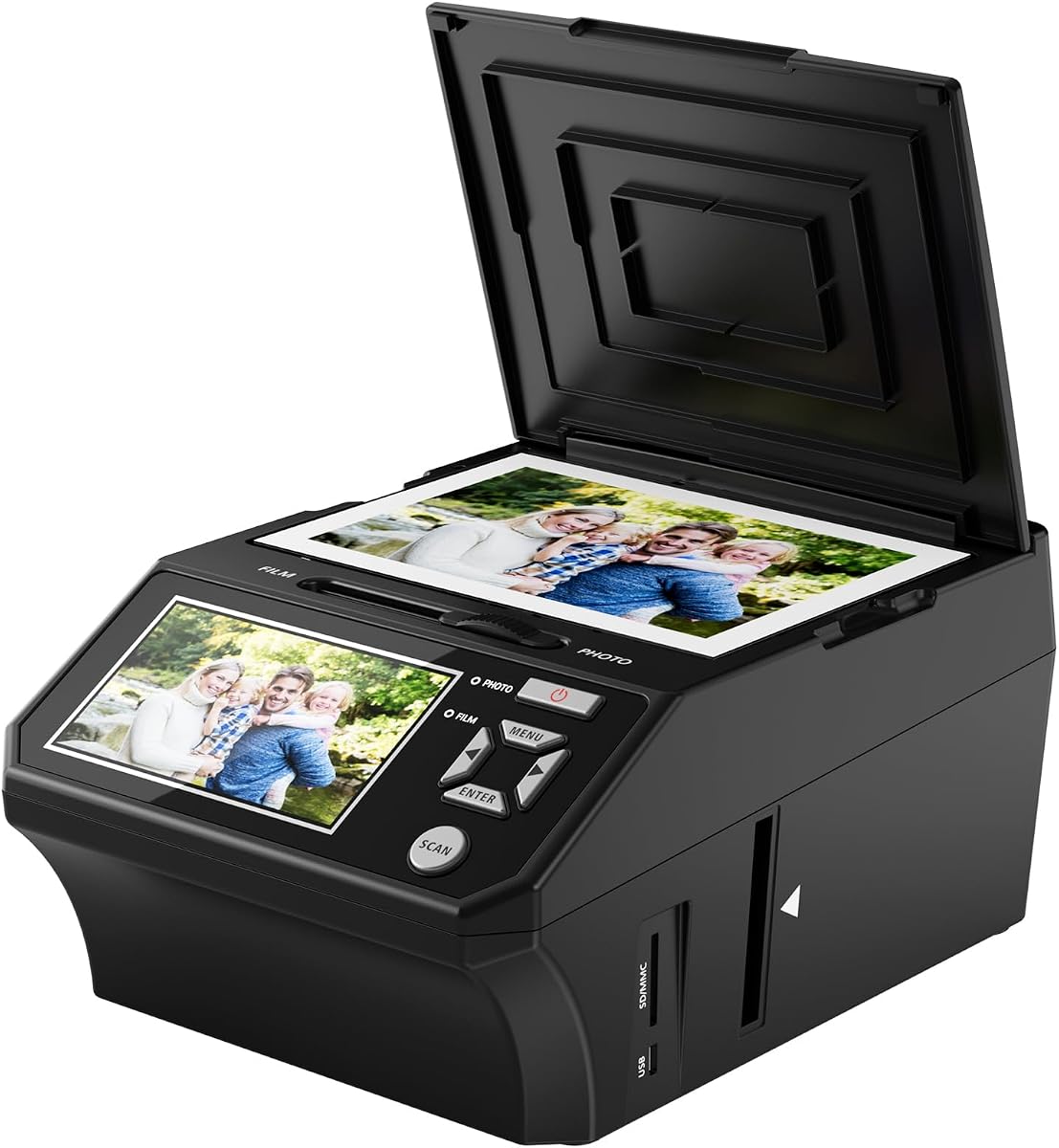
22MP Film & Slide Scanner with 5" LCD
4.3Editor score
Affordable price point
Five inch LCD display
HDMI and USB output
Preserving your family history often means converting old film slides into digital files. A quality 35mm slide scanner makes this process simple without requiring technical expertise or complex software installations.
We compared ten leading models based on resolution, screen size, ease of use, and film format support. Each product was evaluated for its ability to handle negatives and slides efficiently.
This list shows the top picks for different needs and budgets. Prices and availability change frequently so please check current listings before making your final purchasing decision today.
4.3Editor score
4.4Editor score

5.0Editor score
As an Amazon Associate we earn from qualifying purchases.
The following table provides a side-by-side comparison of all ten selected scanners. It highlights key specifications and features to help you decide quickly based on your needs.






This versatile converter stands out for its all-in-one design that handles photos and slides effortlessly. With a 4.4 rating it promises ease of use for families wanting to preserve memories.
We may earn a commission when you buy through this link, at no additional cost to you.
The extra-large five inch screen allows instant previewing without needing external monitors. It saves directly to SD cards which makes workflow simple and fast for any user.
While it lacks some advanced film format options its standalone operation is a major plus. The included accessories and warranty provide peace of mind for new buyers.
Buyers looking for simplicity and clarity will find this model ideal. It balances performance and user-friendliness better than most competitors on the market today.
The intuitive interface lets you scan and save without installing drivers or software on your computer.
The vibrant LCD screen ensures you can see details clearly while reviewing your digitized photos.
We may earn a commission when you buy through this link, at no additional cost to you.
KODAK delivers a reliable scanner that balances price and performance well. The 22MP resolution ensures detailed digital copies of your old slides and negatives.
We may earn a commission when you buy through this link, at no additional cost to you.
Its five inch screen offers a nice viewing experience for previewing scans. The easy-load tray technology simplifies the process of inserting films quickly.
Users may find the software somewhat basic compared to modern alternatives. Additionally you need to purchase an SD card separately which adds to the cost.
This model is perfect for those who trust established brands and want a straightforward solution. It is a solid choice for home archiving projects.
Quick-feeding trays allow continuous loading making scanning faster and less frustrating.
The device blends seamlessly with home decor and supports standard USB connections.
We may earn a commission when you buy through this link, at no additional cost to you.
This scanner offers an impressive feature set at a very affordable price. The 22MP capability ensures decent quality for digital preservation without breaking the bank.
We may earn a commission when you buy through this link, at no additional cost to you.
It comes with a full accessory kit including HDMI and USB cables which adds significant value. The built-in memory allows you to save photos immediately if no SD card is present.
While it lacks some premium features it covers the basics very well. The warranty provides good protection for budget-conscious buyers looking for reliability.
If you need a simple scanner for occasional use this is a great choice. It delivers good results for the price point.
Connect to your TV via HDMI for viewing or transfer to PC via USB.
Everything needed to start scanning is included in the box.
We may earn a commission when you buy through this link, at no additional cost to you.
The 24MP resolution makes this scanner a strong contender for high-quality output. It handles multiple film formats including Super 8 which is rare in this category.
We may earn a commission when you buy through this link, at no additional cost to you.
Its large five inch display is excellent for previewing scans directly. The HDMI support lets you view photos on a TV which is great for family sharing.
While it is efficient it still requires manual insertion of each slide. The editing tools are intuitive but lack some advanced color correction features.
This model is best for those needing high resolution and Super 8 support. It offers a good balance of features and usability.
View directly on the scanner or use HDMI for a larger screen experience.
Supports up to 128GB SD cards for storing thousands of scans.
We may earn a commission when you buy through this link, at no additional cost to you.
This model features a streamlined scanning experience with its smooth-moving tray. It is designed to make operation seamless for users scanning large collections.
We may earn a commission when you buy through this link, at no additional cost to you.
It supports a wide variety of film formats which adds to its versatility. The editing process is simplified to avoid complex menus for average users.
The resolution is solid though not the highest available. The higher price may deter budget buyers but the design quality is strong.
Buyers who value smooth operation and universal support should consider this option. It is a solid choice for serious digitizers.
The tray efficiently feeds film without constant repositioning for seamless operation.
Capture detailed images with a CMOS sensor and interpolation for clear files.
We may earn a commission when you buy through this link, at no additional cost to you.
HP brings a professional touch to home scanning with a seven inch screen. It allows for effortless image management and previewing directly on the device.
We may earn a commission when you buy through this link, at no additional cost to you.
The touch interface makes it suitable for both beginners and experienced users. Editing tools let you crop and adjust scans without additional software.
The price is higher than average which reflects the larger display size. Some users may find the touch responsiveness less sensitive than modern tablets.
This scanner is ideal for those wanting a premium display experience. It transforms your memories into a digital picture frame effectively.
A 13-megapixel sensor transforms negatives into vivid digital memories.
Seamless preview and editing directly on the 7-inch touch display.
We may earn a commission when you buy through this link, at no additional cost to you.
This model stands out for its USB-C versatility which simplifies power needs. It allows you to work from a PC USB or external adapter easily.
We may earn a commission when you buy through this link, at no additional cost to you.
The 13MP sensor ensures exceptional image clarity for color and black and white films. The gallery mode helps you turn the device into a picture frame.
It is slightly less powerful than the larger HP model but offers good value. The quick-load tray makes scanning efficient for most users.
If you want a compact and versatile scanner this is a strong option. It balances modern connectivity with solid performance.
Captures every detail from color and B&W film without needing a computer.
Functions efficiently from PC USB or external adapter for flexible use.
We may earn a commission when you buy through this link, at no additional cost to you.
The SCANZA offers rare support for 8mm and Super 8 formats beyond standard slides. It is a specialized choice for those with vintage film collections.
We may earn a commission when you buy through this link, at no additional cost to you.
Its screen is smaller but the tilt design makes operation easier for some. The included HDMI cable allows you to view on a TV easily.
The resolution varies depending on settings which might affect high detail needs. However the adapters for various formats add significant value to the package.
This model is best for collectors with mixed formats including 8mm. It offers unique utility that few other scanners can match.
Powerful conversion of 35mm 126 110 Super 8 and 8mm negatives.
Unit arrives with multiple film inserts for fast flexible operation.
We may earn a commission when you buy through this link, at no additional cost to you.
This scanner is designed for portability and ease of use. It is compact enough to store anywhere and requires no software installation.
We may earn a commission when you buy through this link, at no additional cost to you.
The batch scanning feature allows for efficient processing of 135 film strips. The small screen works for previewing but lacks the clarity of larger models.
Users may find the resolution lower than expected for detailed work. However the simplicity and low cost make it an attractive entry level option.
It is a good choice for casual users with small collections. Just be aware of the limitations on screen size and quality.
Precision adapters ensure film stability during scanning for sharp results.
Truly portable scanner with no software or drivers needed.
We may earn a commission when you buy through this link, at no additional cost to you.
This scanner receives a perfect rating for its easy-control interface and features. The 24MP output ensures clear digital images from old slides and negatives.
We may earn a commission when you buy through this link, at no additional cost to you.
Its large touch screen reduces button confusion making it comfortable for seniors. The included SD card saves you from needing to buy one separately.
The editing tools are basic compared to professional software but sufficient for most. The price reflects the convenience and high-quality hardware.
For families wanting an intuitive experience this is the top recommendation. It delivers a smooth workflow from scanning to saving.
Unlike traditional button-only scanners it features a large touch screen for easier use.
Save directly to the included SD card without needing complicated software.
We may earn a commission when you buy through this link, at no additional cost to you.
Choosing a scanner depends on your collection size and desired quality. These factors will help you select the right model.
Resolution determines how detailed your digital photos will be. Higher resolution such as 24MP allows you to print larger images or crop without losing clarity.
Look for models with interpolation that enhance the sensor output for better results.
A larger screen makes it easier to preview scans and edit images directly. Models with five inch screens or larger provide a better viewing experience.
Some scanners even offer touch interfaces for more intuitive control.
Ensure the scanner handles all the formats you have such as 35mm 110 126 or Super 8. Some models support only negatives while others take slides too.
Check the adapters included to avoid extra purchases later.
Scanners with one-touch scanning and standalone operation save time. Avoid models that require complex driver installations or software setup.
Simple interfaces are better for seniors or tech-averse users.
Look for HDMI or USB outputs to view photos on TVs or transfer to computers. USB-C ports offer modern charging and data transfer capabilities.
This versatility helps you share memories more easily.
Direct SD card saving eliminates the need for a computer. Ensure the device supports the SD card size you plan to use.
Some models include memory cards or built-in storage for convenience.
A good warranty protects your investment against defects. Longer warranty periods often reflect higher manufacturer confidence.
Check for customer support availability before purchasing.
Set a budget but consider long-term value over initial cost. Higher priced models may save time and produce better quality.
Balance features with your specific needs to avoid overspending.
Start by inserting the correct film adapter based on your slide type. Ensure the film is clean and dry before placing it in the tray to prevent scratches on the sensor.
Use the one-touch button to scan each frame. Preview the image on the LCD screen to check brightness and color settings before saving.
Store your scanner in a cool dry place when not in use. Keep the lid closed to protect the lens from dust and clean the light box regularly with the included brush.
Most modern scanners allow standalone operation without a computer. You can save directly to an SD card and preview on the device. However some models still require software for advanced editing.
A resolution of at least 22MP to 24MP is recommended for high-quality archiving. This ensures details remain sharp for future printing or cropping.
Yes most of the recommended models support both positive slides and negative film. Be sure to select the correct adapter for your specific film type before scanning.
Use the included cleaning brush to remove dust from the light box and lens. Avoid using liquids directly on the sensor to prevent damage.
Check the scanner's specs for supported sizes. Some models support up to 128GB while others are limited to 32GB or 64GB.
Yes many scanners come with an HDMI port allowing you to connect to a TV for large-screen viewing. This is perfect for family sharing sessions.
Most models include basic software or on-device tools for editing brightness and color. Advanced editing may require external programs after transfer.
Modern scanners can scan a single slide in less than five seconds. Batch scanning modes allow processing multiple frames without repositioning.
The top picks offer excellent choices for different needs and budgets. The Photo Slide and Negative Scanner stands out for ease of use and display quality.
Prioritize resolution and format support to ensure your memories are preserved accurately. Consider how much you value standalone operation versus computer connectivity.
Remember that prices change so check current listings before buying. This guide aims to help you find the perfect scanner for your collection.