
Calibrite Display 123
4.0Editor score
Easy 1 2 3 workflow
Supports up to two displays
Includes before and after check
This guide compares the top colorimeter for monitor calibration tools to help creators achieve accurate color across photo, video, and design workflows
Accurate color is essential for professionals who rely on their screens for creative work. A dedicated colorimeter ensures your display matches real-world output, preventing costly reprints or client revisions due to color drift over time.
We evaluated ten leading calibration tools based on sensor accuracy, software features, and compatibility with modern display technologies like OLED and Mini LED. Each product was assessed for ease of use and reliability in daily professional environments.
This list highlights top picks for various budgets and needs, from simple setups to advanced workflows. Keep in mind that product availability and pricing can change frequently, so always check current listings before purchasing your next tool.
4.0Editor score
4.5Editor score

4.0Editor score
The following table provides a side-by-side comparison of all ten colorimeters evaluated in this guide to help you quickly identify key specifications and strengths for your specific workflow needs.


The Calibrite Display 123 is a solid entry-level colorimeter designed for photographers and creators who need accurate color without complex settings. It holds a strong rating and offers a straightforward workflow that makes calibration accessible to everyone.
We may earn a commission when you buy through this link, at no additional cost to you.
Its standout feature is the Easy 1 2 3 software which guides users through the process step by step. The device supports up to two displays, allowing for consistent color across dual monitor setups used in editing or design work.
While it lacks some advanced features like ambient light sensing found in higher-end models, the core calibration performance is reliable for standard workflows. The compact body and USB C connection ensure it is easy to transport and set up anywhere.
This tool is best for those starting their color management journey or needing a secondary calibrator. It delivers trustworthy results for photo editing and general viewing needs at a budget-friendly price point.
The guided software removes guesswork, helping users achieve accurate results quickly without needing deep technical knowledge about color profiles or gamma settings.
Support for two monitors ensures that color matches across screens, which is crucial for professionals working with multiple displays for reference and editing.
We may earn a commission when you buy through this link, at no additional cost to you.
The Calibrite Display Plus HL is engineered for professionals working with high dynamic range and ultra-bright displays. Its advanced HL sensor can measure up to 10000 nits, making it ideal for HDR workflows and modern OLED or Mini LED screens.
We may earn a commission when you buy through this link, at no additional cost to you.
It comes with powerful PROFILER software that offers extensive control over white point, luminance, and gamma. The inclusion of broadcast standards like Rec.709 and BT.1886 tone curves ensures accuracy for video production and grading tasks.
While it is a significant investment, the tools provided for validation and uniformity checks are invaluable for teams requiring consistent results. The built-in tripod mount and storage pouch also enhance its utility for on-site calibration needs.
This colorimeter is the top choice for video editors and colorists who need precise control over highlights and shadows. It ensures that what is seen on screen truly reflects the final output across different devices.
The HL sensor allows for accurate calibration of the brightest displays available, maintaining clean blacks and highlights essential for HDR content creation and review.
Support for industry video standards ensures that content created on this calibrated monitor meets professional delivery requirements for television and streaming platforms.
We may earn a commission when you buy through this link, at no additional cost to you.
The datacolor Spyder stands out for its speed and ease of use, completing calibration in about 90 seconds. It is designed to handle a wide range of modern displays including OLED and Apple Liquid Retina XDR panels effectively.
We may earn a commission when you buy through this link, at no additional cost to you.
A key feature is the ambient light sensor which tracks room lighting changes. The software warns users to recalibrate or adjusts automatically based on light levels, ensuring consistent viewing conditions regardless of environmental shifts.
Its DevicePreview feature simulates how photos will look on other devices, adding a layer of confidence before sharing work. While it lacks some advanced customization found in pro tools, it delivers professional results for most users.
This device is ideal for photographers and designers who value speed and convenience. It bridges the gap between user-friendly operation and reliable color accuracy for daily creative tasks.
The ambient light sensor actively monitors your workspace lighting to recommend or apply changes, ensuring your screen brightness matches your environment for better comfort and accuracy.
DevicePreview allows you to see how your edits will appear on different screens, helping you avoid surprises when clients or viewers access your work on other devices.
We may earn a commission when you buy through this link, at no additional cost to you.
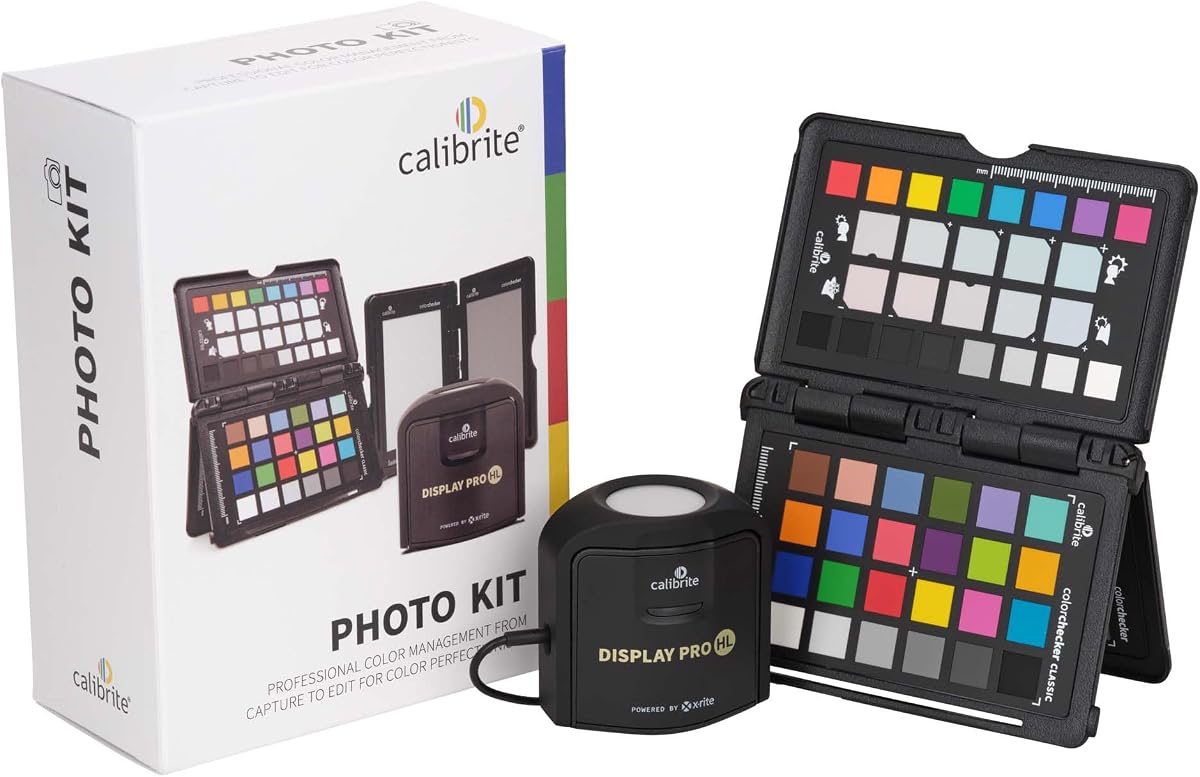
The Calibrite Photo Kit combines a high luminance monitor calibrator with the ColorChecker Passport Photo 2 for a complete workflow solution. It supports custom camera profiles and accurate monitor calibration for modern display technologies like Mini LED.
We may earn a commission when you buy through this link, at no additional cost to you.
By pairing capture tools with calibration hardware, photographers can ensure consistency from the moment a photo is taken to when it is edited. The Display Pro HL ensures that screen output matches final prints or digital delivery standards accurately.
This kit is particularly useful for those working with RAW files who need precise white balance and exposure references. The software included allows for customizable targets to refine creative color with greater confidence and consistency.
Investing in this kit saves time by eliminating color mismatches between camera and screen. It is a robust choice for professional photographers who want a seamless and reliable color management experience throughout their process.
Matching camera profiles with monitor profiles ensures that the colors captured in the field are accurately represented during editing and final output stages.
Custom profiles help reduce unwanted shifts before grading or retouching, giving photographers precise control over exposure and white balance from the start.
We may earn a commission when you buy through this link, at no additional cost to you.
The Calibrite Creator Kit pairs the Display 123 colorimeter with the ColorChecker Passport Video 2 for content creators who shoot both photo and video. It is designed to maintain consistent color from capture through edit across mixed lighting conditions.
We may earn a commission when you buy through this link, at no additional cost to you.
On set, the Passport Video 2 helps verify exposure and match multiple cameras to ensure seamless integration during post-production. The Display 123 ensures that editing happens on a screen that matches the intended final output for clients.
This kit is ideal for hybrid shooters who need dependable color management without the complexity of enterprise solutions. It reduces trial-and-error corrections and improves overall workflow efficiency for delivering consistent professional results.
For filmmakers and photographers working together, this system provides a reliable reference for exposure and white balance. It simplifies the process of ensuring that color standards remain consistent across multiple cameras and monitors.
Combining tools for both media types ensures that color workflows do not diverge, allowing creators to switch between photo and video projects seamlessly.
The Passport Video 2 provides a quick reference for lighting and color matching on set, saving significant time during the post-production grading process.
We may earn a commission when you buy through this link, at no additional cost to you.
The Calibrite ColorChecker Display Pro is a powerful tool that allows for high repeatability on the same display and across different display types. It is compatible with software like ccProfiler or i1Profiler for flexible workflow integration.
We may earn a commission when you buy through this link, at no additional cost to you.
A unique feature is the rotatable diffuser arm which can be used as a stand for table top projector profiling or as a cover for instrument optics. It also includes a convenient tripod mount for larger venue projector profiling.
Powered by X-Rite technology, this colorimeter ensures consistent color profiling which is crucial for teams that require uniform results. Its optical design supports accurate measurements across various screen technologies used in professional environments.
This device is a solid choice for professionals needing reliable and repeatable calibration without excessive software complexity. Its hardware versatility makes it useful for both monitor and projector tasks in studios and venues.
The tripod mount and diffuser arm make it easy to profile projectors in various settings, extending the utility of the tool beyond standard computer monitors.
High repeatability ensures that repeated measurements yield consistent results, which is essential for maintaining standards across different teams or production cycles.
We may earn a commission when you buy through this link, at no additional cost to you.
The Datacolor Spyder5PRO is designed for serious photographers and designers who need reliable color accuracy. It ensures that images are seen and printed just as intended with confidence, offering a full calibration in about five minutes.
We may earn a commission when you buy through this link, at no additional cost to you.
Its room light monitoring determines optimal monitor brightness so you see fine shadow detail and highlights in your photos. This feature ensures that edited images match prints, reducing the need for endless iterations and wasted materials.
The before and after evaluation allows users to focus on details that are important to them using their own photographs. While it is an older model, it remains a trusted tool for those who prioritize print matching and display analysis.
This device is well-suited for studios where print output is a major focus. It offers a balance of ease of use and professional features that help reduce time spent in the print-edit-print cycle.
By adjusting brightness to match ambient light, it ensures that what you see on screen translates well to physical prints and other viewing environments.
The ability to evaluate and compare laptop and desktop monitors helps identify performance issues early, ensuring all screens in your studio are consistent.
We may earn a commission when you buy through this link, at no additional cost to you.
The ASUS ProArt CaliContrO offers a unique 3-in-1 function including a colorimeter, display OSD control, and ASUS Dial features. It measures up to 10000 nits and supports hardware calibration for long-term color accuracy and consistency.
We may earn a commission when you buy through this link, at no additional cost to you.
The 5-way navigator and shortcut key provide intuitive display OSD control accessible within the reach of your hand. The reversible USB-C connection ensures effortless connectivity, while the ASUS Dial integration allows customized shortcuts for creative software control.
However, early user feedback suggests there may be software stability issues that affect the overall experience. Despite the innovative hardware features, the low rating indicates potential reliability concerns for daily professional use.
This device is for users deeply integrated into the ASUS ecosystem who want physical control over display settings. It offers high potential for hardware calibration but requires careful evaluation before adoption in critical workflows.
The ASUS Dial provides customized shortcuts for easy and precise control of creator software, reducing reliance on keyboard shortcuts during editing sessions.
Support for hardware calibration helps maintain long-term accuracy without relying solely on software-based adjustments that may degrade over time.
We may earn a commission when you buy through this link, at no additional cost to you.
The Datacolor Spyder4Pro features a full-spectrum color sensor that calibrates multiple displays with a single device. It improved accuracy and stability with double-shielded color filters that match CIE color standards closely.
We may earn a commission when you buy through this link, at no additional cost to you.
Its ReCAL feature makes it quick and easy to recalibrate your display to compensate for changes over time. This ensures long-term stability without needing a full recalibration process every time adjustments are needed.
While it is an older model, it provides reliable automated calibration and brightness adjustments for standard setups. The consistency between units was improved significantly compared to previous generations for predictable results.
This is a cost-effective choice for those needing a reliable tool without the latest high-tech additions. It maintains a strong reputation for stability and ease of use in routine calibration tasks.
ReCAL allows for quick checks and adjustments based on display drift, saving time while maintaining accuracy between full recalibration sessions.
The double-shielded color filters provide improved long-term stability, ensuring that the sensor readings remain consistent over the lifespan of the device.
We may earn a commission when you buy through this link, at no additional cost to you.
The Datacolor Spyder X Pro features a groundbreaking lens-based color engine that provides a higher level of color accuracy for multiple monitors. It is so intuitive that users do not need to be color experts to achieve precise results.
We may earn a commission when you buy through this link, at no additional cost to you.
Room light monitoring and automatic profile changing help maintain consistent viewing conditions. It includes 12 predefined calibration targets for advanced accuracy and offers a quick single-click calibration process taking just a minute or two.
SpyderProof functionality provides before-and-after evaluation using your own images so you can see the difference clearly. The tool allows for multi-monitor calibration making it easy to manage color across various laptops and desktop screens.
This device is ideal for first-time users who want professional results without technical complexity. It delivers reliable color accuracy for photographic images and ensures that shadow detail and white balance are handled correctly.
The lens-based engine offers improved precision over previous technologies ensuring better color accuracy and white balance for complex visual work.
SpyderProof lets you visually compare your display before and after calibration using your own work to confirm improvements in shadow detail and color balance.
We may earn a commission when you buy through this link, at no additional cost to you.
Choosing the right colorimeter depends on your specific workflow needs such as screen type, software compatibility, and budget. Here are key factors to consider before making your decision.
Ensure the colorimeter supports your monitor technology. Modern tools like the Display Plus HL support HDR and OLED while older models may struggle with high brightness or specific panel types.
Check that the device lists compatibility with your display technology to avoid calibration errors.
Sensor accuracy determines how closely your screen matches real-world colors. Tools with advanced sensors measure light precisely ensuring that colors remain consistent across devices.
Look for sensors with high repeatability to ensure consistent results over time.
Software guides you through the calibration process. Advanced software provides options for custom targets and validation while basic software focuses on speed and simplicity.
Choose software that matches your comfort level and workflow requirements.
Connectivity affects how easily you can use the tool. USB-C is standard on newer devices providing faster data transfer and compatibility with modern laptops.
Ensure the connection type fits your computer ports without needing extra adapters.
Ambient light sensors detect changes in room lighting and suggest adjustments. This helps maintain consistent screen brightness and reduces eye strain during long editing sessions.
This feature is useful if your workspace lighting changes throughout the day.
Consider whether you need to profile cameras or projectors alongside monitors. Kits that include camera profiling tools save money for those needing a complete color management solution.
Determine if a single tool or a kit best fits your creative process.
Professionals often use multiple displays. A colorimeter that supports multiple monitors ensures color consistency across all screens which is vital for accurate editing.
Verify that the tool can handle the number of displays you currently use.
Balancing cost with required features is important. Entry-level models offer basic accuracy while premium tools provide advanced controls and broader compatibility.
Select a model that meets your accuracy needs without overspending on unused features.
To get the best results, allow your monitor to warm up for at least thirty minutes before calibration. This ensures the display has stabilized to its normal operating temperature and brightness levels.
Keep the colorimeter lens clean by using a soft cloth to wipe away dust. Avoid touching the sensor surface with your fingers to prevent oils from affecting measurement accuracy.
Recalibrate your display every month to maintain accuracy as screens drift over time. If you change your lighting environment or move your workspace, recalibration is recommended.
Calibration ensures your monitor displays colors accurately so your edits match what prints or other screens show. Without it, you risk costly mistakes and inconsistent work across different devices.
For best results, calibrate your display once a month. If you work in changing lighting conditions or require strict color accuracy for print production, consider calibrating every two weeks.
Yes, many colorimeters like the Calibrite Display 123 support multiple displays. This allows you to ensure consistent color across all screens in your workspace using one device.
Yes, OLED screens often have unique color characteristics that need precise calibration. Choose a colorimeter specifically designed to support OLED technology for accurate results.
A colorimeter measures light from screens while a spectrophotometer can also measure printed output. Colorimeters are generally cheaper and ideal for screen calibration specifically.
Yes software guides you through the process and applies profiles. Good software offers features like automation and validation which improve the reliability of your calibration results.
Hardware calibration adjusts the monitor directly for better accuracy while software changes settings in the graphics card. Hardware is preferred for critical professional work.
Smartphone apps are not accurate enough for professional work. Dedicated colorimeters provide precise measurements that apps cannot match for reliable color management.
This guide has highlighted top colorimeters ranging from budget-friendly options to professional-grade tools. Whether you need simple calibration for photos or advanced HDR support for video, there is a solution available.
Prioritize features that match your workflow such as display compatibility and software flexibility. Investing in the right tool ensures your creative work is viewed as intended across all devices.
Product availability and pricing can change quickly so always check the latest listings before purchasing. Regular recalibration will keep your equipment performing optimally for years to come.